


Busti
-
Posts
346 -
Joined
-
Last visited
Busti's Achievements

Universalist (7/7)
0
Reputation
-
 Busti reacted to a post in a topic:
Is it possible to find out the memory address of a internal function and retreive the struct of it?
Busti reacted to a post in a topic:
Is it possible to find out the memory address of a internal function and retreive the struct of it?
-
That sounds kinda good, thank you. Didnt think about making the same exe "multiusable" with parameters. Great Idea.
-
The updated function should not be changed in the runtime! i only want to edit the main tool and all of its functionality while it is not running. But i want to edit the functions in the text editor as real functions and not in a string variable which i pass to the programm
-
decompiling my own script on the runtime would be an solution too which i would accept if there is no other solution. i would also work with the #save_source parameter if theres no other way to accomplish this .... and thank you for the explanation. but just another question, if i copy 1:1 the memory from the beginning to the function to the end of the function, then why couldn't i call the function ? cause i give the programm the information what to do and as i know which function it is, why shouldnt i been able to pass the correct call with the correct (new) address to the newly created temporary script?
-
Local $l = @ScriptDir & "\tmp_call.au3", $r, $e, $a Dim $CallBack = DllCallbackRegister("_CallMeFunction", "int", "int;int;int;bool") ; i want the address of the autoit function ConsoleWrite( "!$CallBack: "& $CallBack & @CRLF ) $a = DllCallbackGetPtr($CallBack) ConsoleWrite( "!DllCallbackGetPtr: "& $a & @CRLF ) ; i got the address of the autoit function ; here should be a part which "extract" runnable autoit code from the memory / i would also map the code into the memory/ if possible - but i want to avoid creating a function like: #cs $test_string = 'Func _CallMeFunction( $a=1, $b=2, $c=3, $externalCall=False )' & @CRLF & _ 'If ($externalCall = True) Then' & @CRLF & _ 'MsgBox(0, "external", "call - running in its own script " & $a & $b & $c )' & @CRLF & _ 'ElseIf ($externalCall = False) Then' & @CRLF & _ 'MsgBox(0, "internal", "call - running in the main script " & $a & $b & $c )' & @CRLF & _ 'EndIf' & @CRLF & _ 'Return 1' & @CRLF & _ 'EndFunc' & @CRLF & _ '_CallMeFunction()' and preferable be able to just to something like this : #ce $r = _ExtractAutoItCodeFromMemory( $a, '_CallMeFunction', $lenght ) FileWrite( $l , $r ) $e = Run(@AutoItExe & ' /AutoIt3ExecuteScript "' & $l & '"' ) ConsoleWrite( "!Run: "& $e & @CRLF ) MsgBox(0, $e, $a ) Exit Func _CallMeFunction( $a=1, $b=2, $c=3, $externalCall=True ) If $externalCall = True Then MsgBox(0, "external", "call - running in its own script " & $a & $b & $c ) ElseIf $externalCall = False Then MsgBox(0, "internal", "call - running in the main script " & $a & $b & $c ) EndIf Return 1 EndFunc I tried to describe the problem with this. I want programm A Programm A has a lot of functionality, some of the functionality actually need quite some time to complete and meanwhile programm A is unusable. But Programm A has do be interactable all the time - because it some sort of template editor/manager, when i press F2 it sends a template with ctrl+v or f3 another one or f4 another one. Also is has to be able to load a website and extract its data and display the data for me <- while it is doing this, I'm unable to use the programm Also it has to navigate on the website (like for example) in a new tab WHILE its extracting data from another tab and has to do some tasks there AND while it is doing that i need still be able to press F2,F3,F4 OR use the entire GUI. The problem i have right now is, i have tool A (hotkeys) tool B (extracting) tool C (doing functionality on a website) tool D,E,F etc. - actually its really a lot of functionality and its REALY uncomfortable to start 15 exe files each time i boot the pc or if one is crashing restart it. AND its also realy uncomfortable to create the script in an "COPROCESS" unit like : $test_string = 'Func _CallMeFunction( $a=1, $b=2, $c=3, $externalCall=False )' & @CRLF & _ 'If ($externalCall = True) Then' & @CRLF & _ 'MsgBox(0, "external", "call - running in its own script " & $a & $b & $c )' & @CRLF & _ 'ElseIf ($externalCall = False) Then' & @CRLF & _ 'MsgBox(0, "internal", "call - running in the main script " & $a & $b & $c )' & @CRLF & _ 'EndIf' & @CRLF & _ 'Return 1' & @CRLF & _ 'EndFunc' & @CRLF & _ '_CallMeFunction()' Because i MAY have to align the code quickly and/ or change a lot of lines and test them,. This is also in no way comfortable. So what I'm trying to do - I want to create one tool which merges ALL the functionality into itself and then i want a function like: _getFuncToFileAndRun( @autoitexe, $funcname, $nParam, $paramdelim='|') Then this function should extract the current and actuall function in my code with every code change and write it into TEMP_AU3.au3 and start it with /autoit3executescript The difference between all coprocess i know so far - is the calling of the function! I do not want to hardcore the function into an function call - i want the function to extract the requested function out of the programm itself dynamically and then use it to run the function in a newly created .au3 script. I would also be down to decompile the script on the fly, parse the source - get the function and delete the decompiled source - but i dont even know if this is possible I would also accept the #save_source parameter for this to work - this is no question of having open/visible source as i want to use this in my company for work efficiency. I don't even want fully functional code, just a small push in the right direction :(... (I also have some sort of garbage collector in mind which watches the actuall processes and cleans up the temp files.) actually while writing this, i realize i could just let the compiled exe file in the source directory and then wildly call the available includes. - but honestly this would be the last option i would like to choose, as it feels dirty even thinking in this direction.
-
I have to write a multi-functional tool for my work, and on certrain button presses - different scripts have to run, but i don't want to use multiple exe files neither do i want to include the source code. This is not even about communicating between two scripts / which maybe in areas of the application should also be used - but for this i wanted to use the mailslot UDF. But i want a nice and clean way to start the already created functions, without the need of adding the functions i want to use in "clear text". The only thing which i still can't understand is: Why can my script run the memory part of my function, but cant be run by another script which copies exactly the same area of the memory into its own memory space (cause if I dont think completly wrong - it should be now the function of the other script) and then run it? Like where is the difference between memory space a and (after you copied the function from a to b) memoryspace b Or If i copy the function out of the memory - and save it into a file, what would be needed to actually make this code runable again, i dont want to be able to read it - it just should be runable by autoit itself. Like a stupid question now, if i compile my script X.au3 -> then inside of the X.exe will be an autoit.exe (/autoit64.exe) + the script - now the question is, into what is the script converted?
-
Yes, i got nearly all of those files here - but nothing of those is realy what i would like. The new idea would be somehow like this: Local $l = @ScriptDir & "\tmp_call.au3", $r, $e, $a Dim $CallBack = DllCallbackRegister("_CallMeFunction", "int", "int;int;int;bool") ; i want the address of the autoit function ConsoleWrite( "!$CallBack: "& $CallBack & @CRLF ) $a = DllCallbackGetPtr($CallBack) ConsoleWrite( "!DllCallbackGetPtr: "& $a & @CRLF ) ; i got the address of the autoit function ; here should be a part which "extract" runnable autoit code from the memory / i would also map the code into the memory/ if possible - but i want to avoid creating a function like: #cs $test_string = 'Func _CallMeFunction( $a=1, $b=2, $c=3, $externalCall=False )' & @CRLF & _ 'If ($externalCall = True) Then' & @CRLF & _ 'MsgBox(0, "external", "call - running in its own script " & $a & $b & $c )' & @CRLF & _ 'ElseIf ($externalCall = False) Then' & @CRLF & _ 'MsgBox(0, "internal", "call - running in the main script " & $a & $b & $c )' & @CRLF & _ 'EndIf' & @CRLF & _ 'Return 1' & @CRLF & _ 'EndFunc' & @CRLF & _ '_CallMeFunction()' and preferable be able to just to something like this : #ce $r = _ExtractAutoItCodeFromMemory( $a, '_CallMeFunction', $lenght ) FileWrite( $l , $r ) $e = Run(@AutoItExe & ' /AutoIt3ExecuteScript "' & $l & '"' ) ConsoleWrite( "!Run: "& $e & @CRLF ) MsgBox(0, $e, $a ) Exit Func _CallMeFunction( $a=1, $b=2, $c=3, $externalCall=True ) If $externalCall = True Then MsgBox(0, "external", "call - running in its own script " & $a & $b & $c ) ElseIf $externalCall = False Then MsgBox(0, "internal", "call - running in the main script " & $a & $b & $c ) EndIf Return 1 EndFunc i hope this is understandable - if this is also not possible, okay - then im going to look for another solution, got some more freaky ideas in mind.
-
Sorry but i don't see this as the answer to the other question? You told me, that the sourcecode is included in the compiled .exe file, so why can't i just take the code from the ram and directly execute it with the Run(@AutoItExe & ' /AutoIt3ExecuteLine "MsgBox(4096, ''Hello World!'', ''Hi!'')"') or Run(@AutoItExe & ' /AutoIt3ExecuteScript "MsgBox(4096, ''Hello World!'', ''Hi!'')"') Sorry if i'm the dumb person here, but i dont see an answer regarding to this question. This is no thread attempt and all the co process UDF's work like this, only that they are hardcoding this text - and i would like to create it more flexible. And sorry if you really did answer this question, as unfortunately I'm unable to recognise it. - "CreateThread" is not the question anymore, I'm now looking for another solution, thanks to your' explanations.
-
Yes, i did leave from the CreateThread, i got it know. My question is now another question, which i edited to my post: Or do the same thing just with the internal autoit run() command, but dont give it the entire "function" in clear text as a parameter - just give it the code from the memory as parameter, this would prevent the need of adding the code to each function you want to run like for example: Run(@autoitexe & "\executescript " & _function_read_from_the_memory_by_pointer ) This way i could execute a function directly out of the script, if i create the function that way - that it acts like a "main" function if its not called with any arguments for example Would this work? - or is there any way to get the "function" text without having to hardcode it? Edit: and thank you for your patience and assistance.
-
Thank you, so that means - if i compile the sourcecode to an exe file, its basically the autoit3.exe interpreter* + the sourcecode, and if i call the compiled exe, it's starting the autoit3.exe which interpretes the sourcecode from top to bottom. is that correct? Edit: Would this also be the case for A3X files? Edit: could i run a CreateThread and Call a Run(not from autoit - like from user32.dll or whereever it is sitting) function, which then calls my script with \autoit3execute and give it the function code as argument? Or do the same thing just with the internal autoit run() command, but dont give it the entire "function" in clear text as a parameter - just give it the code from the memory as parameter, this would prevent the need of adding the code to each function you want to run like for example: Run(@autoitexe & "\executescript " & _function_read_from_the_memory_by_pointer ) This way i could execute a function directly out of the script, if i create the function that way - that it acts like a "main" function if its not called with any arguments for example
-
I knew that answer will be coming, that's why i tried to not to hand out too much informations at the beginning, as - i dont know. i just can't believe that there is no way to do that. Like cant i run another second autoit script and call from that second autoit script the function in my first autoit script? will this crash autoit? Or create a second "temporary" autoit script then run that script and memcopy the function of the first autoitscript to the memspace of the second autoit script - which will run the code copied from the memory? Because this would be better than the available methods of co processing i found - as you would not need to create every function again and can just "pseudo-call" the functions already created. Is all of this impossible? Can you send me a link to a detailed explanation on why this is impossible? I just would like to understand it 😕 Edit: and why does the example of prog@ndy work without crashing? Is there realy no way to convert this without the usage of an external dll? Edit: or another thought of mine would be to duplicate the current running autoit script in the memory, and then call the second script and call the function from there and after the function is done, receive the result und terminate the duplicate and free up the space. - look, the big problem i have is, my ideas are floating in my head and im not realy expierierenced enough to put them into working code - therefore im unable to deny them and this hinders me to believe its not possible. i know the fault in this case is in my own brain, but ye - i try to do my best to disprove myself.
-
Ja, sorry - i wanted to try another createthread script.. cause i thought i had a smart idea in combining a working example of prog@ndy with my weird idea. The concept behind it was to create a thread which calls the autoit function in my own thread and therefore create a thread like this. here is the non operational code. if you set $x = 1 then the code will always work, its prog@ndys example - sure it does $x = 2 where my first trys on trying to rewrite it so it works in a way which it does call itself $x = 3 was where i though it will work, but i got problems on recreating the correct struct for the create_thread call (the other idea was to copy the mem area of the function into another space in memory and try to run it as a thread from there, like to sperate it from the current autoit file and maybe to prevent a crash of the main script - but this is just a though and im not even sure if its possible) !DllCallbackRegister: 1 !DllCallbackGetPtr: 0x0000022580910000 Callback ptr: 0x0000022580910000 hThread: 0x0000000000000258 !ThreadID: 17092 !>14:13:58 AutoIt3.exe ended.rc:-1073741819 #AutoIt3Wrapper_Res_SaveSource=y #AutoIt3Wrapper_Res_SaveSourcedirective Global Const $STATUS_PENDING = 0x103 Global Const $STILL_ACTIVE = $STATUS_PENDING #include <WinAPI.au3> ; ThreadID is @extended ;=============================================================================== ; ; Function Name: _Thread_Create ; Description:: Creates a thread ; Parameter(s): see MSDN (lpThreadId is removed) ; Requirement(s): minimum Win2000 ; Return Value(s): see MSDN ; @extended will be ThreadID ; On error, @error will be set to 1 ; Author(s): Prog@ndy ; ;=============================================================================== ; Func _Thread_Create($lpThreadAttributes, $dwStackSize, $lpStartAddress, $lpParameter, $dwCreationFlags) Local $result = DllCall("kernel32.dll", "ptr", "CreateThread", "ptr", $lpThreadAttributes, "dword", $dwStackSize, "ptr", $lpStartAddress, "ptr", $lpParameter, "dword", $dwCreationFlags, "dword*", 0) Return SetError($result[0] = 0, $result[6], $result[0]) EndFunc ;==>_Thread_Create ;=============================================================================== ; ; Function Name: _Thread_Terminate ; Description:: Terminates a thread ; Parameter(s): see MSDN ; Requirement(s): minimum Win2000 ; Return Value(s): see MSDN ; On error, @error will be set to 1 ; Author(s): Prog@ndy ; ;=============================================================================== ; Func _Thread_Terminate($hThread, $dwExitCode) Local $result = DllCall("Kernel32.dll", "int", "TerminateThread", "ptr", $hThread, "dword", $dwExitCode) Return SetError($result[0] = 0, 0, $result[0]) EndFunc ;==>_Thread_Terminate ;=============================================================================== ; ; Function Name: _Thread_Exits ; Description:: Exits the current thread ; Parameter(s): see MSDN ; Requirement(s): minimum Win2000 ; Return Value(s): none ; Author(s): Prog@ndy ; ;=============================================================================== ; Func _Thread_Exit($dwExitCode) DllCall("Kernel32.dll", "none", "ExitThread", "dword", $dwExitCode) EndFunc ;==>_Thread_Exit ;=============================================================================== ; ; Function Name: _Thread_GetExitCode ; Description:: retrieves ExitCode of a thread ; Parameter(s): see MSDN ; Requirement(s): minimum Win2000 ; Return Value(s): see MSDN ; On error, @error will be set to 1 ; Author(s): Prog@ndy ; ;=============================================================================== ; Func _Thread_GetExitCode($hThread) Local $result = DllCall("Kernel32.dll", "int", "GetExitCodeThread", "ptr", $hThread, "dword*", 0) Return SetError($result[0] = 0, 0, $result[2]) EndFunc ;==>_Thread_GetExitCode ;=============================================================================== ; ; Function Name: _Thread_GetID ; Description:: retrieves ThreadID of a thread ; Parameter(s): see MSDN ; Requirement(s): minimum Win2000 ; Return Value(s): see MSDN ; On error, @error will be set to 1 ; Author(s): Prog@ndy ; ;=============================================================================== ; Func _Thread_GetID($hThread) Local $result = DllCall("Kernel32.dll", "dword", "GetThreadId", "ptr", $hThread) Return SetError($result[0] = 0, 0, $result[0]) EndFunc ;==>_Thread_GetID ;=============================================================================== ; ; Function Name: _Thread_GetPriority ; Description:: retrieves priority of a thread ; Parameter(s): see MSDN ; Requirement(s): minimum Win2000 ; Return Value(s): see MSDN ; On error, @error will be set to 1 ; Author(s): Prog@ndy ; ;=============================================================================== ; Func _Thread_GetPriority($hThread) Local $result = DllCall("Kernel32.dll", "int", "GetThreadPriority", "ptr", $hThread) Return SetError($result[0] = 0, 0, $result[0]) EndFunc ;==>_Thread_GetPriority ;=============================================================================== ; ; Function Name: _Thread_SetPriority ; Description:: sets priority of a thread ; Parameter(s): see MSDN ; Requirement(s): minimum Win2000 ; Return Value(s): see MSDN ; On error, @error will be set to 1 ; Author(s): Prog@ndy ; ;=============================================================================== ; Func _Thread_SetPriority($hThread, $nPriority) Local $result = DllCall("Kernel32.dll", "int", "SetThreadPriority", "ptr", $hThread, "int", $nPriority) Return SetError($result[0] = 0, 0, $result[0]) EndFunc ;==>_Thread_SetPriority ;=============================================================================== ; ; Function Name: _Thread_Suspend ; Description:: suspends a thread ; Parameter(s): see MSDN ; Requirement(s): minimum Win2000 ; Return Value(s): see MSDN ; On error, @error will be set to 1 ; Author(s): Prog@ndy ; ;=============================================================================== ; Func _Thread_Suspend($hThread) Local $result = DllCall("Kernel32.dll", "int", "SuspendThread", "ptr", $hThread) Return SetError($result[0] = -1, 0, $result[0]) EndFunc ;==>_Thread_Suspend ;=============================================================================== ; ; Function Name: _Thread_Resume ; Description:: resumes a thread ; Parameter(s): see MSDN ; Requirement(s): minimum Win2000 ; Return Value(s): see MSDN ; On error, @error will be set to 1 ; Author(s): Prog@ndy ; ;=============================================================================== ; Func _Thread_Resume($hThread) Local $result = DllCall("Kernel32.dll", "int", "ResumeThread", "ptr", $hThread) Return SetError($result[0] = -1, 0, $result[0]) EndFunc ;==>_Thread_Resume ;=============================================================================== ; ; Function Name: _Thread_Wait ; Description:: Waits for a thread to terminate ; Parameter(s): $hThread - Handle of thread ; $nTimeOut - [optional] Timeout (default: 0xFFFFFFFF => INFINTE) ; Requirement(s): minimum Win2000 ; Return Value(s): Success: true ; on TimeOut, @eeor will be set to -1 ; On error, @error will be set to 1 ; Author(s): Prog@ndy ; ;=============================================================================== ; Func _Thread_Wait($hThread, $nTimeout = 0xFFFFFFFF) Local $result = DllCall("Kernel32.dll", "dword", "WaitForSingleObject", "ptr", $hThread, "int", $nTimeout) If @error Then Return SetError(2, 0, 0) Switch $result[0] Case -1, 0xFFFFFFFF Return SetError(1, 0, 0) Case 0x00000102 Return SetError(-1, 0, 1) Case Else Return 1 EndSwitch EndFunc ;==>_Thread_Wait ; creates a struct for an Unicode-String Func _UnicodeStruct($text) ; Prog@ndy Local $s = DllStructCreate("wchar[" & StringLen($text) + 1 & "]") DllStructSetData($s, 1, $text) Return $s EndFunc ;==>_UnicodeStruct ; retrieves Address of a function Func _Thread_GetProcAddress($hModule, $sProcname) ; Prog@ndy Local $result = DllCall("kernel32.dll", "ptr", "GetProcAddress", "hwnd", $hModule, "str", $sProcname) Return $result[0] EndFunc ;==>_Thread_GetProcAddress #cs $tagMSGBOXPARAMS = _ "UINT cbSize;" & _ "HWND hwndOwner;" & _ "ptr hInstance;" & _ "ptr lpszText;" & _ "ptr lpszCaption;" & _ "DWORD dwStyle;" & _ "ptr lpszIcon;" & _ "UINT_PTR dwContextHelpId;" & _ "ptr lpfnMsgBoxCallback;" & _ "DWORD dwLanguageId;" #ce ;#include "VarDump.au3" #include <WinAPIDiag.au3> ;#include "NomadMemory.au3" #include <WinAPIConstants.au3> #include <WinAPIProc.au3> #include <WinAPIRes.au3> Func _m() Local $t = "WORKZ" Return MsgBox(0, "test", $t) EndFunc ;==>_m Local $x = 3 If $x = 3 Then ;works Local $a = "" Dim $CallBack = DllCallbackRegister("_m", "int", "str") ;, "int", "str") ConsoleWrite("!DllCallbackRegister: " & $CallBack & @CRLF) $a = DllCallbackGetPtr($CallBack) ConsoleWrite("!DllCallbackGetPtr: " & $a & @CRLF) ;Dim $Ret = DllCallAddress("int", $a , "str", "DID IT WORK" ) ;ConsoleWrite("!"&$a&@CRLF) ;DllCallbackFree($CallBack) ;ConsoleWrite( "!" & $Ret[0] & @CRLF ) Local $stText Local $struct = DllStructCreate("str; text") $stText = _UnicodeStruct("The messageBox in a separate thead!") DllStructSetData($struct, "text", DllStructGetPtr($stText)) ;Local $hThreadProc = _Thread_GetProcAddress(_WinAPI_GetModuleHandle("user32.dll"),"MessageBoxIndirectW") ; ($lpThreadAttributes, $dwStackSize, $lpStartAddress, $lpParameter, $dwCreationFlags) $hThread = _Thread_Create(0, 0, $a, Null, 0) ;DllStructGetPtr($struct), 0) $ThreadID = @extended ConsoleWrite("Callback ptr: " & $a & @CRLF & "hThread: " & $hThread & @CRLF & "!ThreadID: " & $ThreadID) While MsgBox(69, "main", "Main script is not blocked") = 4 WEnd MsgBox(0, "Thread-Info", "Handle: " & $hThread & @CRLF & "Thread-ID: " & $ThreadID & @CRLF) _Thread_Wait($hThread) $code = _Thread_GetExitCode($hThread) MsgBox(0, 'Thread ended', "Threaded MsgBox returned: " & $code) ElseIf $x = 0 Then Local $me = @AutoItPID, $t, $r, $s, $test, $a, $test2, $test3, $i $s = "_m" $t = ProcessExists($me) ; $r = _MemoryModuleGetBaseAddress($t, $s) $test = _WinAPI_GetModuleHandle(@AutoItExe) $test2 = _WinAPI_LoadLibraryEx(@AutoItExe, $LOAD_LIBRARY_AS_DATAFILE) $test3 = _WinAPI_GetProcAddress($test, "") $i = _WinAPI_GetModuleInformation($test) MsgBox(0, "result", $i) MsgBox(0, "PID: " & $me & "/" & $t, "filename: " & $me & @CRLF & "searching for: " & $s & @CRLF & "found: " & $r & @CRLF & "test: " & $test & @CRLF & "test2: " & $test2 & @CRLF & "test3: " & $test3) Exit ElseIf $x = 1 Then ; Struct to send to the Thread ; in this case the MsgBox-Params $MSGBOXPARAMS = DllStructCreate($tagMSGBOXPARAMS) DllStructSetData($MSGBOXPARAMS, "cbSize", DllStructGetSize($MSGBOXPARAMS)) $stText = _UnicodeStruct("The messageBox in a separate thead!") DllStructSetData($MSGBOXPARAMS, "lpszText", DllStructGetPtr($stText)) $stCaption = _UnicodeStruct("Caption") DllStructSetData($MSGBOXPARAMS, "lpszCaption", DllStructGetPtr($stCaption)) DllStructSetData($MSGBOXPARAMS, "dwStyle", 17) ; msgBox-style ; Use MessageBoxIndirect Unicode as ThreadProc ; normal MessageBox doesn't work, since CreateThread just has one possible parameter. Local $hThreadProc = _Thread_GetProcAddress(_WinAPI_GetModuleHandle("user32.dll"), "MessageBoxIndirectW") $hThread = _Thread_Create(0, 0, $hThreadProc, DllStructGetPtr($MSGBOXPARAMS), 0) $ThreadID = @extended While MsgBox(69, "main", "Main script is not blocked") = 4 WEnd MsgBox(0, "Thread-Info", "Handle: " & $hThread & @CRLF & "Thread-ID: " & $ThreadID) _Thread_Wait($hThread) $code = _Thread_GetExitCode($hThread) MsgBox(0, 'Thread ended', "Threaded MsgBox returned: " & $code) EndIf
-
Hello and thank you for responding to my question. I want to call an autoit function of my own script from another script and therefore i need to hand out the memory address of the function to be able to call the function. For example with this Function: #include <MemoryDLL.au3> ;Author(s): Ward, modified: Prog@ndy Func MemoryFuncCall($RetType, $FunctionPointer, $Type1 = "int", $Param1 = 0, $Type2 = "int", $Param2 = 0, $Type3 = "int", $Param3 = 0, $Type4 = "int", $Param4 = 0, $Type5 = "int", $Param5 = 0, _ $Type6 = "int", $Param6 = 0, $Type7 = "int", $Param7 = 0, $Type8 = "int", $Param8 = 0, $Type9 = "int", $Param9 = 0, $Type10 = "int", $Param10 = 0, _ $Type11 = "int", $Param11 = 0, $Type12 = "int", $Param12 = 0, $Type13 = "int", $Param13 = 0, $Type14 = "int", $Param14 = 0, $Type15 = "int", $Param15 = 0, _ $Type16 = "int", $Param16 = 0, $Type17 = "int", $Param17 = 0, $Type18 = "int", $Param18 = 0, $Type19 = "int", $Param19 = 0, $Type20 = "int", $Param20 = 0 ) Local $Ret Local Const $MaxParams = 20 If (@NumParams < 2) Or (@NumParams > $MaxParams * 2 + 2) Or (Mod(@NumParams, 2) = 1) Then SetError(2) Return 0 EndIf If Not IsDllStruct($_MDCodeBuffer) Then MemoryDllInit() If $FunctionPointer = 0 Then SetError(1) Return 0 EndIf Local $Ret[1] = [$FunctionPointer] Switch @NumParams Case 13 To $MaxParams * 2 + 2 Local $DllParams = (@NumParams - 3) / 2, $i, $PartRet $Ret = DllCall("user32.dll", $RetType, "CallWindowProc", "ptr", DllStructGetPtr($_MDCodeBuffer) + $_MDWarpN, _ "uint", $Ret[0], _ "uint", $DllParams, _ $Type1, $Param1, _ $Type2, $Param2) $Ret[1] = $Ret[4] $Ret[2] = $Ret[5] ReDim $Ret[3] For $i = 3 To $DllParams Step 3 $PartRet = DllCall("user32.dll", $RetType, "CallWindowProc", "ptr", DllStructGetPtr($_MDCodeBuffer) + $_MDWarpN, _ "uint", 0, _ Eval('Type' & $i), Eval('Param' & $i), _ Eval('Type' & ($i+1)), Eval('Param' & ($i+1)), _ Eval('Type' & ($i+2)), Eval('Param' & ($i+2))) ReDim $Ret[$i + 3] $Ret[$i + 2] = $PartRet[5] $Ret[$i + 1] = $PartRet[4] $Ret[$i] = $PartRet[3] Next $Ret[0] = $PartRet[0] ReDim $Ret[$DllParams + 1] Case 10 $Ret = DllCall("user32.dll", $RetType, "CallWindowProc", "ptr", $Ret[0], _ $Type1, $Param1, _ $Type2, $Param2, _ $Type3, $Param3, _ $Type4, $Param4) $Ret[1] = $Ret[2] $Ret[2] = $Ret[3] $Ret[3] = $Ret[4] $Ret[4] = $Ret[5] ReDim $Ret[5] Case 8 $Ret = DllCall("user32.dll", $RetType, "CallWindowProc", "ptr", DllStructGetPtr($_MDCodeBuffer) + $_MDWarp3, _ "uint", $Ret[0], _ $Type1, $Param1, _ $Type2, $Param2, _ $Type3, $Param3) $Ret[1] = $Ret[3] $Ret[2] = $Ret[4] $Ret[3] = $Ret[5] ReDim $Ret[4] Case 6 $Ret = DllCall("user32.dll", $RetType, "CallWindowProc", "ptr", DllStructGetPtr($_MDCodeBuffer) + $_MDWarp2, _ "int", 0, _ "uint", $Ret[0], _ $Type1, $Param1, _ $Type2, $Param2) $Ret[1] = $Ret[4] $Ret[2] = $Ret[5] ReDim $Ret[3] Case 4 $Ret = DllCall("user32.dll", $RetType, "CallWindowProc", "ptr", DllStructGetPtr($_MDCodeBuffer) + $_MDWarp1, _ "int", 0, _ "int", 0, _ "uint", $Ret[0], _ $Type1, $Param1) $Ret[1] = $Ret[5] ReDim $Ret[2] Case 2 $Ret = DllCall("user32.dll", $RetType, "CallWindowProc", "ptr", DllStructGetPtr($_MDCodeBuffer) + $_MDWarp0, _ "int", 0, _ "int", 0, _ "int", 0, _ "int", $Ret[0]) ReDim $Ret[1] EndSwitch SetError(0) Return $Ret EndFunc
-
Hello, I hope you are doing well. I'm currently trying something out, and i would need to find the memory address of a function in my own script, to be able to retreive the dllstruct with _WinAPI_DisplayStruct (which i just realise cant be used in the current form, cause it only seems to display its struct in a message box?) But this would be the code - i would need to be able to retrieve the struct of my own function - therefore i would need the memory address of $test - right now i receive the return varaible of the msgbox and i'm quite unsure, how to receive the memory address of the function. #include <WinAPIDiag.au3> Local $me = @AutoItExe $test = _m("test") FileWrite( "test_vardump.txt", _WinAPI_DisplayStruct($test) ) Func _m($t) Return MsgBox(0, "test", $t ) EndFunc Exit i much appreciate your time & help. Thank you. Kind regards Edit: i just found a way in C++ to show the memory address: printf("address of function main() is :%p\n", main); printf("address of function funct() is : %p\n", funct); But is this %p possible in autoit? Edit: I did find out a way to find the address of a variable, but i need the address of the function... mhhh i think this won't be so easy. As deeper investigating into old threads, i saw that this is not supported directly by autoit - but for me autoit did always stepover its limitation with creative ways, and i mean - why not? This is what i found for the variables: Which i really can't understand why nobody is interested to, cause if my plan is going to work - this would be insane :D. But nvm. i will most likely not be able to achieve it, but im yet far away from giving up. down side: only for 32bit, seems to be unstable as the author claims.
-
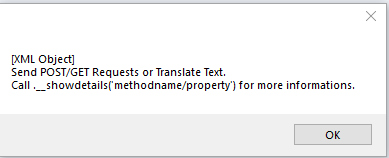
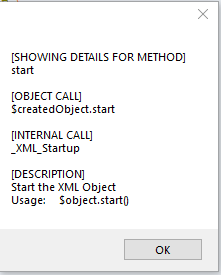
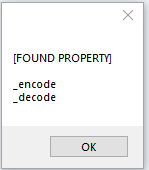
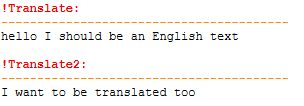
Hello, first of all, sorry for the misleading name, this is in no way a "faster working objects" method. This works with the genius work of prod@ndy and the others "AutoItObject.au3". (which is realy sad that there is no more real development behind it / at least as far as i saw - love your work - kudos to you all) I called this faster objects, because - i think mainly cause i can read it better and therefore work faster with it. haha - theres not even close to be everything included which the original udf offers (which still can be used ofc.) - i just added some additions and changed the way to create the objects a little bit. for example: #include-once #include "XML_Core.au3" Global $oXML ;Object var to use in the main script - global initialiser _CreateXMLObject() Func _CreateXMLObject() ; create XML Class Local $XML_Object_Creation = _ShortObjectCreater("[XML Object]", "Send POST/GET Requests or Translate Text."&@CRLF&"Call .__showdetails('methodname/property') for more informations.") ; main functions $XML_Object_Creation.create () $XML_Object_Creation.method ("start", "_XML_Startup", "Start the XML Object" & @CRLF & "Usage: $object.start()" ) $XML_Object_Creation.method ("post", "_XML_Post" ) $XML_Object_Creation.method ("get", "_XML_Get" ) $XML_Object_Creation.method ("action", "_XML_Action" ) $XML_Object_Creation.method ("_send", "_XML_SendWithAgent" ) $XML_Object_Creation.method ("response", "_XML_ResponseText" ) $XML_Object_Creation.method ("agent", "_XML_Agent" ) $XML_Object_Creation.method ("close", "_XML_Close" ) $XML_Object_Creation.method ("setResponse", "_XML_SetResponseText" ) $XML_Object_Creation.method ("getResponse", "_XML_GetResponseText" ) $XML_Object_Creation.method ("setURL", "_XML_SetURL" ) $XML_Object_Creation.method ("getURL", "_XML_GetURL" ) $XML_Object_Creation.method ("close", "_XML_Close" ) ; translate functions $XML_Object_Creation.method ("gTranslate", "_XML_GoogleTranslateText" ) $XML_Object_Creation.method ("setTranslateResult", "_XML_SetGoogleTranslateResult" ) $XML_Object_Creation.method ("getTranslateResult", "_XML_GetGoogleTranslateResult" ) $XML_Object_Creation.prop ("_translateResult") $XML_Object_Creation.method ("cleanTranslateResult", "__XML_CleanTranslateResult" ) $XML_Object_Creation.method ("_setCleanTranslationResult", "_XML_SetCleanTranslateResult" ) $XML_Object_Creation.method ("_getCleanTranslationResult", "_XML_GetCleanTranslateResult" ) $XML_Object_Creation.prop ("_cleanTranslateResult") $XML_Object_Creation.method ("getLastTranslateURL", "_XML_GetLastTranslateURL" ) ; encoding / decondig $XML_Object_Creation.method ("encodeURI", "_XML_EncodeURI" ) $XML_Object_Creation.method ("setEncode", "_XML_SetEncodeURI" ) $XML_Object_Creation.method ("getEncode", "_XML_GetEncodeURI" ) $XML_Object_Creation.method ("decodeURI", "_XML_DecodeURI" ) $XML_Object_Creation.prop ("_encode") $XML_Object_Creation.prop ("_decode") $XML_Object_Creation.prop ("tUrl") ; coding $XML_Object_Creation.method ("setCookie", "_XML_SetCookie" ) $XML_Object_Creation.method ("getCookie", "_XML_GetCookie" ) $XML_Object_Creation.method ("getSetCookie", "_XML_GetSetCookie" ) $XML_Object_Creation.method ("cLogin", "_XML_LoginWithCookie" ) $XML_Object_Creation.prop ("_cookie") $XML_Object_Creation.prop ("url") $XML_Object_Creation.prop ("_XML_OBJECT") $XML_Object_Creation.prop ("_response") ; create XML Object $oXML = $XML_Object_Creation.save() $XML_Object_Creation = "" ;free up space EndFunc I also used some kind of functionality to add a description to each function at each creation - which then can be shown by the __showdetail command. for example: MsgBox(0, "", $oXML.__Name & @CRLF & $oXML.__Description ) gives you then: or: MsgBox(0, "", $oXML.__showdetails("start")) returns: Everything except the description is auto generated. The description will be added when you are creating the method: You can also look for created propertys, which also get automatically added to the "array": MsgBox(0, "", $oXML.__showdetails("code")) returns: I wanted to also add the posibility to show the value of the propertys - but i did not yet find out - how to evaluate it out of the array - like, without $oXML._encode / cause what you see on the picture is the value out of $s[$i] - just the stored name of the property, but not the address to the value. I also included a fully working example of an google translator: ;translate test: Local $trans $oXML.gTranslate( "hallo ich soll ein englischer text werden" ) $trans = $oXML.getTranslateResult() ConsoleWrite( "!Translate:" & @CRLF & "----------------------------------------" & @CRLF & $trans & @CRLF ) $oXML.close() ;free up memory $oXML.start(); reopen for another test Local $trans $oXML.gTranslate( "ich will auch übersetzt werden" ) $trans = $oXML.getTranslateResult() ConsoleWrite( "!Translate2:" & @CRLF & "----------------------------------------" & @CRLF & $trans & @CRLF ) $oXML.close() ;free up memory As this entire thing is a work in progess and in no way even close to the finish, i'm going to post you the github link, where you could get the entire thing and just use the fasterobjects+xml if you want. I'm going for a big project in my work and i need a good framework which i can easy adapt on different situations, that's why i'm creating this thing. And i freaking love your autoit objects - all other ones i found here, where - earm.. not reliable/ always working.. here is the FastObject.au3 #include-once #include "AutoItObject.au3" ; start autoit object _AutoItObject_StartUp() Func _ShortObjectCreater($name="",$desc="") Local $o = _AutoItObject_Create() _AutoItObject_AddMethod ($o, "create", "_create_object") _AutoItObject_AddMethod ($o, "delete", "_delete_object") _AutoItObject_AddMethod ($o, "method", "_add_method") _AutoItObject_AddMethod ($o, "prop", "_add_property") _AutoItObject_AddMethod ($o, "save", "_save_obj" ) _AutoItObject_AddProperty ($o, "Name") _AutoItObject_AddProperty ($o, "Description") _AutoItObject_AddProperty ($o, "__obj") _AutoItObject_AddProperty ($o, "MethodList") _AutoItObject_AddProperty ($o, "MethodDescription") $o.Name = $name $o.Description = $desc $o.MethodList = "" $o.MethodDescription = "" $o.__obj = 0 Return $o EndFunc Func _save_obj($oSelf) Return $oSelf.__obj EndFunc Func _create_object($oSelf) Local $o = _AutoItObject_Create() Dim $emptymethod[1], $emptymethoddesc[1], $emptyproperty[1] _AutoItObject_AddMethod ($o, "__addMADTA", "__AddMethodAndDescriptionToArray") _AutoItObject_AddMethod ($o, "__addPTA", "__AddPropertyToArray") _AutoItObject_AddMethod ($o, "__showdetails", "__ShowDetailsFor") _AutoItObject_AddProperty ($o, "__Name") _AutoItObject_AddProperty ($o, "__Description") _AutoItObject_AddProperty ($o, "__obj") _AutoItObject_AddProperty ($o, "__MethodArray") _AutoItObject_AddProperty ($o, "__MethodDescriptionArray") _AutoItObject_AddProperty ($o, "__PropertyArray") _AutoItObject_AddProperty ($o, "__MethodInternalCounter") _AutoItObject_AddProperty ($o, "__PropertyInternalCounter") $oSelf.__obj = $o $o.__obj = $o $o.__Name = $oSelf.Name $o.__Description = $oSelf.Description $o.__MethodArray = $emptymethod $o.__MethodDescriptionArray = $emptymethoddesc $o.__MethodInternalCounter = 0 $o.__PropertyArray = $emptyproperty $o.__PropertyInternalCounter= 0 EndFunc Func __ShowDetailsFor($oSelf, $name) Local $c, $s, $x, $f=0 $c = $oSelf.__MethodInternalCounter $s = $oSelf.__MethodArray $x = $oSelf.__MethodDescriptionArray For $i = 1 To $c If ($s[$i]=$name) Then Return "[SHOWING DETAILS FOR METHOD]" & @CRLF & $s[$i] & @CRLF & @CRLF & $x[$i] Next $c = "" $s = ""; nothing found, research vars and $x = ""; search propertys $c = $oSelf.__PropertyInternalCounter $s = $oSelf.__PropertyArray For $i = 1 To $c If StringInStr($s[$i],$name) Then If $f = 0 Then $x = "[FOUND PROPERTY]" & @CRLF & @CRLF $x &= $s[$i]&@CRLF ;& " current value: '" & @CRLF; & Execute("$oSelf.$s[$i]") &"'"& @CRLF ; <- i want to show the value of the property - not yet working :/ $f += 1 ; found 1 property - not needed atm any further - but who knows.. EndIf Next If ($f>=1) Then Return $x Return SetError(-1, 0, "Did not found any method or property with the request '"&$name&"'" & @CRLF & "The Method search is casesensitive, the property search is not." ) EndFunc Func __AddMethodAndDescriptionToArray($oSelf, $n, $d) Local $c = $oSelf.__MethodInternalCounter + 1, $methodArray, $methodDescArray $methodArray = $oSelf.__MethodArray $methodDescArray = $oSelf.__MethodDescriptionArray ReDim $methodArray[$c+1], $methodDescArray[$c+1] $methodArray[0] = $c $methodDescArray[0] = $c $methodArray[$c] = $n $methodDescArray[$c] = $d $oSelf.__MethodArray = $methodArray $oSelf.__MethodDescriptionArray = $methodDescArray $oSelf.__MethodInternalCounter += 1 EndFunc Func __AddPropertyToArray($oSelf, $n) Local $c = $oSelf.__PropertyInternalCounter + 1, $methodArray $methodArray = $oSelf.__PropertyArray ReDim $methodArray[$c+1] $methodArray[0] = $c $methodArray[$c] = $n $oSelf.__PropertyArray = $methodArray $oSelf.__PropertyInternalCounter += 1 EndFunc Func _delete_object($oSelf, ByRef $obj_var) Return $obj_var = 0 EndFunc Func _add_method($oSelf, $objmethod, $function_name, $desc="no description yet") Local $obj = $oSelf.__obj _AutoItObject_AddMethod($obj, $objmethod, $function_name) $obj.__addMADTA( $objmethod, "[OBJECT CALL]"&@CRLF&"$createdObject."&$objmethod&@CRLF&@CRLF&"[INTERNAL CALL]"&@CRLF&$function_name&@CRLF&@CRLF&"[DESCRIPTION]"&@CRLF&$desc) EndFunc Func _add_property($oSelf, $prop ) Local $obj = $oSelf.__obj _AutoItObject_AddProperty($obj, $prop ) $obj.__addPTA($prop) EndFunc Func _set_property($oSelf, $prop, $set ) ;Return $obj.$prop = $set ) ; how to reset property with an var... investigate.. EndFunc If you want the XML with the translate function, please get it from the github, ty https://github.com/bustix/Internal-Framework Hope you like it. Btw. next part is to get the cookies with XML working and to enable an login functionality - later i will also start adding parsing to the XML and multi processing, but - step by step (as my regex skills are no way present - i have to ninja the forums for good examples) If you have any questions or need assistance, feel free to ask them - i'll try to answer them as good as i can. Edit [20.05.19]: Updated: XML_Core.au3 XML_Object.au3 Internal-Framework.au3 on the git repo

-
WebDriver UDF (W3C compliant version) - 2025/09/01
Busti replied to Danp2's topic in AutoIt Example Scripts
Okay, ye - that's what my conclusion was. But thank you for confirming that. I just though, maybe theres a Chrome light version packed into the driver, who knows - is possible to day, but yes - the file would be far bigger then. So i just didn't think it to the end.