


pintas
-
Posts
215 -
Joined
-
Last visited
pintas's Achievements

Polymath (5/7)
0
Reputation
-
 pintas reacted to a post in a topic:
[SOLVED] Repeat While loop?
pintas reacted to a post in a topic:
[SOLVED] Repeat While loop?
-
pintas reacted to a post in a topic:
[SOLVED] Repeat While loop?
-
Thank you guys! The problem was not the while loop. I had to close Oracle connections first. Thank you so much. Solved!
-
Hi. Is there a way to repeat the while loop below every minute, without exiting the script? I've tried placing it inside a function and call that function every minute, but if i do, it doesn't work. Here's the script: #include <GUIConstants.au3> Dim $oMyError $oMyError = ObjEvent("AutoIt.Error","MyErrFunc") $ado = ObjCreate( "ADODB.Connection" ) ; Create a COM ADODB Object with the Beta version With $ado .ConnectionString =("Provider='OraOLEDB.Oracle';Data Source='ORA2011d';User Id='user';Password='user';") .Open EndWith $adors = ObjCreate( "ADODB.RecordSet" ) ; Create a Record Set to handles SQL Records $adors2 = ObjCreate( "ADODB.RecordSet" ) ; Create a Record Set to handles SQL Records $adors3 = ObjCreate( "ADODB.RecordSet" ) ; Create a Record Set to handles SQL Records With $adors .ActiveConnection = $ado ;.CursorLocation = "adUseClient" ;.LockType = "adLockReadOnly" ; Set ODBC connection read only .Source = "select a.cd_ocr_prc from tpcclr_ddo a where a.cd_ocr_prc in (112,113) and to_char(A.DT_LCT, 'DD/MON/YYYY HH24:MI') = to_char(SYSDATE - 1/24/60, 'DD/MON/YYYY HH24:MI')" .Open EndWith With $adors2 .ActiveConnection = $ado .Source = "select a.cd_grp_maq from tpcclr_ddo a where a.cd_ocr_prc in (112,113) and to_char(A.DT_LCT, 'DD/MON/YYYY HH24:MI') = to_char(SYSDATE - 1/24/60, 'DD/MON/YYYY HH24:MI')" .Open EndWith With $adors3 .ActiveConnection = $ado .Source = "select a.cd_maq from tpcclr_ddo a where a.cd_ocr_prc in (112,113) and to_char(A.DT_LCT, 'DD/MON/YYYY HH24:MI') = to_char(SYSDATE - 1/24/60, 'DD/MON/YYYY HH24:MI')" .Open EndWith ;WHILE LOOP STARTS HERE While not $adors.EOF For $i = 0 To $adors.Fields.Count - 1 $TrimApont1 = StringReplace($adors.Fields( $i ).Value, "112", "QUEBRA MECÂNICA") $TrimApont2 = StringReplace($TrimApont1, "113", "QUEBRA ELÉTRICA") $Maq = $adors2.Fields( $i ).Value & " " & $adors3.Fields( $i ).Value $FullString = $TrimApont2 & " - " & $Maq MsgBox(48, "Quebra de máquina", $FullString) Next $adors.MoveNext $adors2.MoveNext $adors3.MoveNext ; Go to the next record WEnd ; This COM error Handler Func MyErrFunc() $HexNumber=hex($oMyError.number,8) ConsoleWrite("We intercepted a COM Error !" & @CRLF & @CRLF & _ "err.description is: " & @TAB & $oMyError.description & @CRLF & _ "err.windescription:" & @TAB & $oMyError.windescription & @CRLF & _ "err.number is: " & @TAB & $HexNumber & @CRLF & _ "err.lastdllerror is: " & @TAB & $oMyError.lastdllerror & @CRLF & _ "err.scriptline is: " & @TAB & $oMyError.scriptline & @CRLF & _ "err.source is: " & @TAB & $oMyError.source & @CRLF & _ "err.helpfile is: " & @TAB & $oMyError.helpfile & @CRLF & _ "err.helpcontext is: " & @TAB & $oMyError.helpcontext _ ) SetError(1) ; to check for after this function returns Endfunc
-
You guys rock!!
-
I think that's perfectly feasible.
-
I won't be using a GUI for this. I would monitor whatever i'm typing in. I'm thinking of showing a tray whenever i pass my score, and a button on tray to click to show my current score. I'll keep it as simple as i can, for now. I see what you mean about the word count accuracy. I don't mind missing a couple of words, but i could desconsider a word until i press the spacebar, right after i press the delete, for example. (sorry if my english isn't the best...) Wow... that was easy. Well... i guess it's time to get my hands 'dirty' Thanks guys! You really helped alot!
-
Great! Sounds like a start to me. Any way to count key clicks? Thanks @seadoggie
-
I want to monitor my typing speed. like in wpm (words-per-minute). However, i need to understand the logic behind it. Would AutoIt be fast enough to check the time variance from one 'word' to another? I'm just trying to understand the logic so i can make my own little app. I don't care about the keys typed. Is it possible to monitor one without the other?
-
Always wrong meaning it shows zero sometimes when i print one or more copies, or it shows 1 sometimes when i print more than one copies. It never shows the correct number of printed paper sheets. Hence... always wrong. What does it mean to 'contain page-delimiting information'? If i print something on notepad, does that contain page-delimiting info? Is there another way to monitor printed copies?
-
I've started playing with Scriptomatic to understand a bit more of WMi Classes and how to use them. My focus is to make a print logger/counter script. So basically i use the script below and print some pages. But when i do, the TotalPages value is always wrong. I've searched the forum to see if i could find a way to correct this, but without luck... $objWMIService = ObjGet("winmgmts:\\" & @ComputerName & "\root\CIMV2") While 1 $AllPrintJobs = $objWMIService.ExecQuery ("SELECT * FROM Win32_PrintJob") For $PrintJob In $AllPrintJobs ConsoleWrite($PrintJob.TotalPages & @CRLF) Next Sleep(500) WEnd Any idea how to monitor printed pages in real time and count them? Thanks!
-
 pintas reacted to a post in a topic:
(Yet another) Transparent splash?
pintas reacted to a post in a topic:
(Yet another) Transparent splash?
-
pintas reacted to a post in a topic:
(Yet another) Transparent splash?
-
-
I've been trying to make a transparent splash PNG image. Looked everywhere on the forum, and every example i found doesn't seem to work anymore. Is there an 'easy' way to perform this?
-
IniRead Key with multiple values
pintas replied to pintas's topic in AutoIt General Help and Support
Oh the shame!... I have such a big ini that i forgot to uncomment that particular key... Please forgive me. You can remove the post, if you like. Thank you for your help and again... sorry. -
I can't seem to read an ini key with multiple values. Like this: [General] File=1,2,3,4,5,6,7,8,9,0 IniRead returns completely blank, not sure why. Something wrong with reading commas, i suppose it assumes several values that need to return as an array...maybe? I've tried StringSplit, StringReplace...
-
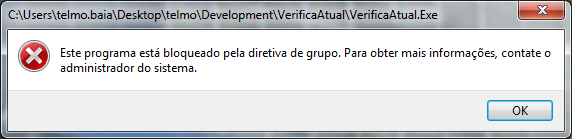
Hi. I'm trying to suppress or prevent a Windows message from appearing. The message is regarding a GPO policy that prevents users from running some apps. (see pic attached) I'd like to prevent that message from appearing without making my script waiting for the message in real-time, so i don't stress the cpu. I tried 'playing' with _WinAPI_SetWinEventHook but i couldn't figure out how to use it. The message title is also relative to the app the user tries to run, so it's not a fixed message, nor do i see a new process in task manager. Is this possible in AutoIT?
-
I'd like to know if it's possible to run a different process for each ini file in a folder. So, basically i have a folder with a variable number of ini files, each with it's specific settings. I'd like to run a process for each file that runs with each file settings, individually. Is this possible in AutoIt? It's not multi-thread per-say i'm looking for, but multi-process. The ini files have timers and other settings, like such: [Site] URL=http://www.google.com [LastCheck] Y=2019 M=04 D=15 H=10 Min=05 Secs=59 [Check] CheckMail=X Popup= Timer=1 hora [Mail] Mail=example@gmail.com