Baraoic
-
Posts
152 -
Joined
-
Last visited
Recent Profile Visitors
400 profile views
Baraoic's Achievements

Prodigy (4/7)
1
Reputation
-
 Baraoic reacted to a post in a topic:
BETA: SciTE v5x & lua Dynamic_include and "Smart" AutoComplete for Vars/UDFs/Abbrevs
Baraoic reacted to a post in a topic:
BETA: SciTE v5x & lua Dynamic_include and "Smart" AutoComplete for Vars/UDFs/Abbrevs
-
Perfect, that's exactly what I wanted. Thank you.
-
 argumentum reacted to a post in a topic:
BETA: SciTE v5x & lua Dynamic_include and "Smart" AutoComplete for Vars/UDFs/Abbrevs
argumentum reacted to a post in a topic:
BETA: SciTE v5x & lua Dynamic_include and "Smart" AutoComplete for Vars/UDFs/Abbrevs
-
setting dynamic.include=n in au3.properties does set it back to the old style, but it also breaks the new auto include, which was really nice and I'd like to keep. I already messed with the autocomplete options in that file before my initial post and they don't help. It looks like AutoItAutoComplete.lua controls both the include logic and autocomplete logic, but trying to just revert only the autocomplete is more complicated than it appears. I do see it has a Old_AutoComplete function it uses on unsaved files, but that also doesn't allow the new auto include so I'd have to change the main autocomplete function while not breaking the auto include. Will have to look into it more tomorrow.
-
I do appreciate your work and I'm sure some people enjoy the recursive autocomplete, but I personally don't. I use vscode for powershell and while it does add some extra random ones, it only adds a handful at worse, not nearly as many. I'm asking how to change it because I couldn't figure out how? The install process didn't appear to have that option as far as I can tell. I did open SciTEGlobal.properties and skim through there and even tried changing a few, but that didn't help. So I figured I'd just ask instead of randomly changing properties. I asked the question because I couldn't figure out what property to change... If you know the property name then please do share.
-
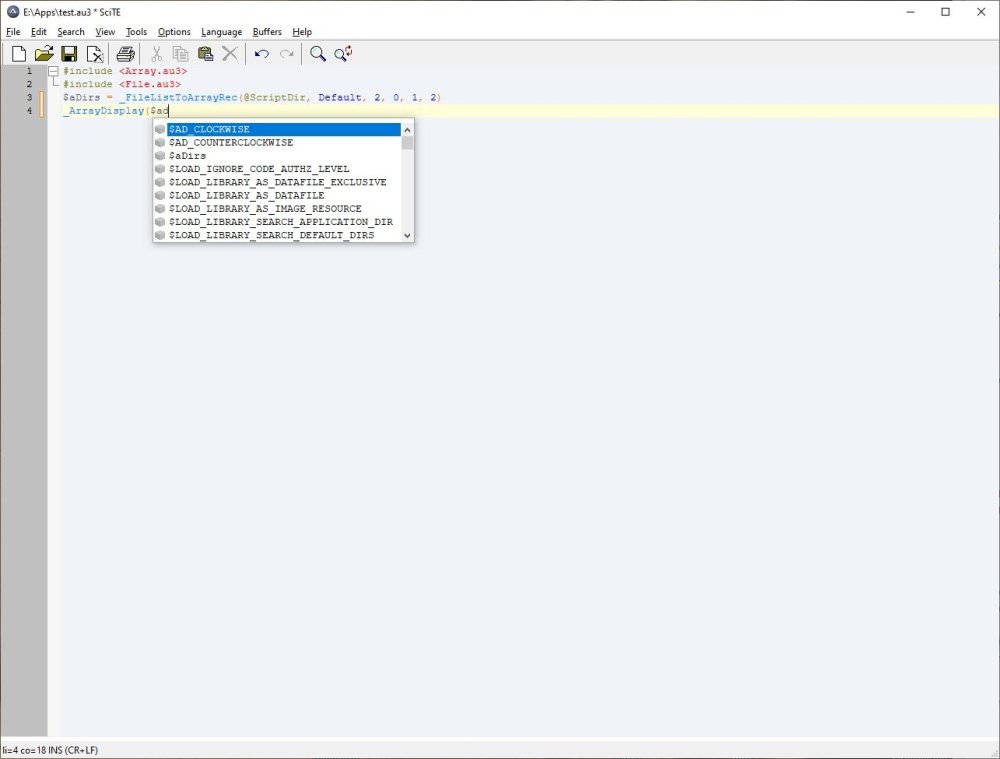
Thank you for the update. I love the auto Include and it works great, but is it possible to set auto complete back to the old way? I hate the auto complete being filled with completely irrelevant options as in the screenshot.
-
I'm pretty sure I updated to 1.2.1 a while back and it worked when upgrading to 1.2.1. I just installed the 1.0.0 version, which I was using before and it didn't help. Other than that the only changes that come to mind are WIndows/Office updates and I have started using DNS level ad blocking. I use this script 1st week of every month and I can't remember for sure if it worked correctly in December, but I'm sure it worked back in November. I haven't changed the script in about 8 months until I started troubleshooting the Outlook issue.
-
I was using OutlookEX 1.2.1, but upgraded to 1.2.2 to see if it would help, but it didn't.
-
Hello, I'm having a weird error that I'm thinking the UDF is doing something weird with the returned array. I have Outlook 2016 with two different hotmail accounts added to it. I used to use _OL_ItemFind and $vFolder = "*", but it recently stopped returning emails from the 2nd account in Outlook. I updated the script to use _OL_FolderGet, but now the array returned by _OL_ItemFind on the 2nd account is messed up. Here is part of the code that has the problem: #include <OutlookEX.au3> Global $sAmazonClaimEmail = "claim@hotmail.com", $sAmazonBuyEmail = "buy@hotmail.com" Global $oOutlook = _OL_Open(), $aCode, $sCodeList If @error <> 0 Then Exit MsgBox(16, "OutlookEX UDF", "Error creating a connection to Outlook. @error = " & @error & ", @extended = " & @extended) Global $aOutlookClaimInbox = _OL_FolderGet($oOutlook, $sAmazonClaimEmail & "\Inbox"), $aOutlookBuyInbox = _OL_FolderGet($oOutlook, $sAmazonBuyEmail & "\Inbox") If Not IsArray($aOutlookClaimInbox) Or Not IsArray($aOutlookBuyInbox) Then Exit MsgBox(48, "_OL_FolderGet", "Inbox Array Error") Global $aItems = _OL_ItemFind($oOutlook, $aOutlookClaimInbox[1], $olMail, "@SQL=urn:schemas:httpmail:subject ci_startswith 'Someone sent you an Amazon.com Gift Card'", "", "", "Body,EntryID") If IsArray($aItems) And UBound($aItems) > 1 Then _ArrayDisplay($aItems, "'Someone sent you an Amazon.com Gift Card") For $x = 1 To UBound($aItems) - 1 $aCode = StringRegExp($aItems[$x][0], "(?s)Claim Code.+?(\w{4}-\w{6}-\w{4})", 1) $sCodeList &= $aCode[0] & @CRLF _OL_ItemDelete($oOutlook, $aItems[$x][1], $aOutlookClaimInbox[3]) Next Else MsgBox(48, "Someone sent you an Amazon.com Gift Card", "Could not find mail. @error = " & @error & ", @extended: " & @extended) Exit EndIf Global $aItems2 = _OL_ItemFind($oOutlook, $aOutlookBuyInbox[1], $olMail, "@SQL=urn:schemas:httpmail:subject ci_startswith 'An Amazon.com Gift Card you sent'", "", "", "EntryID") If IsArray($aItems2) And UBound($aItems2) > 1 Then _ArrayDisplay($aItems2, "An Amazon.com Gift Card you sent before") _ArrayDelete($aItems2, 0) _ArrayDisplay($aItems2, "An Amazon.com Gift Card you sent after") For $x = 0 To UBound($aItems2) -1 MsgBox(0,$x,$aItems2[$x]) _OL_ItemDelete($oOutlook, $aItems2[$x], $aOutlookBuyInbox[3]) Next Else MsgBox(48, "An Amazon.com Gift Card you sent", "Could not find Gift Card recieved. @error = " & @error & ", @extended: " & @extended) Exit EndIf _OL_Close($oOutlook) The loop through $aItems works just fine, but the script errors out on $aItems2 on the very first loop saying: "C:\a.au3" (28) : ==> Array variable has incorrect number of subscripts or subscript dimension range exceeded.: MsgBox(0,$x,$aItems2[$x]) MsgBox(0,$x,^ ERROR ->18:15:06 AutoIt3.exe ended.rc:1 Though the _ArrayDelete($aItems2, 0) does work as well as the two _ArrayDisplays. The array has 11 rows before the delete and doing a MsgBox(0,'',$aItems2[3]) before the _ArrayDisplay doesn't work either. Also before the delete aItems2[0] displays 10 and copying it into notepad looks fine, but trying to do For $x = 1 To aItems2[0] was failing.
-
Help with copying PuTTY screen output
Baraoic replied to erik7426's topic in AutoIt General Help and Support
Do you need the users to see or interact with putty at all? I tried reading the output of the GUI version of putty years ago and couldn't get it to work, but I was able to get the CLI version, plink, to work with reading and interacting with the output using StdoutRead. Here is basically what I used many years ago for running a bunch of commands on Cisco switches $IP = "192.168.5.5" $UName = "user" $UPass = "pass" $ENPass = "enpass" $PID = _Connect($IP) If $PID = False Then MsgBox(0, "Login Error", "Error logging into device: " & $IP, 8) Exit EndIf If _Enable($PID) = False Then Exit MsgBox(0, "Priv EXEC Error", "Error going into privilege EXEC mode on: " & $IP, 8) Local $OUT, $aTask[1] = ["Task"] _FileReadToArray(@ScriptDir & "\Commands.txt", $aTask) For $t = 1 To UBound($aTask) - 1 $OUT2 = _Task($PID, $aTask[$t]) If StringInStr($OUT2, "Task Error") Then $OUT &= @CRLF & "~~~~~~~~~~~~~~~~~~~~~~~~~" & @CRLF & "Error executing: " & $aTask[$t] & @CRLF & $OUT2 & @CRLF & "~~~~~~~~~~~~~~~~~~~~~~~~~" & @CRLF ExitLoop EndIf $OUT &= $OUT2 Next Func _Connect($cIP) Local $cOUT = "" $cPID = Run(@ScriptDir & "\plink.exe -ssh -l " & $UName & " -pw " & $UPass & " " & $cIP, @DesktopDir, @SW_HIDE, 0x1 + 0x8) For $c = 1 To 45 Sleep(100) $cOUT = StdoutRead($cPID) If StringInStr($cOUT, ">") Then Return $cPID ElseIf StringInStr($cOUT, "Store key") Then StdinWrite($cPID, "y" & @CRLF & @CRLF) Sleep(2000) $cOUT = StdoutRead($cPID) If StringInStr($cOUT, ">") Then Return $cPID Else Return False EndIf ElseIf StringInStr($cOUT, "Update cached") Then StdinWrite($cPID, "y" & @CRLF & @CRLF) Sleep(2000) $cOUT = StdoutRead($cPID) If StringInStr($cOUT, ">") Then Return $cPID Else Return False EndIf EndIf Next Return False EndFunc ;==>_Connect Func _Enable($ePID) Local $eOUT = "" StdinWrite($ePID, "enable" & @CR & $ENPass & @CRLF) Sleep(1000) $eOUT = StdoutRead($ePID) If StringInStr($eOUT, "#") Then StdinWrite($ePID, "terminal length 0" & @CR & @CRLF) Sleep(250) Return True Else Return False EndIf EndFunc ;==>_Enable Func _Task($tPID, $tTask) Local $tOUT = "" StdinWrite($tPID, $tTask & @CR) Sleep(100) For $t = 1 To 80 Sleep(100) $tOUT &= StdoutRead($tPID) If StringInStr(StringRight($tOUT, 1), "#") Then Sleep(100) Return $tOUT EndIf Next Return "Task Error" & @CRLF & $tOUT EndFunc ;==>_Task -
Update the Excel UDF that comes with AutoIt
Baraoic replied to water's topic in AutoIt General Help and Support
I haven't tested it yet, but looks perfect to me, thank you. -
Update the Excel UDF that comes with AutoIt
Baraoic replied to water's topic in AutoIt General Help and Support
Well now that I know what's wrong it's easy to fix, but I think that's not a bad idea. -
Update the Excel UDF that comes with AutoIt
Baraoic replied to water's topic in AutoIt General Help and Support
Thank you, I appreciate you looking into it for me. -
Update the Excel UDF that comes with AutoIt
Baraoic replied to water's topic in AutoIt General Help and Support
Yes that works. Are you able to test using an array from _AD_GetObjectsInOU? Only when I take the array from that and try writing it to excel does it not work. I can try doing other things to the array first before writing it to excel to see if that helps if you tell me what to try. -
Update the Excel UDF that comes with AutoIt
Baraoic replied to water's topic in AutoIt General Help and Support
I added message boxes after each excel function and all of them report 0 for @error and 0 for @extended except for the open is extended 1, which it should be because I'm forcing new instance. So the functions report nothing is wrong, even though it's not working for me. -
Update the Excel UDF that comes with AutoIt
Baraoic replied to water's topic in AutoIt General Help and Support
Hello, I am having a problem trying to add an array from your AD script to an excel spreadsheet. If I try to take an array returned from the AD script and write it to excel it doesn't work, but if I first write the array to a file the read the file back into an array it works. Here is an example: #include <AD.au3> #include <Array.au3> #include <Date.au3> #include <Excel.au3> #include <File.au3> $DaysInactive = 90 $FQDN = "DC=domain,DC=com" Local $sYear, $sMonth, $sDay _DayValueToDate(_DateToDayValue(@YEAR, @MON, @MDAY) - $DaysInactive, $sYear, $sMonth, $sDay) $pTime = _Date_Time_EncodeFileTime($sMonth, $sDay, $sYear) $LLTSlimit = _LargeInt2Double(DllStructGetData($pTime, 1), DllStructGetData($pTime, 2)) _AD_Open("", "", "", StringTrimLeft(@LogonServer, 2)) If @error Then Exit MsgBox(16, "Active Directory", "Function _AD_Open encountered a problem. @error = " & @error & ", @extended = " & @extended) $aUsersE = _AD_GetObjectsInOU($FQDN, "(&(objectCategory=person)(objectClass=user)(lastlogontimestamp<=" & $LLTSlimit & ")(!(userAccountControl:1.2.840.113556.1.4.803:=2)))", 2, "sAMAccountName,description,lastLogonTimestamp", "sAMAccountName") ;enabled users _LastLoginTimestamp($aUsersE) _AD_Close() _ArrayDisplay($aUsersE) $aUsersE[0][0] = "sAMAccountName" $aUsersE[0][1] = "Description" $aUsersE[0][2] = "Last Logon" $Month = _DateToMonth(@MON, 1) $sWorkbook = @ScriptDir & "\Accounts Disable " & $Month & " " & @YEAR & ".xls" $oExcel = _Excel_Open(False, Default, Default, Default, True) MsgBox(0,'open',@error & @CRLF & @extended) $oWorkbook = _Excel_BookNew($oExcel, 1) MsgBox(0,'booknew',@error & @CRLF & @extended) $oExcel.ActiveSheet.Range("A:A").ColumnWidth = 21 $oExcel.ActiveSheet.Range("B:B").ColumnWidth = 125 $oExcel.ActiveSheet.Range("C:C").ColumnWidth = 15.14 _Excel_RangeWrite($oWorkbook, Default, $aUsersE, "A1") MsgBox(0,'rw1',@error & @CRLF & @extended) _Excel_BookSaveAs($oWorkbook, $sWorkbook, $xlExcel8, True) MsgBox(0,'save',@error & @CRLF & @extended) _Excel_BookClose($oWorkbook) MsgBox(0,'bookclose',@error & @CRLF & @extended) _Excel_Close($oExcel) MsgBox(0,'close',@error & @CRLF & @extended) Func _LargeInt2Double($i_Low, $i_High) Local $i_ResultLow, $i_ResultHigh If $i_Low < 0 Then $i_ResultLow = 2 ^ 32 + $i_Low Else $i_ResultLow = $i_Low EndIf If $i_High < 0 Then $i_ResultHigh = 2 ^ 32 + $i_High Else $i_ResultHigh = $i_High EndIf Return Int($i_ResultLow + $i_ResultHigh * 2 ^ 32) EndFunc ;==>_LargeInt2Double Func _LastLoginTimestamp(ByRef $aInput) For $x = 1 To UBound($aInput) - 1 $aTemp = _AD_GetObjectProperties($aInput[$x][0], "lastLogonTimestamp") If $aTemp[0][0] > 0 Then $aInput[$x][2] = $aTemp[1][1] Else $aInput[$x][2] = "Never" EndIf Next EndFunc ;==>_LastLoginTimestamp Now with that example excel reports everything was fine, but the spreadsheet appears empty when I open it and it's file size is too small so I think it really didn't work. Though if I add: _FileWriteFromArray(@ScriptDir & "\userse.txt", $aUsersE) $aUsersE = "" _FileReadToArray(@ScriptDir & "\userse.txt", $aUsersE, Default, "|") before the $Month then it works. -
StringRegExp crash on subject string length > 20154
Baraoic replied to Baraoic's topic in AutoIt General Help and Support
Well it's not like you can stop bad programmers from doing that anyways, but that is a good point.