vish2503
-
Posts
6 -
Joined
-
Last visited
vish2503's Achievements

Seeker (1/7)
0
Reputation
-
Dynamic IDs, Handles and Instances - Urgent
vish2503 replied to vish2503's topic in AutoIt General Help and Support
Here is the Info from the Auto Info Tool: This info doesnt quite clearly tell me whether the Control is an Edit type or list box. etc. We have a TE editor instance embedded in our application, I am able to write to the editor using ControlSend, However no matter what I am unable to retrieve or get or read text from the Editor. I have explained this issue in detail in another post (http://www.autoitscript.com/forum/index.php?showtopic=87371&hl=Urgent) >>>> Window <<<< Title: NewsPlex Class: WindowsForms10.window.8.app.0.129c866 Position: -4, -4 Size: 1288, 968 Style: 0x17CF0000 ExStyle: 0x00050100 Handle: 0x003D0750 >>>> Control <<<< Class: WindowsForms10.window.8.app.0.129c866 Instance: 9 ClassnameNN: WindowsForms10.window.8.app.0.129c8669 Advanced (Class): [CLASS:WindowsForms10.window.8.app.0.129c866; INSTANCE:9] ID: 2885490 Text: tern1 Position: 169, 157 Size: 903, 344 ControlClick Coords: 464, 161 Style: 0x56010000 ExStyle: 0x00000000 Handle: 0x002C0772 >>>> Mouse <<<< Position: 633, 344 Cursor ID: 0 Color: 0xFFFFFF >>>> StatusBar <<<< >>>> Visible Text <<<< New Document Modified Text 00:00 tern1 New Document Modified Text 00:00 tern1 / ultraGrid1 StatusStrip >>>> Hidden Text <<<< -
Dynamic IDs, Handles and Instances - Urgent
vish2503 replied to vish2503's topic in AutoIt General Help and Support
Hi, Is there a way or method to find out what type of a control, a control is? Whether it is Listbox or menu or edit box etc? -
Dynamic IDs, Handles and Instances - Urgent
vish2503 replied to vish2503's topic in AutoIt General Help and Support
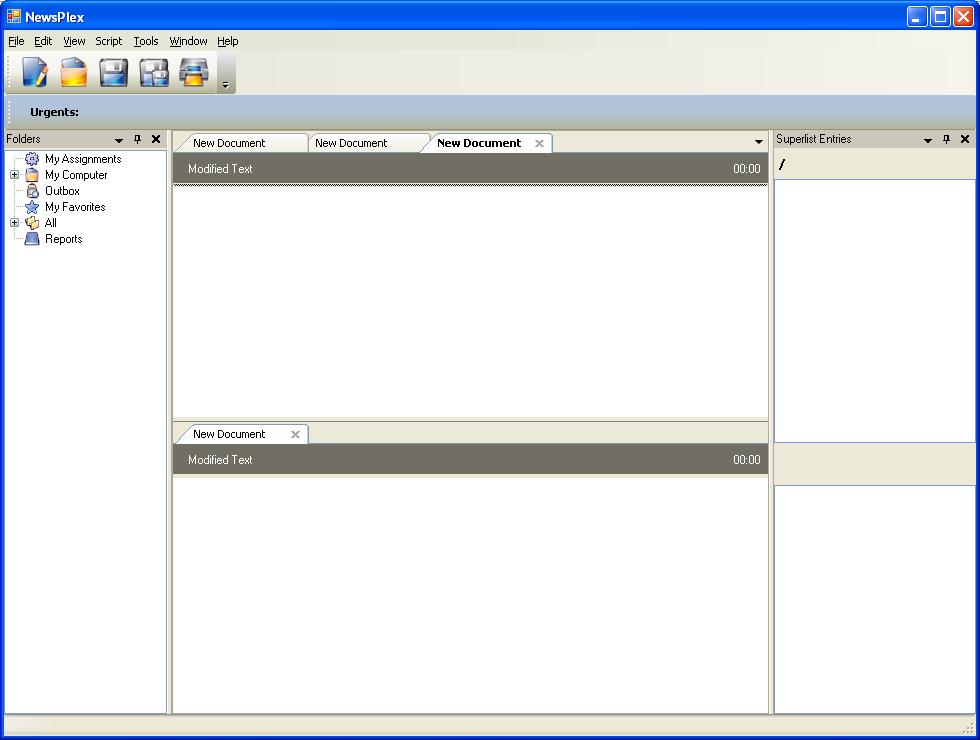
Hi, My Aplologies for the delayed response. Was stuck with other high priority work. I checked both the blogs. Using WinGetCtrlInfo I can get the IDs and ClassNameNNs. Really Helps a Lot. Using CtrlGetByPos, is also good enough. I can get the position of the Ctrl. Neat Code. Here are my other main issues: 1. My main area / issue where I am stuck is, I am unable to read from anything off the Editor window that I have using any functions. Pls Help. 2. Pls refer screen shot psoted earlier: In the upper editor window, if I have only one New Document tab, the Instance value is 3. However, if I have more than 1 New Document tabs, the Instance number changes. Also the ClassNameNN changes. How to read data from the Editor. Is there a function to read DATA on / from a Editor Control? How can I handle or deal with second issue. PLEASE HELP!!!!!!! -
Dynamic IDs, Handles and Instances - Urgent
vish2503 replied to vish2503's topic in AutoIt General Help and Support
I tried your code. The Text retrieved is still "tern1". Any help in this regard would be really helpful. THanks. -
Dynamic IDs, Handles and Instances - Urgent
vish2503 replied to vish2503's topic in AutoIt General Help and Support
This is the Code that I tried: ControlSend("NewsPlex", "", "[CLASSNN:WindowsForms10.window.8.app.0.129c8669; Instance:9]", "Sample Text") $textA = ControlGetText("NewsPlex", "", "[CLASSNN:WindowsForms10.window.8.app.0.129c8669; Instance:9]") I also tried. $ctrlHandle = ControlGetHandle("NewsPlex", "", "[CLASSNN:WindowsForms10.window.8.app.0.129c8669; Instance:9]") _GUICtrlEdit_SetText($ctrlHandle, "This is my First Test") $textA = _GUICtrlEdit_GetText($ctrlHandle) Thanks. -
Hi I just started Automating one of my apps with Autoit. Snapshot attached. 1. For all the controls, IDs, Handles and sometimes instances are also generated dynamically. 2. Pls refer screen shot: For Ex: In the upper editor window, if I have only one New Document tab, the Instance value is 3. However, if I have more than 1 New Document tabs, the Instance number changes. Pls see below for the AutoInfo Text for the Control. 3. My main issue is that I am unable to read anything from both upper and lower editor windows. I have tried using both, ControlGetText and _GUICtrlEdit_GetText by passing the right parameters. All I get is "tern1" as shown in the AutoInfo text window. No matter what I am unable to read the text typed in Text Editors. I can only use ControlSend to send my text to the Editors. Few scenarios that I plan to automate are: Creation of mutiple New Documents tabs, Read Text from the Editor, Manipulate text in the editor. How to handle the dynamic IDs. NOTE: THe application is developed using MS Techologies, C# and .NET. This main window of the application is Document Manager window. Pls Help. Thanks a bunch in advance. When Multiple New Documents TAB Class: WindowsForms10.window.8.app.0.129c866 Instance: 19 ClassnameNN: WindowsForms10.window.8.app.0.129c86619 Advanced (Class): [CLASS:WindowsForms10.window.8.app.0.129c866; INSTANCE:19] ID: 12453402 Text: tern1 Position: 169, 157 Size: 595, 230 ControlClick Coords: 171, 63 Style: 0x56010000 ExStyle: 0x00000000 Handle: 0x00BE061A When Single New Document TAB Class: WindowsForms10.window.8.app.0.129c866 Instance: 9 ClassnameNN: WindowsForms10.window.8.app.0.129c8669 Advanced (Class): [CLASS:WindowsForms10.window.8.app.0.129c866; INSTANCE:9] ID: 12453402 Text: tern1 Position: 169, 157 Size: 595, 230 ControlClick Coords: 247, 82 Style: 0x56010000 ExStyle: 0x00000000 Handle: 0x00BE061A