wchan2122
-
Posts
24 -
Joined
-
Last visited
wchan2122's Achievements

Seeker (1/7)
0
Reputation
-
Cannot click the "Yes" button of IE Dialog box
wchan2122 replied to wchan2122's topic in AutoIt General Help and Support
Dear Dale, It work! Thank you very much for your invaluable advise and help!!!!!!!!!! wchan -
Cannot click the "Yes" button of IE Dialog box
wchan2122 replied to wchan2122's topic in AutoIt General Help and Support
Dear Dale, It shows it cannot attached to IE. Please advise the correct method >"C:\Program Files\AutoIt3\SciTE\..\autoit3.exe" /ErrorStdOut "C:\w5\Auto\t3.au3" --> IE.au3 V2.4-0 Warning from function _IEAttach, $_IEStatus_NoMatch --> IE.au3 V2.4-0 Error from function _IEAction, $_IEStatus_InvalidDataType --> IE.au3 V2.4-0 Error from function _IELoadWait, $_IEStatus_InvalidDataType >Exit code: 0 Time: 2.737 -
Cannot click the "Yes" button of IE Dialog box
wchan2122 replied to wchan2122's topic in AutoIt General Help and Support
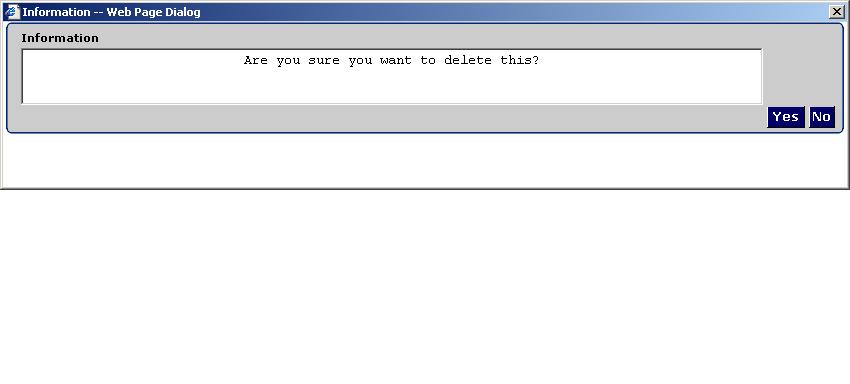
Dear Dale, I still cannot click the "Yes" button. I also try below and still fail. Please see attached screen print and html source code of the dialog box. #include <IE.au3> Global $oIE, $oPopup $oPopup = _IEAttach ("[CLASS:Internet Explorer_Server; INSTANCE:1]", "dialogbox") ControlClick("Information--Web Page dialog", "", "[CLASS:Button; TEXT:Yes; Instance:1;]") msgbox(0,"",isobj($oPopup)) HTML Source.zip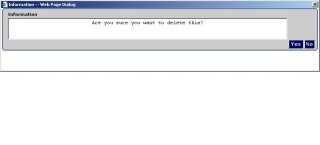
-
Cannot click the "Yes" button of IE Dialog box
wchan2122 replied to wchan2122's topic in AutoIt General Help and Support
Dear Dale, Thank for your reply! I amend the script and it display 0. Below is the html code <HTML><HEAD><TITLE>Information</TITLE> <META http-equiv=Content-Type content="text/html; charset=iso-8859-1"><LINK href="stylesheets/styledarkblue.css" type=text/css rel=stylesheet> <script src="jscript/ManagedDialog.js" type=text/javascript></SCRIPT> <META content="Copyright © 1985, 2006 BY CGI-AMS INCORPORATED, ALL RIGHTS RESERVED. THIS PROGRAM IS PROPRIETARY AND IS THE PROPERTY OF: AMERICAN MANAGEMENT SYSTEMS, INCORPORATED COPYING OR USE OF THIS PROGRAM, EXCEPT AS SPECIFICALLY PROVIDED FOR IN A LICENSE AGREEMENT CONTROLLING SUCH USE, IS PROHIBITED. THIS PROGRAM IS DESIGNATED AS CONFIDENTIAL AND IS A TRADE SECRET UNDER APPLICABLE LAWS. UNAUTHORIZED COPYING OR DISCLOSURE IS PROHIBITED AND IS SUBJECT TO CRIMINAL AND CIVIL PENALTIES, INCLUDING FINES AND IMPRISONMENT." name=Copyright> <script language=javascript> function keyPress() { } </SCRIPT> </HEAD> <BODY onkeyup=keyPress(); text=#000000 bgColor=#ffffff leftMargin=0 topMargin=0 marginheight="0" marginwidth="0"> <FORM> <TABLE cellSpacing=0 cellPadding=0 width="100%" border=0> <TBODY> <TR> <TD noWrap width=8 height=6><IMG height=6 src="images/Corner_Left_top.gif" width=8></TD> <TD background=images/0_TopRuleTop.gif height=6><IMG height=6 src="images/0_TopRuleTop.gif" width=1></TD> <TD noWrap width=8 height=6><IMG height=6 src="images/Corner_Right_top.gif" width=8></TD></TR></TBODY></TABLE> <TABLE cellSpacing=0 cellPadding=0 width="100%" border=0> <TBODY> <TR> <TD noWrap width=8 background=images/0_GreyRuleLeftSide.gif> </TD> <TD class=TabOffBackground width="100%"> <TABLE cellSpacing=0 cellPadding=0 width="100%" border=0> <TBODY> <TR> <TD vAlign=top noWrap align=middle> </TD> <TD noWrap width=6> </TD> <TD> <P class=ControlLabel>Information</P></TD> <TD width="100%"> </TD></TR> <TR> <TD vAlign=top noWrap align=middle> <P class=ControlLabel> </P></TD> <TD noWrap width=6> </TD> <TD width="100%"><!-- Format Dialog message --><TEXTAREA class=InputFields style="OVERFLOW: auto; TEXT-ALIGN: center" name=DW_MessagesText rows=3 readOnly cols=90>Are you sure you want to delete this?</TEXTAREA> </TD> <TD width="100%"> </TD></TR> <TR> <TD vAlign=top noWrap align=middle> </TD> <TD noWrap width=6> </TD> <TD align=right><INPUT class=Button onclick="window.returnValue='yes'; window.close()" type=button value=Yes name=DW_MessagesYesButton> <INPUT class=Button onclick="window.returnValue='no'; window.close()" type=button value=No name=DW_MessagesNoButton> </TD> <TD width="100%"> </TD></TR></TBODY></TABLE></TD> <TD noWrap width=8 background=images/0_GreyRuleRightSide.gif> </TD></TR></TBODY></TABLE> <TABLE cellSpacing=0 cellPadding=0 width="100%" border=0> <TBODY> <TR> <TD height=6><IMG height=6 src="images/Corner_Left.gif" width=8></TD> <TD width="100%" background=images/0_TopRuleBottom.gif height=6><IMG height=6 src="images/0_TopRuleBottom.gif" width=1></TD> <TD height=6><IMG height=6 src="images/Corner_Right.gif" width=8></TD></TR></TBODY></TABLE></FORM></BODY></HTML> -
I want to click the "Yes" button of IE Dialog box with below script but fail. Please help #include "dbug.au3" #include <IE.au3> Global $oIE, $oPopup $oPopup = _IEAttach ("[CLASS:Internet Explorer_Server; INSTANCE:1]", "dialogbox") _IEAction ( $oPopup, "click" ) _IELoadWait ($oPopup) >>>> Window <<<< Title: Information -- Web Page Dialog Class: Internet Explorer_TridentDlgFrame Position: 29, 164 Size: 850, 190 Style: 0x96C80000 ExStyle: 0x00000101 Handle: 0x001A0D90 >>>> Control <<<< Class: Internet Explorer_Server Instance: 1 ClassnameNN: Internet Explorer_Server1 Name: Advanced (Class): [CLASS:Internet Explorer_Server; INSTANCE:1] ID: Text: Position: 0, 0 Size: 844, 165 ControlClick Coords: 381, 27 Style: 0x56000000 ExStyle: 0x00000000 Handle: 0x002B0E22 >>>> Mouse <<<< Position: 384, 49 Cursor ID: 0 Color: 0x404040 >>>> StatusBar <<<< >>>> ToolsBar <<<< >>>> Visible Text <<<< >>>> Hidden Text <<<<
-
Dear Doudou, It can work Million thanks!!!!
-
-
I want to close an in use excel file with below code but fail with error. Please help >"C:\Program Files\AutoIt3\SciTE\..\autoit3.exe" /ErrorStdOut "C:\w5\Auto\t4.au3" C:\w5\Auto\t4.au3 (6) : ==> The requested action with this object has failed.: For $element In $oExcel.Application.Workbooks For $element In $oExcel.Application^ ERROR >Exit code: 1 Time: 0.395 _CloseExcel() Func _CloseExcel() $oExcel = ObjGet("", "Excel.Application") For $element In $oExcel.Application.Workbooks If $element.FullName <> "" Then ;MsgBox(0,"",$element.FullName) $element.Save $element.Close Else $element.Activate $oExcel.Application.Dialogs(5).Show EndIf Next $oExcel.Application.Quit EndFunc
-
Dear Dale, The script is still pending after I change the setting to "_IELinkClickByText($oIE, "Edit",0,0)" The script can only resume after I dismiss the dialog box. _IELinkClickByText ($oIE, "Contacts") _IELinkClickByText($oIE, "Edit",0,0) ;--Edit Contact PopUp------------------------------------------------ $oPopup = _IEAttach("Edit Contact", "DialogBox") $o_form = _IEFormGetCollection ($oPopup, "DEM_Form") $o_TaxId = _IEFormElementGetObjByName ($o_form, "Dem_TaxId") $o_TaxIdType = _IEFormElementGetObjByName ($o_form, "Dem_TaxIdType")
-
Dear Dale, Thank for your advice, However, I find my code stops on after the script line " _IELinkClickByText($oIE, "Edit")" (click to activate the Dialog Box). After investigation, the code is actually pended on IE.au3 Line 558 (_IELoadWait function). _IELinkClickByText ($oIE, "Contacts") _IELinkClickByText($oIE, "Edit") ;--Edit Contact PopUp------------------------------------------------ $oPopup = _IEAttach("Edit Contact", "DialogBox") $o_form = _IEFormGetCollection ($oPopup, "DEM_Form") $o_TaxId = _IEFormElementGetObjByName ($o_form, "Dem_TaxId") $o_TaxIdType = _IEFormElementGetObjByName ($o_form, "Dem_TaxIdType") _IEFormElementSetValue ($o_TaxId, $SSN) _IEFormElementOptionselect ($o_TaxIdType,"SSN", 1, "byText") $o_OK_Button = _IEFormElementGetObjByName ($o_form, "Dem_SaveButton1") _IEAction ($o_OK_Button, "click")
-
Dear Dale, I can locate the field name. Thank a lot! However, I want to change the field Dem_TaxId and Dem_TaxIdType with attached script and fail. I would like to see your professional advice Sorry, I attached the wrong file. Please see Customer IDSSN.zip Customer IDSSN.zip
-
I use debutbar to locate the IE form/fields name for IE automation. However, I cannot locate the IE form/fields name for IE popup window. The application use javascript to popup a new window for data input
-
I run the other sample with below error message. Please advise how to fix it. >"C:\Program Files\AutoIt3\SciTE\..\autoit3.exe" /ErrorStdOut "D:\Autoit\Script\Muti-Task\Muti-T5.au3" C:\Program Files\AutoIt3\Include\_Adlib.au3 (225) : ==> Recursion level has been exceeded - AutoIt will quit to prevent stack overflow.: If $al_current[$al_ID] Then $t = __Euclid($t, $al_time[$al_ID]) >Exit code: 1 Time: 0.638
-
Dear Brett , I find the information very useful. Thank a lot!!!! Wchan
-
Thank you for your advice Attached please find the screen print Wchan