JRSmile
-
Posts
474 -
Joined
-
Last visited
Recent Profile Visitors
1,057 profile views





JRSmile's Achievements

Universalist (7/7)
17
Reputation
-

UDF Input Event Capture - Mouse & Keyboard
JRSmile replied to MouseSpotter's topic in AutoIt Example Scripts
i know this is a old thread, but i came across a minor flaw, when using display scaling (win10) the coordinates of autoit internal functions and event input do no longer match. when using mousegetpos and input event udf cords 0,0 are ok but cords 3460, 2065 (input event) equals to 2306,1377 (mousegetpos) with a display scaling of 150% -
 yutijang reacted to a post in a topic:
Logitech G600 Keys to AutoIT Functions
yutijang reacted to a post in a topic:
Logitech G600 Keys to AutoIT Functions
-
argumentum reacted to a post in a topic:
dll call failed
-
@argumentum i needed a solution that is known to be able to read the GPU framebuffer. a screenshot didn't capture all overlays in my tests. the other thing from what i undertand that the process writing to the gpu is not able to see the copy of the frame beeing leeached. and is not disturbed otherwise. i theory you could be able to get nearly realtime fps from the dxgi api at least on newer cards as the use the copy commands which are part of the gpu. i am researching KI and a quick and application independant true grab of the gpu framebuffer is key to my solution. autoit helps for POCs but i think i have to switch to python soon :-( these new tensor cores on rtx 2060+ cards are more then interresting. i was able to save a bmp, you might want to look at the original source. https://github.com/pgurenko/DXGICaptureSample/blob/master/DXGICaptureSample/DXGICaptureSample.cpp
-
mLipok reacted to a post in a topic:
Stringbuilder Functionality
-
KaFu reacted to a post in a topic:
DXGI Screen Capture
-
i got around by converting the dxgi c++ example into a dll and using dllcalls to get the data i want. @Danyfirex i still have the goal to scrap the dll and do it only in autoit with the desktop duplication api. this evening i will update my github to represent a working sample.
-
KaFu reacted to a post in a topic:
dll call failed
-
 JRSmile reacted to a post in a topic:
dll call failed
JRSmile reacted to a post in a topic:
dll call failed
-
as wished. DXGCap32.dll DXGCap64.dll
-
cleaned it up a little. only the commented out stuff makes my head itch. #AutoIt3Wrapper_UseX64=y #NoTrayIcon #include <array.au3> Local $width, $hight, $output, $hdll,$o_byte,$o_size $hDLL = DllOpen("DXGCap64.dll") DllCall($hDLL, "none", "init") DllCall($hDLL, "none", "create_dxgi_manager") $hd = DllCall($hdll,"USHORT","get_capture_source") ConsoleWrite("+capsrc: " & _ArrayToString($hd) & @CRLF) $hd = DllCall($hDLL, "BOOLEAN", "refresh_output") ConsoleWrite("+refresh: " & _ArrayToString($hd) & @CRLF) ;~ DllCall($hDLL, "none", "set_capture_source","USHORT",1) ;~ if @error Then ConsoleWrite("!ERROR6" & @CRLF) ;~ $hd = DllCall($hdll,"none","get_output_dimensions","ULONG_PTR",$width,"ULONG_PTR",$hight) ;~ if @error Then ConsoleWrite("!ERROR7" & @CRLF) ;~ _ArrayDisplay($hd) ;~ ConsoleWrite($width & " " & $hight & @CRLF) ;~ $hd = DllCall($hdll,"BYTE","get_frame_bytes","ULONG_PTR",$o_size,"BYTE",$o_byte) ;~ ConsoleWrite("+frames: " & _ArrayToString($hd) & @CRLF) ;~ ConsoleWrite($o_size & @CRLF) ;~ ConsoleWrite($o_byte & @CRLF) ;~ DllCall($hDLL, "none", "delete_dxgi_manager") ;~ if @error Then ConsoleWrite("!ERROR8" & @CRLF) DllCall($hDLL, "none", "uninit") DllClose($hDLL) i know its a type conversion problem, or do i have to use structs?
-
still some questions :-) @trancexx i got further and tried to keep near the help file. but i got stuck again. #Region ;**** Directives created by AutoIt3Wrapper_GUI **** #AutoIt3Wrapper_UseX64=y #EndRegion ;**** Directives created by AutoIt3Wrapper_GUI **** #include <array.au3> Local $width, $hight, $output, $hdll $hDLL = DllOpen("DXGCap64.dll") if $hDLL = -1 Then ConsoleWrite("!ERROR 1" & @error & @CRLF) DllCall($hDLL, "none", "init") if @error Then ConsoleWrite("!ERROR2" & @CRLF) DllCall($hDLL, "none", "create_dxgi_manager") if @error Then ConsoleWrite("!ERROR3" & @CRLF) $hd = DllCall($hdll,"USHORT","get_capture_source") if @error Then ConsoleWrite("!ERROR4" & @CRLF) ConsoleWrite(_ArrayToString($hd)) ;~ DllCall($hDLL, "none", "set_capture_source","USHORT",1) ;~ if @error Then ConsoleWrite("!ERROR5" & @CRLF) ;~ $hd = DllCall($hdll,"none","get_output_dimensions","ULONG_PTR",$width,"ULONG_PTR",$hight) ;~ if @error Then ConsoleWrite("!ERROR6" & @CRLF) ;~ _ArrayDisplay($hd) ;~ ConsoleWrite($width & " " & $hight & @CRLF) ;~ DllCall($hDLL, "none", "delete_dxgi_manager") ;~ if @error Then ConsoleWrite("!ERROR7" & @CRLF) DllCall($hDLL, "none", "uninit") if @error Then ConsoleWrite("!ERROR8" & @CRLF) DllClose($hDLL) if @error Then ConsoleWrite("!ERROR9" & @CRLF) it looks like i can init the dll and get the dxgi manager created i even get a 1 back when getting capture source. if i want to set capture source or try to get the width or hight of the desktop autoit exits. could you assist again please?
-
JRSmile reacted to a post in a topic:
dll call failed
-
thank you should have read the dllcall help better....
-
as seen in the output log i dont :-( there is no errorcode in the output
-
Hi i am strugeling with a dll call from autoit, i can't even open the dll. the dll source can be found here, i compiled it for 32 and 64 bit with windows 10 sdk and visual studio 2017. https://github.com/bryal/DXGCap / C ABI extern "C" { __declspec(dllexport) void init() { CoInitializeEx(NULL, COINIT_APARTMENTTHREADED); } __declspec(dllexport) void uninit() { CoUninitialize(); } __declspec(dllexport) void* create_dxgi_manager() { DXGIManager* dxgi_manager = new DXGIManager(); dxgi_manager->setup(); return (void*)dxgi_manager; } __declspec(dllexport) void delete_dxgi_manager(void* dxgi_manager) { DXGIManager* m = (DXGIManager*)(dxgi_manager); delete m; } __declspec(dllexport) void set_timeout(void* dxgi_manager, uint32_t timeout) { ((DXGIManager*)dxgi_manager)->set_timeout(timeout); } __declspec(dllexport) void set_capture_source(void* dxgi_manager, uint16_t cs) { ((DXGIManager*)dxgi_manager)->set_capture_source(cs); } __declspec(dllexport) uint16_t get_capture_source(void* dxgi_manager) { return ((DXGIManager*)dxgi_manager)->get_capture_source(); } __declspec(dllexport) bool refresh_output(void* dxgi_manager) { return ((DXGIManager*)dxgi_manager)->refresh_output(); } __declspec(dllexport) void get_output_dimensions(void*const dxgi_manager, uint32_t* width, uint32_t* height) { RECT dimensions = ((DXGIManager*)dxgi_manager)->get_output_rect(); *width = dimensions.right - dimensions.left; *height = dimensions.bottom - dimensions.top; } // Return the CaptureResult of acquiring frame and its data __declspec(dllexport) uint8_t get_frame_bytes(void* dxgi_manager, size_t* o_size, uint8_t** o_bytes) { return ((DXGIManager*)dxgi_manager)->get_output_data(o_bytes, o_size); } } // Debugging int main(int argc, _TCHAR* argv[]) { init(); auto dxgi_manager = create_dxgi_manager(); if (dxgi_manager == NULL) { printf("dxgi_manager is null\n"); return 1; } uint32_t width, height; get_output_dimensions(dxgi_manager, &width, &height); printf("%d x %d\n", width, height); size_t buf_size; uint8_t* buf = NULL; for (size_t i = 0; i < 60000; i++) { switch (get_frame_bytes(dxgi_manager, &buf_size, &buf)) { case CR_OK: break; case CR_ACCESS_DENIED: printf("Access denied\n"); break; case CR_ACCESS_LOST: printf("Access lost\n"); break; case CR_TIMEOUT: printf("Timeout\n"); break; case CR_FAIL: printf("General failure\n"); break; } } get_frame_bytes(dxgi_manager, &buf_size, &buf); printf("Saving capture to capture.bmp\n"); CComPtr<IWICImagingFactory> spWICFactory; TRY_RETURN(spWICFactory.CoCreateInstance(CLSID_WICImagingFactory)); CComPtr<IWICBitmap> spBitmap; TRY_RETURN(spWICFactory->CreateBitmapFromMemory(width, height, GUID_WICPixelFormat32bppBGRA, width * 4, buf_size, buf, &spBitmap)); CComPtr<IWICStream> spStream; TRY_RETURN(spWICFactory->CreateStream(&spStream)); TRY_RETURN(spStream->InitializeFromFilename(L"capture.bmp", GENERIC_WRITE)); CComPtr<IWICBitmapEncoder> spEncoder; TRY_RETURN(spWICFactory->CreateEncoder(GUID_ContainerFormatBmp, NULL, &spEncoder)); TRY_RETURN(spEncoder->Initialize(spStream, WICBitmapEncoderNoCache)); CComPtr<IWICBitmapFrameEncode> spFrame; TRY_RETURN(spEncoder->CreateNewFrame(&spFrame, NULL)); TRY_RETURN(spFrame->Initialize(NULL)); TRY_RETURN(spFrame->SetSize(width, height)); WICPixelFormatGUID format; TRY_RETURN(spBitmap->GetPixelFormat(&format)); TRY_RETURN(spFrame->SetPixelFormat(&format)); TRY_RETURN(spFrame->WriteSource(spBitmap, NULL)); TRY_RETURN(spFrame->Commit()); TRY_RETURN(spEncoder->Commit()); delete_dxgi_manager(dxgi_manager); return 0; } unfortunaltely even the dll open call already fails to succeed. #include <array.au3> $hDLL = DllOpen(@ScriptDir & "\DXGCap64.dll") if $hDLL = -1 Then ConsoleWrite("!ERROR " & @error & @CRLF) DllCall($hDLL, "void", "init") if @error Then ConsoleWrite("!ERROR" & @CRLF) $hd = DllCall(@ScriptDir & "\DXGCap64.dll","void","init") _ArrayDisplay($hd) if @error Then ConsoleWrite("!ERROR" & @CRLF) DllCall($hDLL, "void", "uninit") if @error Then ConsoleWrite("!ERROR" & @CRLF) DllClose($hDLL) can anyone tell me what i do wrong?
-
mLipok reacted to a post in a topic:
DXGI Screen Capture
-
for future reference, i was able to create a c++ executable that forwards the part of the screen as html pixel data via named pipe to autoit. https://github.com/jrsmile/DXGICapture2NamedPipe it is far from polished but the concept works. i would rather like to do it in AutoIT but so far no chance.
-
JRSmile reacted to a post in a topic:
DXGI Screen Capture
-
i tried adding: While Not $oDXGIFactory.EnumAdapters($i, $pAdapter) = $DXGI_ERROR_NOT_FOUND ConsoleWrite("$pAdapter: " & $pAdapter & @CRLF) $oAdapter = ObjCreateInterface($pAdapter, $sIID_IDXGIAdapter, $sTag__IDXGIAdapter) ConsoleWrite("IsObj($oAdapter): " & IsObj($oAdapter) & @CRLF) If IsObj($oAdapter) Then $tApdaterDescription = DllStructCreate($sTag_DXGI_ADAPTER_DESC) $oAdapter.GetDesc(DllStructGetPtr($tApdaterDescription)) ConsoleWrite(">>>>>>>>>>>Adapter Information<<<<<<<<<<<<<" & @CRLF) ConsoleWrite("Description: " & $tApdaterDescription.Description & @CRLF) ConsoleWrite("VendorId: " & $tApdaterDescription.VendorId & @CRLF) ConsoleWrite("DeviceId: " & $tApdaterDescription.DeviceId & @CRLF) ConsoleWrite("SubSysId: " & $tApdaterDescription.SubSysId & @CRLF) ConsoleWrite("Revision: " & $tApdaterDescription.Revision & @CRLF) ConsoleWrite("DedicatedVideoMemory: " & $tApdaterDescription.DedicatedVideoMemory & @CRLF) ConsoleWrite("DedicatedSystemMemory: " & $tApdaterDescription.DedicatedSystemMemory & @CRLF) Local $x = 0 Local $pOutput = 0 Local $oOutput = 0 While not $oAdapter.EnumOutputs($x,$pOutput) = $DXGI_ERROR_NOT_FOUND $oOutput = ObjCreateInterface($pOutput, $sIID_IDXGIAdapter, $sTag__IDXGIAdapter) ConsoleWrite("IsObj($oOutput): " & IsObj($oOutput) & @CRLF) $tOutputDescription = DllStructCreate($sTag_DXGI_ADAPTER_DESC) $oOutput.GetDesc(DllStructGetPtr($tOutputDescription)) ConsoleWrite("Output: " & $oOutput.Size & @CRLF) $x += 1 WEnd $oOutput = 0 ConsoleWrite(@CRLF & @CRLF) $oAdapter = 0 EndIf $i += 1 WEnd but i can't get a adapter to show the connected monitors and their screensize. could you give me a hint how to create the needed dll struct?
-
argumentum reacted to a post in a topic:
StreamLabs OBS NamedPipe Toggle Recording
-
StreamLabs OBS NamedPipe Toggle Recording
JRSmile replied to JRSmile's topic in AutoIt Example Scripts
as long as you keep the json request a one liner i had no problems. -
argumentum reacted to a post in a topic:
StreamLabs OBS NamedPipe Toggle Recording
-
Earthshine reacted to a post in a topic:
StreamLabs OBS NamedPipe Toggle Recording
-
Hi, just for reference. you can control the streamlabs OBS client via Named Pipes like so: Local $sMessage = '{"jsonrpc": "2.0","id": 1,"method": "toggleRecording","params": {"resource": "StreamingService","args": []}}' $handle = FileOpen("\\.\pipe\slobs", 2) FileWriteLine($handle, $sMessage) FileClose($handle) the api can be found here: https://stream-labs.github.io/streamlabs-obs-api-docs/docs/index.html
-
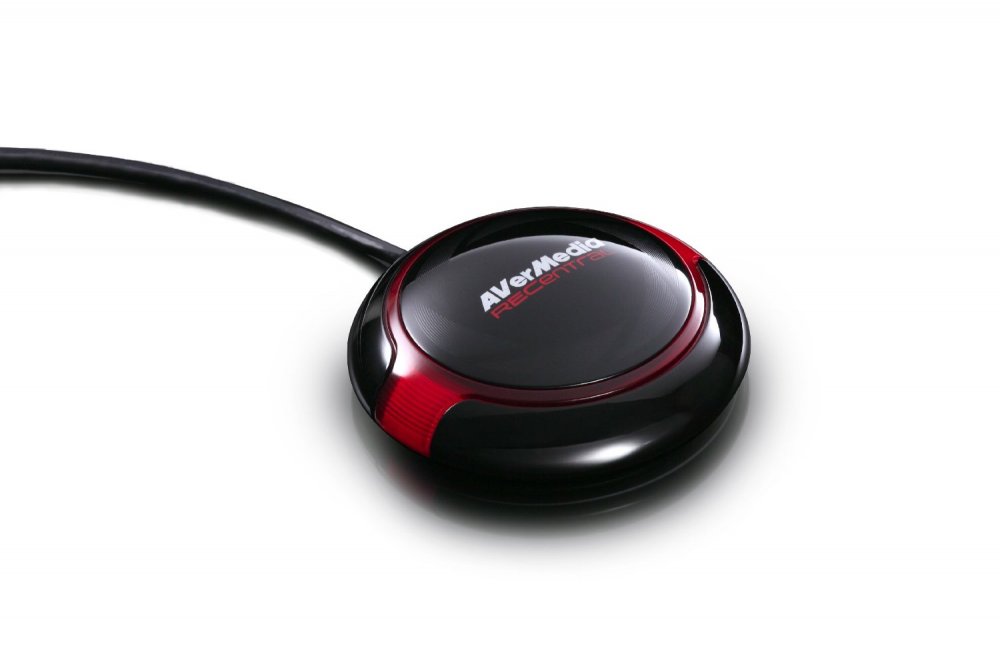
Hi, i changed a hid script i found here to support the avermedia HotButton, now you can execute autoit functions with the press of a stylish button. #Region ;**** Directives created by AutoIt3Wrapper_GUI **** #AutoIt3Wrapper_UseX64=n #AutoIt3Wrapper_Change2CUI=n #EndRegion ;**** Directives created by AutoIt3Wrapper_GUI **** #NoTrayIcon #include <APISysConstants.au3> #include <GUIConstantsEx.au3> #include <StaticConstants.au3> #include <WinAPIGdi.au3> #include <WinAPIMisc.au3> #include <WinAPISys.au3> #include <WindowsConstants.au3> Global $g1_toogle = False $atagRID_DEVICE_INFO_HID = 'struct;dword VendorId;dword ProductId;dword VersionNumber;ushort UsagePage;ushort Usage;endstruct' $atagRID_INFO_HID = 'dword Size;dword Type;' & $atagRID_DEVICE_INFO_HID & ';dword Unused[2]' Opt('TrayAutoPause', 0) ; Create GUI Global $g_hForm = GUICreate('AVButton', 100, 25, -1, -1, BitOR($WS_CAPTION, $WS_POPUP, $WS_SYSMENU)) Local $tRID = DllStructCreate($tagRAWINPUTDEVICE) DllStructSetData($tRID, 'Flags', $RIDEV_INPUTSINK) DllStructSetData($tRID, 'hTarget', $g_hForm) DllStructSetData($tRID, 'UsagePage', 0xFFA0) ; AverMedia Hot Button DllStructSetData($tRID, 'Usage', 0x01) ; _WinAPI_RegisterRawInputDevices($tRID) ; Now iterate to find other devices Local $tText, $aData = _WinAPI_EnumRawInputDevices() If IsArray($aData) Then ReDim $aData[$aData[0][0] + 1][3] $tText = DllStructCreate('wchar[256]') For $i = 1 To $aData[0][0] If _WinAPI_GetRawInputDeviceInfo($aData[$i][0], $tText, 256, $RIDI_DEVICENAME) Then $aData[$i][2] = DllStructGetData($tText, 1) Else $aData[$i][2] = '' EndIf If $aData[$i][1] = $RIM_TYPEHID Then $devInf = DllStructCreate($atagRID_INFO_HID) If _WinAPI_GetRawInputDeviceInfo($aData[$i][0], $devInf, DllStructGetSize($devInf), $RIDI_DEVICEINFO) Then If DllStructGetData($devInf, 'VendorId') = 0x07ca And DllStructGetData($devInf, 'ProductId') = 0x9850 Then ; ReCentral Button VID & PID ConsoleWrite("Device Info:-" & @CRLF) ConsoleWrite('VendorId: ' & Hex(DllStructGetData($devInf, 'VendorId'), 4) & @CRLF) ConsoleWrite('ProductId: ' & Hex(DllStructGetData($devInf, 'ProductId'), 4) & @CRLF) ConsoleWrite('VersionNumber: ' & DllStructGetData($devInf, 'VersionNumber') & @CRLF) ConsoleWrite('UsagePage: ' & Hex(DllStructGetData($devInf, 'UsagePage'), 2) & @CRLF) ConsoleWrite('Usage: ' & Hex(DllStructGetData($devInf, 'Usage'), 2) & @CRLF) DllStructSetData($tRID, 'UsagePage', DllStructGetData($devInf, 'UsagePage')) DllStructSetData($tRID, 'Usage', DllStructGetData($devInf, 'Usage')) _WinAPI_RegisterRawInputDevices($tRID) EndIf EndIf EndIf Next EndIf ; Register WM_INPUT message GUIRegisterMsg($WM_INPUT, 'WM_INPUT') GUISetState(@SW_HIDE) Global $structHID_DATA = "struct;" & _ "dword Type;" & _ "dword Size;" & _ "handle hDevice;" & _ "wparam wParam;" & _ "dword dwSizeHid;" & _ "dword dwCount;" & _ "endstruct;" Global $structWACOM_PEN_DATA = "struct;" & _ "dword Type;" & _ "dword Size;" & _ "handle hDevice;" & _ "wparam wParam;" & _ "dword dwSizeHid;" & _ "dword dwCount;" & _ "ubyte bRawData00;" & _ "ubyte penvsEraser;" & _ "word x;" & _ "word y;" & _ "word proximity;" & _ "word pressure;" & _ "ubyte bRawData09;" & _ "ubyte bRawData10;" & _ "ubyte bRawData11;" & _ "ubyte bRawData12;" & _ "ubyte bRawData13;" & _ "ubyte bRawData14;" & _ "ubyte bRawData15;" & _ "ubyte bRawData16;" & _ "ubyte bRawData17;" & _ "ubyte bRawData18;" & _ "ubyte bRawData19;" & _ "ubyte bRawData20;" & _ "ubyte bRawData21;" & _ "ubyte bRawData22;" & _ "ubyte bRawData23;" & _ "ubyte bRawData24;" & _ "ubyte bRawData25;" & _ "ubyte bRawData26;" & _ "ubyte bRawData27;" & _ "ubyte bRawData28;" & _ "ubyte bRawData29;" & _ "ubyte bRawData30;" & _ "ubyte bRawData31;" & _ "ubyte bRawData32;" & _ "ubyte bRawData33;" & _ "ubyte tilt_ba;" & _ "ubyte bRawData35;" & _ "ubyte tilt_na;" & _ "ubyte bRawData37;" & _ "endstruct;" Do Until GUIGetMsg() = $GUI_EVENT_CLOSE Func WM_INPUT($hWnd, $iMsg, $wParam, $lParam) #forceref $iMsg, $wParam Switch $hWnd Case $g_hForm Local $tRIM = DllStructCreate($tagRAWINPUTHEADER) If _WinAPI_GetRawInputData($lParam, $tRIM, DllStructGetSize($tRIM), $RID_HEADER) Then ; Retrieves the raw input from the specified device $devType = DllStructGetData($tRIM, 'Type') $devSize = DllStructGetData($tRIM, 'Size') Else ConsoleWrite("Device Header Retrieval Failed" & @CRLF) Return EndIf ; Now use the handle to the device to get it's name Local $tText = DllStructCreate('wchar[256]') If _WinAPI_GetRawInputDeviceInfo(DllStructGetData($tRIM, 'hDevice'), $tText, 256, $RIDI_DEVICENAME) Then $devName = DllStructGetData($tText, 1) Else ConsoleWrite("Device Name Retrieval Failed" & @CRLF) EndIf If $devType = $RIM_TYPEHID Then $tRIM = DllStructCreate($structWACOM_PEN_DATA) If _WinAPI_GetRawInputData($lParam, $tRIM, DllStructGetSize($tRIM), $RID_INPUT) Then If DllStructGetData($tRIM, 9) = 1 Then ; Button Pressed ConsoleWrite("GO" & @CRLF) EndIf EndIf EndIf EndSwitch Sleep(10) Return $GUI_RUNDEFMSG EndFunc ;==>WM_INPUT
-
Hi Folks, i was looking for a fast an reliable way to make screenshots and came across this: https://github.com/pgurenko/DXGICaptureSample https://msdn.microsoft.com/en-us/library/windows/desktop/bb205075(v=vs.85).aspx so far i managed to find the following code on the forum but not more. ;~ #AutoIt3Wrapper_UseX64=y #include <WinAPI.au3> Global Const $DXGI_ERROR_NOT_FOUND = 0x887A0002 Global Const $sTag_DummyIDXGIObject = "Dummy1 hresult();Dummy2 hresult();Dummy3 hresult();Dummy4 hresult();" Global Const $sTag_IDXGIFactory = $sTag_DummyIDXGIObject & "EnumAdapters hresult(uint;ptr*); MakeWindowAssociation hresult(hwnd;uint); GetWindowAssociation hresult(hwnd*); CreateSwapChain hresult(ptr;ptr;ptr*); CreateSoftwareAdapter hresult(hwnd;ptr*);" Global Const $sIID_IDXGIFactory = "{7b7166ec-21c7-44ae-b21a-c9ae321ae369}" Global Const $sTag__IDXGIAdapter = $sTag_DummyIDXGIObject & "EnumOutputs hresult(uint;ptr*);GetDesc hresult(ptr);CheckInterfaceSupport hresult(ptr;long)" Global Const $sIID_IDXGIAdapter = "{2411e7e1-12ac-4ccf-bd14-9798e8534dc0}" Global Const $sTag_DXGI_ADAPTER_DESC = "wchar Description[128];uint VendorId;uint DeviceId;uint SubSysId;uint Revision;ULONG_PTR DedicatedVideoMemory;ULONG_PTR DedicatedSystemMemory;ULONG_PTR SharedSystemMemory;DWORD LowPart;LONG HighPart;" DllOpen("DXGI.dll") Local $tRIID_IDXGIFactory = _WinAPI_CLSIDFromString($sIID_IDXGIFactory) Local $aRet = DllCall("DXGI.dll", "long", "CreateDXGIFactory1", "ptr", DllStructGetPtr($tRIID_IDXGIFactory), "ptr*", 0) If @error Or UBound($aRet) <> 3 Then $aRet = DllCall("DXGI.dll", "long", "CreateDXGIFactory", "ptr", DllStructGetPtr($tRIID_IDXGIFactory), "ptr*", 0) If @error Or UBound($aRet) <> 3 Then Exit ConsoleWrite("Unable to get IDXGIFactory Interface Pointer" & @CRLF) EndIf EndIf Local $pIDXGIFactory = $aRet[2] ConsoleWrite("$pIDXGIFactory: " & $pIDXGIFactory & @CRLF) If Not $pIDXGIFactory Then Exit ConsoleWrite("Unable to get IDXGIFactory Interface Pointer" & @CRLF) Local $oDXGIFactory = ObjCreateInterface($pIDXGIFactory, $sIID_IDXGIFactory, $sTag_IDXGIFactory) ConsoleWrite("IsObj($oDXGIFactory): " & IsObj($oDXGIFactory) & @CRLF) Local $pAdapter = 0 Local $oAdapter = 0 Local $i = 0 Local $tApdaterDescription = 0 While Not $oDXGIFactory.EnumAdapters($i, $pAdapter) = $DXGI_ERROR_NOT_FOUND ConsoleWrite("$pAdapter: " & $pAdapter & @CRLF) $oAdapter = ObjCreateInterface($pAdapter, $sIID_IDXGIAdapter, $sTag__IDXGIAdapter) ConsoleWrite("IsObj($oAdapter): " & IsObj($oAdapter) & @CRLF) If IsObj($oAdapter) Then $tApdaterDescription = DllStructCreate($sTag_DXGI_ADAPTER_DESC) $oAdapter.GetDesc(DllStructGetPtr($tApdaterDescription)) ConsoleWrite(">>>>>>>>>>>Adapter Information<<<<<<<<<<<<<" & @CRLF) ConsoleWrite("Description: " & $tApdaterDescription.Description & @CRLF) ConsoleWrite("VendorId: " & $tApdaterDescription.VendorId & @CRLF) ConsoleWrite("DeviceId: " & $tApdaterDescription.DeviceId & @CRLF) ConsoleWrite("SubSysId: " & $tApdaterDescription.SubSysId & @CRLF) ConsoleWrite("Revision: " & $tApdaterDescription.Revision & @CRLF) ConsoleWrite("DedicatedVideoMemory: " & $tApdaterDescription.DedicatedVideoMemory & @CRLF) ConsoleWrite("DedicatedSystemMemory: " & $tApdaterDescription.DedicatedSystemMemory & @CRLF) ConsoleWrite("SharedSystemMemory: " & $tApdaterDescription.SharedSystemMemory & @CRLF) ConsoleWrite(@CRLF & @CRLF) $oAdapter = 0 EndIf $i += 1 WEnd Func _WinAPI_CLSIDFromString($sGUID) Local $tGUID = DllStructCreate('ulong Data1;ushort Data2;ushort Data3;byte Data4[8]') Local $iRet = DllCall('ole32.dll', 'uint', 'CLSIDFromString', 'wstr', $sGUID, 'ptr', DllStructGetPtr($tGUID)) If (@error) Or ($iRet[0]) Then Return SetError(@error, @extended, 0) EndIf Return $tGUID EndFunc ;==>_WinAPI_CLSIDFromString my question is how would i go from c to autoit. and make it reliable. the most interresting function is DXGIOutputDuplication::AcquireNextFrame i wonder if it is possible to request regions of a screen and if it is possible to get hex values of the pixels very fast.