leuce
-
Posts
411 -
Joined
-
Last visited






leuce's Achievements

Universalist (7/7)
3
Reputation
-
Hello everyone I want to change this: <a href="some-folder/2021-abc/123-somefile-456"> into this: <a href="###123-somefile-456"> I.e. if the right-most folder's name (i.e. the part after the last forward slash) in the URL starts with a number, I want the hyperlink to contain only ### plus that folder's name. <a href="some-folder/2021-abc/somefile"> = must stay the same <a href="some-folder/2021-abc/somefile-123"> = must stay the same <a href="some-folder/2022-abc/1234"> must become: <a href="###1234"> <a href="some-folder/2022-abc/1234-somefile"> must become: <a href="###1234-somefile"> <a href="some-folder/2023-abc/123-somefile-456"> must become: <a href="###123-somefile-456"> <a href="some-folder/another-folder/2024-abc/789-somefile-456"> must become: <a href="###789-somefile-456"> This is the regular expression that I believe should work... but doesn't: $string = '<a href="some-folder/2021-abc/123-somefile-456">' $code = "###" $replace = StringRegExpReplace ($string, '(<a href=")(\S+?)(/[\S^/]+?">)', "$1" & $code & "$3") MsgBox (0, "", $replace, 0) Any advice? Thanks Samuel
-
 leuce reacted to a post in a topic:
StringReplace next only from the previous position onwards
leuce reacted to a post in a topic:
StringReplace next only from the previous position onwards
-

StringReplace next only from the previous position onwards
leuce replied to leuce's topic in AutoIt General Help and Support
Thanks for your effort -- I'll have a look. Added: Aaah, I didn't notice "Check @extended for next offset" in the help file for StringRegExp. That's very useful. -
StringReplace next only from the previous position onwards
leuce replied to leuce's topic in AutoIt General Help and Support
As requested (attached). Granted, my test was small: I made only 6 replacements in a 45 MB XML file and it took 25 seconds whether I use StringReplace or StringRegExpReplace: $sdlfileread = StringReplace ($sdlfileread, $columnsplit[1], $columnsplit[2]) $sdlfileread = StringRegExpReplace ($sdlfileread, $columnsplit[1], $columnsplit[2]) The IDs in the replacements.txt file are in order from small to large, and they occur in the XML file in that same order, but each ID is paired with an attribute that is different for each ID. So e.g. ID 1106 must be replaced with something that says 1106 and "nbs", and ID 1180 must be replaced with something that says 1180 and "quo", etc. Anyway, if the cat/dog example mentioned previously is not possible using regex, then it looks like I'm going to have to experiment with StringMid etc., splitting the file into hundreds of little chunks and then merging it all together in the end. 🙂 Samuel input example.txt -
StringReplace next only from the previous position onwards
leuce replied to leuce's topic in AutoIt General Help and Support
Thanks, Andreik, for the tip about using regex replace. I tested it but the speed is the same if I use a single regular expression for each replacement. I'm not sure if it's possible to do multiple replacements inside a single regex. For example, if I want to replace "{cat}" with "{dog}", replace "{apple}" with "{pear}" and replace "{bike}" with "{car}", can I perform that replacement with a single line of regular expression? You asked for sample data, but I'm not sure if that'll help. Better you give me an example with cat, dog, apple etc. 🙂 See attached. So, currently, I split the replacements.txt file by line and then by tab, and then use a For...Next loop to make those find/replacements in the XML file. If there is a way to put those six items into a single regular expression ... wow. Samuel replacements.txt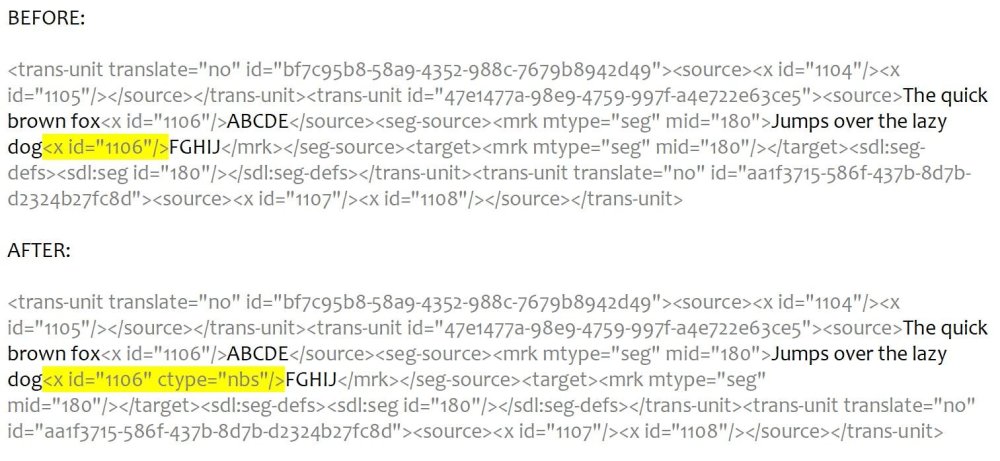
-
Hello everyone I'm using StringReplace to perform a series of replacements in a file. Each replacement only needs to be done (or attempted) once, since each found text occurs only once in the file... and the next replacement will always come AFTER the previous replacement in the file. It is a very, very large file, though. Currently, StringReplace evaluates the entire file each time. Is there a way to tell StringReplace to search for the next found text only starting from the position where the previous replacement was made? My code is (inside a For...Next loop): $sdlfileread = StringReplace ($sdlfileread, $columnsplit[1], $columnsplit[2]) ...in which $columnsplit represents an array of replacements that have been read from a separate tab delimited text file. This array is a set of numbers of increasing values, so larger values are lower down in the file and thus lower down on the replacement list as well. I wrote this script for small files and few replacements, but I'm now trying it on a larger file, and I discover that this is not the ideal way of doing it. Thanks Samuel Added: Edited to make example simpler.
-
Unfortunately ChatGPT's AutoIt scripts sometimes contain functions that are either yet-to-be-written user functions or non-existent built-in functions. I asked it to write a script for something and it included a non-existing user function as part of the script... though it did end up writing that function for me when I asked it to. But it used two functions that it insists are built-in functions of AutoIt, but which doesn't actually exist in AutoIt. Fortunately, it is also able to explain what those functions are supposed to do. An example of what ChatGPT believes: The Min() function in the script is a built-in function in AutoIt that returns the smallest value among the values passed as arguments. As far as I can tell, there is no Min() function in AutoIt. There is _Min(), but that only compares two values (the test script had three). I asked it to write me a user function that actually does what it believes the Min() function does, and it complied (and the function appears like it could work), but the function wasn't compatible with the syntax used in the test script... which meant that I had to ask more questions and make more requests (and know what to request) to get it all to work. I don't see any prohibition to using AI generation for script support questions in the FAQ yet... something for the future, perhaps?
-
Hello everyone If you go to this page: https://www.utf8-chartable.de/unicode-utf8-table.pl ...you'll see a column for "Unicode code point" and a column for "UTF-8 (hex.)". Do you know how I can covert the one to the other in AutoIt? In other words, the input would be the "Unicode code point" and the output would be its UTF-8 hexadecimal equivalent. For example, if the input is U+11EE0 (or however AutoIt wants it written), then the output should be F0 91 BB A0 (or however AutoIt writes it). Thanks Samuel (I'm just trying to generate a single-page list of all Unicode code points and their associated UTF-8 hex values.)
-
dreivilo47 reacted to a post in a topic:
@SW_MINIMIZE does not work
-
Installing an exe on remote machine
leuce replied to Jayser279's topic in AutoIt General Help and Support
Are you able to run the AU3 script uncompiled on any of the machines where AutoIt is installed? When you double-click the EXE file, does the UAC come up and ask for your permission to run it, or does it just hang immediately? Have you tried right-clicking the EXE and selecting "Run as administrator"? -
I did a quick test, and FileWriteLine has no difficulty writing multiple lines (e.g. "asdf" & @CRLF & "asdf" is one line). What sets is apart from FileWrite is that it adds a line break at the end. Dercardano, I'm just a beginner script writer myself, but can you explain two things for me? For $I = 01 To 1 So, this means that the For-Next loop will cycle only once, right? This means that the script will write "a,b,c,d" & @CRLF, followed by the content of $text & @CRLF. And if $text is just one line long, it will write just that one line. I've noticed that $text is a map ($text = $Price.innertext) but since the For-Next loop will cycle only once, surely only one element of that map will be dealt with (and written to the text file). Right? FileWriteLine($hFile, "who,is,there,now") FileWriteLine($hFile, $text) Out of curiosity, why did you indent the second FileWriteLine? I mean, you're free to do that, of course, but usually this indicates an expectation.
-
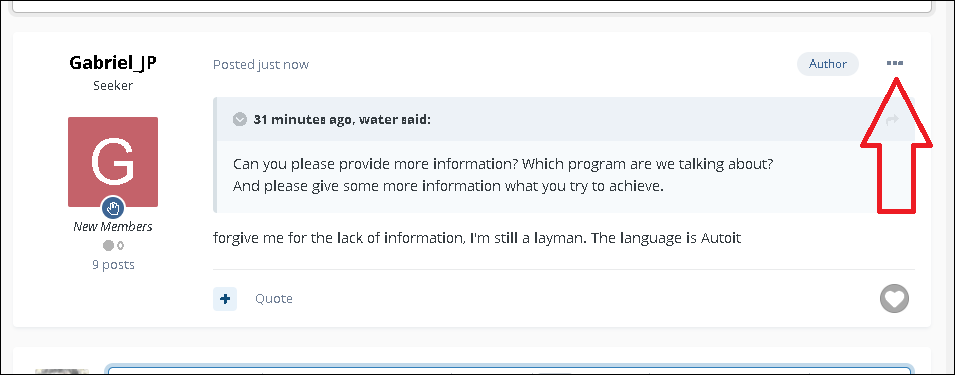
1. To edit a message, click the three dots at the top right of your post and select the Edit option: 2. If you want to edit a post, do NOT just press the back-button in your browser and then press the Submit button again. 3. I suggest to repost your question, but this time, use full sentences, and use fullstops at the ends of sentences. We're having trouble figuring out where your sentences begin and end.
-
Can you fix the HotKeySet and @HotKeyPressed
leuce replied to gemtoc's topic in AutoIt General Help and Support
Could you tell me where in the AutoIt help file it says that this is the correct syntax? I can't find any mention of this on the page for "HotKeySet". -
and Okay... erm... err... no, I don't see how you get from post #1 to post #2.
-
Multiple languages without tons of global variables
leuce replied to Bresacon's topic in AutoIt General Help and Support
The first thing that sprung to mind after reading your query was "I wonder if there are GNU Gettext supports for AutoIt?", and with that search term in mind, I found this: ...but I can't vouch for it. -
So, you'll have a text file with 128 lines, right? Each line contains the machine number plus the parts that work with that machine. Then you just need the script to tell you which lines contain the number that you've entered into the input box. Surely it would not take much time to read the 128 lines into an array and search the array one iteration at at time. Then you'll end up with a list of lines containing the search term. You just have to make sure you don't find one number inside another number (-: Here's a quick view of what I mean: $r = "" $s = FileRead (FileOpen ("textfile.txt", 128)) $t = StringSplit ($s, @CRLF, 1) $u = InputBox ("Type number...", "Type number of machine or part") For $v = 1 to $t[0] If StringInStr ($t[$v], $u) Then $r = $r & $t[$v] & @CRLF & @CRLF EndIf Next MsgBox (0, "Matching lines", $r, 0) If your images have the same file names as the machine numbers, and if the machine numbers is always the first item on each line, and if the thing that delimits the machine numbers and part numbers is " - ", then you can e.g. replace the If-Then-EndIf with something crude like this: If StringInStr ($t[$v], $u) Then $x = StringSplit ($t[$v], " - ", 1) $machinename = $x[1] SplashImageOn ("Machine: " & $machinename, $machinename & ".jpg") MsgBox (0, "Matching line", $t[$v], 0) SplashOff () EndIf Personally I would rather create an HTML page from the results, so that it opens in the browser, so you can include images of the tools and an image of the machine, and use coloured text to highlight useful content, etc. MsgBox and SplashOn are quite limited. PS. I get the impression from you post that when you say "faster search", you mean smaller script (i.e. less code). Right?
-
Where did you get that script from? (-: I'm not a programmer either, so how about this: #Include <Array.au3> $s = FileRead ("2.txt") Local $w = StringRegExp ($s, "(?s)(\b[[:alpha:]]{2,}\b)", 3) _ArrayColInsert($w, 1) For $i = 0 to UBound ($w)-1 StringRegExpReplace ($s, '(?i)\b' & $w[$i][0] & '\b', $w[$i][0]) $w[$i][1] = @extended Next _ArraySort ($w, 1, 0, 0, 1) $z1 = _ArrayToString ($w, @TAB, -1, -1, @CRLF, -1, -1) FileWrite ("2_output1.txt", $z1) $z2 = StringSplit ($z1, @CRLF, 1) $z3 = _ArrayUnique ($z2) $z4 = _ArrayToString ($z3, @CRLF) FileWrite ("2_output2.txt", $z4) (which is basically your script, with some stuff removed and some stuff added.)