sandeep
-
Posts
29 -
Joined
-
Last visited
sandeep's Achievements

Seeker (1/7)
0
Reputation
-
hey,Info window just shows me the window name.Apart from that nothing...no controls. We have automated many things using Shortcuts ,keyboard controls and finally Mouse co-ordinates..We have included OCR's too at some place for Validation, But more help on this would be really great.
-
HI All, We are in process of Automating Oracle based forms for one of out product. Since we are new to automating Oracle apps forms...any help would be really appreciated... Sandeep
-
try this it will work #include <Array.au3> #include <ScreenCapture.au3> WinActivate("EFI Colorproof XF Client") ; Capture region ;$file1= _ScreenCapture_Capture("C:\GDIPlus_Image2.bmp", 141, 572, 850, 950) ;$file2= _ScreenCapture_Capture("C:\menu1.bmp", 1053,123, 1111, 141) $menu_XF = _ScreenCapture_Capture("C:\menuXF3.bmp",873,123,1282,169) $output = _OCR("C:\menuXF3.bmp") ;================================= OCR ======================================= ; Function Name: ; Description: Searches a bmp file for all recognizable characters and returns them in an array ; Requires: Microsoft Word must be installed on system & <Array.au3> ; Parameters: $file bmp file to search ; ; Syntax: _OCR($file) ; Returns: $Array[1] = 0 on failure, $Array on success ; ;=============================================================================== Func _OCR($file) Dim $miDoc, $Doc, $str, $oWord, $sArray[500] $oMyError = ObjEvent("AutoIt.Error","_CoMErrFunc") $miDoc = ObjCreate("MODI.Document") $miDocView = ObjCreate("MiDocViewer.MiDocView") $miDoc.Create($file) $miDoc.Ocr(9, True, False) $MiDocView.Document = $miDoc $MiDocView.SetScale (0.75, 0.75) $i = 0 For $oWord in $miDoc.Images(0).Layout.Words $str = $str & $oWord.text & @CrLf $fileopen = FileOpen("C:\test.txt", 1) If $fileopen = -1 Then MsgBox(0, "Error", "Unable to open file.") Exit EndIf ConsoleWrite($oWord.text & @CRLF) ;MsgBox(0,"Console writing",$oWord.text) FileWrite($fileopen, $oWord.text & @CRLF) ; Check if file opened for reading OK $sArray [$i] = $oWord.text ;$sArray = $oWord.text $i += 1 $i += 1 Next Return $sArray EndFunc;========================== OCR ========================================
-
Your image will be very small. Paste ur image in paint and use some white space which is provided along with it...Save it and run ur code.. It will work
-
.. Ok this was with a .bmp file. Now is there any way that we can run OCR on top of any application which is running.? Something like Testcomplete ,running OCR straight on top of an application. I am still trying to figure out something like that.
-
Script worked beautifully. But there is one small problem. For example if i have a bmp image with text "HE ME",after running the script it lands up with "HEME".The space is gone. I converted the whole array to string and tried.But still it the same. Any idea why it could be. Thansk
-
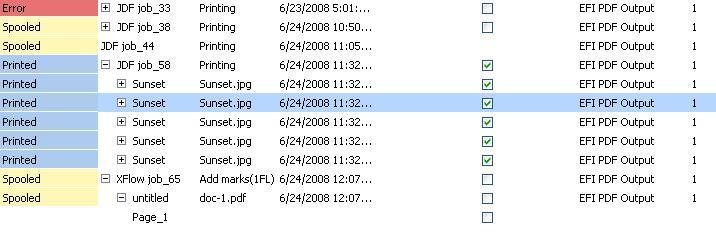
Now thats the image of a list view... NO dialog box.
-
Forget abot that.Check the screenshot that i have newly attached... This will definetly give u clear idea
-
Please check the screen shot. In this i wanna find Error...I need to do an OCR
-
OK,THe problem we have is the menus are desinged using Photoshop. So the buttons in the image are recognised as a single entity/ So for example i want to search for only Server,AU3Info gives me the whole toolbar class. At this point i believe OCR will be benefitial. And when we start testing localization also. Please check the attachments. Thanks Sandi
-
image.bmp
-
Hi all, currently we have an application with lots of embedded strings. And i am trying to read the particular string in the whole application . I tried with http://www.autoitscript.com/forum/index.ph...50608&st=45 but was unsuccessful Tried ScreenOCR and failed. Can somebody help me with this It would be nice if somebody can provide us info on how to do this. With out cordinates the OCR should scan the whole application for the particular string. Thanks Sandi Ptex expecting a good response from you
-
Is it working??
-
hey Even i am trying to do the same thing. Only difference is it will work on a application to find the embedded strings. I am trying but getting stuck in some places. if u dont mind can i borrow ur code for experimental purpose. Thnaks Sandi
-
Hi All to the wonderful brains out there, and a Happy new year Here i m with another problem..may be small one to u guys. Here i go.. I am able to write a code to get the pixel values,Hex color,Decimal Color,RGB color on my machine with a resolution 1024*768. But when the same code is run on a different machine with same resolution it gives me totally different values. I m really confused here, would like to know how pixelchecksum, getpixelcolor and other functions are working? The only difference i saw between two machines are the brightness, and color settings of the monitor. So, is there any way that i can get the pixel value of the document that i am using? to get the pixel keeping monitor settings aside. Help is needed very urgently.. Thanks Sandi