fgilain
-
Posts
18 -
Joined
-
Last visited
fgilain's Achievements

Seeker (1/7)
0
Reputation
-
thanks, i finally did it with a simple vbs script ;-))
-
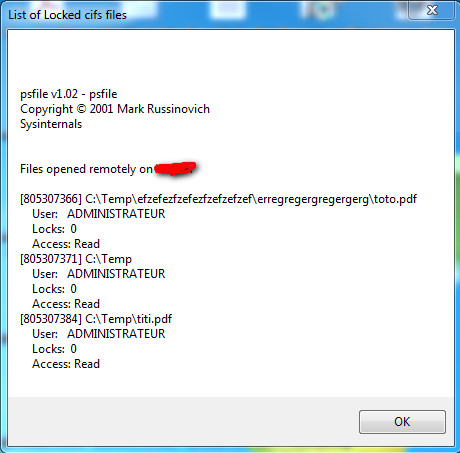
Hello, i need to force closing of remotely opened file in specific path on my server, so i wanted to use the "net file" (standard Windows command) or "psfile" (from Microsoft Pstools, better than "net file" because it doesn"t truncate the full path of opened file) tool to list locked files and close them. Here is what i already found to start : $strCmdOutput = Run(@ComSpec & " /c C:\Temp\psfile.exe", "", Default, $STDERR_MERGED) $strLockedFilesList = "" While 1 $strSTDOUT = StdoutRead($strCmdOutput) If $strSTDOUT <> "" Then $strLockedFilesList = $strLockedFilesList & @CRLF & $strSTDOUT If @error Then ExitLoop WEnd MsgBox (0, "List of Locked cifs files", $strLockedFilesList) Autoit code actually shows me the window you'll see in the attached screenshot. Command line output will generally give something like that : C:\>C:\Temp\psfile.exe psfile v1.02 - psfile Copyright ® 2001 Mark Russinovich Sysinternals Files opened remotely on MYCOMPUTER: [805307366] C:\Temp\efzefezfzefezfzefzefzef\erregregergregergerg\toto.pdf User: ADMINISTRATEUR Locks: 0 Access: Read [805307371] C:\Temp User: ADMINISTRATEUR Locks: 0 Access: Read [805307384] C:\Temp\titi.pdf User: ADMINISTRATEUR Locks: 0 Access: Read What i need to do is to extract each lock numbers (numbers between the "[" and the "]") and run another command with them in parameter.. Thanks for your help Florent
-
Datediff problem between windows and Linux machine ?
fgilain replied to fgilain's topic in AutoIt General Help and Support
Seems to calculate correcly the time (1 hour less in UTC time) ..but what i really need is the "epoch datetime"... NB : will htis work too after next daylight change ? FG -
Datediff problem between windows and Linux machine ?
fgilain replied to fgilain's topic in AutoIt General Help and Support
Sorry, i'm not a "professional developer"...i'm quite lost in all theses expert solutions... As i need to generate from my windows computer a string representing the actual time (since 1970) that would be the same as if i had calculated it on my linux box (even if there were daylight saving changes), what would be the best way then ? NB :today, i just did a "- 3600" to my result to remove 1 hour in the result of my windows computer (but i suppose it won't work anymore after the next daylight change here in france ?) -
 fgilain reacted to a post in a topic:
Datediff problem between windows and Linux machine ?
fgilain reacted to a post in a topic:
Datediff problem between windows and Linux machine ?
-
Datediff problem between windows and Linux machine ?
fgilain replied to fgilain's topic in AutoIt General Help and Support
Solution would be to get the "now date" from autoit in UTC format, no ? Because actually it seems to return the GMT+1 datetime.... And what will happen at next change of hour here in france ? -
Datediff problem between windows and Linux machine ?
fgilain replied to fgilain's topic in AutoIt General Help and Support
[root@remote_linux_server]# date ven fév 22 18:14:18 CET 2013 [root@remote_linux_server]# date -u ven fév 22 17:20:55 UTC 2013 -
Datediff problem between windows and Linux machine ?
fgilain replied to fgilain's topic in AutoIt General Help and Support
on the linux server, result is : [root@remote_linux_server]# date ven fév 22 13:22:20 CET 2013 [root@remote_linux_server]# date ven fév 22 13:22:20 CET 2013 [root@remote_linux_server]# date ven fév 22 13:22:20 CET 2013 [root@remote_linux_server]# /bin/date +%s 1361535757 seems to have 1 hour of difference too in the result ???? should i change something about the "CET" timezone somewhere on the linux ? -
Hello, I need to create a script using autoit on a windows computer to execute it on a remote linux server using putty (or plink) and this script needs to generate a string corresponding to the actuel date/time in the linux format (equivalent to the linux command : `/bin/date +%s`). My problem is that it seems to generate it with 1 hour more than it should be.. maybe did i missed something ? here is the code i used : $UnixDateSince1970 = _DateDiff( 's',"1970/01/01 00:00:00",_NowCalc()) Any idea of what i coul have missed ? Nb : actually, it's 2013/02/22 01:20PM in France, and the result string is : 1361539258 thanks Florent
-
Hi all, I'd like to create a simple way to diffuse some text messages at the bottom of a screen from right to left on the entire width in continue. Goal is to diffuse message to my company's people on a 16/9 TV in a continue way. Messages would be taken from text files created in a specified directory.... How could i do this with AutoIT ? thanks a lot for your help. Florent
-
Sorry, i just have tested, and it doesn't works too... Florent
-
Problem is the line with : $UserDetails = $UserDetails & $objAccount.$attribut & @CRLF i get an error message : "Error in expression". i need to generate a loop that will do something like : $UserDetails = $UserDetails & $objAccount.company & @CRLF $UserDetails = $UserDetails & $objAccount.name & @CRLF $UserDetails = $UserDetails & $objAccount.department & @CRLF etc... etc... using the attributs list in variable $ListeAttributsrecherches
-
Hello, i'm trying to develop a script using WMI that will display every Active directory user details by looping on an array that contains user's informations. My problem is that i want to make easy to add or remove wanted attributs in result, so, i need to be able to give the list of wanted attributs in a simple string variable separated by ",". Problem is that i'm unable to find the right syntax to get it work. here is my code : $ADShortDomainName = "MYDOMAIN" $ADFullDnsDomainName = "MYDOMAIN.LOCAL" $ListeAttributsRecherches = "company,name,department,title,telephoneNumber,facsimileTelephoneNumber,mobile,mail" $objWMI = ObjGet("winmgmts:\\" & $ADFullDnsDomainName & "\root\cimv2") $objAccount = $objWMI.Get("Win32_UserAccount.Name='" & $Login & "',Domain='" & $ADShortDomainName & "'") If IsObj($objAccount) Then ; Loop and display on every attributs defined in the "$ListeAttributsRecherches" variable $ArrayAttributs = StringSplit($ListeAttributsRecherches, ",") $UserDetails = "" For $attribut In $ArrayAttributs $UserDetails = $UserDetails & $objAccount.$attribut & @CRLF Next Thanks for your help ! Florent.
-
Hello, Is there a way from an AutoIt script to get access to data from a WMI ? i'd like to get a loop on the "installed softwares" of the computer where the autoit script runs. Exemple of a VBS script doing this : strComputer = "." Set objWMIService = GetObject("winmgmts:" & "{impersonationLevel=impersonate}!\\" & strComputer & "\root\cimv2") Set colSoftware = objWMIService.ExecQuery ("Select * from Win32_Product") For Each objSoftware in colSoftware ' loop on each software name from WMI request objTextFile.WriteLine objSoftware.Name & ";" & objSoftware.Vendor & ";" & objSoftware.Version Next thanks for your help. Florent
-
RegWrite + user permission ? runas ?
fgilain replied to fgilain's topic in AutoIt General Help and Support
Windows XP SP3 OS, here is what i try to do (but doesn't works at all...): deleting key : RunAs($sUserName, $sDomainName, $sPassword, 0, @ComSpec & " /c " & "reg.exe delete HKLM\Software\Policies\Microsoft\Communicator\TabUrl /f", @SystemDir, @SW_HIDE) RunAs($sUserName, $sDomainName, $sPassword, 0, @ComSpec & " /c " & "reg.exe delete HKCU\Software\Policies\Microsoft\Communicator\TabUrl /f", @SystemDir, @SW_HIDE) adding key : Select Case $User_Btn And BitAND(GUICtrlRead($User_Btn), $GUI_CHECKED) = $GUI_CHECKED ;$add_conf_tab = RegWrite("HKEY_CURRENT_USER\Software\Policies\Microsoft\Communicator", "TabUrl", "REG_SZ", GUICtrlRead($TabUrl)) RunAs($sUserName, $sDomainName, $sPassword, 0, @ComSpec & " /c " & "reg.exe add HKCU\Software\Policies\Microsoft\Communicator /v TabUrl /d " & $TabUrl & " /t REG_SZ /f", @SystemDir, @SW_HIDE) Case $Machine_Btn And BitAND(GUICtrlRead($Machine_Btn), $GUI_CHECKED) = $GUI_CHECKED ;$add_conf_tab = RegWrite("HKEY_LOCAL_MACHINE\Software\Policies\Microsoft\Communicator", "TabUrl", "REG_SZ", GUICtrlRead($TabUrl)) RunAs($sUserName, $sDomainName, $sPassword, 0, @ComSpec & " /c " & "reg.exe add HKLM\Software\Policies\Microsoft\Communicator /v TabUrl /d " & $TabUrl & " /t REG_SZ /f", @SystemDir, @SW_HIDE) EndSelect -
hi all, I have a little script that need to be able to create/update a key in the Registry. in HKLM and/or HKCU sub-tree. Problem : when i run my AutoIT EXE file in the user session, he isn't allowed to d othis. is there a tip to do this using another DOMAIN user account in order to get access to these 2 registry keys ? thanks Florent