JamesDover
-
Posts
200 -
Joined
-
Last visited
JamesDover's Achievements

Polymath (5/7)
2
Reputation
-
StringRegExpReplace help
JamesDover replied to JamesDover's topic in AutoIt General Help and Support
Thanks everyone. -
StringRegExpReplace help
JamesDover replied to JamesDover's topic in AutoIt General Help and Support
I just found one that was in this format mydomain/firstname.lastname and the StringRegExpReplace doesn't seem to effect it. Would this be because the \ is in a different direction on the StringRegExpReplace? Func Test2() Local $sInput = "mydomain/firstname.lastname" Local $sOutput = StringRegExpReplace($sInput, '[^//]+//', "") Msgbox(0,"2", $sOutput) EndFunc -
 JamesDover reacted to a post in a topic:
StringRegExpReplace help
JamesDover reacted to a post in a topic:
StringRegExpReplace help
-
StringRegExpReplace help
JamesDover replied to JamesDover's topic in AutoIt General Help and Support
That's a good example. I've always struggled with StringRegExpReplace expressions so this was very helpful. -
StringRegExpReplace help
JamesDover replied to JamesDover's topic in AutoIt General Help and Support
Excellent! Thanks for the quick responses. -
 JamesDover reacted to a post in a topic:
StringRegExpReplace help
JamesDover reacted to a post in a topic:
StringRegExpReplace help
-
I know this is a simple script however, I can't seem to get the code correct. I'm pulling in domain users in this format mydomain\firstname.lastname and I would like the output to be firstname.lastname (basically just removing the mydomain\ ). Here is the code below that I am working on. Cheers #include <MsgBoxConstants.au3> Test1() Func Test1() Local $sInput = "mydomain\firstname.lastname" Local $sOutput = StringRegExpReplace($sInput, 'mydomain\', '$1') Display($sInput, $sOutput) EndFunc
-
Skysnake reacted to a post in a topic:
SMTP with GMAIL
-
Excel.au3 Issues in Version 3.4.4
JamesDover replied to JamesDover's topic in AutoIt General Help and Support
Thanks -
I am using the version of Excel.au3 that came with auto-it but it says undefined function when I try to run it. Here is the code. Thanks Local $oExcel = _ExcelBookNew() ===================SHOWS undefinded function _ExcelWriteSheetFromArray($oExcel, $Model1, 1, 1, 0, 0) ===================SHOWS undefinded function
-
GUICtrlRead($password) pulling from $ES_PASSWORD
JamesDover replied to JamesDover's topic in AutoIt General Help and Support
I figured it out. I made the input box to small for the 15 letter password. For some reason it didn't want to copy the full password. Cheers -
I have a script that uses GUICtrlRead($password) that pulls from the input that contains the password. However when it is encrypted it can't read it. But it works unencrypted (without the $ES_PASSWORD) . $Input58 = GUICtrlCreateInput("", 570, 890, 140, 28, $ES_PASSWORD) GUICtrlSetFont(-1, 12, 800, 0, "MS Sans Serif") $Password = GUICtrlRead($Input58) Thanks Update: It looks like it is only reading 11 letters of a 15 letter password.
-
Never mind I got it figured out it was the two step verification causing the issue. I turned it off and it works.
-
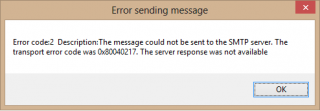
This looks promising however I got this error. (see attachment)
-
Hello, I'm trying to send an email through gmail IMAP. It doesn't seem to be working correctly. Could the two step verification be causing the issue? It says it sent it but i never receive it. Cheers #include <file.au3> ;AutoIt Error Object (Prevents script from crashing if an unexpected error occurs Global $oMyError = ObjEvent("AutoIt.Error", "ErrorDebug") ;;SMTP Email Info Local $Subject = "[AutoIt] Subject" Local $Username = "yourusername@gmail.com" Local $Password = "p@5s" Local $SmtpServer = "smtp.gmail.com" Local $FromName = "SomeName" Local $IPPort = 465 Local $ssl = 1 Local $ToAddress = "to@hotmail.com" Local $FromAddress = "autoit@gmail.com" Local $AttachFiles = "" Local $CcAddress = "" Local $BccAddress = "" Local $Importance = "High" Local $body = "This is the body of the message" Local $oMyRet[1] Local $objEmail _INetSmtpMailCom($SMTPSErver,$FromName,$FromAddress,$ToAddress,$Subject,$Body,"","","",$Importance,$Username,$password,$IPPort,$SSL) Func _INetSmtpMailCom($s_SmtpServer, $s_FromName, $s_FromAddress, $s_ToAddress, $s_Subject = "", $as_Body = "", $s_AttachFiles = "", $s_CcAddress = "", $s_BccAddress = "", $s_Importance = "High", $s_Username = "", $s_Password = "", $IPPort = 25, $ssl = 0) $objEmail = ObjCreate("CDO.Message") $objEmail.From = '"' & $s_FromName & '" <' & $s_FromAddress & '>' $objEmail.To = $s_ToAddress Local $i_Error = 0 Local $i_Error_desciption = "" If $s_CcAddress <> "" Then $objEmail.Cc = $s_CcAddress If $s_BccAddress <> "" Then $objEmail.Bcc = $s_BccAddress $objEmail.Subject = $s_Subject If StringInStr($as_Body, "<") And StringInStr($as_Body, ">") Then $objEmail.HTMLBody = $as_Body Else $objEmail.Textbody = $as_Body & @CRLF EndIf If $s_AttachFiles <> "" Then Local $S_Files2Attach = StringSplit($s_AttachFiles, ";") For $x = 1 To $S_Files2Attach[0] $S_Files2Attach[$x] = _PathFull($S_Files2Attach[$x]) ConsoleWrite('@@ Debug(62) : $S_Files2Attach = ' & $S_Files2Attach & @LF & '>Error code: ' & @error & @LF) ;### Debug Console If FileExists($S_Files2Attach[$x]) Then $objEmail.AddAttachment($S_Files2Attach[$x]) Else ConsoleWrite('!> File not found to attach: ' & $S_Files2Attach[$x] & @LF) SetError(1) Return 0 EndIf Next EndIf $objEmail.Configuration.Fields.Item("http://schemas.microsoft.com/cdo/configuration/sendusing") = 2 $objEmail.Configuration.Fields.Item("http://schemas.microsoft.com/cdo/configuration/smtpserver") = $s_SmtpServer If Number($IPPort) = 0 Then $IPPort = 25 $objEmail.Configuration.Fields.Item("http://schemas.microsoft.com/cdo/configuration/smtpserverport") = $IPPort ;Authenticated SMTP If $s_Username <> "" Then $objEmail.Configuration.Fields.Item("http://schemas.microsoft.com/cdo/configuration/smtpauthenticate") = 1 $objEmail.Configuration.Fields.Item("http://schemas.microsoft.com/cdo/configuration/sendusername") = $s_Username $objEmail.Configuration.Fields.Item("http://schemas.microsoft.com/cdo/configuration/sendpassword") = $s_Password EndIf If $ssl Then $objEmail.Configuration.Fields.Item("http://schemas.microsoft.com/cdo/configuration/smtpusessl") = True EndIf ;Update settings $objEmail.Configuration.Fields.Update ; Set Email Importance Switch $s_Importance Case "High" $objEmail.Fields.Item("urn:schemas:mailheader:Importance") = "High" Case "Normal" $objEmail.Fields.Item("urn:schemas:mailheader:Importance") = "Normal" Case "Low" $objEmail.Fields.Item("urn:schemas:mailheader:Importance") = "Low" EndSwitch $objEmail.Fields.Update ; Sent the Message ConsoleWrite("echo Sending" & @LF) If Not IsObj($objEmail) Then ConsoleWrite("echo error sending (not an object)" & @CRLF) $sendfailed = True Else $sendfailed = False $objEmail.Send EndIf ConsoleWrite("echo SENT" & @LF) If @error Then $sendfailed = True SetError(2) ;~ _ArrayDisplay($oMyRet, "MyRet") Return $oMyRet[1] EndIf $objEmail = 0 EndFunc ;==>_INetSmtpMailCom Func ErrorDebug() Local $HexNumber Local $strMsg $HexNumber = Hex($oMyError.Number, 8) $strMsg = "Error Number: " & $HexNumber & @CRLF $strMsg &= "WinDescription: " & $oMyError.WinDescription & @CRLF $strMsg &= "Script Line: " & $oMyError.ScriptLine & @CRLF FileWrite(@ScriptDir & "\" & @ScriptName & "_ErrorDebug.txt", "------------------[Error]------------------" & @LF & $strMsg & @LF & @LF) SetError(1) EndFunc ;==>ErrorDebug
-
There we go! Cheers
-
Yes, I can verify that they both exist. Would windows 7 x64 have anything to do with it? Cheers
-
I used to be able to start typing and the call tips would pop up and show me the format. I checked under the C:Program Files (x86)AutoIt3SciTEapi and the au3.user.calltips.api doesn't exist. I am on windows 7 x64. Cheers