


qwert
-
Posts
1,267 -
Joined
-
Last visited
-
Days Won
2
Recent Profile Visitors








qwert's Achievements

-
 Tony4219 reacted to a post in a topic:
Method for extracting text from RTF file
Tony4219 reacted to a post in a topic:
Method for extracting text from RTF file
-
 TimRude reacted to a post in a topic:
Function to determine Scaling Factor of primary monitor
TimRude reacted to a post in a topic:
Function to determine Scaling Factor of primary monitor
-
GuiFlatButton UDF : Change Colors of Regular Buttons
qwert replied to kurtykurtyboy's topic in AutoIt Example Scripts
I only had time to make a quick test: The GUI comes up fine ... and the elements seem to behave. HOWEVER, clicking on the window's top bar immediately causes both buttons to disappear. -
cramaboule reacted to a post in a topic:
How to get ANSI symbols into a compiled script?
-
Parsix reacted to a post in a topic:
GuiFlatButton UDF : Change Colors of Regular Buttons
-
Parsix reacted to a post in a topic:
GuiFlatButton UDF : Change Colors of Regular Buttons
-
GuiFlatButton UDF : Change Colors of Regular Buttons
qwert replied to kurtykurtyboy's topic in AutoIt Example Scripts
With a couple more hours of effort, I now have a workaround. First, I've concluded that there's some deep-seated problem with the way MDI Child Windows are managed when they're deleted. I was using the MDI child method for a small overlay panel that my GUI uses. It worked well because it would overlay whatever was defined under it on the main GUI (... which happen to be Flat Buttons). As I stated, previously, the problem was that when I was finished with the overlay panel and deleted it, the Flat Buttons were deleted upon the first drag action of the Main GUI. My workaround is this: before creating my overlay panel, I use GuiFlatButton_SetState to hide the buttons that are under the panel. I then create the panel as a simple Child window (not an MDI Child). I then delete the panel and $GUI_SHOW the hidden buttons. Everything now works fine. Unless someone poses at clean solution, I'll use this method and consider the problem solved. (And, BTW, searches on this forum revealed there are enough fringe problems with MDI Child Windows to give one doubts about using them in any situation beyond the simplest ones.) -
GuiFlatButton UDF : Change Colors of Regular Buttons
qwert replied to kurtykurtyboy's topic in AutoIt Example Scripts
After much testing, I can add a couple more findings: OnAutoItExitRegister("GUIFlatButton_Exit") does not appear to be a problem. I removed it and added the delete button call to my _Exit() and the buttons still disappear. But I have now isolated a main suspect. One of the functions of my GUI creates and then deletes a $WS_POPUP overlay window that is defined as an MDI_CHILD window. After that function has been used, the flat buttons always disappear the next time I try to drag the main GUI to a new position on the desktop. Without the drag GUI action, the flat buttons are fine and work properly. But any subsequent drag causes the buttons to immediately disappear. This is about as strange as anything I've ever encountered with Au3. I'm trying different combinations of CLIP_CHILDREN and CLIPSIBLINGS, but so far, nothing helps. -
Parsix reacted to a post in a topic:
GuiFlatButton UDF : Change Colors of Regular Buttons
-
GuiFlatButton UDF : Change Colors of Regular Buttons
qwert replied to kurtykurtyboy's topic in AutoIt Example Scripts
Thanks for chiming in. I want to add a couple of things to this puzzle: First, I've now used the Au3 Inspection Tool to confirm that, indeed, the buttons are completely gone from the GUI. What were (initially ) identified as "Button 1, 2, 3 ... etc., don't show anything at all, once they've disappeared. Second, I opened the FlatButton UDF, itself, and found this ominous line of code: OnAutoItExitRegister("GUIFlatButton_Exit") This button exit function specifically deletes each of a GUIs defined buttons. Given that Au3's function can be triggered by any of 5 different actions, it opens the possibility (to me) of some extraneous operation within the FlatButton UDF. So I have to ask: Do Flat Buttons require the _Exit? ... or will they be deleted by the normal Au3 GUI close processing? -
Parsix reacted to a post in a topic:
GuiFlatButton UDF : Change Colors of Regular Buttons
-
GuiFlatButton UDF : Change Colors of Regular Buttons
qwert replied to kurtykurtyboy's topic in AutoIt Example Scripts
@kurtykurtyboy I hope it's not too late to add to this thread, but I've encountered a problem using flat buttons that I just can't get a handle on. Under some circumstances, the flat buttons disappear from the GUI I'm using them on. (Minimizing and restoring the GUI doesn't being them back.) It's so rare that I haven't been able to isolate a cause. (I suspect it might be related to my use of SplashTextOn windows as overlays.) And the flat buttons work fine, up until they go away. Once they're gone, they're completely gone ... hovering ... tooltips ... everything. MSDN has a detailed description of window type here ... but it's hard to follow how all the variations might interact. So my questions are: 1) should my main GUI be created as a Layered window? and 2) are flat buttons considered Child windows? Those answers will help me decipher what might be happening. Thanks in advance for help. -
How to make a vertical scroll bar "sticky"?
qwert replied to qwert's topic in AutoIt General Help and Support
; ; SIMPLIFIED example of a single RTF control with scrollbar ; #include <GUIConstantsEx.au3> #include <GuiRichEdit.au3> #include <String.au3> #include <WinAPISysWin.au3> #include <MsgBoxConstants.au3> #include <GUIConstantsEx.au3> #include <GUIMenu.au3> #include <WindowsConstants.au3> #Include <ScrollBarConstants.au3> #include <StaticConstants.au3> #include <GuiScrollBars.au3> #include <GuiRichEdit.au3> #include <GUIScrollbars_Ex.au3> $hGUI = GUICreate("Tabs with RichEdit transparent field", 500, 260) $hRichEdit = _GUICtrlRichEdit_Create($hGui, "", 20, 40, 460, 200, BitOR($ES_MULTILINE, $WS_VSCROLL)) ;, $WS_EX_TRANSPARENT) GUICtrlCreateLabel("Removing 3 blank lines from the control causes the scroll bar to be removed.", 20, 12, 460, 22) ; set for no frame on RichEdit: Local $iExStyte = _WinAPI_GetWindowLong( $hRichEdit, $GWL_EXSTYLE ) - $WS_EX_CLIENTEDGE _WinAPI_SetWindowLong( $hRichEdit, $GWL_EXSTYLE, $iExStyte ) _GUICtrlRichEdit_AppendText($hRichEdit, @CRLF & "This is text" & _StringRepeat(@CRLF, 16) ) _GUICtrlRichEdit_SetScrollPos($hRichEdit, 0, 0) Local $result = _GUIScrollBars_Generate($hRichEdit, 0, 200, 0, 0, False) If Not IsArray($result) Then MsgBox(0, "Scrollbar failed", @error) GUISetState(@SW_SHOW, $hGUI) While 1 Switch GUIGetMsg() Case $GUI_EVENT_CLOSE _GUICtrlRichEdit_Destroy($hRichEdit) Exit EndSwitch WEnd -
Is there any setting that makes a vertical scroll bar "sticky"? What I mean is this: I use _GUIScrollBars_Generate() to add a vertical scroll bar to a RichEdit control (which has $ES_MULTILINE and $WS_VSCROLL set, of course). The scroll bar appears, whether or not the current number of lines in the control is less than or greater than the vertical size of the control ... which is what I expect. A problem occurs when I remove lines from the end of long displayed text. When the vertical threshold is crossed, Windows (I assume Windows) detects the shortening and removes the vertical scroll bar. The result is that word wrap causes text in the control to shift around ... which is not good for my use. I need for the scroll bar to "stick" ... be there through thick or thin. Is that possible? Thanks in advance for any help.
-
How to set default color for RichEdit text?
qwert replied to qwert's topic in AutoIt General Help and Support
After much testing, it seems that adding $WS_EX_TRANSPARENT to the RichEdit Create avoids the problem that I was trying to resolve on this thread (white text displayed on a white background following certain edit actions). Unless another problem shows up, I'll sideline any further investigation ... although, ultimately, I'd like to know how to set the low-level defaults for a Rich Edit Control. I've concluded that EM_SETCHARFORMAT and EM_SETCHARFORMAT2 bring a lot to the table ... but the associated data structures and the send message calls aren't easy, at least not that I could see. Thanks for the interest shown. -
How to set default color for RichEdit text?
qwert replied to qwert's topic in AutoIt General Help and Support
Yes, normally I would attempt to build an example script. But the case I'm encountering is so subtle that I haven't been able to isolate anything with a test script. It only occurs in my runtimes and only after dozens of uses (1 out of 50 edits?). But I think I'm on the tail of something. It seems centered around sending a message to the rich edit control with the EM_SETCHARFORMAT parameter. I found this reference on these forums: forum post (see the _SetColor() function) And here's another level of detail from MSFT: MSFT link Unfortunately, I've never modified a rich edit control in this way, so the going is slow. Thanks for responding. -
How to set default color for RichEdit text?
qwert replied to qwert's topic in AutoIt General Help and Support
I thought so. But what I'm experiencing is that, very occasionally, text that's displayed in a control is changing to transparent text on a white background. It seems to be related to deleting some text at the end of the control ... or inserting text somewhere other than at the end. The text is there (you can view it with a Select All). So what I'd like to do is to force the control's default color to black. Supposedly, setting the default color keeps "transparent" from ever taking effect. Thanks for your response. -
According to MSFT, it's possible to use a SetDefaultCharFormat function to set the default color for a RichEdit control: link to MSFT docs But Au3 doesn't include these among the many RichEdit functions that it does. What is the proper way to set the default text color for all text entered into a RichEdit control? Thanks in advance for any help.
-
argumentum reacted to a post in a topic:
Function to determine Scaling Factor of primary monitor
-
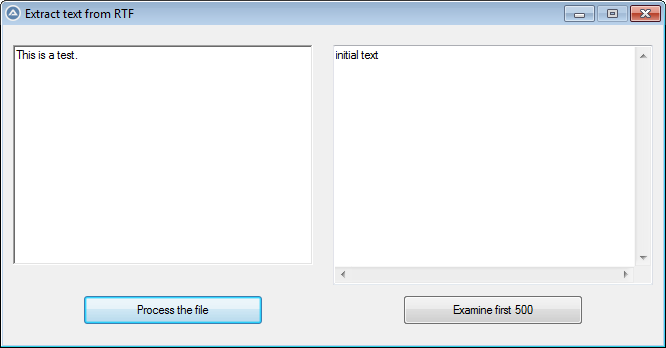
I've worked with RTF files and rich edit controls for years. But recently I needed to simply extract the text from an RTF file (i.e., without any of the formatting). I found a few suggested methods, but none were as simple as what I would like. A short investigation revealed that although all the necessary pieces are in the standard Au3 function set, there is no macro Extract Text function. What I'm providing below is a working tool for ferreting out and tuning any subtle aspects to any processing you might need. THE IMPORTANT THING TO KNOW IS THIS: the file's ENCODING is key to everything. If you're certain of the file's encoding, then just specify it in your _GUICtrlRichEdit_StreamFromFile() call. If you don't know it, use FileGetEncoding() and use the result in your StreamFrom call. BUT HERE'S THE CAVEAT: determining a file's encoding is tricky. There's a wide range of programs writing RTFs ... and the specification(s) for a file's encoding can be rather loosely implemented. As a result, there's a note in the Au3 function that it will return Binary (code = 16) if the encoding isn't clear. But you can never specify Binary in your StreamFrom call or you will get gibberish. A fairly reliable "rule" is that if your don't get a clear encoding indication—like UTF-8 or UTF-16—then it's pretty safe to assume ANSI for an RTF file on a windows PC ... so replace any code=16 with code=512. Feel free to suggest alternatives ... or ways to make the process more robust. For anyone who's interested, I found this related discussion on StackExchange: link #include <GUIConstantsEx.au3> #include <GuiRichEdit.au3> #include <WindowsConstants.au3> #include <WinAPISysWin.au3> #include <String.au3> #include <Array.au3> #include <File.au3> Global $watch = "C:\path\to\file.rtf" ; path to RTF file $hGui = GUICreate("Extract text from RTF", 660, 320, -1, -1) $lblMask = GUICtrlCreateLabel("", 10, 10, 300, 220) GUICtrlSetBkColor($lblMask, $GUI_BKCOLOR_TRANSPARENT) $hRichEdit = _GUICtrlRichEdit_Create($hGui, "This is a test.", 10, 20, 300, 220, BitOR($ES_MULTILINE, $WS_VSCROLL)) $normal = GUICtrlCreateEdit("initial text", 330, 20, 320, 240) $cButton = GUICtrlCreateButton("Process the file", 80, 270, 180, 30) $eButton = GUICtrlCreateButton("Examine first 500", 400, 270, 180, 30) GUICtrlSetState($cButton, $GUI_FOCUS) GUISetState(@SW_SHOW) While True $iMsg = GUIGetMsg() Select Case $iMsg = $GUI_EVENT_CLOSE _GUICtrlRichEdit_Destroy($hRichEdit) ; needed unless script crashes Exit Case $iMsg = $cButton $encoding = FileGetEncoding($watch) If $encoding = 16 Then $encoding = 512 ; MsgBox(0, "Encoding is ", $encoding) _GUICtrlRichEdit_StreamFromFile($hRichEdit, $watch, $encoding) GUICtrlSetData($normal, _GUICtrlRichEdit_GetText($hRichEdit, True)) ConsoleWrite("Processed" & @CRLF) Case $iMsg = $eButton $readText = StringLeft(GUICtrlRead($normal), 500) MsgBox(0, "2: ", $readText & @CRLF & _StringRepeat("-", 80) & @CRLF & _StringToHex($readText)) EndSelect WEnd
- 1 reply
-
- 1
-
-
dmob reacted to a post in a topic:
[Solved] Problem with ListView UDF _AddArray function
-
[Solved] Problem with ListView UDF _AddArray function
qwert replied to qwert's topic in AutoIt General Help and Support
Also for dmob: I noticed that the help file for _AddArray includes statements for testing the difference. -
[Solved] Problem with ListView UDF _AddArray function
qwert replied to qwert's topic in AutoIt General Help and Support
pixelsearch, that is a insightful bit of knowledge: Number($row) I don't recall ever seeing or thinking about such a difference. I guess I've been spoiled by the ways AutoIt bridges over the differences between strings and integers. Thanks very much. "Problem solved!" -
I've worked with ListView functions for years, but now it appears that the methods I've used have masked problems with some of the UDF's basic features. What I've concluded is that proper operation of the UDF depends on how you populate the view. If you add list entries one at a time, using standard functions, then all the item fetch features work. But it you populate using the _AddArray function, the item fetch features don't work—even though the ListView displays just fine. What masked the problems was that although my previous scripts were getting the current row from the ListView, they were going back and fetching contents from the posted array. In other words, I was never using ListView's fetch features. Now, I've started using features that manipulate the contents of the view, so I need to rely on the UDF's "get content" features. The following is a simple example. The get current row function works, but the fetch corresponding text function doesn't. #include <GUIConstantsEx.au3> #include <GuiListView.au3> Example() Func Example() ; Create GUI GUICreate("ListView Add Array", 400, 300) $idListview = GUICtrlCreateListView("", 2, 2, 394, 268) $idButton = GUICtrlCreateButton("get subitem", 160, 272, 100, 22) GUISetState(@SW_SHOW) ; Add columns _GUICtrlListView_AddColumn($idListview, "Items", 100) _GUICtrlListView_AddColumn($idListview, "SubItems 1", 100) _GUICtrlListView_AddColumn($idListview, "SubItems 2", 100) _GUICtrlListView_AddColumn($idListview, "SubItems 3", 100) _GUICtrlListView_SetItemCount($idListview, 50) ; Four column load Local $aItems[50][4] For $iI = 0 To UBound($aItems) - 1 $aItems[$iI][0] = "Item " & $iI $aItems[$iI][1] = "Item " & $iI & "-1" $aItems[$iI][2] = "Item " & $iI & "-2" $aItems[$iI][3] = "Item " & $iI & "-3" Next _GUICtrlListView_AddArray($idListview, $aItems) ;~ ; Loop until the user exits. While 1 Switch GUIGetMsg() Case $GUI_EVENT_CLOSE ExitLoop Case $idButton Local $row = _GUICtrlListView_GetSelectedIndices($idListview) MsgBox(0, "listview row", $row, 1) Local $cSelected = _GUICtrlListView_GetItemText($idListview, $row, 2) ; subitem 2 MsgBox(0, "listview item", $cSelected, 0) EndSwitch WEnd EndFunc ;==>Example I can only think that maybe I've missed setting some essential parameter after I've populated the array. Otherwise, I suppose my use is just a fringe case that the UDF was never intended to support. But which? Any assistance will be greatly appreciated. (BTW, I'm using the recommended latest UDF version, 3.3.14.5, on an up-to-date Win10 PC.)