


tcox8
-
Posts
40 -
Joined
-
Last visited
tcox8's Achievements

Seeker (1/7)
0
Reputation
-
Best way to read from powershell script?
tcox8 replied to tcox8's topic in AutoIt General Help and Support
Thanks for the help! My problem was that I was attempting to process each line from StdoutRead as it was happening. What worked for me was to do like what is in the example in the help file (of course!) and use $sOutput &= StdoutRead($pid). Now I just parse the $sOuput after the While Loop. Problem solved! -
Hello, Currently I am running a script that calls a powershell script. To read the results of that I am reading StdOut. I am parsing things accordingly but unfortunately it doesn't parse correctly all the time and I end up missing parts of the string or other problems. My question then is, what is the best results for reading what is returned when running a powershell script or something similar?
-
I'm familiar with all the powershell command but was in need of an .exe. I'll try to figure out how to wrap the powershell commands in autoit. Thanks! @JLogan3o13
-
Is this still being developed? I'm working on making a tool that allows my help desk to search for existing devices via Name, MAC address, or GUID and delete them from SCCM.
-
This version worked! Thanks so much!
-
I would prefer to not do it this way. I only need to make a minor change (which I have done but can't compile it) and do not want to spend a lot of time recoding this program (it's over 1100 lines). :-(
-
I just tried this. It is a rabbit hole. Kept asking for more files in the include. After including about 10 more files it fails when running part of one of those included files.
-
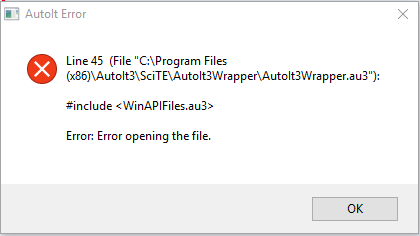
Hello all, Long story short: I am updating a program I created many years ago for our Help Desk. I haven't used AutoIt in a while so I downloaded it again. Of course there were several script breaking changes so I opted to download an older version of AutoIt (3.3.8.1) which worked. However when downloading the full Scite it produces the attached error when trying to compile my script. I need the full version of Scite to compile with options. Is it possible to download older versions of Scite or is there an easy fix for this issue? I have attempted reinstalling, uninstalling/rebooting/reinstalling to no avail. Thanks!
-
Can't get ControlID from Windows Dialog
tcox8 replied to tcox8's topic in AutoIt General Help and Support
Just FYI to anyone needing this: I just bypassed the credentials box by forcing the credentials into the credential manager first using "cmdkey.exe" After that I was able to use "Start serverprinter" to add the networked printer without the need to enter the credentials. Works very well for what I need it to. Thanks everyone! -
Can't get ControlID from Windows Dialog
tcox8 replied to tcox8's topic in AutoIt General Help and Support
Hmm, I played around with PrintUI.dll before but I am unable to get it to map the printer with the network logon credentials that are required. -
Can't get ControlID from Windows Dialog
tcox8 replied to tcox8's topic in AutoIt General Help and Support
Yes this would work on a normal network location, however I am mapping to a print queue. I tried the DriveMapAdd and it did not work. -
Can't get ControlID from Windows Dialog
tcox8 replied to tcox8's topic in AutoIt General Help and Support
I appreciate the help! I made do with using ControlSend to tab down. Hopefully that will be more stable -
Can't get ControlID from Windows Dialog
tcox8 replied to tcox8's topic in AutoIt General Help and Support
I do not prefer this way as it is quite unstable. I have not used this (nor have I heard of it!) I do have access to visual studios so I will have to download it and see if that helps. Thanks for the tip! -
Can't get ControlID from Windows Dialog
tcox8 replied to tcox8's topic in AutoIt General Help and Support
Yes i Know about the ClassNN, however there is no info for the checkbox using the windows Info tool. I can get the class, instance, and classnamNN of the 2 edit boxes and 2 buttons but nothing shows up for the checkbox. -
Hello all, I am making a simple script that requires me to select the "Remember my credentials" checkbox on the "Windows Security" box that pops up when mapping a network location. This checkbox however does not show up in the Window Info tool like the other controls do. I have read through many posts today trying to figure this out but seems not many people have issues like this. Does anyone have an idea how to get this control ID? Thanks! screenshot: http://imageshack.us/photo/my-images/96/examplerq.png/