


E1M1
-
Posts
1,096 -
Joined
-
Last visited
E1M1's Achievements

-
 TheDcoder reacted to a post in a topic:
How to disable high DPI scaling for autoit GUI?
TheDcoder reacted to a post in a topic:
How to disable high DPI scaling for autoit GUI?
-
 E1M1 reacted to a post in a topic:
EasyCodeIt - cross-platform AutoIt implementation
E1M1 reacted to a post in a topic:
EasyCodeIt - cross-platform AutoIt implementation
-
E1M1 reacted to a post in a topic:
EasyCodeIt - cross-platform AutoIt implementation
-
TheDcoder reacted to a post in a topic:
EasyCodeIt - cross-platform AutoIt implementation
-
EasyCodeIt - cross-platform AutoIt implementation
E1M1 replied to TheDcoder's topic in AutoIt Projects and Collaboration
That would allow others to see how far have you get with this project. I mean not eveyone who is interested in project is interested enough to try it out for themselves. It's kinda like with YouTube - It allows me to quickly check out new interesting and fun Doom mods without having to install and play these myself. And so is with examples - it helps you to get more "views". Which means better chance that someone would actually try to do something with your language and upload their script to their github which in return ends up in more click on your project. I understand how busy you are - I would probably also feel that way. But you also dont want to end up having 100% implementation of Autoit and only then star to figure out how to get user base. And These example scripts could also serve as some sort of unit tests - you refactor something and then see which example scripts start to print something else than they used to. -
EasyCodeIt - cross-platform AutoIt implementation
E1M1 replied to TheDcoder's topic in AutoIt Projects and Collaboration
Would be cool to have examples directory in your git where with every new feature you also post example code. Like if you add switch statement then also add switch.au3 to your examples that does simple printing or something. you could also just add it in form of md file so that code is in code tags and output is in some preformat tags. -
E1M1 reacted to a post in a topic:
EasyCodeIt - cross-platform AutoIt implementation
-
 TheDcoder reacted to a post in a topic:
EasyCodeIt - cross-platform AutoIt implementation
TheDcoder reacted to a post in a topic:
EasyCodeIt - cross-platform AutoIt implementation
-
EasyCodeIt - cross-platform AutoIt implementation
E1M1 replied to TheDcoder's topic in AutoIt Projects and Collaboration
Wine user base has left the building. -
E1M1 reacted to a post in a topic:
EasyCodeIt - cross-platform AutoIt implementation
-
E1M1 reacted to a post in a topic:
EasyCodeIt - cross-platform AutoIt implementation
-
TheDcoder reacted to a post in a topic:
EasyCodeIt - cross-platform AutoIt implementation
-
E1M1 reacted to a post in a topic:
How to draw controls on blur?
-
EasyCodeIt - cross-platform AutoIt implementation
E1M1 replied to TheDcoder's topic in AutoIt Projects and Collaboration
Technically you could just build compiler that packs wine and autoit exe both is single executable Of course hello world would be 200MB download and 10 sec startup time but thanks to modern frameworks everyone are already used to it that simple apps are large and slow -
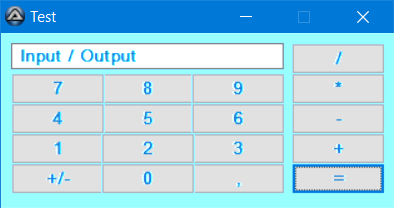
It is good that you added screenshot. Yes it is exactly what I was looking for. On my work and home computers both it displays like this: I am not sure what is wrong.
-
argumentum reacted to a post in a topic:
How to disable high DPI scaling for autoit GUI?
-
EasyCodeIt - cross-platform AutoIt implementation
E1M1 replied to TheDcoder's topic in AutoIt Projects and Collaboration
I agree that window automation wouldnt be something that you do everyday. But then again, if you want to make GUI applications you still need ws_popup or ws_child be the same on both linux and windows. Because in AutoIt every advanced GUI application has some (ex)styles, some messages and so on. -
EasyCodeIt - cross-platform AutoIt implementation
E1M1 replied to TheDcoder's topic in AutoIt Projects and Collaboration
Interesting project. I think some rewarding challenge would be to get window interaction to work. What I mean is if you could make some translator that translates SendMessage and other such stuff to linux. That if I call WinGetState it would translate linux states to corresponding windows states and vice versa. And also that if I call _WinAPI_SetWindowLong to set style or exstyle it would translate styles like ws_child or ws_popup to styles that xserver can understand that visually look similar. And that if I call _WinAPI_GetWindowLong then it would translate linux states to windows states. I mean that is a lot of work to do but if you could get this work then it would really be interesting project. I mean send and mouseclick are already implemented in java but window automation would be something that is actually new. At least I am not aware that someone has done it yet. -
Is there any way to get it work with white background? I tried to play around with CombineRgn in hope that I could somehow just exclude the buttons and other controls from blur so that they would be displayed normally, but it did not seem to work. I also tried to put them in child window but once I gave it $WS_C_HILD and set parent the child also inherited blur. I am looking to have something like win 10 calculator app that has blur but also black text on buttons.
-
Hi, sorry I wasn't clear enough. Yes, the problem was their background color, not clicking on them. As this thing removes black. by unusable I meant that input has no real use if it is white on white. Would like to keep black as text color.
-
Hi! I have script that blurs GUI on window 10. But button and input are unusable. In other words I want text to be black on them. How do I fix it? #include <GUIConstants.au3> #include <WinAPI.au3> #include <WinAPIGdi.au3> #include <GUIConstantsEx.au3> #include <MsgBoxConstants.au3> If _WinAPI_DwmIsCompositionEnabled() Then $iHasDWM=1 Local $iHeight=300 Local $iWidth=300 $hGUI = GUICreate("Windows 10 Blur", $iWidth, $iHeight,-1,-1) GUICtrlCreateButton("test", 10,10, 75, 25) GUICtrlCreateInput("test", 10,40, 75, 25) GUISetBkColor(0x000000) GUISetState() If $iHasDWM Then Local $hRgn = _WinAPI_CreateRoundRectRgn(0,0,$iWidth+1,$iHeight+1,50,50) Local $hFormRgn=_WinAPI_CreateRectRgnIndirect(_WinAPI_GetClientRect($hGUI)) Local $hRgnTest=_WinAPI_CreateNullRgn() _WinAPI_CombineRgn($hRgnTest,$hRgn,$hFormRgn,$RGN_XOR) _WinAPI_DwmEnableBlurBehindWindow($hGUI,1,1,$hRgnTest) _WinAPI_DwmEnableBlurBehindWindow10($hGUI) EndIf While 1 Switch GUIGetMsg() Case $GUI_EVENT_CLOSE ExitLoop EndSwitch WEnd ; #FUNCTION# ==================================================================================================================== ; Name ..........: _WinAPI_DwmEnableBlurBehindWindow10 ; Description ...: Enables Aero-like blurred background in Windows 10. ; Syntax ........: _WinAPI_DwmEnableBlurBehindWindow10($hWnd[, $iMode = $ACCENT_ENABLE_BLURBEHIND]) ; Parameters ....: $hWnd - Window handle. ; $bEnable - [optional] Enable or disable the blur effect. ; Return values .: 1 on success, 0 otherwise. Call _WinAPI_GetLastError on failure for more information. ; Author ........: scintilla4evr ; Modified ......: ; Remarks .......: ; Related .......: ; Link ..........: http://vhanla.codigobit.info/2015/07/enable-windows-10-aero-glass-aka-blur.html and http://undoc.airesoft.co.uk/user32.dll/SetWindowCompositionAttribute.php ; Example .......: Yes ; =============================================================================================================================== Func _WinAPI_DwmEnableBlurBehindWindow10($hWnd, $bEnable = True) Local $tAccentPolicy = DllStructCreate("int AccentState; int AccentFlags; int GradientColor; int AnimationId") Local $tAttrData = DllStructCreate("dword Attribute; ptr DataBuffer; ulong Size") $tAccentPolicy.AccentState = $bEnable ? 3 : 0 $tAttrData.Attribute = 19 ; WCA_ACCENT_POLICY $tAttrData.DataBuffer = DllStructGetPtr($tAccentPolicy) $tAttrData.Size = DllStructGetSize($tAccentPolicy) Local $aResult = DllCall("user32.dll", "bool", "SetWindowCompositionAttribute", "hwnd", $hWnd, "ptr", DllStructGetPtr($tAttrData)) If @error Then Return SetError(@error, @extended, 0) Return $aResult[0] EndFunc
-
How to disable high DPI scaling for autoit GUI?
E1M1 replied to E1M1's topic in AutoIt GUI Help and Support
Thanks! Just in case anyone arrives here from search engine. The solution was: DllCall("User32.dll", "bool", "SetProcessDPIAware") -
Hi! When I use my autoit GUI with high DPI monitor, it gets blurry because of faulty scaling. How do I disable scaling for my GUI? I tried SetProcessDPIAwareness but it does not seem to work. $__eDPIAWARNESS_Process_DPI_Unaware = 0 $__eDPIAWARNESS_Process_System_DPI_Aware = 1 $__eDPIAWARNESS_Process_Per_Monitor_DPI_Aware = 2 Func _WinAPI_SetProcessDPIAwareness($iPROCESS_DPI_AWARENESS) Return DllCall('Shcore.dll', 'int', 'SetProcessDPIAwareness', 'int', $iPROCESS_DPI_AWARENESS) EndFunc ;==>_WinAPI_SetProcessDPIAwareness _WinAPI_SetProcessDPIAwareness($__eDPIAWARNESS_Process_Per_Monitor_DPI_Aware) $gui = GUICreate("Title") GUICtrlCreateLabel("Hello World", 10, 10) GUISetState(@SW_SHOW) while GUIGetMsg() <> -3 WEnd
-
E1M1 reacted to a post in a topic:
How to preven my scrollable tabs from grabbing focus?
-
E1M1 reacted to a post in a topic:
How to preven my scrollable tabs from grabbing focus?
-
How to preven my scrollable tabs from grabbing focus?
E1M1 replied to E1M1's topic in AutoIt General Help and Support
Thanks! It took me a while to figure out why simply updating window styles didnt fix it. Does anyone know why this new code requires GUICtrlCreateTab to be width = 0 and height = 0? And why now windows appear below it if I make it size 100,100 for example? Like previously they appeared on top of tab container. -
Hi! My goal is to make tabs that I can scroll. As I understand there there is no correct way of doing it so I have to use trick that uses child windows to do this. I use M23's code for my include: #include <GUIConstantsEx.au3> #include "GUIScrollbars_Ex.au3" Dim $tabWindows[2] $hGui = GUICreate("Scrollable tabs", 640, 480, -1, -1, $WS_CLIPCHILDREN + $WS_MINIMIZEBOX + $WS_CAPTION + $WS_POPUP + $WS_SYSMENU) GUICtrlCreateLabel("Label on main gui", 5, 5, Default, 20) $tabs = GUICtrlCreateTab(5, 25, 630, 450) $tab1 = GUICtrlCreateTabItem("Tab 1") $tab2 = GUICtrlCreateTabItem("Tab 2") $pos = ControlGetPos($hGui, "", $tabs) $tabWindows[0] = GUICreate("test", $pos[2] - 10, $pos[3] - 30, 7, 50, $WS_POPUP, $WS_EX_MDICHILD, $hGui) GUISetBkColor(0xffffff) GUICtrlCreateLabel("Hello World!",10,10) $tabWindows[1] = GUICreate("test", $pos[2] - 10, $pos[3] - 30, 7, 50, $WS_POPUP, $WS_EX_MDICHILD, $hGui) GUISetBkColor(0xffffff) GUICtrlCreateLabel("Label", 10, 10, 25, 25) GUICtrlSetTip(-1, "Label hint") GUISetState(@SW_SHOW, $hGui) _GUIScrollbars_Generate($tabWindows[1], 500, 1000) ; This is the current active tab $iLastTab = GUICtrlRead($tabs) GUISetState(@SW_SHOW, $tabWindows[$iLastTab]) $lastLabelIndex = -1 While 1 Switch GUIGetMsg() Case $GUI_EVENT_CLOSE Exit Case $tabs $currentTab = GUICtrlRead($tabs) If $currentTab <> $iLastTab Then GUISetState(@SW_HIDE, $tabWindows[$iLastTab]) GUISetState(@SW_SHOW, $tabWindows[$currentTab]) $iLastTab = $currentTab ; EndIf EndSwitch WEnd However when I click on labels under tabs then those child windows grab focus from parent. And whenever I switch tabs, parent window flashes focus. Is there way to prevent this or even better, add scrollbars directly to tabs instead of using GUIs to wrap content?
-
E1M1 reacted to a post in a topic:
How to correctly DllCall atoi ( char const* _Str ) ?
-
How to correctly DllCall atoi ( char const* _Str ) ?
E1M1 replied to E1M1's topic in AutoIt General Help and Support
Thanks! @jchd, would be interesting to know how you found out that it was cdecl ? For example: DllCall ( "kernel32.dll", "int", "GetTickCount" ) works fine with stdcall.