


magace
-
Posts
49 -
Joined
-
Last visited
magace's Achievements

Seeker (1/7)
0
Reputation
-
Please help using "or" in a if statement
magace replied to magace's topic in AutoIt General Help and Support
Thanks! That worked. -
Hello I am detecting the fist 3 characters of a string and I want the script to do something if they match. This works Local $smidds = StringMid($readsn,1,3) ToolTip($smidds,0,0) If $smidds = "CN0" Then ;do whatever EndIf However when I try this it detects every 3 character string and tries to "do whatever". Not just the CN0, PH0, MY0 Local $smidds = StringMid($readsn,1,3) ToolTip($smidds,0,0) If $smidds = "CN0" or "MY0" or "PH0" Then ;do whatever EndIf Any help? And thanks for all the help over the years autoit community!
-
Help me read a position in a array.
magace replied to magace's topic in AutoIt General Help and Support
thanks! MsgBox($MB_SYSTEMMODAL, "", $text[$iIndex]) -
Hello I am having a hard time reading a specific position in a array. I located the position with $iIndex but I cant figure out how to display the line in a message box. When I run it I get "WCC2ECZ98621" was found in the array at position 5393 on column 0 So I need to display column 0 position 5393 Thanks in advance!! #include <file.au3> #include <array.au3> ; only for _ArrayDisplay() $sFile = "\\Teesttterrr-pc\pxe\programs\DYMO\printer\logs\log.txt" ;Read in lines of text into 1D array Dim $text If Not _FileReadToArray($sFile, $text) Then MsgBox(4096, "Error", " Error reading text file to Array error:" & @error) Exit EndIf ;_ArrayDisplay($text, "Debug: $text") Local $sSearch = "WCC2ECZ98621" If @error Then Exit Local $sColumn ="WCC2ECZ98621" If @error Then Exit $sColumn = Int($sColumn) Local $iIndex = _ArraySearch($text, $sSearch, 0, 0, 0, 1, 1, $sColumn) If @error Then MsgBox($MB_SYSTEMMODAL, "Not Found", '"' & $sSearch & '" was not found on column ' & $sColumn & '.') Else MsgBox($MB_SYSTEMMODAL, "Found", '"' & $sSearch & '" was found in the array at position ' & $iIndex & ' on column ' & $sColumn & '.') ;display the line of the array located at $iIndex EndIf
-
Can I run a program in the background.
magace replied to magace's topic in AutoIt General Help and Support
I figured it out I had a extra 0 on a delay of mine. Thanks @JLogan3o13 -
Can I run a program in the background.
magace replied to magace's topic in AutoIt General Help and Support
Here is the script and a little info on how it works. When I scan a serial number into the s/n box my scanner auto tabs to the next box. The script detects the box is focused and initiates the Sendit() function. This function edits the mobo.lable file and then runs it and brings the printer gui back the top for another scan. When I scan again it goes to the next box where it should que up the next print but it wont start until the other label is finished printing. #include <Array.au3> #include <File.au3> #include <Date.au3> #include <Misc.au3> #include <GUIConstantsEx.au3> #include <WindowsConstants.au3> #include <AutoItConstants.au3> #include <FileConstants.au3> #include '_Startup.au3' Opt("TrayIconDebug", 1) Local $hDLL = DllOpen("user32.dll") readconfig() Example() Func Example() Local $beepc = "1000" Local $randbeep = False Local $sMsg1 = "" Local $hGUI = GUICreate("MY NEW PRINTER", 320, 120, @DesktopWidth / 2 - 160, @DesktopHeight / 2 - 45, -1, $WS_EX_ACCEPTFILES) Local $sku = GUICtrlCreateInput($lsku, 30, 5, 280, 20) Local $skul = GUICtrlCreateLabel("SKU",5,5,25,20) Local $snl = GUICtrlCreateLabel("S/N",5,35,25,20) Local $sn = GUICtrlCreateInput("", 30, 35, 250, 20) Local $sn3 = GUICtrlCreateInput("", 290, 35, 10, 20) Local $cnl = GUICtrlCreateLabel("QTY",250,55,25,20) Local $cn = GUICtrlCreateInput("1", 245, 75, 25, 20) Local $bc = GUICtrlCreateLabel("BEEP",280,55,30,20) Local $bc = GUICtrlCreateInput("500", 275, 75, 35, 20) Local $idBtn = GUICtrlCreateButton("Print", 5, 75, 60, 20) Local $setup = GUICtrlCreateButton("Setup", 68, 75, 60, 20) Local $ucounts = GUICtrlCreateButton("Counts", 130, 75, 60, 20) Local $lg1 = GUICtrlCreateLabel("USER",195,55,45,20) Local $lg2 = GUICtrlCreateInput("9949", 190, 75, 45, 20) Local $snl1 = GUICtrlCreateLabel("S/N LOOKUP",5,100,105,20) Local $snl2 = GUICtrlCreateInput("", 80, 95, 150, 20) Local $snl3 = GUICtrlCreateButton("LOOKUP", 235, 95, 60, 20) Local $idCheckbox = GUICtrlCreateCheckbox("Random Beep", 15,55,100,20) Local $startup = GUICtrlCreateCheckbox("AutoStart", 125,55,70,20) GUISetState(@SW_SHOW) GUICtrlSetData($bc,$beepc) GUICtrlSetData($lg2,$usr) if $astart = "TRUE" Then GUICtrlSetState(-1,$startup) Else GUICtrlSetState(1,$startup) EndIf While 1 $win = "MY NEW PRINTER" If WinActive($win) Then If _IsPressed("26", $hDLL) Then ;up arrow WinActivate("MY NEW PRINTER") ControlClick("MY NEW PRINTER","",3,"LEFT",2,261,12) EndIf If _IsPressed("28", $hDLL) Then ;down arrow ControlClick("MY NEW PRINTER","",5,"LEFT",2,261,16) EndIf EndIf ToolTip("",0,0) Switch GUIGetMsg() Case $GUI_EVENT_CLOSE ExitLoop Case $startup If _IsChecked($startup) Then IniWrite(@ScriptDir & "\config.ini", "General", "AUTOSTART","TRUE") _StartupRegistry_Install() Else IniWrite(@ScriptDir & "\config.ini", "General", "AUTOSTART","FALSE") _StartupRegistry_Uninstall() EndIf Case $idCheckbox If _IsChecked($idCheckbox) Then Local $randbeep = True Else Local $randbeep = False EndIf Case $idBtn Global $readsku = (GUICtrlRead($sku)) IniWrite(@ScriptDir & "\config.ini", "General", "LASTSKU",$readsku) Global $readsn = (GUICtrlRead($sn)) Global $readct = (GUICtrlRead($cn)) Global $usser = (GUICtrlRead($lg2)) IniWrite(@ScriptDir & "\config.ini", "General", "USER",$usser) If $randbeep = False Then IniWrite(@ScriptDir & "\config.ini", "General", "BEEP",GUICtrlRead($bc)) Global $beepc = IniRead(@ScriptDir & "\config.ini", "General", "BEEP", "Default Value") GUICtrlSetData($bc,$beepc) Else Global $beepc = Random(37,32767) GUICtrlSetData($bc,$beepc) EndIf logdata($usser,$readsku,$readsn) Sendit() Case $setup Case $ucounts Local $sAnswer = InputBox("Question", "What user number?", "9949", "", _ - 1, -1, 0, 0) Run("\\Teesttterrr-pc\pxe\programs\DYMO\date.exe") Case $snl3 ;lookup Global $snsearch = (GUICtrlRead($snl2)) ToolTip("looking up " & $snsearch,0,0) Sleep(500) $file = "\\Teesttterrr-pc\pxe\programs\DYMO\printer\logs\log.txt" FileOpen($file, 0) For $i = 1 to _FileCountLines($file) $line = FileReadLine($file, $i) ;msgbox(0,'','the line ' & $i & ' is ' & $line) if StringInStr($line,$snsearch) Then ToolTip("line number " & $i,0,0) MsgBox(0,'',FileReadLine($file,$i)) Sleep(500) EndIf Next FileClose($file) Case Else $sFocus = ControlGetFocus($hGUI) $hFocus = ControlGetHandle($hGUI, "", $sFocus) $ctrlFocus = _WinAPI_GetDlgCtrlID($hFocus) $sMsg = "Focus:" & @CRLF & _ @TAB & "ClassNameNN = " & $sFocus & @CRLF & _ @TAB & "Hwnd = " & $hFocus & @CRLF & _ @TAB & "ID = " & $ctrlFocus if $ctrlFocus = "7" Then ToolTip("found id5",0,0) Global $readsku = (GUICtrlRead($sku)) IniWrite(@ScriptDir & "\config.ini", "General", "LASTSKU",$readsku) Global $readsn = (GUICtrlRead($sn)) Global $readct = (GUICtrlRead($cn)) Global $usser = (GUICtrlRead($lg2)) IniWrite(@ScriptDir & "\config.ini", "General", "USER",$usser) If $randbeep = False Then IniWrite(@ScriptDir & "\config.ini", "General", "BEEP",GUICtrlRead($bc)) Global $beepc = IniRead(@ScriptDir & "\config.ini", "General", "BEEP", "Default Value") GUICtrlSetData($bc,$beepc) Else Global $beepc = Random(37,32767) GUICtrlSetData($bc,$beepc) EndIf logdata($usser,$readsku,$readsn) ;logwhatever Sendit() EndIf If $sMsg <> $sMsg1 Then ConsoleWrite($sMsg & @CRLF) $sMsg1 = $sMsg EndIf ToolTip("",0,0) EndSwitch WEnd DllClose($hDLL) EndFunc ;==>Example Func Sendit() $LINE1 = FileReadLine(@ScriptDir & "\MOBO.LABEL",25) Local $SKPOS1 = StringInStr($LINE1 , "<String>")+8 Local $SKPOS2 = StringInStr($LINE1 , "</String>")-9 Local $SKMID = StringMid($LINE1,$SKPOS1,$SKPOS2) Local $SKNEW = ($readsku) ToolTip($SKMID) _FileWriteToLine(@ScriptDir & "\MOBO.LABEL", 25, "<String>" & StringUpper($SKNEW) & "</String>" , True) $LINE1 = FileReadLine(@ScriptDir & "\MOBO.LABEL",49) Local $SNPOS1 = StringInStr($LINE1 , "<Text>") + 6 Local $SNPOS2 = StringInStr($LINE1 , "</Text>") -7 Local $SNMID = StringMid($LINE1,$SNPOS1,$SNPOS2) Local $SNNEW = ($readsn) ToolTip($SNMID) _FileWriteToLine(@ScriptDir & "\MOBO.LABEL", 49, "<Text>" & $SNNEW & "</Text>" , True) WinActivate("MY NEW PRINTER") ControlClick("MY NEW PRINTER","",6,"LEFT",2,111,16) Send("^a") $forcount = ($readct) For $i = $forcount To 1 Step -1 ShellExecute(@ScriptDir & "\MOBO.label") Next Local $hWnd = WinWait("[CLASS:ConsoleWindowClass]", "", 0) WinSetState($hWnd, "", @SW_HIDE) Sleep(500) Beep($beepc,1000) EndFunc Func _IsChecked($idControlID) Return BitAND(GUICtrlRead($idControlID), $GUI_CHECKED) = $GUI_CHECKED EndFunc ;==>_IsChecked func logdata($data1,$data2,$data3) Local $hFileOpen = FileOpen("\\Teesttterrr-pc\pxe\programs\DYMO\printer\logs\log.txt", $FO_APPEND) FileWriteLine($hFileOpen, "DATE:" & _NowDate() & " | TIME:" & _NowTime() & " | USER:" & $data1 & " | SKU:" & $data2 & " | S/N:" & $data3 & @CRLF) FileClose($hFileOpen) EndFunc func readconfig() Global $beepc = IniRead(@ScriptDir & "\config.ini", "General", "BEEP", "Default Value") Global $lsku = IniRead(@ScriptDir & "\config.ini", "General", "LASTSKU", "Default Value") Global $usr = IniRead(@ScriptDir & "\config.ini", "General", "USER", "Default Value") Global $astart = IniRead(@ScriptDir & "\config.ini", "General", "AUTOSTART", "Default Value") EndFunc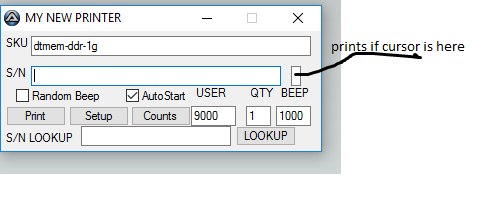
-
Can I run a program in the background.
magace replied to magace's topic in AutoIt General Help and Support
The for is just to print multiple times if I have the gui set to print multiple. Its stalling on the shellExecute until the printer is finished. -
Hello I have a simple program to print stuff threw my printer however the script stalls until the printer is done printing. Is there any way to run a program and instantly continue with the script? $forcount = ($readct) For $i = $forcount To 1 Step -1 ShellExecute(@ScriptDir & "\MOBO.label") ;this is where the program stalls until its done with the print. Next Thanks in advance please let me know if you have any questions or ideas.
-
Thanks this helps a ton!
-
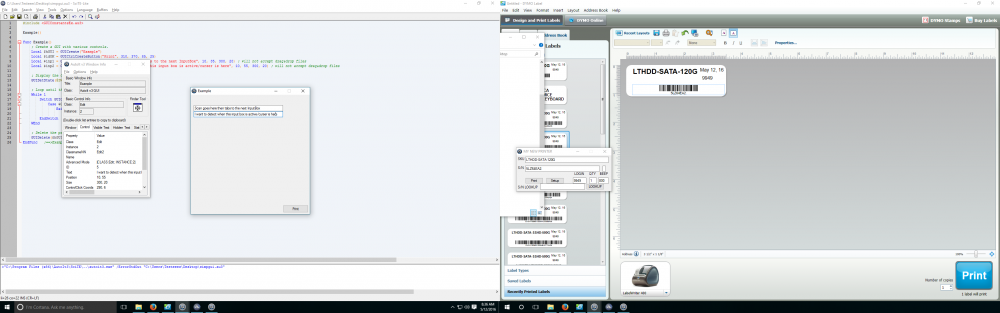
Hello I have written a simple gui for work to auto print labels with DYMO. However I have one small problem. Currently I detect when the scanner sends the tab key to call the print function. I was thinking if I can just detect when a input box is active or the curser is in the input box I could do away with the _ispressed function making the script run smoother. Here is a sample gui showing what I would like to do please let me know if anything is unclear. Thanks! #include <GUIConstantsEx.au3> Example() Func Example() ; Create a GUI with various controls. Local $hGUI = GUICreate("Example") Local $idOK = GUICtrlCreateButton("Print", 310, 370, 85, 25) Local $inp1 = GUICtrlCreateInput("Scan goes here then tabs to the next InputBox", 10, 35, 300, 20) ; will not accept drag&drop files Local $inp2 = GUICtrlCreateInput("I want to detect when this input box is active/curser is here", 10, 55, 300, 20) ; will not accept drag&drop files ; Display the GUI. GUISetState(@SW_SHOW, $hGUI) ; Loop until the user exits. While 1 Switch GUIGetMsg() Case $GUI_EVENT_CLOSE, $idOK ExitLoop EndSwitch WEnd ; Delete the previous GUI and all controls. GUIDelete($hGUI) EndFunc ;==>Example
-
I am working on a simple custom shutdown timer. I made it where when you press the start button the script reads how much time in hr/min you want to wait before it sleeps. Then I make it go into a while loop that stays on until the time has passed then it turns it off and shutdowns or what ever you choose in the combo box. My question is how would I go about exiting the while loop inside Case $idBtn with the stop button Case $isBtn? Here is my code and sorry if things are unclear just ask if you have any questions! #include <GUIConstantsEx.au3> #include <WindowsConstants.au3> #include <Date.au3> CustomSleep() Func CustomSleep() Local $iWidthCell = 70 Local $hGUI = GUICreate("parent", 140, 120 -1, $WS_EX_ACCEPTFILES) ;creates parent gui to hide from taskbar $hGUI_No_TaskBar_1 = GUICreate("Sleep Timer", 120, 120, 100, 100, Default, Default, $hGUI); main gui WinSetTrans($hGUI_No_TaskBar_1, "", 170) ;make gui transparent GUICtrlCreateLabel("Sleep Timer", 25, 5) ;sleep timer laBEL GUICtrlCreateLabel("HR:", 1, 27) ;hr label Local $shr = GUICtrlCreateInput("0",20, 25, 20, 20);hr input box GUICtrlCreateLabel("MIN:", 45, 27) ;min label Local $smin = GUICtrlCreateInput("45", 70, 25, 20, 20) ;min input box GUICtrlSetState(-1, $GUI_DROPACCEPTED) Local $idBtn = GUICtrlCreateButton("Start", 1, 75, 60, 20) ;start button Local $isBtn = GUICtrlCreateButton("Stop", 60, 75, 60, 20) ;stop button I need help making it break the go 1 while. Local $idComboBox = GUICtrlCreateCombo("Shut down", 30, 50, 80, 20) ;combo select box shutdown, logoff, etc.. GUICtrlSetData($idComboBox, "Restart|Log off|Sleep", "Shut down") ;combo data GUISetState(@SW_SHOW) While 1 Switch GUIGetMsg() Case $GUI_EVENT_CLOSE ExitLoop Case $isBtn $go1 = 0 ;this needs to end the while loop in the Case $idBtn Case $idBtn $go1 = 1 Local $hTimer = TimerInit() Local $hrt = GUICtrlRead($shr) * 3600000 ;hrs in ms Local $mrt = GUICtrlRead($smin) * 60000 ;min in ms Local $rtime = $mrt + $hrt ;hr + min while $go1 = 1 ;while 1 I want to break when $isBtn is pushed Local $fDiff = TimerDiff($hTimer) Local $ctime = $rtime - $fDiff GUICtrlCreateLabel(_Convert($ctime), 5, 23) sleep(5000) if $fDiff > $rtime Then ;if current time is greater than total time hr + min in ms it reads the combo and does what I selected ToolTip("TIME TO TURN OFF",0,0) $go1 = 0 $sComboRead = GUICtrlRead($idComboBox) if $sComboRead = "Shut down" Then $go1 = 0 Shutdown(1) EndIf if $sComboRead = "Restart" Then $go1 = 0 Shutdown(2) EndIf if $sComboRead = "Log off" Then $go1 = 0 Shutdown(4) EndIf if $sComboRead = "Sleep" Then $go1 = 0 Shutdown(64) EndIf EndIf WEnd EndSwitch WEnd EndFunc Func _Convert($ms) Local $day, $hour, $min, $sec _TicksToTime($ms, $hour, $min, $sec) If $hour > 24 Then $day = $hour/24 $hour = Mod($hour, 24) EndIf Return StringFormat("%02iD/%02iH/%02iM/%02iS", $day, $hour, $min, $sec) EndFunc
-
Edit Stupid question.
-
Yea idk why this is confusign me so much. Should of studied harder in math! I need to convert $ctime to day/hr/min/sec format Local $hTimer = TimerInit() Local $rtime = 2 * 86400000 ;2 days in ms While 1 sleep(1000) Local $fDiff = TimerDiff($hTimer) Local $ctime = $rtime - $fDiff if $fDiff > $rtime Then ;GetnPost() ToolTip("TIMESUP!!!!",0,0) Sleep(5000) Local $hTimer = TimerInit() Else ToolTip("TIMELEFT: " & $ctime,0,0) EndIf WEnd Thanks for viewing!
-
Send() is not sending full line of code.
magace replied to magace's topic in AutoIt General Help and Support
Everything I can use -changeip too thx ,1 fixed it. -
Send() is not sending full line of code.
magace replied to magace's topic in AutoIt General Help and Support
You can send a cmd line threw run? I want to connect using cmd not the actual program.
