AndreyS
-
Posts
276 -
Joined
-
Last visited
AndreyS's Achievements

Universalist (6/7)
0
Reputation
-
How can I get the entire code of a website page?
AndreyS replied to AndreyS's topic in AutoIt General Help and Support
Now it’s clear what this code is for. Thank you, MojoeB, but I myself know how to analyze it. The whole problem is what to do with the Webdriver, how to make it work again after hibernation. This is not clear. -
How can I get the entire code of a website page?
AndreyS replied to AndreyS's topic in AutoIt General Help and Support
So then I didn’t understand the meaning of your code at all I understand that you want me to check whether your script will work after hibernation. Have you sent me the code that you want me to implement in my script? So he doesn’t decide or change anything at all. It only gives out some messages. -
How can I get the entire code of a website page?
AndreyS replied to AndreyS's topic in AutoIt General Help and Support
Of course I could check it out. But to do this, your code must run in a loop and continuously. And it runs in seconds and ends. -
How can I get the entire code of a website page?
AndreyS replied to AndreyS's topic in AutoIt General Help and Support
Thanks for your participation, MojoeB! I checked all the nuances you mentioned. I compiled the script and ran it. I added to the exceptions for scanning the entire folder where the program is located and launched. Nothing helps - after hibernation the program still stops working - it does not receive any data from the web driver, although it remains in the list of running processes. -
How can I get the entire code of a website page?
AndreyS replied to AndreyS's topic in AutoIt General Help and Support
Danp2, hello! Are there any solutions or ideas on how to solve this problem? Maybe you need to check something again after hibernation and restart it in the WebDriver functions? Please tell me. -
How can I get the entire code of a website page?
AndreyS replied to AndreyS's topic in AutoIt General Help and Support
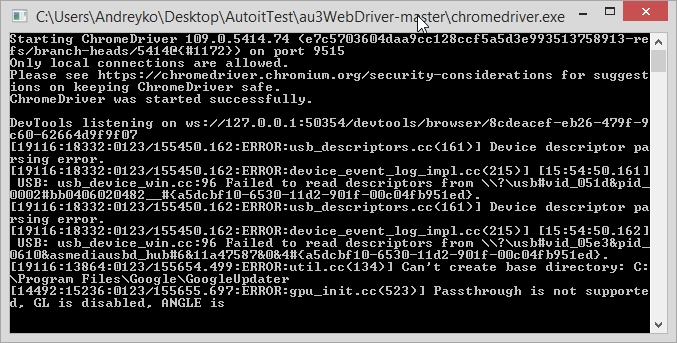
Yes, the webdriver continues to work all the time. But there is a difference in the contents of its window: Here's before going into hibernation: But after recovery from hibernation: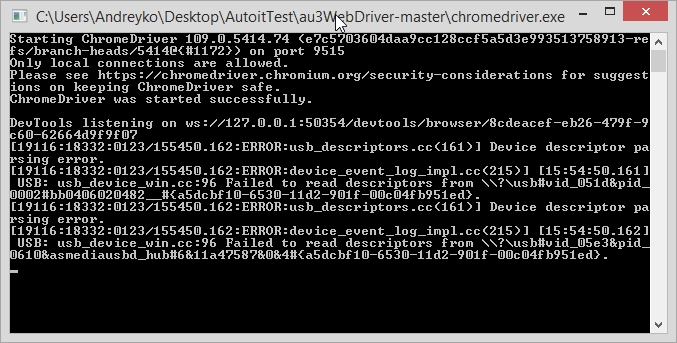
-
How can I get the entire code of a website page?
AndreyS replied to AndreyS's topic in AutoIt General Help and Support
These are the errors that constantly appear in the editor console window after exiting hibernation mode: __WD_Post ==> Send / Recv error [6] : HTTP status = 0 ResponseText=WinHTTP request timed out before Webdriver -
How can I get the entire code of a website page?
AndreyS replied to AndreyS's topic in AutoIt General Help and Support
Danp2, I want to thank you for your advice on using the UDF Webdriver and for your code example! Based on it, I created a script that retrieves the data I need over a certain period! It turned out that this UDF is not so complicated and scary. Special thanks to you for developing it! But at the moment there is one significant problem with the script. After putting the computer into hibernation mode and returning it to a working state, the script stops working and receiving data from the site. Please tell me how to get the Webdriver to work after hibernation? -
How can I get the entire code of a website page?
AndreyS replied to AndreyS's topic in AutoIt General Help and Support
Danp2, thank you for the example! I will start with it and try to further solve my problem using Webdriver. But if anyone else has a simpler solution to my problem, please share your ideas and solutions. Thank you in advance! -
How can I get the entire code of a website page?
AndreyS replied to AndreyS's topic in AutoIt General Help and Support
I’ve probably already re-read all possible topics related to my question, including this entire topic, and more than once. So you are suggesting trying to use curl as stated in this post? But it is used there for authorization, and not for retrieving data on a site page, which is generated using JavaScript. As far as I understood correctly. I would like to find at least some example of using UDF Webdriver in which data generated using JavaScript is read on the site. -
How can I get the entire code of a website page?
AndreyS replied to AndreyS's topic in AutoIt General Help and Support
Thank you. Tried this option - it also doesn't extract all the code. If you can, please tell me such tools. Yes, I've already watched this UDF. It is quite difficult to use. But the worst thing is that it is tied to a specific browser and you also need to install an additional driver for it. I would really like to find an option that is at least a little simpler. -
How can I get the entire code of a website page?
AndreyS replied to AndreyS's topic in AutoIt General Help and Support
Thank you for your participation! We need a way without using the API. I need to get the full page code not only from this site. And not all of them have an API. -
How can I get the entire code of a website page?
AndreyS replied to AndreyS's topic in AutoIt General Help and Support
Gentlemen programmers, does anyone have any thoughts or tips? -
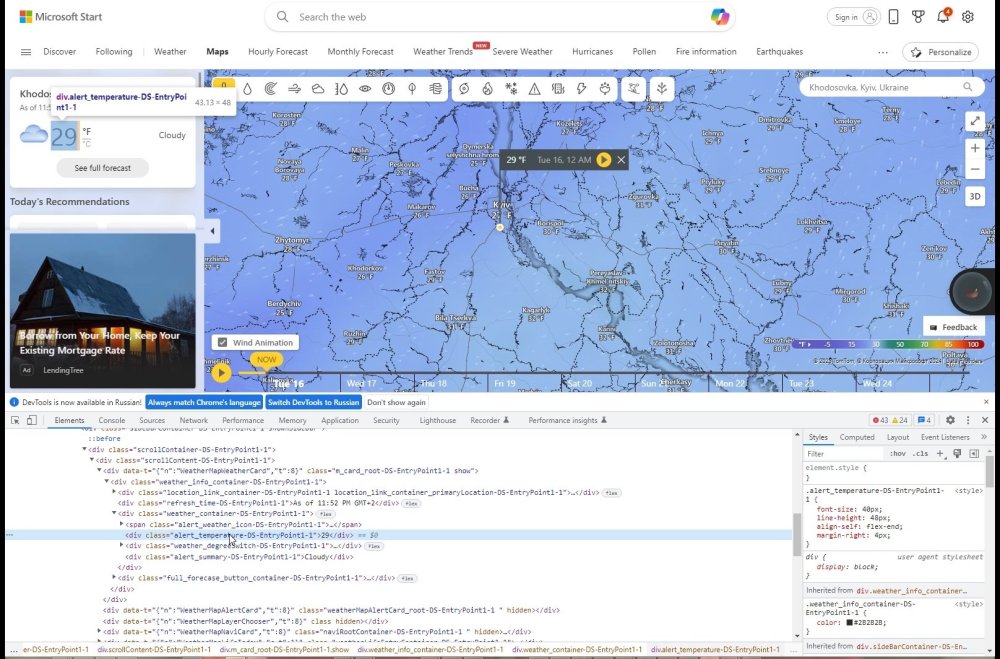
Greetings to all forum members! Can you please tell me how I can get the entire site page code? Only part of it is extracted. Ultimately I will need to get the value from: alert_temperature-DS-EntryPoint1-1. Shown in the screenshot. But I still can’t get the contents of the entire page code in any way. $oHTTP = ObjCreate("winhttp.winhttprequest.5.1") $oHTTP.Open("GET","https://www.msn.com/en-us/weather/maps/temperature/in-Fastov,Kyiv") $oHTTP.Send() $HTTPSource = $oHTTP.Responsetext ConsoleWrite($HTTPSource) I would be very grateful for any help, options and tips.
-
 AndreyS reacted to a post in a topic:
In the combo box, the selected item is not highlighted.
AndreyS reacted to a post in a topic:
In the combo box, the selected item is not highlighted.
-
In the combo box, the selected item is not highlighted.
AndreyS replied to AndreyS's topic in AutoIt General Help and Support
Wow! Thank you very much, pixelsearch, for even finding such material! This is valuable information! I re-read the topic on their forum. There really is the same situation as my situation and the justification for the need to use the same items. I realized that this is really a flaw in the implementation of combos or OS. And, worst of all, this problem is unlikely to be fixed by the creators. Then it seems you need to use only some workarounds to solve this problem.