FredAI
-
Posts
82 -
Joined
-
Last visited
-
Days Won
1
Recent Profile Visitors
631 profile views


FredAI's Achievements

Wayfarer (2/7)
21
Reputation
-
 obiwanceleri reacted to a post in a topic:
System restore UDF
obiwanceleri reacted to a post in a topic:
System restore UDF
-
 youtuber reacted to a post in a topic:
System restore UDF
youtuber reacted to a post in a topic:
System restore UDF
-
masvil reacted to a post in a topic:
System restore UDF
-
Dellroc reacted to a post in a topic:
Set Acl permissions UDF
-
nacerbaaziz reacted to a post in a topic:
Set Acl permissions UDF
-
taurus905 reacted to a post in a topic:
Set Acl permissions UDF
-
mLipok reacted to a post in a topic:
Set Acl permissions UDF
-
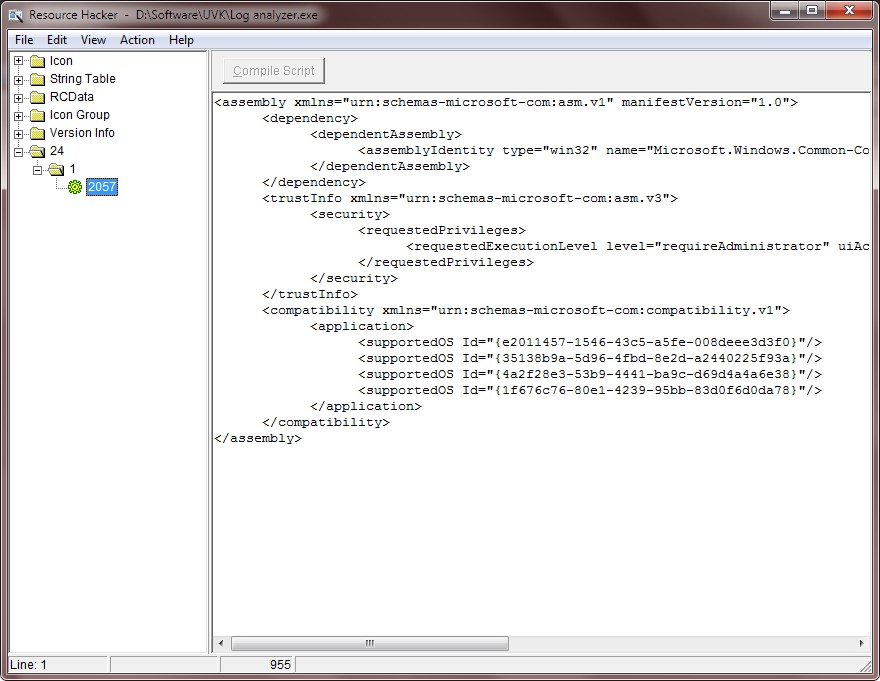
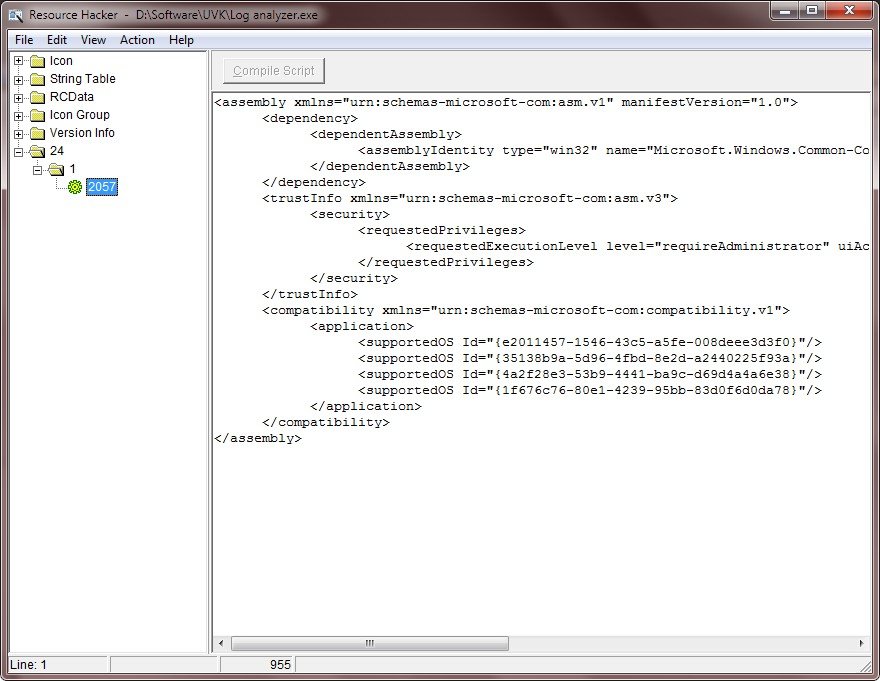
The real problem is not GetVersionEx(). It's the AutoIt compiler that does not set the application's manifest correctly. And before anyone asks, yes I am using the latest 3.3.14.1 version, and yes, I'm using the #pragma compile(Compatibility, win10) directive. I opened my compiled file with resource hacker and got this: The entry for Windows 10 (<supportedOS Id="{8e0f7a12-bfb3-4fe8-b9a5-48fd50a15a9a}"/>) is missing! After adding that entry everything works fine, including @OSVersion and GetVersionEx(). Microsoft explains why that happens in the GetVersionEx() documentation page. Hope this gets fixed soon.
-
spudw2k reacted to a post in a topic:
Set Acl permissions UDF
-
Adele reacted to a post in a topic:
Set Acl permissions UDF
-
Luigi reacted to a post in a topic:
Set Acl permissions UDF
-
ControlClick Not Working for Swapped Button
FredAI replied to BruceCopperField's topic in AutoIt General Help and Support
I created a function _Click control(), which takes the same parameters as ControlClick(), but only uses the Windows api to send the correct messages to the control. It's working accordingly to the ControlClick() help. I hope it will prove my point. Edit I edited the code. I was sending screen coordinates instead of client coordinates. Also added support for middle button clicks. Edit 2: Added support for double clicks. Guess I won't be needing ControlClick() anymore, at least until the bug is fixed. I'm actually glad I resurrected this thread. It didn't get the attention it deserved back then, leading to an important bug lasting for several years. Global Const $User32Dll = DllOpen('user32.dll') ;Message codes for left click Global Const $WM_LBUTTONDOWN = 513 Global Const $WM_LBUTTONUP = 514 ;Message codes for middle click Global Const $WM_MBUTTONDOWN = 519 Global Const $WM_MBUTTONUP = 520 ;Message codes for right click Global Const $WM_RBUTTONDOWN = 516 Global Const $WM_RBUTTONUP = 517 ;Message codes for double click Global Const $WM_LBUTTONDBLCLK = 515 Global Const $WM_MBUTTONDBLCLK = 521 Global Const $WM_RBUTTONDBLCLK = 518 $GUI = GUICreate('MouseClick test',400,300,0,0) $edit = GUICtrlCreateEdit('Some text.',0,0,400,300) GUISetState() Sleep(200) ;Test mouse click ;MouseClick('menu',200,150,1,0) ;MouseClick('right',200,150,1,0) ;MouseClick('left',200,150,1,0) ;ControlClick($GUI, '', 'Edit1', 'menu') ;ControlClick($GUI, '', 'Edit1', 'right') ;ControlClick($GUI, '', 'Edit1', 'left') _ClickControl($GUI, '', 'Edit1', 'menu') ;_ClickControl($GUI, '', 'Edit1', 'right') ;_ClickControl($GUI, '', 'Edit1', 'left') ;Test double click (will select the last word of the edit text) ;_ClickControl($GUI, '', 'Edit1', 'main', 2) ;ControlClick($GUI, '', 'Edit1', 'main', 2) ;MouseClick('main', 200, 150, 2, 0) While GUIGetMsg() <> -3 WEnd Func _ClickControl($title, $text, $hCtrl, $button = 'main', $clicks = 1, $x = Default, $y = Default) If Not IsHWnd($hCtrl) Then $hCtrl = ControlGetHandle($title, $text, $hCtrl) If $hCtrl = 0 Then Return 0 Local $sRect = _GetClientRect($hCtrl) If $x = Default Then $x = DllStructGetData($sRect,3)/2 If $y = Default Then $y = DllStructGetData($sRect,4)/2 Local $MsgDown = $WM_LBUTTONDOWN, $MsgUp = $WM_LBUTTONUP Local $msgDbClick = $WM_LBUTTONDBLCLK Switch $button Case '', 'main', 'primary' ;Already set Case 'menu', 'secondary' $MsgDown = $WM_RBUTTONDOWN $MsgUp = $WM_RBUTTONUP $msgDbClick = $WM_RBUTTONDBLCLK Case 'middle' $MsgDown = $WM_MBUTTONDOWN $MsgUp = $WM_MBUTTONUP $msgDbClick = $WM_MBUTTONDBLCLK Case 'left', 'right' If _GetSystemMetrics(23) Then $MsgDown = _IsTrue($button = 'left',$WM_RBUTTONDOWN,$WM_LBUTTONDOWN) $MsgUp = _IsTrue($button = 'left',$WM_RBUTTONUP,$WM_LBUTTONDOWN) $msgDbClick = _IsTrue($button = 'left',$WM_RBUTTONDBLCLK,$WM_LBUTTONDBLCLK) Else $MsgDown = _IsTrue($button = 'left',$WM_LBUTTONDOWN,$WM_RBUTTONDOWN) $MsgUp = _IsTrue($button = 'left',$WM_LBUTTONDOWN,$WM_RBUTTONUP) $msgDbClick = _IsTrue($button = 'left',$WM_LBUTTONDBLCLK,$WM_RBUTTONDBLCLK) EndIf Case Else Return 0 EndSwitch Local $lParam = BitOR($x,BitShift($y,-16)) If $clicks = 2 Then _Send_Message($hCtrl, $msgDbClick, 0, $lParam) Else For $i = 1 To $clicks _Send_Message($hCtrl, $MsgDown, 0, $lParam) _Send_Message($hCtrl, $MsgUp, 0, $lParam) Sleep(20) Next EndIf Return 1 EndFunc ;==> _ClickControl Func _IsTrue($val, $true, $false) If $val Then Return $true Return $false EndFunc ;==> _IsTrue Func _GetClientRect($hwnd) Local $RECT = DllStructCreate('LONG left;LONG top;LONG right;LONG bottom') Local $aCall = DllCall($User32Dll, 'BOOL','GetClientRect', 'HWND',$hwnd, 'struct*',$RECT) If @error Then Return SetError(@error,0,$RECT) Return SetError(Number($aCall[0] = 0),0,$RECT) EndFunc ;==> _GetWindowRect Func _GetSystemMetrics($Index) Local $aCall = DllCall($User32Dll, 'int','GetSystemMetrics', 'int',$Index) If Not @error Then Return $aCall[0] Return SetError(1,0,0) EndFunc ;==> _GetSystemMetrics Func _Send_Message($hWnd, $uMsg, $wParam = 0, $lParam = 0) Local $aCall = DllCall($User32Dll, 'LRESULT','SendMessageW', _ 'HWND',$hWnd, 'UINT',$uMsg, 'WPARAM',$wParam, 'LPARAM',$lParam) If Not @error Then Return $aCall[0] EndFunc ;==> _Send_Message -
ControlClick Not Working for Swapped Button
FredAI replied to BruceCopperField's topic in AutoIt General Help and Support
I don't see anything wrong in resurrecting an old thread. I did it because it was the only thread I found mentioning this issue, and I wondered if anyone else was having the same issue. But maybe everyone is using "left" and "right", which work for ControlClick() even if the mouse buttons are swapped. You want an example script? so here it goes. Try first with mouse buttons not swapped. $GUI = GUICreate('ControlClick test',400,300,0,0) $edit = GUICtrlCreateEdit('',0,0,400,300) $hedit = GUICtrlGetHandle($edit) GUISetState() Sleep(500) ControlClick($GUI, '', 'Edit1', 'menu') While GUIGetMsg() <> -3 WEnd You'll see the right click menu opens. Now swap the mouse buttons in the control panel and try again. It does not work. Now replace ControlClick($GUI, '', 'Edit1', 'menu') with ControlClick($GUI, '', 'Edit1', 'right'). It works, but according to the help file, it shouldn't. Now replace ControlClick($GUI, '', 'Edit1', 'right') with MouseClick('menu',200,150,1,0). It works. Thus, if the mouse buttons are swapped, the behavior of "right", "left" and "menu" is different for MouseClick() and ControlClick(). The help file is correct for MouseClick, but not for ControlClick. -
ControlClick Not Working for Swapped Button
FredAI replied to BruceCopperField's topic in AutoIt General Help and Support
Ok, I tested with MouseClick(), and it works just like specified in the help file. The issue seems to be only with ControlClick(). My guess is that AutoIt uses the SendInput() api for MouseClick() and sends the following messages to the control for ControlClick(): WM_LBUTTONDOWN / WM_LBUTTONUP (for left click), and WM_RBUTTONDOWN / WM_RBUTTONUP (for right click). I'm guessing, if the mouse buttons are swapped, and we use "main" or "primary" it (wrongly) sends the WM_R* messages instead of the W_L* ones. Now that's not right. The applications do not need to be aware of the mouse buttons swapped state. It's the system that changes the messages sent. That means the messages should be changed for "left" and "right", not for "main" or "menu". I think someone should notify the devs about this issue. -
ControlClick Not Working for Swapped Button
FredAI replied to BruceCopperField's topic in AutoIt General Help and Support
Hi, I'm resurrecting this topic because I'm also having the same issue when I swap the mouse buttons in the control panel. The help file says: But in my case, if the mouse buttons are swapped, "left" and "menu" perform the main click and "right" and "main" bring up the context menu. I'm not sure it is a driver issue, but I don't think so. I tested in 2 pcs (one laptop and one desktop) running Windows 7 x64. Also tested in 2 VMs (Xp x86 and Windows 7 x86). Same result. Is anyone else experimenting the same issue? I only tested with ControlClick() yet. I'll to test MouseClick() and keep you posted.. -
Wow, it seems I've been away from the forums for too long @Keniger, updating AutoIt to the latest version should solve your issue. @amuboj, _MergeDACLToArray returns the user SID in a dllstruct, which outputs an empty string. If you want a string, use $aPerm[0][0] = _SidToStringSid(DllStructGetPtr($aPerm[0][0]))
-
Well, I'm glad the example is helping you. I had started to answer with an example, but you were faster. I don't know how you're declaring THREAD_PARAM_COMPONENTS, but here goes an example: Declare your struct at the top of the file, preferently. typedef struct ThreadProc1Data {LPWSTR text;float myfloat;int myint;DWORD mydword;} *PThreadProc1Data; Then your function: DWORD WINAPI _ThreadProc1(LPVOID param) { PThreadProc1Data pth4d = (PThreadProc1Data)param; //Your thread code } // End of _ThreadProc1 Then your autoIt code: Local $sText = DllStructCreate('wchar[300]') DllStructSetData($sText,1,'This is the string to pass to the DLL''s thread function.') Local $sThread1 = DllStructCreate('ptr text;float myfloat;int myint;DWORD mydword') DllStructSetData($sThread1,'text',DllStructGetPtr($sText,1)) Local $aThread1 = _AutoItThreadCreate(1,DllStructGetPtr($sThread1)) Note: not tested: Hope it helps. Fred
-
I just said you were wrong beacause you said it was not possible and that you can do the same thing with AutoIt code. It's not true and the example proves it. If you can come up with an autoIt script that does the same as my example it will be cool. You say "Complicated C code". That depends on whether you know how to program in C/C++ or not. Take a look at the code I used to draw the scrolling parts of the desktop in the two small windows. Of course, it's possible to do the same thing in autoIt, but it woud be much more complicated and need much more lines of code. I just said an external dll can help to make many things possible, and multithreading is one of them. I'm not forcing anyone to use it, Those who want to stick to ONLY AutoIt code, can simply ignore the topic.
-
Yeah, that must be the reason why it's crashing. I think the same happens if the same callback gets called a second time before the first call returns.
-
No prob, but let me tell you that you're wrong. The exampe proves that it's possible to create and run as many threads as you want, but only running those threads in an exteral dll's function body. If you try passing a pointer to a DllCalback function your program will crash. Believe me, I tried it. Now what doesn't seem possible is to run autoit code within the new threads. I think it's related to the variables scopes. I'm still trying, though. I already managed to make it work, but only for one Window (created with AutoIt code in a new thread). But when I try to create another one... crash. My bad. Maybe I'll make it work?
-
Well, my first goal was to make it be able to call AutoIt functions, so we can run AutoIt code in a different thread. I tried passsing a pointer to a DllCallback function, but for some reason the program always crashed. I still have a few ideas I'm gonna try today. If I make some progress, I'll post here.
-
Just a small note: On Windows x64 you must either compile the script x86 or run it from scite, because the dll is compliled x86.
-
Shoot! I had cleaned the project and forgot to put the dll back again. It's now updated. Thanks for the warning.
-
Ok, new example updated. Download in the first post, please. Well, you don't have to write all the threads, each TreadProc function can run as many threads as you want. And since you can pass data to the function, it can perform several different tasks depending on the data passed. The new example shows exactly that. The left window shows the upper part of the desktop scroling in its client area, while the right window shows the bottom. But they both run in the same function's body, in different threads. Anyway, the point is that you can use the dll to help you not only to create threads, but also to perform other tasks you can't with AutoIt code. For instance how do you access Windows api macros such as MAKEINTRESOURCE from AutoIt? How about the C++ classes defined in the Windows headers? Wee, now you can acces them all. Just create a new exportable function in the Dll that calls the macro or the class and returns the desired value to your AutoIt code. Honestly, I thought this example would be received with more enthusiasm. I use a helper dll in one of my AutoIt aps, to help with the drawing and big loops. I had a speed improvement of 1000%. Most of the functions that took long time to return, now they return ten times faster.
-
It's comments like this one that keep me away from the forums. Did you even take a look at the code? Didn't you see that the DLL is creating each message box in a different thread by calling CreateThread? Didn't you see the message boxes being closed each time TerminateThread is called? Isn't that multi-threading? Work first. Comment later.