samonlinesuper
-
Posts
26 -
Joined
-
Last visited
samonlinesuper's Achievements

Seeker (1/7)
0
Reputation
-
GUI infomation compare
samonlinesuper replied to samonlinesuper's topic in AutoIt GUI Help and Support
Dears, Any expert could help this!!! thank you. -
GUI infomation compare
samonlinesuper replied to samonlinesuper's topic in AutoIt GUI Help and Support
Dear All, Could anyone help, I don't have any idea for this. Sorry I am new in programming. -
GUI infomation compare
samonlinesuper replied to samonlinesuper's topic in AutoIt GUI Help and Support
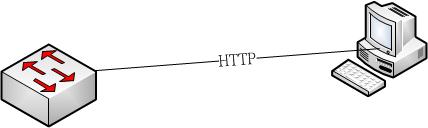
Dears, It is like this. The device is switch like and I need to check S/N from the web and compare it. If it is ok then output PASS/FAIL result to excel for the record. The web page is writen in .asp file and the simple diagram is attached. Really appreciate!!!
-
GUI infomation compare
samonlinesuper replied to samonlinesuper's topic in AutoIt GUI Help and Support
Could someone help, it is about QA testing automation!! -
Dears, If it is possible to capture the text on the GUI page and compare it?

-
Dear All, Can AutoIT be able to analysis wireshark packet content, I can control the wireshark to caputre packets but cannot analysis the packet content or comparisson. Does anyone have the experinment on this, thank you.
-
How to start the test with select items
samonlinesuper replied to samonlinesuper's topic in AutoIt General Help and Support
Dear UEZ, Sorry, it is me again. I change the consoelwrite ro "RUN"; however, the items that I choose already compile to "exe" file so I modify as Run("(" & _GUICtrlListView_GetItemText($hListView2, $i) & ")", "" ) but fail to excute, could you give me advice. Sorry again, I am beginner of programming. -
How to start the test with select items
samonlinesuper replied to samonlinesuper's topic in AutoIt General Help and Support
Dear UEZ, Sorry to bother you again, the example that you shared is worked well. How to make selected items to get execute when I click "RUN"? This is trouble me for sometimes, thank you if you can help. -
How to start the test with select items
samonlinesuper replied to samonlinesuper's topic in AutoIt General Help and Support
Dear UEZ, Thank you and It works, thank you again. -
How to start the test with select items
samonlinesuper replied to samonlinesuper's topic in AutoIt General Help and Support
Dear UEZ, I used GUICtrlCreateListView to create menu, but I still cannot "Shift" item which selected from left to right when ">" button is pressed, could you help and below is my code, thank you. #include <ButtonConstants.au3> #include <GUIConstantsEx.au3> #include <ListViewConstants.au3> #include <WindowsConstants.au3> #include <Array.au3> #include <GuiListView.au3> Global $aItem[100][2] $Form1_1 = GUICreate("Automation Test", 656, 443, 235, 19, BitOR($GUI_SS_DEFAULT_GUI,$WS_MAXIMIZEBOX,$WS_TABSTOP), BitOR($WS_EX_ACCEPTFILES,$WS_EX_WINDOWEDGE)) GUISetBkColor(0xE0FFFF) $ListView1 = GUICtrlCreateListView("Test Items", 40, 32, 249, 281, BitOR($GUI_SS_DEFAULT_LISTVIEW,$LVS_NOLABELWRAP)) GUICtrlSendMsg(-1, $LVM_SETCOLUMNWIDTH, 0, 300) $ListView1_0 = GUICtrlCreateListViewItem("Upgrade/Downloadgrade", $ListView1) $ListView1_1 = GUICtrlCreateListViewItem("Item2", $ListView1) $ListView2 = GUICtrlCreateListView("Selected Items", 355, 33, 249, 281) GUICtrlSendMsg(-1, $LVM_SETCOLUMNWIDTH, 0, 300) $Button1 = GUICtrlCreateButton(">", 304, 48, 33, 33) $Button2 = GUICtrlCreateButton(">>", 304, 90, 33, 33) $Button3 = GUICtrlCreateButton("<", 304, 138, 33, 33) $Button4 = GUICtrlCreateButton("<<", 304, 182, 33, 33) $ButtonRUN = GUICtrlCreateButton("RUN", 168, 352, 97, 41) $ButtonCLOSE = GUICtrlCreateButton("Close", 320, 352, 97, 41) GUISetState(@SW_SHOW) Update_Listviews() While 1 $nMsg = GUIGetMsg() Switch $nMsg Case $Button1 Shift($ListView1, 1) Update_Listviews() Case $Button3 Shift($ListView2, 0) Update_Listviews() Case $GUI_EVENT_CLOSE Case $ButtonCLOSE, $GUI_EVENT_CLOSE Exit EndSwitch WEnd Func Update_Listviews() ; scan array and reload listboxes accordingly Local $str1, $str2 For $x = 1 to $aItem[0][0] ; loop through array If $aItem[$x][1] Then ; if 1, add to right listbox string $str2 &= $aItem[$x][0] & "|" Else ; if 0, add to left listbox string $str1 &= $aItem[$x][0] & "|" EndIf Next GUICtrlSetData($ListView1, "") GUICtrlSetData($ListView1, StringTrimRight($str1, 1)) ; strip trailing "|" and load to left listbox GUICtrlSetData($ListView2, "") GUICtrlSetData($ListView2, StringTrimRight($str2, 1)) ; strip trailing "|" and load to right listbox EndFunc Func Shift($control, $dest) Local $row = 0 For $x = 1 to $aItem[0][0] ; loop through array If $aItem[$x][1] <> $dest Then ; is array element not already in dest listbox? If _GUICtrlListView_GetItemSelected($control, $row) Then $aItem[$x][1] = $dest ; if row selected , move array element $row += 1 EndIf Next EndFunc -
How to make listbox items run
samonlinesuper replied to samonlinesuper's topic in AutoIt GUI Help and Support
Upgrade process means that if smart device (such as Cisco switch so on) has loaded firmware with version 1.1xxx, and I want to use the script to change the loaded or upgrade to version 1.2xxx. That is what the Upgrade process means, thank you. -
How to make listbox items run
samonlinesuper replied to samonlinesuper's topic in AutoIt GUI Help and Support
When pressed then "Upgrade/Downgrade" item will start to do the upgrade process (By the way, this upgrade/download is for the "smart device" not for windows itself), thank you. -
How to make listbox items run
samonlinesuper replied to samonlinesuper's topic in AutoIt GUI Help and Support
Dears, Sorry, I am new in this forum and AutoIT. I don't know what you mean about to past the code but anyway, the code is like below: #include <ButtonConstants.au3> #include <GUIConstantsEx.au3> #include <GUIListBox.au3> #include <WindowsConstants.au3> #include <Array.au3> Global $aItem[6][2] = [[5,""],["Upgrade/Downloadgrade,0],["Item2",0],["Item3",0],["Item4",0],["Item5",0]] $DualListDlg = GUICreate("Choices Dialog", 751, 514, 247, 156) GUISetIcon("", -1) $ListBox1 = GUICtrlCreateList("", 8, 8, 305, 227, BitOR($GUI_SS_DEFAULT_LIST,$LBS_MULTIPLESEL)) $Button1 = GUICtrlCreateButton(">", 332, 15, 31, 25) $Button2 = GUICtrlCreateButton(">>", 332, 48, 31, 25) $Button3 = GUICtrlCreateButton("<", 332, 81, 31, 25) ;GUICtrlSetState(-1, $GUI_DISABLE) $Button4 = GUICtrlCreateButton("<<", 332, 114, 31, 25) $ListBox2 = GUICtrlCreateList("", 384, 8, 331, 227, $LBS_MULTIPLESEL) $Button5 = GUICtrlCreateButton("&RUN", 112, 273, 75, 25) $Button6 = GUICtrlCreateButton("&CLOSE", 192, 273, 75, 25) ; $Button7 = GUICtrlCreateButton("&Help", 272, 273, 75, 25) GUISetState(@SW_SHOW) Update_Listviews() While 1 $msg = GUIGetMsg() Switch $msg Case $Button1 Shift($ListBox1, 1) Update_Listviews() Case $Button3 Shift($ListBox2, 0) Update_Listviews() Case $Button6, $GUI_EVENT_CLOSE ExitLoop EndSwitch WEnd Func Update_Listviews() ; scan array and reload listboxes accordingly Local $str1, $str2 For $x = 1 to $aItem[0][0] ; loop through array If $aItem[$x][1] Then ; if 1, add to right listbox string $str2 &= $aItem[$x][0] & "|" Else ; if 0, add to left listbox string $str1 &= $aItem[$x][0] & "|" EndIf Next GUICtrlSetData($ListBox1, "") GUICtrlSetData($ListBox1, StringTrimRight($str1, 1)) ; strip trailing "|" and load to left listbox GUICtrlSetData($ListBox2, "") GUICtrlSetData($ListBox2, StringTrimRight($str2, 1)) ; strip trailing "|" and load to right listbox EndFunc Func Shift($control, $dest) Local $row = 0 For $x = 1 to $aItem[0][0] ; loop through array If $aItem[$x][1] <> $dest Then ; is array element not already in dest listbox? If _GUICtrlListBox_GetSel($control, $row) Then $aItem[$x][1] = $dest ; if row selected , move array element $row += 1 EndIf Next EndFunc The "RUN" means to "Execute". What I did now is to create Menu list and have the items select from left then press ">" button to right listbox. After that, I can press "RUN" to "execute" those items in the Right listbox. Thank you for helping. -
Dear all, I created below GUI and wants to have the select items to RUN while the "RUN" button is pressed. I already tried a lots of ways but failed, could anyone help me, thank you. #include <ButtonConstants.au3> #include <GUIConstantsEx.au3> #include <GUIListBox.au3> #include <WindowsConstants.au3> #include <Array.au3> Global $aItem[6][2] = [[5,""],["Upgrade/Downloadgrade,0],["Item2",0],["Item3",0],["Item4",0],["Item5",0]] $DualListDlg = GUICreate("Choices Dialog", 751, 514, 247, 156) GUISetIcon("", -1) $ListBox1 = GUICtrlCreateList("", 8, 8, 305, 227, BitOR($GUI_SS_DEFAULT_LIST,$LBS_MULTIPLESEL)) $Button1 = GUICtrlCreateButton(">", 332, 15, 31, 25) $Button2 = GUICtrlCreateButton(">>", 332, 48, 31, 25) $Button3 = GUICtrlCreateButton("<", 332, 81, 31, 25) ;GUICtrlSetState(-1, $GUI_DISABLE) $Button4 = GUICtrlCreateButton("<<", 332, 114, 31, 25) $ListBox2 = GUICtrlCreateList("", 384, 8, 331, 227, $LBS_MULTIPLESEL) $Button5 = GUICtrlCreateButton("&RUN", 112, 273, 75, 25) $Button6 = GUICtrlCreateButton("&CLOSE", 192, 273, 75, 25) ; $Button7 = GUICtrlCreateButton("&Help", 272, 273, 75, 25) GUISetState(@SW_SHOW) Update_Listviews() While 1 $msg = GUIGetMsg() Switch $msg Case $Button1 Shift($ListBox1, 1) Update_Listviews() Case $Button3 Shift($ListBox2, 0) Update_Listviews() Case $Button6, $GUI_EVENT_CLOSE ExitLoop EndSwitch WEnd Func Update_Listviews() ; scan array and reload listboxes accordingly Local $str1, $str2 For $x = 1 to $aItem[0][0] ; loop through array If $aItem[$x][1] Then ; if 1, add to right listbox string $str2 &= $aItem[$x][0] & "|" Else ; if 0, add to left listbox string $str1 &= $aItem[$x][0] & "|" EndIf Next GUICtrlSetData($ListBox1, "") GUICtrlSetData($ListBox1, StringTrimRight($str1, 1)) ; strip trailing "|" and load to left listbox GUICtrlSetData($ListBox2, "") GUICtrlSetData($ListBox2, StringTrimRight($str2, 1)) ; strip trailing "|" and load to right listbox EndFunc Func Shift($control, $dest) Local $row = 0 For $x = 1 to $aItem[0][0] ; loop through array If $aItem[$x][1] <> $dest Then ; is array element not already in dest listbox? If _GUICtrlListBox_GetSel($control, $row) Then $aItem[$x][1] = $dest ; if row selected , move array element $row += 1 EndIf Next EndFunc
-
How to start the test with select items
samonlinesuper replied to samonlinesuper's topic in AutoIt General Help and Support
Dear all, Could anyone help me about this question?