


LxP
-
Posts
1,587 -
Joined
-
Last visited
Recent Profile Visitors
1,189 profile views








LxP's Achievements

Universalist (7/7)
7
Reputation
-
 LxP reacted to a post in a topic:
Run Script (x64)
LxP reacted to a post in a topic:
Run Script (x64)
-
LxP reacted to a post in a topic:
_GUICtrlListView_GetItemChecked reporting False after _GUICtrlListView_GetItemText twice
-
LxP reacted to a post in a topic:
AutoIt v3.3.15.3 Beta
-
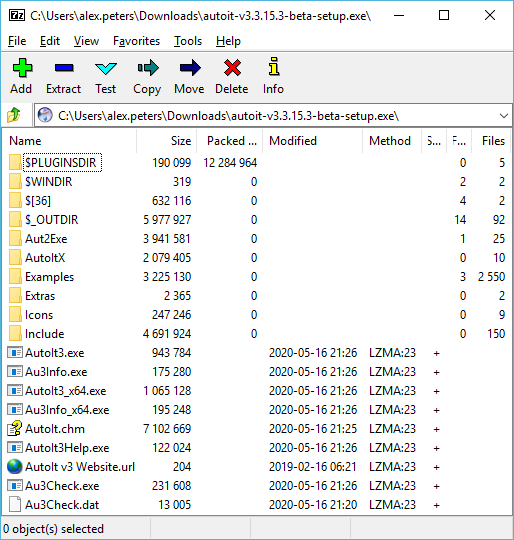
Hello, Are there any official locations where this Beta version can be downloaded as a Zip file? I'm intending to run this version on a system where I don't have permission to run installers. I can see that the installer itself can be opened as a Zip file, but the folder structure is somewhat unclear:
-
 Professor_Bernd reacted to a post in a topic:
LabelClick()
Professor_Bernd reacted to a post in a topic:
LabelClick()
-
My arrays contain varying content in this case—numbers, strings, handles, other arrays (I'm technically trying to emulate object instances). Nonetheless, I'll keep your tip in mind for another time. Thank you.
-
Thanks for confirming. I greatly appreciate the time you have put into your code example using structs. I think in my case, the best alternative will be to adopt the Registry pattern, store my arrays in another global array, and pass around a global array index as a reference for each sub-array. I'm guessing that this is mostly due to performance? I suppose my proposed array-of-arrays could be a 2D array instead since each sub-array is guaranteed to be of a certain length. Is that a significant improvement in your view?
-
Aelc reacted to a post in a topic:
Inner/nested ByRef behaviour?
-
Thanks to everyone for your replies so far. Why isn't $aOuter declared? This is intended—$aOuter is a parameter name, for referencing any desired other variable at runtime. Why use ByRef if not altering the top-level data structure being passed in? Because I want to change the contents of the inner array, and if I don't pass the top-level, outer array by reference using ByRef, then my changes to the inner array will definitely not persist after the function returns. Why not have a ByRef parameter for the inner array directly? Because this is not viable outside my minimal reproducible example given above. The example given above is the minimal code needed to demonstrate my issue. In my actual code I wouldn't have access to a variable name for the inner array. Why am I expecting the outer array's copy of the inner array to ever be modified? These replies hit the nail on the head (emphasis is mine): “Also, your test is wrong, as $ainnerArray is itself never changed (a copy is stored in $aOuterArray).” “The reason it doesn't change the original inner array is because you never actually modified it. You modify a copy of it, then do absolutely nothing with that modified array expecting it to magically know that the copy of the array is supposed to modify the original array without being told to.” As a formally qualified software engineer I know better than to expect magic synchronisation of two distinct data structures in memory. What I didn't know was that two distinct data structures existed. Here's the source of my misunderstanding: Local $aOuterArray[1] = [$aInnerArray] In other languages, $aOuterArray would get a reference to $aInnerArray. In AutoIt, $aOuterArray gets a copy of $aInnerArray. In other words, I didn't know I had made two $aInnerArrays at this point. With this knowledge I can move forwards. My new question Is there a way to store an inner array inside an outer array by reference, such that: two different outer arrays can reference the same inner array; and changes to the inner array are visible within both outer arrays? If not, I'll resort to global arrays and store indexes instead.
-
I'm trying to pass a nested array to a function, such that the function alters the inner array. I was surprised to find that this minimal reproducible example, despite its use of ByRef, seems to pass a copy of the inner array to the function: #include <Array.au3> ; a boring old array Local $aInnerArray[5] = [1, 2, 3, 4, 5] ; a one-element array containing a reference to the other array Local $aOuterArray[1] = [$aInnerArray] ; intention: take a nested array and alter its inner array ; reality: the inner array seems to be getting copied Func ChangeIt(ByRef $aOuter) Local $aInner = $aOuter[0] $aInner[2] = 0 EndFunc ; Expected: [1, 2, 3, 4, 5] ; Actual: [1, 2, 3, 4, 5] ✔ _ArrayDisplay($aInnerArray, 'Before') ; $aOuterArray passed by-ref, should receive reference to $aInnerArray ; Therefore should change $aInnerArray to [1, 2, 0, 4, 5] ChangeIt($aOuterArray) ; Expected: [1, 2, 0, 4, 5] ; Actual: [1, 2, 3, 4, 5] ✘ _ArrayDisplay($aInnerArray, 'After') I suspect that either: the copy is taking place in the first line of the function (I couldn't find a way to access the inner array without first assigning it to a variable though); or ByRef doesn't propagate into inner levels of the data structure being passed, which seems less likely to me. Could someone please point me in the right direction to get this working as intended? Update: the answer ; WRONG: ; a one-element array containing a reference to the other array Local $aOuterArray[1] = [$aInnerArray] The assumption I made about this code is wrong—it actually copies $aInnerArray into $aOuterArray, so there are now two unrelated $aInnerArray instances. It is not possible to store arrays in other arrays by reference. If it is necessary to refer to a mutable array in multiple places, consider holding it in a global variable. Where a collection of mutable arrays needs to be accessed in multiple places (as in my case), consider storing them in a global array and referring to each sub-array by index (also known as the Registry pattern).
-
ibrahem reacted to a post in a topic:
Find Classes by Text (v1.2)
-
PoojaKrishna reacted to a post in a topic:
how to send key "context menu"
-
AnonymousX reacted to a post in a topic:
Msgbox font size?
-
I'm reviving this old topic because it's the top Google result for "AutoIt flush STDOUT," and no other similar threads seem to give a solution. I'm experiencing the same problem: the only way I can detect a specific action is to match certain STDOUT output by a console executable, but StdoutRead() doesn't see any output until after the process terminates. My belief is that the executable is flushing STDOUT per line when run "interactively," but not flushing at all when AutoIt is connecting to the process (presumably in a manner that the console executable sees as "non-interactive"). A possible solution to this problem might be to invoke the executable in a way that makes it believe it's being run interactively. Is anyone aware of a way to do this with AutoIt? Is this sort of thing even possible under Windows? I know nothing about the internal workings of AutoIt (or Windows IPC), but is it possible that the implementation of StdoutRead() can be changed to manually flush STDOUT before it's read?
-
These problems have now been addressed with the release of v1.2, available from the first post in this thread. v1.2 (29/May/2013): Add "Copy Item" and "Copy All" buttons to copy information from the TreeView item to the clipboard (thanks to big_daddy for the idea) Show control text as an AutoIt string definition (with macros as appropriate) instead of just naively wrapping it in single quotes
-
This script (like AutoIt Window Info) will only be useful for windows containing standard Windows controls. Games tend to manage their own controls in a custom way. This problem was caused by AutoIt v3.2.12.0 making backwards-incompatible changes to some library files. ptrex helpfully provided a fix I've now added this fix to the script available from the original post. I intend to merge big_daddy's and MHz's copy-to-clipboard functionality into that script soon as well.
-
How to Code with AutoIT [not a programmer at all]
LxP replied to babelpatcher's topic in AutoIt General Help and Support
You contacted me outside the forums for assistance on this topic. GUIs add a lot of complexity to a programming project, and I believe that they should be the last addition. The primary purpose of your project is to start and stop a VPN connection using a set of variables provided by the user. Therefore, as a first step I would recommend collecting these variables in a simpler manner. Local $protocol = InputBox("SuperVPN", "Protocol (TCP or UDP):") If @Error = 1 Then Exit ; exit if Cancel pressed Local $server = InputBox("SuperVPN", "Server hostname or IP address:") If @Error = 1 Then Exit ; (repeat for all data required) Local $response = MsgBox(1 + 64, "SuperVPN", "You entered the following information:" & @CRLF & "Protocol: " & $protocol & @CRLF & "Server: " & $server) If $response = 2 Then Exit ; exit if Cancel pressed ; start OpenVPN Local $pid = Run("C:\Path\to\OpenVPN.exe --proto " & $protocol & " --remote " & $server & " ...") ; ask user when to close connection MsgBox(64, "SuperVPN", "VPN connection established; press OK when ready to close connection.") ProcessClose($pid) The snippet of code above uses the InputBox function to collect all the necessary data as simple plain-text strings, and the MsgBox function to communicate information in a simple manner. While it's not ideal for a finished product, it allows you to focus on the most important aspect of your project: establishing and closing the VPN connection. Try expanding this code to gather all the needed information to start the connection, and let us know how you go. Once that works, we can look at adding more features. Ask questions if anything shown above doesn't make sense, and we'll try to explain it more clearly. Best of luck! -
PostMessage is indeed a better way of doing things if you don't care about a result being returned from the call, which we don't for this. I just referred to the other thread that you mentioned because I was curious as to why you weren't using WinSetState with @SW_MINIMIZE to minimise the window. In doing so I learnt (and should mention to anyone else reading) that using _WinAPI_PostMessage from WinAPI.au3 is more appropriate. I'll update my code snippet above. 0x180 is a code specific to PuTTY, meaning "toggle full-screen mode." It will likely have no relevance to anyone else's work.
-
Hello again, four-year-old thread! Got a PM requesting further info on my approach to solving this issue. Extreme kudos to the sender for searching the forums first, and requesting that I amend this thread for benefit of others. I was using some software called Winspector to monitor activity while I switched between full-screen and windowed modes in PuTTY. I discovered that selecting the appropriate system menu item resulted in a Windows message being emitted (WM_SYSCOMMAND to be precise, with a "wParam" of 0x180 for full screen toggling). Using PowerPro, I was able to confirm that sending a WM_SYSCOMMAND Windows message with this wParam value did indeed toggle full-screen and windowed modes. Getting AutoIt to do this was the puzzle. Larry responded between my above two posts (not sure why his post is no longer visible) and led me to this solution: #include <WinAPI.au3> #include <WindowsConstants.au3> Local Const $PUTTY_TOGGLE_FS = 0x180 _WinAPI_PostMessage($hWnd, $WM_SYSCOMMAND, $PUTTY_TOGGLE_FS, 0)Edit: Replaced hard-coded DLLCall for SendMessage with UDF call to the more appropriate PostMessage. Also named 0x180 for clearer relevance. where 0x180 above was specific to my problem. So in short I found the appropriate information getting emitted using Winspector, and then I formulated the appropriate DLLCall. I don't know if this is still necessary as I haven't been following AutoIt's development. Ideally, as mentioned above, WinMenuSelectItem would be built to offer manipulation of system menu items; perhaps it now is. I also don't know if all system menus function in this way; I possibly just got lucky with PuTTY. If your window doesn't emit or respond to a Windows message then I'm afraid I can't offer anything of further value.
-
Excellent work, Brett. >_
-
How to synch two sliders smoothly and continuously?
LxP replied to DocMarten's topic in AutoIt GUI Help and Support
That's close, but there's an actual place called Heidelberg too. This Wikipedia article might tell you more about its history. -
Discussion on this topic should probably continue in its other thread...
-
Newcomers don't always know these things so I think it's okay to be a little lenient at first about these things. Anyway, since this thread is more about code cleanup than GUI stuff, I propose we lock the other thread and carry on here.