GNGNUT
-
Posts
39 -
Joined
-
Last visited
Recent Profile Visitors
259 profile views

GNGNUT's Achievements

Seeker (1/7)
2
Reputation
-
 argumentum reacted to a post in a topic:
My Gui to refesh data When it's not in focus (RESOLVED)
argumentum reacted to a post in a topic:
My Gui to refesh data When it's not in focus (RESOLVED)
-
kawumm3000 reacted to a post in a topic:
Outlook and reply-to - (Moved)
-
My Gui to refesh data When it's not in focus (RESOLVED)
GNGNUT replied to GNGNUT's topic in AutoIt GUI Help and Support
@nine Awesome Ty for that -
My Gui to refesh data When it's not in focus (RESOLVED)
GNGNUT replied to GNGNUT's topic in AutoIt GUI Help and Support
HI Nine Ty for the comments, The problem i have and looking for a solution to is Getting it to update - when its not in focus as I'm working on other things on my pc, so if i'm writing emails, coding ect I would still like to see the GUI to update Per sec with out me having to click on it to update, Currently if i take focus The time will stop - and only change once i refocus the Gui again, -
Outlook and reply-to - (Moved)
GNGNUT replied to kawumm3000's topic in AutoIt General Help and Support
@water IMO I believe you should add this as its a state with in the email format and will also keep your outlookEX UDF up to date -
Hi guys what i am trying to do is have My Gui LIve update Out of focus, so i can have this on a 2nd monitor streaming live updates while i continue to work on other screen, i have been googling and looking at other threads about focus and stuff , but they do not seem to match what I'm after, to be clear - i am not wanting to put focus on the GUI for it to auto update values, if you have any positive feed back on the script while you read - i would be more then happy to accept - as im still building my Knowledge of this coding, and stream line is always better Garbage code writing, Kind regards Gngnut #include <MemoryConstants.au3> #include <MsgBoxConstants.au3> #include <ButtonConstants.au3> #include <GUIConstantsEx.au3> #include <StaticConstants.au3> #include <WindowsConstants.au3> Global $currentTime,$currentTimeValue,$v,$Label_Time,$Form1 Global $Label_C2_1,$Label_C2_2,$Label_C2_3,$Label_C2_4,$Label_C2_5,$Label_C2_6,$Label_C2_7 Global $Label_C3_1,$Label_C3_2,$Label_C3_3,$Label_C3_4,$Label_C3_5,$Label_C3_6,$Label_C3_7 ;~ Default Hight for boxs $Hight = 40 $lenght = 180 ;; As per nines comments moved out side of the While loop, AdlibRegister(UpdateTime,250) AdlibRegister(updateValues,500) AdlibRegister(Warning,250) hotkeyset ("{ESC}",Terminate) ;; <<< Used to Quit the programe $aMemStats = MemGetStats() MyGui() ;; running the GUI #Region ### START Koda GUI section ### Form= func MyGui() $ServerName=@ComputerName ; ### Change to your location of image $Image = "C:\Users\gngnut\OneDrive\Pictures\Computer.jpg" ; Creating the form With the Labels $Form1 = GUICreate("My System Status", 800, 750, 225, 173,BitOR($WS_SYSMENU,$WS_MAXIMIZEBOX,$WS_MINIMIZEBOX));$WS_POPUP)) $Pic1 = GUICtrlCreatePic($Image, 0, 0, 800, 750) ;;; #### Column 1 $Label_C1_1 = GUICtrlCreateLabel("Total load currently on RAM:", 71, 192, 180, $Hight, BitOR($SS_CENTER,"")) GUICtrlSetBkColor(-1, 0xFEF200) GUICtrlSetFont(-1, 12, 400, 0, "Lucida Console") $Label_C1_2 = GUICtrlCreateLabel("Total physical RAM:", 71, 248, 180, $Hight, BitOR($SS_CENTER,"")) GUICtrlSetBkColor(-1, 0xFEF200) GUICtrlSetFont(-1, 12, 400, 0, "Lucida Console") $Label_C1_3 = GUICtrlCreateLabel("Available physical RAM:", 71, 304, 180, $Hight, BitOR($SS_CENTER,"")) GUICtrlSetBkColor(-1, 0xFEF200) GUICtrlSetFont(-1, 12, 400, 0, "Lucida Console") $Label_C1_4 = GUICtrlCreateLabel("Total Page Size:", 71, 360, 180, $Hight, BitOR($SS_CENTER,"")) GUICtrlSetBkColor(-1, 0xFEF200) GUICtrlSetFont(-1, 12, 400, 0, "Lucida Console") $Label_C1_5 = GUICtrlCreateLabel("Available Page Size:", 71, 416, 180, $Hight, BitOR($SS_CENTER,"")) GUICtrlSetBkColor(-1, 0xFEF200) GUICtrlSetFont(-1, 12, 400, 0, "Lucida Console") $Label_C1_6 = GUICtrlCreateLabel("Total virtual Size:", 71, 472, 180, $Hight, BitOR($SS_CENTER,"")) GUICtrlSetBkColor(-1, 0xFEF200) GUICtrlSetFont(-1, 12, 400, 0, "Lucida Console") $Label_C1_7 = GUICtrlCreateLabel("Available virtual RAM:", 71, 528, 180, $Hight, BitOR($SS_CENTER,"")) GUICtrlSetBkColor(-1, 0xFEF200) GUICtrlSetFont(-1, 12, 400, 0, "Lucida Console") ;;; #### Column 2 $Label_C2_1 = GUICtrlCreateLabel($aMemStats[$MEM_LOAD] & " %", 311, 192, 180, $Hight, BitOR($SS_CENTER,$WS_BORDER,$SS_CENTERIMAGE)) $colour=0xFEF200 GUICtrlSetFont(-1, 12, 400, 0, "Lucida Console") $Label_C2_2 = GUICtrlCreateLabel($aMemStats[$MEM_TOTALPHYSRAM] & ' Kb' , 311, 248, 180, $Hight, BitOR($SS_CENTER,$WS_BORDER,$SS_CENTERIMAGE)) GUICtrlSetBkColor(-1, 0xFEF200) GUICtrlSetFont(-1, 12, 400, 0, "Lucida Console") $Label_C2_3 = GUICtrlCreateLabel($aMemStats[$MEM_AVAILPHYSRAM] & ' Kb', 311, 304, 180, $Hight, BitOR($SS_CENTER,$WS_BORDER,$SS_CENTERIMAGE)) GUICtrlSetBkColor(-1, 0xFEF200) GUICtrlSetFont(-1, 12, 400, 0, "Lucida Console") $Label_C2_4 = GUICtrlCreateLabel($aMemStats[$MEM_TOTALPAGEFILE] & ' Kb', 311, 360, 180, $Hight, BitOR($SS_CENTER,$WS_BORDER,$SS_CENTERIMAGE)) GUICtrlSetBkColor(-1, 0xFEF200) GUICtrlSetFont(-1, 12, 400, 0, "Lucida Console") $Label_C2_5 = GUICtrlCreateLabel($aMemStats[$MEM_AVAILPAGEFILE] & ' Kb', 311, 416, 180, $Hight, BitOR($SS_CENTER,$WS_BORDER,$SS_CENTERIMAGE)) GUICtrlSetBkColor(-1, 0xFEF200) GUICtrlSetFont(-1, 12, 400, 0, "Lucida Console") $Label_C2_6 = GUICtrlCreateLabel($aMemStats[$MEM_TOTALVIRTUAL] & ' Kb' , 311, 472, 180, $Hight, BitOR($SS_CENTER,$WS_BORDER,$SS_CENTERIMAGE)) GUICtrlSetBkColor(-1, 0xFEF200) GUICtrlSetFont(-1, 12, 400, 0, "Lucida Console") $Label_C2_7 = GUICtrlCreateLabel($aMemStats[$MEM_AVAILVIRTUAL] & ' Kb', 311, 528, 180, $Hight, BitOR($SS_CENTER,$WS_BORDER,$SS_CENTERIMAGE)) GUICtrlSetBkColor(-1, 0xFEF200) GUICtrlSetFont(-1, 12, 400, 0, "Lucida Console") ;;; #### Column 3 $Label_C3_2 = GUICtrlCreateLabel(Round($aMemStats[$MEM_TOTALPHYSRAM]/1024/1024, 2) & ' Gb', 551, 248, 180, $Hight, BitOR($SS_CENTER,$WS_BORDER,$SS_CENTERIMAGE)) GUICtrlSetBkColor(-1, 0xFEF200) GUICtrlSetFont(-1, 12, 400, 0, "Lucida Console") $Label_C3_3 = GUICtrlCreateLabel(Round($aMemStats[$MEM_AVAILPHYSRAM]/1024/1024, 2) & ' Gb', 551, 304, 180, $Hight, BitOR($SS_CENTER,$WS_BORDER,$SS_CENTERIMAGE)) GUICtrlSetBkColor(-1, 0xFEF200) GUICtrlSetFont(-1, 12, 400, 0, "Lucida Console") $Label_C3_4 = GUICtrlCreateLabel(Round($aMemStats[$MEM_TOTALPAGEFILE]/1024/1024, 2) & ' Gb', 551, 360, 180, $Hight, BitOR($SS_CENTER,$WS_BORDER,$SS_CENTERIMAGE)) GUICtrlSetBkColor(-1, 0xFEF200) GUICtrlSetFont(-1, 12, 400, 0, "Lucida Console") $Label_C3_5 = GUICtrlCreateLabel(Round($aMemStats[$MEM_AVAILPAGEFILE]/1024/1024, 2) & ' Gb', 551, 416, 180, $Hight, BitOR($SS_CENTER,$WS_BORDER,$SS_CENTERIMAGE)) GUICtrlSetBkColor(-1, 0xFEF200) GUICtrlSetFont(-1, 12, 400, 0, "Lucida Console") $Label_C3_6 = GUICtrlCreateLabel(Round($aMemStats[$MEM_TOTALVIRTUAL]/1024/1024, 2) & ' Gb', 551, 472, 180, $Hight, BitOR($SS_CENTER,$WS_BORDER,$SS_CENTERIMAGE)) GUICtrlSetBkColor(-1, 0xFEF200) GUICtrlSetFont(-1, 12, 400, 0, "Lucida Console") $Label_C3_7 = GUICtrlCreateLabel(Round($aMemStats[$MEM_AVAILVIRTUAL]/1024/1024, 2) & ' Gb', 551, 528, 180, $Hight, BitOR($SS_CENTER,$WS_BORDER,$SS_CENTERIMAGE)) GUICtrlSetBkColor(-1, 0xFEF200) GUICtrlSetFont(-1, 12, 400, 0, "Lucida Console") $Label_Server = GUICtrlCreateLabel($ServerName, 551, 600, 180, $Hight, BitOR($SS_CENTER,$WS_BORDER,$SS_CENTERIMAGE)) GUICtrlSetBkColor(-1, 0xFEF200) GUICtrlSetFont(-1, 12, 400, 0, "Lucida Console") $Label_Time = GUICtrlCreateLabel($currentTime , 71, 600, 180, $Hight, bitOR($SS_CENTER,$WS_BORDER,$SS_CENTERIMAGE)) GUICtrlSetBkColor(-1, 0xFEF200) GUICtrlSetFont(-1, 12, 400, 0, "Lucida Console") GUISetState(@SW_SHOWNORMAL) #EndRegion ### END Koda GUI section ### EndFunc While 1 Sleep(1000) ; sets a delay of 1 sec per 1000 WEnd ;; close down the Application func Terminate() exit EndFunc ;; Updating Time func UpdateTime() $currentTime = @HOUR&":"& @MIN &":"& @SEC ControlSetText($Form1,"",$Label_Time, $currentTime) EndFunc ;; currently changing the CPU % lable Func Warning() if $aMemStats[$MEM_LOAD] <=40 Then ; Green GUICtrlSetbkColor($Label_C2_1,0x2BFC0B) ElseIf $aMemStats[$MEM_LOAD] >40 and $aMemStats[$MEM_LOAD] <= 80 Then GUICtrlSetbkColor($Label_C2_1,0xFDBE01) Elseif $aMemStats[$MEM_LOAD] > 80 Then GUICtrlSetBkColor($Label_C2_1, 0xEE0C0C) EndIf EndFunc ;; Updating The Lable values of column 2 Only if the values change func updateValues() $aMemStats = MemGetStats() if GUICtrlRead($Label_C2_1) <> $aMemStats[$MEM_LOAD] Then ControlSetText($Form1,"",$Label_C2_1,$aMemStats[$MEM_LOAD]) endif If GUICtrlRead($Label_C2_2) <> $aMemStats[$MEM_TOTALPHYSRAM] & ' Kb' then ControlSetText($Form1,"",$Label_C2_2,$aMemStats[$MEM_TOTALPHYSRAM] & ' Kb') endif If GUICtrlRead($Label_C2_3) <> $aMemStats[$MEM_AVAILPHYSRAM] & ' Kb' then ControlSetText($Form1,"",$Label_C2_3,$aMemStats[$MEM_AVAILPHYSRAM] & ' Kb') endif If GUICtrlRead($Label_C2_4) <> $aMemStats[$MEM_TOTALPAGEFILE] & ' Kb' then ControlSetText($Form1,"",$Label_C2_4,$aMemStats[$MEM_TOTALPAGEFILE] & ' Kb') endif If GUICtrlRead($Label_C2_5) <> $aMemStats[$MEM_AVAILPAGEFILE] & ' Kb' then ControlSetText($Form1,"",$Label_C2_5,$aMemStats[$MEM_AVAILPAGEFILE] & ' Kb') endif If GUICtrlRead($Label_C2_6) <> $aMemStats[$MEM_TOTALVIRTUAL] & ' Kb' then ControlSetText($Form1,"",$Label_C2_6,$aMemStats[$MEM_TOTALVIRTUAL] & ' Kb') endif If GUICtrlRead($Label_C2_7) <> $aMemStats[$MEM_AVAILVIRTUAL] & ' Kb' then ControlSetText($Form1,"",$Label_C2_7,$aMemStats[$MEM_AVAILVIRTUAL] & ' Kb') endif EndFunc
-
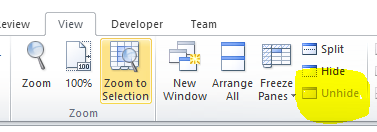
@ecaliber13 using the commands as per the helpfile there was no need to use book save, as the data is writing and being stored, if i'm reading the help file correctly Excel_close - saves the document _Excel_Close ( $oExcel [, $bSaveChanges = True [, $bForceClose = False]] ) by having the 2nd option as default, this saves the document on close, after brain stoming with a friend we worked out its coming from _Excel_BookOpen ( $oExcel, $sFilePath [, $bReadOnly = False [, $bVisible = True [, $sPassword = Default [, $sWritePassword = Default [, $bUpdateLinks = Default]]]]] ) i was reading the help file $bvisable - as stopinbg the excel poping up on screen behind / ontop of your UI when running commands this Hides the workbook within excel Directly, and prevents the excel popup when running code - you can view the data in excel when you open it by going to VIEW - unhide In order to prevent the excel document from poping up while writing I have these settings, $oExcel = _Excel_Open(False) $oWorkbook = _Excel_BookOpen($oExcel, "File" , False, true)
-
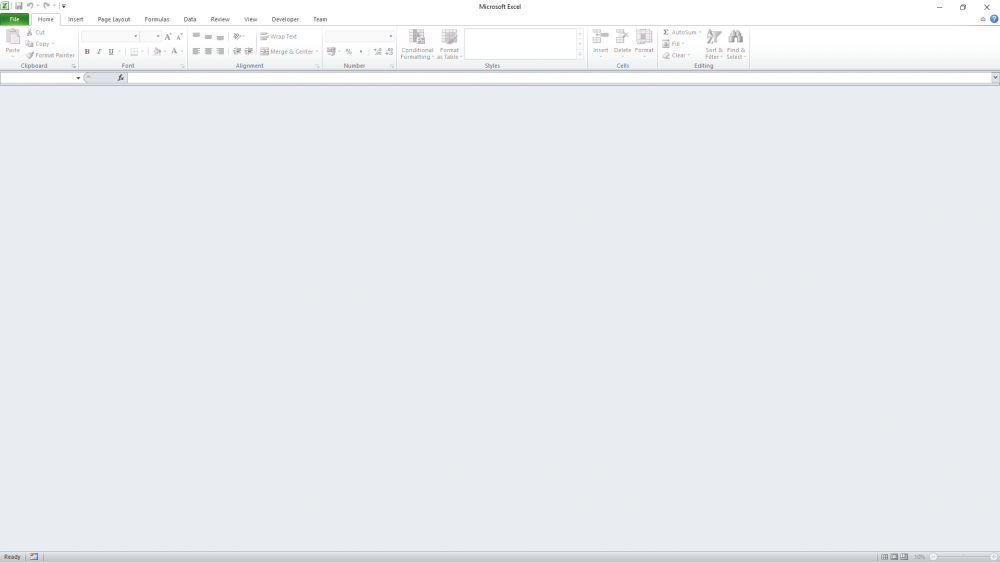
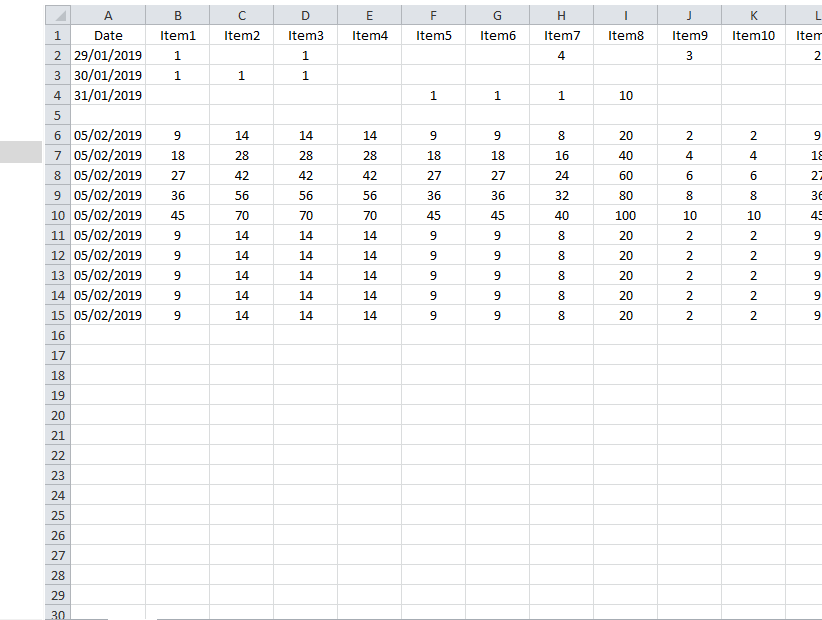
Hi guys unsure if anyone has come across this issue before, been trying fixes I'v seen on line and they don't seem to work, here is the issue: & code i use to read & Write $oExcel = _Excel_Open(False) If @error Then Exit MsgBox($MB_SYSTEMMODAL, "Excel UDF: _Excel_RangeWrite Example", "Error creating the Excel application object." & @CRLF & "@error = " & @error & ", @extended = " & @extended) $oWorkbook = _Excel_BookOpen($oExcel, $Sale_Stock , False, False) Local $Saleflag = _Excel_RangeRead($oWorkbook,1,("AH1"), 2) $Saleflag = $Saleflag +1 Local $aArray2D[1][35] = [[$ND, $v1, $v2, $v3, $v4, $v5, $v6, $v7, $v8, $v9, $v10, $v11, $v12, $v13, $v14, $v15, $v16, $v17, $v18, $v19, $v20, $v21, $v22, $v23, $v24, $v25, $v26, $v27, $v28, $v29, $v30, $v31, $v32,"",$cashsum ]] _Excel_RangeWrite($oWorkbook, 1, $Saleflag, "AH1", "", True ) _Excel_RangeWrite($oWorkbook, 1, $aArray2D, "A"& $Saleflag, "", True ) If @error Then MsgBox($MB_SYSTEMMODAL, "Excel UDF: _Excel_RangeWrite Example", "Error creating the new workbook." & @CRLF & "@error = " & @error & ", @extended = " & @extended) Exit EndIf If @error Then Exit MsgBox($MB_SYSTEMMODAL, "Excel UDF: _Excel_RangeWrite Example 2", "Error writing to worksheet." & @CRLF & "@error = " & @error & ", @extended = " & @extended) _Excel_Close($oExcel) I can create Excel document and use autoit to read and write to, when I create this out side of autoit I can open and excell and all displays fine, after writing to it via autoit and i open out side of my program I'm faced with a gray excel screen, all most like the file / data is currupt / not oping the document i have selected, if any one has any fixes or can point me to how to try and fix this would be great kind regards Gngnut same file in explorer preview mode so i know there is data in it
-
Thank you - so clearly i was using this wrong :):) lol and i can now see the error of my ways
-
hi guys I'm sorry if this has been asked before, I'm trying to get my head around the auto resize of Gui's Including Tabs in the gui, I have read the Help file but i am still struggling to understand to resize all of this at the same time, i have generated gui(s) in the past but always kept them a static size - but this one its not practical to keep as 750 x 480, as I'm looking to expand my knowledge and build a dynamic gui which can grow in size on its own, can anyone simplify - to and idiot like me of how the process works, does it need an action/event in order to auto resize, ? is a main question below is sample script I'm trying to get to resize, ( tab, button(s) and labels ) I have been reading forum post about adding resize and using GUICtrlSetResizing - but not sure if I'm using this correctly, if i am - even when i max the window every thing stays the same size, and shifts to top corner, again sorry - I'm stupid and simple minded and sometimes need it explained differently, kind regards Craig HotKeySet("{ESC}","terminate") func Terminate() Exit EndFunc #include <ButtonConstants.au3> #include <EditConstants.au3> #include <GUIConstantsEx.au3> #include <StaticConstants.au3> #include <WindowsConstants.au3> #Include <FontConstants.au3> #include <ColorConstants.au3> #include <Date.au3> #include <GuiListView.au3> #Region ### START Koda GUI section ### Form= local $TBL1Form1 = GUICreate("FORM TITLE", 750, 458, -1,-1,0x00010000) ;Style enables the Max button $Tab1 = GUICtrlCreateTab(0, 8, 750, 425) $TabSheet1 = GUICtrlCreateTabItem("Tab one") $Label1 = GUICtrlCreateLabel("LABLE ONE", 178, 48, 406, 49) GUICtrlSetFont(-1, 30, 400, 0, "Arial") GUICtrlSetResizing(-1, $GUI_DOCKSIZE + $GUI_DOCKLEFT + $GUI_DOCKTOP) $Label2 = GUICtrlCreateLabel("LABLE TWO", 128, 136, 93, 36) GUICtrlSetFont(-1, 20, 400, 0, "Arial") GUICtrlSetResizing(-1, $GUI_DOCKSIZE + $GUI_DOCKLEFT + $GUI_DOCKTOP) $Label3 = GUICtrlCreateLabel("LABLE THREE", 388, 131, 82, 36) GUICtrlSetFont(-1, 20, 400, 0, "Arial") GUICtrlSetResizing(-1, $GUI_DOCKSIZE + $GUI_DOCKLEFT + $GUI_DOCKTOP) $Button1 = GUICtrlCreateButton("1", 8, 192, 75, 25) GUICtrlSetFont(-1, 8, 400, 0, "Arial") GUICtrlSetResizing(-1, $GUI_DOCKSIZE + $GUI_DOCKLEFT + $GUI_DOCKTOP) $Button2 = GUICtrlCreateButton("2", 8, 225, 75, 25) GUICtrlSetFont(-1, 8, 400, 0, "Arial") GUICtrlSetResizing(-1, $GUI_DOCKSIZE + $GUI_DOCKLEFT + $GUI_DOCKTOP) $Button3 = GUICtrlCreateButton("3", 8, 259, 75, 25) GUICtrlSetFont(-1, 8, 400, 0, "Arial") GUICtrlSetResizing(-1, $GUI_DOCKSIZE + $GUI_DOCKLEFT + $GUI_DOCKTOP) GUISetState(@SW_SHOW) #Region ### END Koda GUI section ### Form= While 1 $nMsg = GUIGetMsg() Switch $nMsg Case $GUI_EVENT_CLOSE EndSwitch WEnd
-
OMG - How did I not see that HAHAHA Thank you for the fresh eyes JFISH :):) _FileWriteToLine( $Filelocation&$Wsinsertamend,2,"",1) should Be _FileWriteToLine( $Filelocation&$Wsinsertamend[$a],2,"",1) Issue resolved :):)
-
Thank you for your reply and a new method in getting the data, but this still doesn't help me with my situation, problem I'm getting when using "@error" - 1 = ("File has less lines than $iLine") - file contains 140 line and the line I'm trying to write to is 40
-
Hi Guys need some pointing in the right direction here, have a script I'm trying to write , which Requires reading a txt document (Xml) obtaining the line number of (Said) nodes (Policyholder, Driver) and writing a line based on information win in a tag , problem I'm getting when using "@error" is 1 = File has less lines than $iLine file contains 140 line and the line Im trying to write to is 40 have attached test file of what I'm looking at basically what I need to do is If town node is blank look at county 1st and get the data from there else look at locality and take that data and place it in the Town node, any advice would be great , #include <EditConstants.au3> #include <GUIConstantsEx.au3> #include <StaticConstants.au3> #include <WindowsConstants.au3> #include <File.au3> #include <Array.au3> #Include <Excel.au3> #include <Date.au3> HotKeySet("{ESC}", "Terminate") Func Terminate() Exit 0 EndFunc ;==>Terminate #AutoIt3Wrapper_run_debug_mode=Y ;~################################################################### ;;######### LIVE ######## ;~ $Filelocation = ;~ $Movefile = ;~################################################################### ;~ ############ TESTING ####### $Filelocation = "S:\Development Share\Craig\file\" ; Test location $Movefile = $Filelocation&"Moved\" ; test location ;~################################################################### $Wsinsertamend = _FileListToArray($Filelocation ,"*.xml", 1) if @error Then msgbox(1,"Warning...","No files currently In the folder") exit EndIf for $Filearray = 1 to $Wsinsertamend[0] ; number of files in the folder - for each file do the actions $result =_FileCountLines($Filelocation&$Wsinsertamend[$Filearray]) ;; count the lines within the file $PolicyholderNode=0 $DriverNode=0 $count=0 $counting=0 While $DriverNode = 0 $count=$count+1 $Driver = FileReadLine($Filelocation & $Wsinsertamend[$Filearray],$count) If StringInStr ($Driver,"<PolicyHolder>") Then ;; get the line policyholder Node is on $PolicyholderNode = $Count endif if StringInStr ($Driver,"<Driver>") Then ;; get the line Driver Node is on $DriverNode = $Count endif wend ; max of 50 lines read msgbox(0,"while end",$DriverNode) $RLine2 = FileReadLine ($Filelocation & $Wsinsertamend[$Filearray],2) if StringInStr ($RLine2,"<Error>") then If StringInStr($RLine2, "<Error> PolicyHolderTown Invalid</Error>") then $PHLocality = FileReadLine ($Filelocation & $Wsinsertamend[$Filearray],$PolicyholderNode+9) $PHCounty = FileReadLine ($Filelocation & $Wsinsertamend[$Filearray],$PolicyholderNode+11) If StringInStr ($PHCounty,"<County />") then If StringInStr ($PHLocality,"<Locality />") then ;; Leave the file if both are Blank Manual Action to be taken else $Cutline = StringSplit($PHLocality,">") ; value 2 for the midle text $Cutline = StringSplit($Cutline[2],"<") ; value 1 _FileWriteToLine( $Filelocation&$Wsinsertamend,$PolicyholderNode+10," <Town>"&$Cutline[1]&"</Town>",1) if @error then Msgbox(0,"Error" ,"Error Number - "& @error & @CRLF & "NO. lines - " & $result & @crlf & "line writing to " & $PolicyholderNode+10 & @CRLF & "text to be writen - " & " <Town>"&$Cutline[1]&"</Town>") EndIf _FileWriteToLine( $Filelocation&$Wsinsertamend,2,"",1) ;; Clear error if @error then Msgbox(0,"PH Locality - Line 2 " , @error) EndIf endif Else $Cutline = StringSplit($PHCounty,">") ; value 2 for the midle text $Cutline = StringSplit($Cutline[2],"<") ; value 1 _FileWriteToLine( $Filelocation&$Wsinsertamend,$PolicyholderNode+10," <Town>"&$Cutline[1]&"</Town>",1) if @error then Msgbox(0,"Error" ,"Error Number - "& @error & @CRLF & "NO. lines - " & $result & @crlf & "line writing to " & $PolicyholderNode+10 & @CRLF & "text to be writen - " & " <Town>"&$Cutline[1]&"</Town>") EndIf _FileWriteToLine( $Filelocation&$Wsinsertamend,2,"",1) ;; Clear error if @error then Msgbox(0,"PH County - Line 2 " , @error) EndIf endif endif Else $error = 1 Endif next Thanks for taking a look, kind regards Craig Test data file.xml
-
Using a functions from multiple tab screen
GNGNUT replied to GNGNUT's topic in AutoIt GUI Help and Support
Thank you for your help Melba23 makes lots of sense, I think I was over thinking about it -
Using a functions from multiple tab screen
GNGNUT replied to GNGNUT's topic in AutoIt GUI Help and Support
Using the (message loop) and It makes sense, But one Stupid question, if I press button one and goto said function to get my result - how can I store / set this on the Tab window from which I entered the function, mybe I'm trying to over complicate my thinking, or I'm just old and stupid .. -
Hi, guys I'm in need of a little advice , help with my coding, I currently have 10 tab Gui pages 1-9 all have the same screen layout, on these screens i have a button that needs to access a function to do some workings out, but I don't want to have to copy this out 9 times all with different variable names is there a way to use a function that can be accessed by multiple screens ? working outs is done within the script but the output from this goes to tab one if button on tab one is used and so on for the 9 screens, sorry if this has been answered before or if im not looking at the correct sections of the help file, if your able to help or even point me to the correct section that tells me how to share a function accorss that would be great
-
Automaticly Resize every thing in a gui to fit monitors
GNGNUT replied to GNGNUT's topic in AutoIt General Help and Support
I have reviewed this, but will this mean I will have to add to each lable, field, group box ?