sathish
-
Posts
78 -
Joined
-
Last visited
Recent Profile Visitors
285 profile views

sathish's Achievements

Wayfarer (2/7)
0
Reputation
-
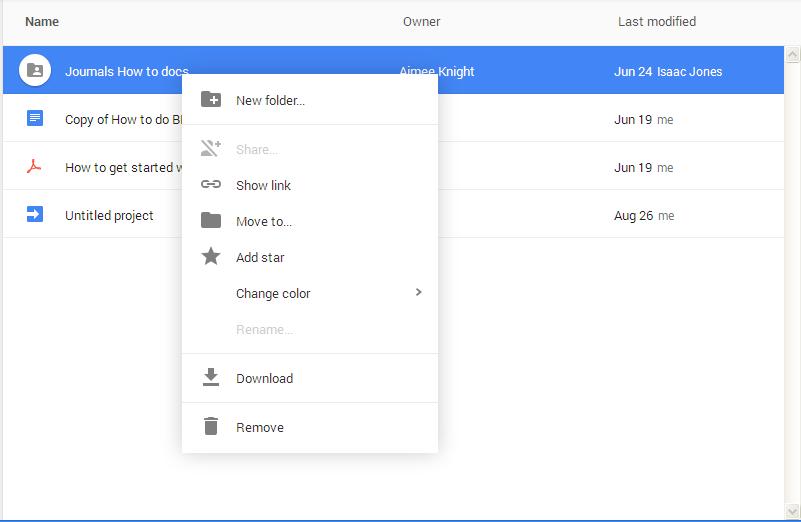
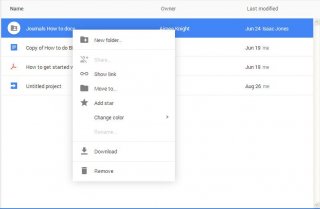
Hi forum, Is there a way to send Right Click from Keyboard, I can't use Mouseclick(Right), because i don't know the X Y co ordinates, when we can send all Keyboard buttons, i can't find a way to send Right Click from keyboard, I tried Send('+{F10}') I am trying to Right click a Google drive Button, please refer attached image, Please guide, Thanks in Advance Sathish V.
-
AUTOIT for Google Drive Download all files
sathish replied to sathish's topic in AutoIt General Help and Support
lol, Actually, i want to acces/download google drive files through Autoit, i dont want to click the download button manually using my mouse :-) -
AUTOIT for Google Drive Download all files
sathish posted a topic in AutoIt General Help and Support
Hi Forum, I am just a beginner in AUTOIT, Just wanted to know, Is it possible to download a folder from my Google Drive automatically using AUTOIT, I googled to see some logic or guide to complete my task, but haven't succeded, Please guide me Thanks in Advance Sathish V. -
Send RIGHT arrow Key n number of times
sathish replied to sathish's topic in AutoIt General Help and Support
Sorry Forum for posting this Dumb Question, I got the Answer Send("{RIGHT " & $columnnum & "}") -
Hi Forum, Here is my code, $linenum="101" $columnnum="10" mouseclick("left",481,660,1) sleep(1000) Send("^{F3}") WinWaitActive("Go To Line") ControlSend("Go To Line", "", "", $linenum) sleep(1000) ControlSend("Go To Line", "", "", "{ENTER}") sleep(1000) Send("{RIGHT && "$columnnum" &&}") The problem I am facing here is i dont know how to send my Variable $columnnum in Send("{RIGHT && "$columnnum" &&}") Simply to say i need send right arrow button n number of times, $columnnum is an Argument, Please guide, Thanks in Advance Sathish V.
-
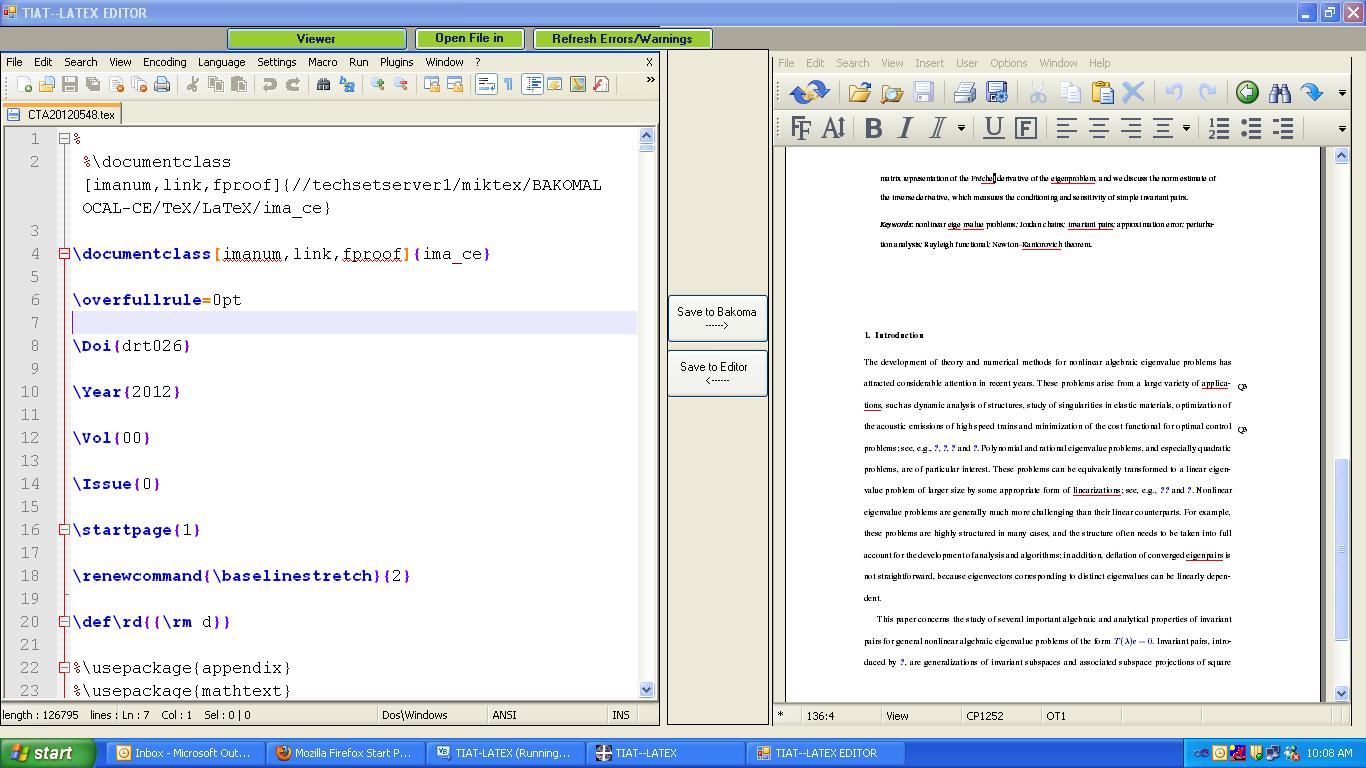
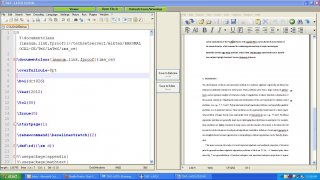
Hi Forum, I have created a VB.net Program in which i have used two panels, The panels contain two text editors (Editor1, Editor2) in each panel, I have created 2 buttons in between the panels (1. Save Editor1, 2. Save Editor2), My requirement is if i click the button (1.Save Editor 1), it shud send CTRL+S to the panel 1 which contains Editor 1, and the same with Editor 2, The Editor 1 is nothing but notepad++ text editor, i tried to send keys to notepad++ when it opened outside my VBform created Window, it works fine, but if i cal notepad++ inside my VB form, my autoit script not sending keys to the notepad++, i dont know what is the problem, i googled a lot about it, but of no use, I tried to send keys from VB.net itself and that also failing, please guide me My Autoit script Winactivate ("[class:notepad++]") sleep(500) Winwaitactive("[class:notepad++]") ControlSend("[class:notepad++]", "", "", "^{s}") I have attached the screenshot of my VB.net created form Thanks & Regards Sathish V.
-
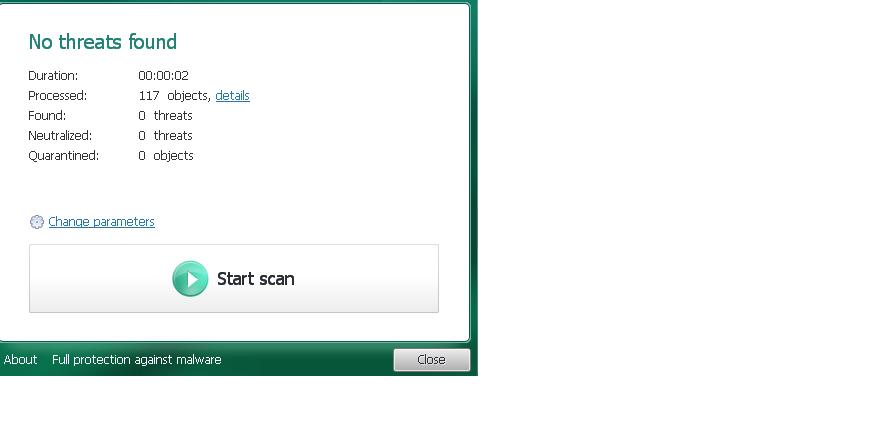
Hi Forum, I tried to automate a window, and i am facing some problems clicking the button, Here is my autoit script #RequireAdmin $tool1="D:\Virusscan\MiniToolBox.exe" $tool2="D:\Virusscan\tdsskiller.exe" ShellExecute($tool1) WinWaitActive("MiniToolBox by Farbar") ControlCommand ("MiniToolBox by Farbar", "", 3, "CHECK") sleep (100) ControlCommand ("MiniToolBox by Farbar", "", 5, "CHECK") sleep (100) ControlCommand ("MiniToolBox by Farbar", "", 7, "CHECK") sleep (100) ControlClick ( "MiniToolBox by Farbar", "", 20) WinWaitActive("[class:Notepad]") ControlSend("[class:Notepad]", "", "", "!{F4}") ShellExecute($tool2) WinWaitActive("[CLASS:#32770]") ControlClick ("[Class:#32770]", "", 1002) In this window, i need to click the Start Scan button, Here is the window properties >>>> Window <<<< Title: Class: #32770 Position: 441, 209 Size: 490, 450 Style: 0x94000044 ExStyle: 0x00010000 Handle: 0x003E0120 >>>> Control <<<< Class: ATL:00551468 Instance: 1 ClassnameNN: ATL:005514681 Name: Advanced (Class): [CLASS:ATL:00551468; INSTANCE:1] ID: 1002 Text: Start scan Position: 40, 315 Size: 410, 69 ControlClick Coords: 270, 36 Style: 0x5001000B ExStyle: 0x00000020 Handle: 0x003D0284 >>>> Mouse <<<< Position: 751, 560 Cursor ID: 0 Color: 0xFDFDFD >>>> StatusBar <<<< >>>> ToolsBar <<<< >>>> Visible Text <<<< Start scan Close Report About Full protection against malware Change parameters details >>>> Hidden Text <<<< Please guide me, Thanks in advance Sathish V.

-
<input type=file> problem, why script pauses in IE.au3
sathish replied to sathish's topic in AutoIt General Help and Support
Anyway, thanks forum, i found out a solution finally, Here is the updated code #RequireAdmin ;$btype = $CmdLine[1] ;$filepath = $CmdLine[2] ;$pass = $CmdLine[3] $btype = "Automobile Dealers" $filepath="D:\Datas\Coimbatore_Automobile-Dealers_Data.xml" $pass="avssoft" $weburl="[url="http://jrvindia.com/newdata.php"]http://jrvindia.com/newdata.php"[/url] #include <IE.au3> $oIE = _IECreate($weburl) _IELoadWait($oIE) $sText1 = _IEBodyReadHTML ($oIE) If StringInStr($sText1,"JRV INDIA Data Upload Panel") Then $oform = _IEFormGetObjByName($oIE, "form1") $obtype = _IEFormElementGetObjByName($oform, "database") $oupload = _IEFormElementGetObjByName($oform, "uploadfile") $opassword = _IEFormElementGetObjByName($oform, "secpass") ;_IEFormElementSetValue($obtype, $btype) _IEFormElementSetValue($opassword, $pass) $oSelect = _IEFormElementGetObjByName($oForm, "database") _IEFormElementOptionselect($oSelect, $btype, 1, "byText") $oT = _IEFormElementGetObjByName($oForm, "uploadfile") MouseMove (_IEPropertyGet ($oT, "screenx") + _IEPropertyGet ($oT, "width") - 10, _IEPropertyGet ($oT, "screeny") + _IEPropertyGet ($oT, "height") / 2) MouseClick ("left") WinWait ("Choose File to Upload") $hChoose = WinGetHandle ("Choose File to Upload") ControlSetText ($hChoose, "", "Edit1", $filepath) Sleep(4000) ControlClick ($hChoose, "", "Button2") $Button = _IEGetObjByName ($oIE, "upload") _IEAction ( $Button, "click" ) _IELoadWait($oIE) Endif Thank you All, Sathish V. -
<input type=file> problem, why script pauses in IE.au3
sathish replied to sathish's topic in AutoIt General Help and Support
Thanks for your reply, but the problem is the restrictions applied by IE it seems, is there any way to overcome it, all lines of my code works fine, the problem is it pauses the script after the click of Browse button, Is there any solution for that -
Hello Forum, I tried to fill up a form which has the button <input type="file">, I got success in clicking the browse button, but after that the script pauses, can't able to send any commands to the browser, why is it so, is there any security restrictions by IE, how to solve this, please help, Below is my Code #RequireAdmin ;$btype = $CmdLine[1] ;$filepath = $CmdLine[2] ;$pass = $CmdLine[3] $btype = "Automobile Dealers" $filepath="D:\Datas\Coimbatore_Automobile-Dealers_Data.xml" $pass="avssoft" $weburl="http://jrvindia.com/newdata.php" #include <IE.au3> $oIE = _IECreate($weburl) _IELoadWait($oIE) $sText1 = _IEBodyReadHTML ($oIE) If StringInStr($sText1,"JRV INDIA Data Upload Panel") Then $oform = _IEFormGetObjByName($oIE, "form1") $obtype = _IEFormElementGetObjByName($oform, "database") $oupload = _IEFormElementGetObjByName($oform, "uploadfile") $opassword = _IEFormElementGetObjByName($oform, "secpass") ;_IEFormElementSetValue($obtype, $btype) _IEFormElementSetValue($opassword, $pass) $oSelect = _IEFormElementGetObjByName($oForm, "database") _IEFormElementOptionselect($oSelect, $btype, 1, "byText") ;$oInputFile = _IEFormElementGetObjByName($oForm, "uploadfile") $oElement = _IEFormElementGetObjByName($oForm, "uploadfile") $oElement.fireEvent("onmouseover") $oInput = _IETagnameGetCollection($oForm, "input", 0) _IEAction($oInput, "click") exit ;$Button = _IEGetObjByName ($oIE, "upload") ;_IEAction ( $Button, "click" ) ;_IELoadWait($oIE) Endif HTML Code <h1 align="center">JRV INDIA Data Upload Panel</h1> <div align="center"> <form action="newdata.php" method="post" enctype="multipart/form-data" name="form1"> <table align="center"> <tr> <td colspan="2"><div align="center"><strong>Uplad New Data</strong></div></td> </tr> <tr><td> <p> <label for="select"></label> Select The Database </p> </td> <p> <label for="fileField"></label> </p></td> </tr> <tr> <td>Select The XML File</td> <td><input type="file" name="uploadfile" id="uploadfile" /></td> </tr> <tr> <td>Enter Your Password</td> <td> <label for="secpass"></label> <input type="password" name="secpass" id="secpass" /> </td> </tr> <tr> <td> </td> <td><input type="submit" name="upload" id="upload" value="Upload File" /></td> </tr> <tr> <td colspan="2"> </td> </tr> <tr> <td colspan="2"> </td> </tr> </table></form> </div> <p align="center">Developed by <a href="http://www.avssoftwares.in">AVS WEBRAMS INFOTECH</a></p> Thanks & Regards Sathish V.
-
How to Check the Status of Check BOX (Enabled/Diabled)
sathish replied to sathish's topic in AutoIt General Help and Support
Thanks for your Kind help, Now it's working fine, here is the completed code If ControlCommand("Define Styles", "", "Button24", "IsChecked", "") = 0 Then MsgBox(0, "", "not checked") Else MsgBox(0, "", "checked") EndIf -
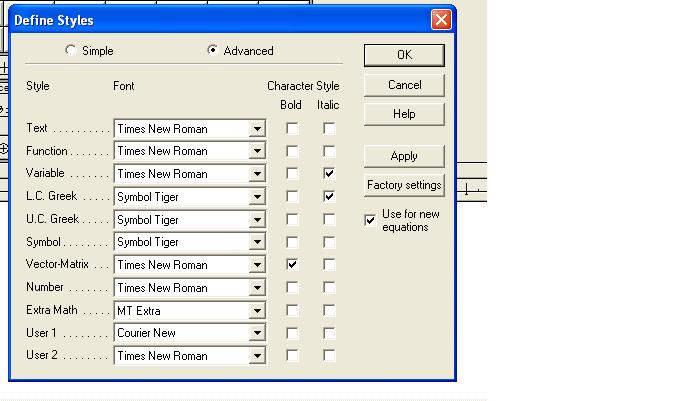
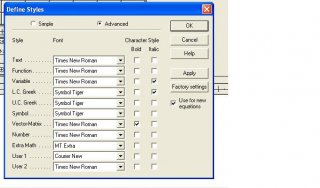
Hi Forum Members, Good Morning to all, I am new to autoit (Basically a perl developer), I have a query in window, in which several check boxes are there, i want to check a particular box, whether it is enabled or disabled, Window Screenshot: Here is the Window Properties >>>> Window <<<< Title: Define Styles Class: #32770 Position: 380, 195 Size: 449, 378 Style: 0x94C800C4 ExStyle: 0x00010101 Handle: 0x00090534 >>>> Control <<<< Class: Button Instance: 24 ClassnameNN: Button24 Name: Advanced (Class): [CLASS:Button; INSTANCE:24] ID: 156 Text: Position: 275, 224 Size: 30, 16 ControlClick Coords: 10, 4 Style: 0x50010002 ExStyle: 0x00000004 Handle: 0x000305BE >>>> Mouse <<<< Position: 668, 452 Cursor ID: 0 Color: 0xFFFFFF >>>> StatusBar <<<< >>>> ToolsBar <<<< >>>> Visible Text <<<< OK Cancel Help &Apply &Factory settings &Use for new equations &Simple A&dvanced Style Font Character Style Bold Italic &Text . . . . . . . . . . . Times New Roman Fun&ction . . . . . . . Times New Roman &Variable . . . . . . . Times New Roman &L.C. Greek . . . . . Symbol Tiger U.C. &Greek . . . . . Symbol Tiger Sym&bol . . . . . . . . Symbol Tiger Vector-&Matrix . . . . Times New Roman &Number . . . . . . . Times New Roman &Extra Math . . . . . MT Extra User &1 . . . . . . . . Courier New User &2 . . . . . . . . Times New Roman Language/Keyboard: Te&xt style . . . . . . &Other styles . . . . . . >>>> Hidden Text <<<< &Primary font: Times New Roman &Greek and math fonts: Italic &variables Italic &lower-case Greek I have done some autoit scripts in past (1 year ago), usually the send keys etc, I used the Control Command to check and Uncheck radio buttons and Check box using the following commands ControlCommand ( "Translators", "&Translation to other language (text) :", 31, "CHECK") ControlCommand ( "Translators", "T&ranslator:", 42, "Selectstring", 'Tex -- Plain Tex') ControlCommand ( "Translators", "Include translator &name in translation", 41, "UNCHECK") ControlCommand ( "Translators", "Include MathType &data in translation", 40, "UNCHECK") But I can't able to get the status of the check box, Please guide me, Thanks & Regards Sathish V.
-
Sorry for the late reply Yes through Autoit Script only (text editor)
-
Saving a Variable From Regex FIND (IF LOOP)
sathish replied to sathish's topic in AutoIt General Help and Support
Thanks Friend It helped me a lot -
Hello Forum Here is my perl code $Curr="Sathish 1184-1194, Suresh 1185-1195"; while($Curr=~m/(\d+)-(\d+)/g)#####WHILE LOOP { my $number1="$1";####SAVING First REGEX VALUE as $number1 my $number2="$2";####SAVING Second REGEX VALUE as $number2 } I searched in autoit forum to write a code like above in autoit, but it seems, i should follow some other way to write a code like this I have to write a script in which a variable contains "Sathish 1184-1194, Suresh 1185-1195" In the variable i have to search all the instances of (\d+)-(\d+) into a another variables Please guide me Thanks & Regards Sathish V.