ru2cool
-
Posts
7 -
Joined
-
Last visited
ru2cool's Achievements

Seeker (1/7)
0
Reputation
-
_WinAPI_PostMessage() question
ru2cool replied to ru2cool's topic in AutoIt General Help and Support
Thank you for being honest. -
_WinAPI_PostMessage() question
ru2cool replied to ru2cool's topic in AutoIt General Help and Support
Thank you both very much for the information. @JohnOne - I never thought of using ControlSend() to target the window itself but that actually worked perfectly. Example code below - $window = HWnd(0x008A043A) ControlSend($window, "", $window, "{TAB}") Sleep(1000) WinSetState($window, "", @SW_SHOW) WinActivate($window) Sleep(2000) WinSetState($window, "", @SW_HIDE) ControlSend($window, "", $window, "+{TAB}") Sleep(1000) WinSetState($window, "", @SW_SHOW) WinActivate($window) Sleep(2000) WinSetState($window, "", @SW_HIDE) @MilesAhead - I tried using the _SendMessage() function but it would still only send the TAB key. For the sake of learning, I would very much like to figure out how to send keys using both of those functions. If you are willing, I would be grateful for any further assistance. Example code below - #include <SendMessage.au3> #include <WindowsConstants.au3> $window = HWnd(0x008A043A) _SendMessage($window, $WM_KEYDOWN, 0x10, 0) _SendMessage($window, $WM_KEYDOWN, 0x09, 0) _SendMessage($window, $WM_KEYUP, 0x09, 0) _SendMessage($window, $WM_KEYUP, 0x10, 0) -
_WinAPI_PostMessage() question
ru2cool replied to ru2cool's topic in AutoIt General Help and Support
/bump -
I am working on a project for my job and have run into a small snag. I need the program to send TAB & SHIFT + TAB to a hidden window. The following code works flawlessly for sending just TAB - #include <WinAPI.au3> #include <WindowsConstants.au3> $window = HWnd(0x002D05D8) _WinAPI_PostMessage($window, $WM_KEYDOWN, 0x09, 0) _WinAPI_PostMessage($window, $WM_KEYUP, 0x09, 0) However, when I try to add in the SHIFT key the program still only sends TAB. Example below - #include <WinAPI.au3> #include <WindowsConstants.au3> $window = HWnd(0x002D05D8) _WinAPI_PostMessage($window, $WM_KEYDOWN, 0x10, 0) _WinAPI_PostMessage($window, $WM_KEYDOWN, 0x09, 0) _WinAPI_PostMessage($window, $WM_KEYUP, 0x09, 0) _WinAPI_PostMessage($window, $WM_KEYUP, 0x10, 0) Any assistance with this would be greatly appreciated.
-
My apologies for the delayed response, but after much testing I've been able to embed an IE window into my form & set up basic browsing controls. The program will store up to 20 URLs before it starts removing the first entry when a new URL is added. The code is a bit lengthy but I wanted to share it with the community in case someone else may have a similar need. Thank you again Dale for the most excellent assist. If I may ask, how do I edit the title of this topic to include the [sOLVED] prefix? #include <ButtonConstants.au3> #Include <Constants.au3> #include <GUIConstantsEx.au3> #include <StaticConstants.au3> #include <WinAPI.au3> #Include <WindowsConstants.au3> Local $Form1, $Border1, $Border2, $Label1, $Input1 Local $Button1, $Button2, $Button3 Local $arrURLs, $strURLs = "", $Counter = 1, $Switch = 0, $objIE, $objIEdoc _EmbedIE() Func _EmbedIE() $Form1 = GUICreate("Test", 1000, 750, 200, 50, BitOR($WS_CAPTION, $WS_SYSMENU, $WS_CLIPCHILDREN)) $Border1 = GUICtrlCreateLabel("", 0, 30, 1000, 720, $SS_SUNKEN) $Button1 = GUICtrlCreateButton("Back", 5, 5, 55, 20) $Button2 = GUICtrlCreateButton("Forward", 65, 5, 55, 20) $Button3 = GUICtrlCreateButton("GO", 665, 5, 30, 20) GUICtrlSetState($Button1, $GUI_DISABLE) GUICtrlSetState($Button2, $GUI_DISABLE) $Label1 = GUICtrlCreateLabel("URL", 125, 5, 26, 20, BitOR($SS_CENTER, $SS_CENTERIMAGE)) $Input1 = GUICtrlCreateInput("", 155, 5, 500, 20) $processID = Run(@ProgramFilesDir & "\internet explorer\iexplore.exe -k" , "", @SW_HIDE) ProcessWait($processID) Sleep(500) $objIE = _GetIEObject($processID) ObjEvent($objIE, "_IEEvent_", "DWebBrowserEvents2") $objIE.Navigate("about:blank") Do $objIEdoc = $objIE.Document Until IsObj($objIEdoc) ObjEvent($objIEdoc, "_IEDocEvent_") $hwndIE = HWnd($objIE.HWND) _WinAPI_SetParent($hwndIE, $Form1) _WinAPI_MoveWindow($hwndIE, 1, 31, 998, 718, True) _WinAPI_SetWindowLong($hwndIE, $GWL_STYLE, BitOR($WS_CHILD, $WS_VISIBLE)) GUISetState(@SW_SHOW) EndFunc Func _PageCounter() If $Switch < 1 Or $Switch > 2 Then $arrURLs = StringSplit($strURLs, ",") If $arrURLs[0] > 20 Then $strURLs = StringMid($strURLs, StringInStr($strURLs, ",") + 1) $arrURLs = StringSplit($strURLs, ",") EndIf If $Counter < 20 And $Switch > 2 Then $Counter += 1 EndIf EndIf Switch $Switch Case 1 If $Counter < 2 Then GUICtrlSetState($Button1, $GUI_DISABLE) EndIf GUICtrlSetState($Button2, $GUI_ENABLE) Case 2 If $Counter >= $arrURLs[0] Then GUICtrlSetState($Button2, $GUI_DISABLE) EndIf GUICtrlSetState($Button1, $GUI_ENABLE) Case 3 To 4 If $Counter > 1 Then GUICtrlSetState($Button1, $GUI_ENABLE) EndIf GUICtrlSetState($Button2, $GUI_DISABLE) EndSwitch EndFunc Func _GetIEObject($pid) $objShell = ObjCreate("Shell.Application") $objShellWindows = $objShell.Windows If $objShellWindows.Count > 0 Then For $objShellWindow In $objShellWindows If WinGetProcess(HWnd($objShellWindow.HWND)) = $pid Then Return $objShellWindow EndIf Next EndIf EndFunc Func _PostNavigation() While $objIE.Busy Sleep(100) WEnd GUICtrlSetData($Input1, $objIE.LocationURL) EndFunc Func _IEDocEvent_OnClick() $Switch = 4 EndFunc Func _IEEvent_BeforeNavigate2($IEobj, $IEurl, $Flags, $TargetFrameName, $PostData, $Headers, $Cancel) If $IEobj = $objIE Then GUICtrlSetData($Input1, $IEurl) EndIf EndFunc Func _IEEvent_NavigateComplete2($IEobj, $IEurl) If $IEobj = $objIE Then If $Switch = 0 Then $a = StringInStr($strURLs, ",", 0, -1) $strURLs = StringMid($strURLs, 1, $a) & $IEurl _PageCounter() Else If $strURLs = "" Then $strURLs = $IEurl _PageCounter() Else If StringInStr($strURLs, $IEurl) = 0 Then $strURLs &= "," & $IEurl _PageCounter() ElseIf $arrURLs[$arrURLs[0]] <> $IEurl Then For $a = 1 to $Counter - 1 Select Case $a = 1 $strURLs = $arrURLs[$a] Case Else $strURLs &= "," & $arrURLs[$a] EndSelect Next $strURLs &= "," & $IEurl _PageCounter() EndIf EndIf $Switch = 0 EndIf _PostNavigation() EndIf EndFunc While 1 Switch GUIGetMsg() Case $GUI_EVENT_CLOSE GUISetState(@SW_HIDE) $objIE.Quit Sleep(500) Exit Case $Button1 $Switch = 1 $Counter -= 1 _PageCounter() $objIE.Navigate($arrURLs[$Counter]) Case $Button2 $Switch = 2 $Counter += 1 _PageCounter() $objIE.Navigate($arrURLs[$Counter]) Case $Button3 $URL = GUICtrlRead($Input1) If $URL = "" Then $URL = "about:blank" EndIf $Switch = 3 $objIE.Navigate($URL) Case $Input1 ControlClick($Form1, "", $Button3) EndSwitch WEnd
-
Dale, thank you very much for the info. I will post an update once I've tested the code linked in your signature.
-
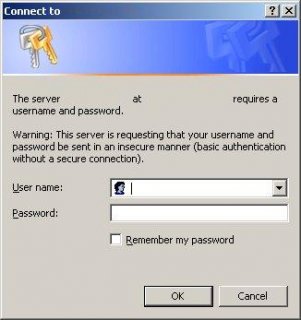
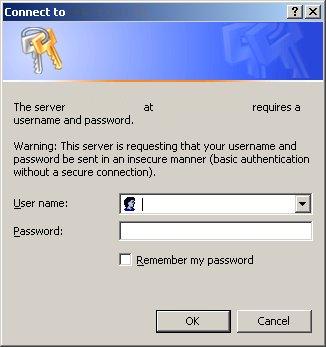
I am attempting to design a GUI with two embedded IE windows for a project at work and need help with an unexpected error. The issue I've encountered is that one of the URLs will not load. The site in question is a network server which requires authentication prior to loading the page. I am able to get the login prompt to launch if I navigate to the site using the 'InternetExplorer.Application' object. However, my GUI window simply says 'Navigation to the webpage was canceled' if I try to navigate there using the 'Shell.Application.2' object. Ideally, I would like the login prompt to launch first so the user can authenticate. I've written in a loop to delay the GUI from being displayed until both web pages have loaded. But, that does no good if navigation for the second page is canceled. If anyone knows a workaround for this issue I would be most grateful. Below is a screenshot of the login window & my code (I had to censor the IP address & server name due to our security policies at work) - #include <GUIConstantsEx.au3> #include <WindowsConstants.au3> Opt("MustDeclareVars", 1) #region ========================= SPECIAL USE VARIABLES ========================= ; INTEGERS for counters, loops, switch based logic, and function calls Local $l = 0 ; STRINGS for counters, loops, & logical statements Local $w #endregion ====================================================================== ; Control ID variables Local $Form1, $Obj1, $Obj2 ; Object variables Local $objIE1, $objIE2 $Form1 = GUICreate("Embedded Web Pages", 1001, 751, 200 , 50) $objIE1 = ObjCreate("Shell.Explorer.2") $Obj1 = GUICtrlCreateObj($objIE1, 0, 0, 1000, 375) ; I used google.com as an example only. The work related URL ; loads ok for the first embedded page. $objIE1.Navigate("http://www.google.com") $objIE2 = ObjCreate("Shell.Explorer.2") $Obj2 = GUICtrlCreateObj($objIE2, 0, 375, 1000, 375) ; Below is the URL I'm trying to use for work (IP address censored) ; $objIE2.Navigate("http://0.0.0.0/top_outbound_senders.html") ; This was a test to see if I could navigate to yahoo.com by IP address ; which does work $objIE2.Navigate("http://209.191.122.70") Do Select Case $objIE1.Busy Case $objIE2.Busy Case Else $l = 1 EndSelect Until $l = 1 GUISetState(@SW_SHOW) While 1 Switch GUIGetMsg() Case $GUI_EVENT_CLOSE Exit EndSwitch WEnd