Bitten
-
Posts
18 -
Joined
-
Last visited
Bitten's Achievements

Seeker (1/7)
0
Reputation
-
 Bitten reacted to a post in a topic:
Weird output with excel rangewrite.
Bitten reacted to a post in a topic:
Weird output with excel rangewrite.
-

Weird output with excel rangewrite.
Bitten replied to Bitten's topic in AutoIt General Help and Support
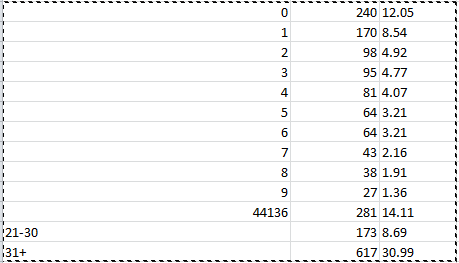
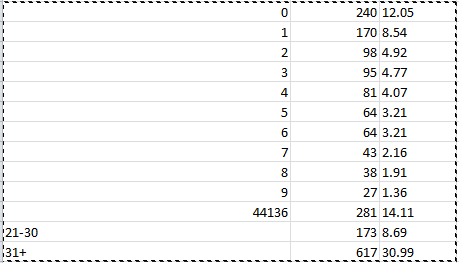
So simple! I set the format to text, and now i get the values i wanted Awesome. I was on the right track, but im a noob when it comes to excel. -
Hi, I'm having a weird issue i can't figure out. When i use _Excel_RangeWrite to outout my array to excel, i get a different value for one of the cells, than the actual array holds. The code i use is: Func OutputExcel($array) Local $oAppl = _Excel_Open() If @error Then Exit MsgBox($MB_SYSTEMMODAL, "Excel UDF: _Excel_RangeWrite Example", "Error creating the Excel application object." & @CRLF & "@error = " & @error & ", @extended = " & @extended) Local $oWorkbook = _Excel_BookNew($oAppl) If @error Then MsgBox($MB_SYSTEMMODAL, "Excel UDF: _Excel_RangeWrite Example", "Error creating the new workbook." & @CRLF & "@error = " & @error & ", @extended = " & @extended) _Excel_Close($oAppl) Exit EndIf _Excel_RangeWrite($oWorkbook, $oWorkbook.Activesheet, $array) $oAppl.ActiveSheet.Columns("A:C").AutoFit EndFuncI have an array that looks like this: 0|240|12.05 1|170|8.54 2|98|4.92 3|95|4.77 4|81|4.07 5|64|3.21 6|64|3.21 7|43|2.16 8|38|1.91 9|27|1.36 11-20|281|14.11 21-30|173|8.69 31+|617|30.99 However, when i output it to excel, the value for "11-20" is replaced with "44136" ( see image ). I'm guessing this has something to do with the format of the value, but i can't seem to make it work. Any idea's are welcome.
-
Interacting with COM object for scheduled task.
Bitten replied to Bitten's topic in AutoIt General Help and Support
Hmm, strange, it's not working on my own windows 7, however i'm part of a domain, so it may be a rights problem. I am a local administrator of my windows system though, and running it as an admin makes no difference. -
Interacting with COM object for scheduled task.
Bitten replied to Bitten's topic in AutoIt General Help and Support
Is this not the correct forum to ask this perhaps? Or is it just too weird for anyone to know -
Xcopy implementation in script fails after compilation.
Bitten replied to Bitten's topic in AutoIt General Help and Support
I'm running it on a Windows Server 2012.. maybe its some kind of rights issue. I have tried elevating the script to admin, and run the exe as admin.. but it makes no difference -
I'm trying to edit scheduled tasks through the COM object, but somehow it seems to be a little stubborn when i'm doing anything other than just reading. $TaskRootFolder = "\myFolder" $oTaskSchedule = ObjCreate("Schedule.Service") $oTaskSchedule.connect() $oRootFolder = $oTaskSchedule.GetFolder($TaskRootFolder) If IsObj($oRootFolder) then $oTaskDefinition = $oRootFolder.GetTasks(0) $NumTasks = $oTaskDefinition.count ConsoleWrite($NumTasks & " tasks found in " & $TaskRootFolder & @CRLF) For $oTask in $oTaskDefinition ConsoleWrite("Task: " & $oTask.name & " enabled: " & $oTask.enabled & @LF) $oTask.enabled = False Next Else ConsoleWrite("Task scheduler rootfolder not found." & @LF) Exit EndIf In the above code i connect just fine to the object, and i can read the tasks just fine. But nothing happens when i try to modify it with " $oTask.enabled = False ". I have tried every possible syntax of this i could think of but nothing works. Any info or ideas would be greatly appreciated.
-
Xcopy implementation in script fails after compilation.
Bitten replied to Bitten's topic in AutoIt General Help and Support
That was one of the first things i tried, and that works just fine. It seems like xcopy just wont run with " runwait() " -
Xcopy implementation in script fails after compilation.
Bitten replied to Bitten's topic in AutoIt General Help and Support
Unfortunately this has to run windows native programs only. I guess i'll stick with the shell solution for now. -
Xcopy implementation in script fails after compilation.
Bitten replied to Bitten's topic in AutoIt General Help and Support
Did that too, no difference. I even tried replacing xcopy with a different command, which works just fine. -
Xcopy implementation in script fails after compilation.
Bitten replied to Bitten's topic in AutoIt General Help and Support
It's not outputting anything, its as if the command isn't run at all. -
Xcopy implementation in script fails after compilation.
Bitten replied to Bitten's topic in AutoIt General Help and Support
Aparently this works if i use ShellExecuteWait instead.. I have no idea why though. -
Hello, I'm having a weird issue i can't figure out. When i run the script without compiling it it works just fine, however when i compile and run the exe file, nothing is done. I'm at a loss as to what is causing this issue, any suggestions are welcome. The script is compiled and run without any errors. $source = "d:\temp\Mobile\*.*" $destination = "d:\pakning" Runwait(@ComSpec & " /c " & "xcopy " & '"' & $source & '"' & ' "' & $destination & '"' & " /V /H /Y /S /E","",@SW_HIDE)
-
Hey, I have been searching a bit for a way to do some punycode conversion, i need to convert IDN domain names to their punycode counterpart. I found an example script that used a php tool on a website, but im wondering if it is possible to do this with au3 locally? Anyone got an idea or example script on how to do this?
-
Just a small update. The script Melba suggested works perfectly. Thnx a bunch!
-
You know.. that might actually do the trick! Going to test it as soon as a get a minute. It was a lot simpler than what i was expecting.. Awesome!