


nicdev007
-
Posts
26 -
Joined
-
Last visited
nicdev007's Achievements

Seeker (1/7)
0
Reputation
-
Hi there ProgAndy, I know this is an old thread, but I'm trying to print something to a label printer and wanted to use your GDI UDF. Your site seems down or may have changed. Is this UDF still available, useable? Thank you Nicdev
-
Predict Text for an Edit Control _PredictText.au3 (UDF)
nicdev007 replied to PhoenixXL's topic in AutoIt Example Scripts
Used this today in GUI after searching the forum. Time to impliment just a few minutes! Great job, nothing to add from my side. Thanks PhoenixXL! Wil use it even more in other applications :-) Cheers -
Hello everyone, Does anyone have any other ideas that I can try? Any help appreciated as for now I had to publish the GUI without tabs to avoid issues. Thanks in advance
-
For information I tried opening the folder directly with COM objects as below t (as I'm really out of ideas now!): Local $oShell = ObjCreate("shell.application") $oShell.Open("C:\Windows\") ; AND Local $oShell = ObjCreate("shell.application") $oShell.ShellExecute("C:\Windows\","","","open",1) ; tried all the vShow variables 0-5, 7 and 10 withe same results ; AND Local $oShell = ObjCreate("shell.application") $oShell.Explore("C:\Windows\") In all cases the input box loses it's frame. Now either it's a bug in windows, or the way the painting of the tab control gets done... EDIT: Anyone have any ideas? This is a really annoying bug, and I'm completely lost for ideas.
-
I agree with you on this, but how to pinpoint it is really a tough one. I tried to check with AU3info if anything changes in the GUI or the control but got no further. In the mean time i'll dig some more into the bowels of the beast to see what pops. Hopefully we can stumble across something to point in the right direction. I'll try some tests later to try and recover the attributes if I can and then see where it leads and what changes. Thanks for your help so far!! Regards Nicdev
-
I tested with both and the results are the same... curious indeed... I did some more testing and if I open a file (instead of a folder) the input box border does not disappear. I tried several folders and several files the result is the same. It's like the return back from windows explorer, after opening the folder location, is not correct or something, but that's a leap ...
-
So right: negative progress is still progress in some form :-) In any even even thought the problem is not solved yet, It has pushed me to learn a lot more! So that makes it positive progress. By the way thanks for the example you sent, it gives me an idea for another project I want to start soon. I like the way you used an array at creation time, that opens up a lot of possibilities. In fact the example I showed to explain the issue I am experiencing is just a sample code from Koda, my actual project is much larger than that, and GUI has around 12 input boxes among the 30 or so Controls, and they all disappear when the user clicks the "Open" button. The interface allows an engineer to enter information about the analysis he is doing in a structured (and controlled) way locally, and saving eventually to the main database when he is done. I tested this morning on a PC of one such engineer running Windows 10 and the result is the same, the input box disappears. while testing your last code here, I noticed that the input box on the last tab also disappears on my side. For sure it must have something to do with the loss of focus, when the button is clicked, but why it happens for me and not for you remains a mystery... If the folder location (C:\Windows\) is already open in an explorer window, then the input box does not lose it's border. If the folder location is not open yet, then the input box loses it's border, and only gets redrawn once I change tabs or hover my mouse over it. This behavior is the same for you example and mine. Thanks for all your help so far.
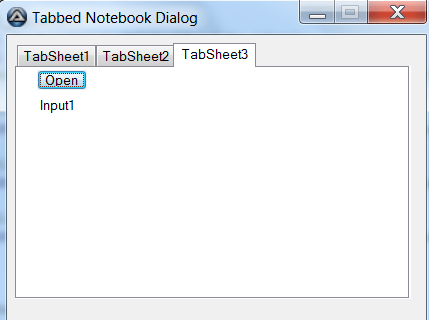
-
Hi Bilgus, Thanks for the insight, but to no avail. In the meantime I have learnt a lot about Tabcontrol handles, but nothing redraws that frame around the Input box. Here is the last code for information if someone else wants to try. I added some Console writes to show the return of _WinAPI_RedrawWindow to see if it fails. For info the Tabitem does not return a handle with GetHandle as suggested in the helpfile. That said even with the right handle it does not redraw the lost inputbox. #include <ButtonConstants.au3> #include <EditConstants.au3> #include <GUIConstantsEx.au3> #include <StaticConstants.au3> #include <TabConstants.au3> #include <WindowsConstants.au3> #include <AutoItConstants.au3> #include <WinAPI.au3> #Region ### START Koda GUI section ### Form= $Form1 = GUICreate("Tabbed Notebook Dialog", 419, 311, 299, 218) $PageControl1 = GUICtrlCreateTab(8, 8, 396, 256) $TabSheet1 = GUICtrlCreateTabItem("TabSheet1") $Button4 = GUICtrlCreateButton("Open", 40, 56, 65, 33) GUICtrlSetFont(-1, 8, 400, 0, "Arial") $Input1 = GUICtrlCreateInput("Input1", 256, 56, 50, 22, -1, 0x00000300);$WS_EX_OVERLAPPEDWINDOW) GUICtrlSetFont(-1, 8, 400, 0, "Arial") $Label1 = GUICtrlCreateLabel("Label1", 208, 56, 36, 18) GUICtrlSetFont(-1, 8, 400, 0, "Arial") $TabSheet2 = GUICtrlCreateTabItem("TabSheet2") $Button5 = GUICtrlCreateButton("Button5", 168, 88, 57, 33) GUICtrlSetFont(-1, 8, 400, 0, "Arial") $TabSheet3 = GUICtrlCreateTabItem("TabSheet3") $Button6 = GUICtrlCreateButton("Button6", 256, 64, 73, 33) GUICtrlSetFont(-1, 8, 400, 0, "Arial") GUICtrlCreateTabItem("") $Button1 = GUICtrlCreateButton("&OK", 166, 272, 75, 25) $Button2 = GUICtrlCreateButton("&Cancel", 246, 272, 75, 25) $Button3 = GUICtrlCreateButton("&Help", 328, 272, 75, 25) GUISetState(@SW_SHOW) #EndRegion ### END Koda GUI section ### ;~ ConsoleWrite("Handle form (" & $Form1 & ")" & @CRLF) ;~ ConsoleWrite("Handle Tab (" & GUICtrlGetHandle($PageControl1) & ")" & @CRLF) ;~ ConsoleWrite("Handle TabItem (" & GUICtrlGetHandle($TabSheet1) & ")" & @CRLF) ;~ ConsoleWrite("Handle Input (" & GUICtrlGetHandle($Input1) & ")" & @CRLF) While 1 $nMsg = GUIGetMsg() Switch $nMsg Case $GUI_EVENT_CLOSE Exit Case $Button4 $FolderPath = "C:\Windows" ShellExecute($FolderPath,"","",$SHEX_OPEN) ;$iHandle = GUICtrlGetHandle($Input1) ;$bRedraw = _WinAPI_RedrawWindow($iHandle,0,0, BitOr($RDW_INVALIDATE, $RDW_UPDATENOW)); ;OR this one ;$iHandle = $Form1 ;$bRedraw = _WinAPI_RedrawWindow($iHandle,0,0, $RDW_UPDATENOW) ;Or ;$iHandle = $Form1 ;$bRedraw = _WinAPI_RedrawWindow($iHandle,0,0, BitOr($RDW_INVALIDATE, $RDW_UPDATENOW)) ;Or ;Get handle to TAB control $iHandle = ControlGetHandle($Form1, "", "SysTabControl321") $bRedraw = _WinAPI_RedrawWindow($iHandle,0,0, BitOr($RDW_INVALIDATE, $RDW_UPDATENOW)); ;$bRedraw = _WinAPI_RedrawWindow($iHandle,0,0, BitOr($RDW_INTERNALPAINT,$RDW_ALLCHILDREN)); ConsoleWrite("Redraw return value:-" & $bRedraw & " for Handle (" & $iHandle & ")" & @CRLF) EndSwitch WEnd Open to any suggestions... On my home PC i'm running Windows 7 family premium edition, and on my work PC Win 7 enterprise, both behave the same way. BR Nicdev
-
Hi ther KickStarter15 and Bilgus, I tried both your suggestions, but it is still the same for me. Really strange you do not have the same on your side .... Just to show you what happens, here is a screencapture video. By elimination I downloaded again the latest Autoit from the website to be sure it is not an issue with the compiler, but after all I tried it is still the same. Any other suggestions? Keep in mind it is only when I have a GUI with tabs 5.avi
-
Thanks for the try but still the same ... Strangely when I remove the tabs (having just a normal GUI without tabs) it solves the problem (see code below). It looks like ShellExecute takes the focus away from the GUI tab, and does not redraw it correctly afterwards, but maybe I'm wrong. Any ideas? I'm completely lost here, and not for a lack of trying :-( #include <ButtonConstants.au3> #include <EditConstants.au3> #include <GUIConstantsEx.au3> #include <StaticConstants.au3> #include <TabConstants.au3> #include <WindowsConstants.au3> #include <AutoItConstants.au3> #Region ### START Koda GUI section ### Form= $Form1 = GUICreate("Tabbed Notebook Dialog", 419, 311, 299, 218) ;$PageControl1 = GUICtrlCreateTab(8, 8, 396, 256) ;$TabSheet1 = GUICtrlCreateTabItem("TabSheet1") $Button4 = GUICtrlCreateButton("Open", 40, 56, 65, 33) GUICtrlSetFont(-1, 8, 400, 0, "Arial") $Input1 = GUICtrlCreateInput("Input1", 256, 56, 97, 22) GUICtrlSetFont(-1, 8, 400, 0, "Arial") GUICtrlSetStyle(-1, $WS_BORDER) $Label1 = GUICtrlCreateLabel("Label1", 208, 56, 36, 18) GUICtrlSetFont(-1, 8, 400, 0, "Arial") ;$TabSheet2 = GUICtrlCreateTabItem("TabSheet2") ;$Button5 = GUICtrlCreateButton("Button5", 168, 88, 57, 33) ;GUICtrlSetFont(-1, 8, 400, 0, "Arial") ;$TabSheet3 = GUICtrlCreateTabItem("TabSheet3") ;$Button6 = GUICtrlCreateButton("Button6", 256, 64, 73, 33) ;GUICtrlSetFont(-1, 8, 400, 0, "Arial") ;GUICtrlCreateTabItem("") $Button1 = GUICtrlCreateButton("&OK", 166, 272, 75, 25) $Button2 = GUICtrlCreateButton("&Cancel", 246, 272, 75, 25) $Button3 = GUICtrlCreateButton("&Help", 328, 272, 75, 25) GUISetState(@SW_SHOW) #EndRegion ### END Koda GUI section ### While 1 $nMsg = GUIGetMsg() Switch $nMsg Case $GUI_EVENT_CLOSE Exit Case $Button4 ShellExecute("C:\Windows\","","",$SHEX_OPEN) EndSwitch WEnd
-
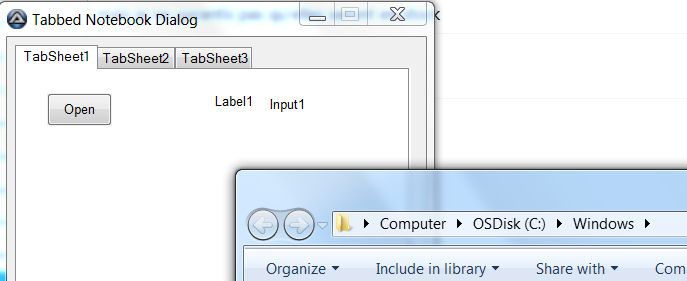
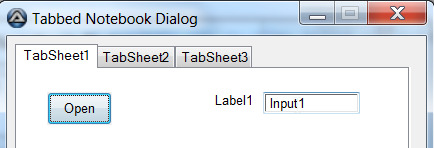
Hello KickStarter15, Thanks for your feedback and test. Strange thing is I tested again and have the same results as I had before. Even with the box around the inputbox. The one parameter to be sure of is that the folder must not already be open before you click the button (meaning make sure all explorer windows are closed when doing the test). Test start: Click on the button (Folder opens) and the Input box loses it's frame... Moving my mouse pointer over the Input bow makes it re-appear! Any ideas or comments greatly appreciated! For information I have tested it on a Win7 and Win 10 machine and the results are the same. BNR Nicdev
-
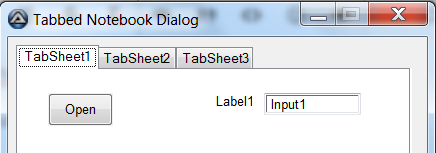
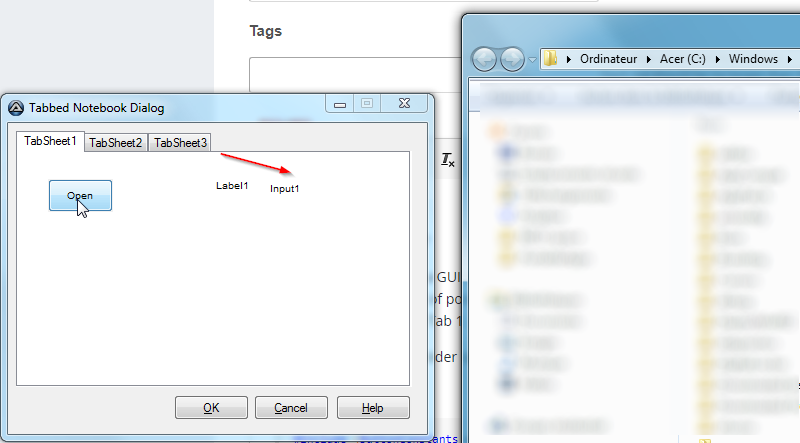
Hello All, Hope you are doing well? I have a small issue with a GUI not redrawing properly, after I click a button to open a windows folder location. For simplicity I have made an example to explain (to avoid posting all my code). I have searched a lot of posts on redrawing the GUI but have not been able to resolve this, and I'm sure i'm forgetting something silly. The code creates a simple 3 tab GUI, with a button and Input box on Tab 1. The button opens a folder location (in this case C:\Windows\). The problem: Once the folder opens, the input box "loses" its box (if that makes sense)-> See the image attached. Your help is greatly appreciated as always Best regards Nicdev #include <ButtonConstants.au3> #include <EditConstants.au3> #include <GUIConstantsEx.au3> #include <StaticConstants.au3> #include <TabConstants.au3> #include <WindowsConstants.au3> #include <AutoItConstants.au3> #Region ### START Koda GUI section ### Form= $Form1 = GUICreate("Tabbed Notebook Dialog", 419, 311, 299, 218) $PageControl1 = GUICtrlCreateTab(8, 8, 396, 256) $TabSheet1 = GUICtrlCreateTabItem("TabSheet1") $Button4 = GUICtrlCreateButton("Open", 40, 56, 65, 33) GUICtrlSetFont(-1, 8, 400, 0, "Arial") $Input1 = GUICtrlCreateInput("Input1", 256, 56, 97, 22) GUICtrlSetFont(-1, 8, 400, 0, "Arial") $Label1 = GUICtrlCreateLabel("Label1", 208, 56, 36, 18) GUICtrlSetFont(-1, 8, 400, 0, "Arial") $TabSheet2 = GUICtrlCreateTabItem("TabSheet2") $Button5 = GUICtrlCreateButton("Button5", 168, 88, 57, 33) GUICtrlSetFont(-1, 8, 400, 0, "Arial") $TabSheet3 = GUICtrlCreateTabItem("TabSheet3") $Button6 = GUICtrlCreateButton("Button6", 256, 64, 73, 33) GUICtrlSetFont(-1, 8, 400, 0, "Arial") GUICtrlCreateTabItem("") $Button1 = GUICtrlCreateButton("&OK", 166, 272, 75, 25) $Button2 = GUICtrlCreateButton("&Cancel", 246, 272, 75, 25) $Button3 = GUICtrlCreateButton("&Help", 328, 272, 75, 25) GUISetState(@SW_SHOW) #EndRegion ### END Koda GUI section ### While 1 $nMsg = GUIGetMsg() Switch $nMsg Case $GUI_EVENT_CLOSE Exit Case $Button4 ShellExecute("C:\Windows\","","",$SHEX_OPEN) EndSwitch WEnd
-
 nicdev007 reacted to a post in a topic:
check if file is open before FileMove()
nicdev007 reacted to a post in a topic:
check if file is open before FileMove()
-
nicdev007 reacted to a post in a topic:
Get the value of last cell used in row
-
Thanks, helped me today as well :-) For information though I had to change it to "FileExists($folder)" to make it work. Cheers
-
nicdev007 reacted to a post in a topic:
If folder exists...
-
Hi water, I've been using your Excel UDF for a few weeks now to write a GUI front-end for a shared Excel file on the network, accessed by multiple users daily. I just wanted to send out a thanks to you and anyone else involved in creating this UDF ! It works like a charm :-) Cheers Nicdev
-
nicdev007 reacted to a post in a topic:
ExcelChart UDF
-
Excel sequential serial number To DATE
nicdev007 replied to DXRW4E's topic in AutoIt Example Scripts
Hi DXRW4E, I was about to write a function to do this when I stumbled onto yours! It works great! Just wanted to shout out a thank you for the code :-) Ciao