undream
-
Posts
14 -
Joined
-
Last visited
undream's Achievements

Seeker (1/7)
0
Reputation
-
Buttons not working when the script is running ?
undream replied to undream's topic in AutoIt General Help and Support
oh thank you, I will look into this. I got the logic behind it. By the way, what I'm building overall is pretty simple, but... after your example I have another question in mind: Is it normal that everything is inside of a big while loop ? I mean, is this what is supposed to be in a program with a gui ? -
Buttons not working when the script is running ?
undream replied to undream's topic in AutoIt General Help and Support
Oh I get it now, thank you for the explanatory example ! I would love to know if ther is a way to use the timer like the sleep command, which I use a lot in my original code (not the simplified one) Seemslike it will be impossible to use it this way, How can I turn the timer into something that works almost like _waitFor(1000) -
Buttons not working when the script is running ?
undream replied to undream's topic in AutoIt General Help and Support
You are right. Here is the simplified version of the code which has the very same problem. I hope this explains the problem, #NoTrayIcon #include <GUIListView.au3> #include <GuiToolbar.au3> #include <ButtonConstants.au3> #include <GUIConstantsEx.au3> #include <WindowsConstants.au3> #Region ### START Koda GUI section ### $Aut = GUICreate("Automator", 335, 163, 438, 207) $StartButton = GUICtrlCreateButton("START", 8, 120, 105, 33) GUISetState(@SW_SHOW) #EndRegion ### END Koda GUI section ### $running = 0 $a = 0 While 1 $nMsg = GUIGetMsg() Switch $nMsg Case $GUI_EVENT_CLOSE Exit Case $StartButton if $running = 0 Then $running = 1 GUICtrlSetData($StartButton, "STOP") init() Else $running = 0 GUICtrlSetData($StartButton, "START") EndIf EndSwitch WEnd func loop() $a = $a + 1 Sleep(1000) if $running = 1 Then loop() EndIf EndFunc Func init() $a = 0 loop() EndFunc -
Here is a fairly simple problem. I'm probobly doing somethingwrong. There is a GUI button, that I use to run my script loop. When it is pressed (and my autoit script is runniing) no other buttons on my GUI (including the windows's close button) is not working any more. I'm asking this to learn the point I am missing. Waiting for a reply, Thank you
-
Tried, still the same. Nothing changed. The opening windows opens instantly anyway.
-
Hello everyone. I'm trying to send commands to a toolbar button, which opens up a window. And then I want to press another button in that window to execute a command. Here is the code that opens the window named "send settings" (bysending the button command) ControlCommand ( $APP, "", $handleToolbar, "SendCommandID", 32820) and here is the code that closes the window named "send settings" (again via button command") ControlCommand ( "Send Set", "", "[CLASS:Static; INSTANCE:14]", "SendCommandID", 1) Both of them works. When I run the first command only, it opens up the second window. When I open up the vindow by hand and send up the second code line, it "executes" and closes the second window action. However, when the code is stucked like this, the second windows never closes, its like the second command is not even there: ControlCommand ( $APP, "", $handleToolbar, "SendCommandID", 32820) Sleep(1000) ControlCommand ( "Send Set", "", "[CLASS:Static; INSTANCE:14]", "SendCommandID", 1) Why can this be ? Do you have any ideas ? I've tried playing with the sleep time too, it didnt do any change.
-
_GUICtrlToolbar_ClickButton - witout "focus" ?
undream replied to undream's topic in AutoIt General Help and Support
no replies ? This should be simple I suppose... -
I would like to click one button on my toolbar, found this function. Would love to know if there is a way to click the buttons on toolbars using a function like this (that works with "command id" instead of coordinate) but NOT focus the application like this click does.. I want my script to run at the background so I need to get over this focus to window issue... Thank you.
-
How can I press a button on a "ToolbarWindow32" ? I dont want to send mouse position but send the id of a button or so.. This is an external application so I first need to get the buttons, then be able to press one of them through autoit. is thispossible ?

-
THank you that was amazing. Helped a lot !
-
ControlListView not properly selecting entries
undream replied to DGClarke1's topic in AutoIt GUI Help and Support
May I ask how you made this work please ? How did you select the window (and the program) with this command ? Thank you. -
SysListView32 control handling
undream replied to riddertje's topic in AutoIt General Help and Support
I have almost exactly the same problem (have my topic active) but can't find a solution... -
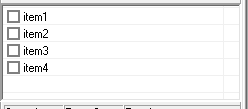
I was able to get the item count with the following script. $count = ControlListView ("MyProgram", "", "[CLASS:SysListView32; INSTANCE:2]", "GetItemCount") However, I dont have any idea on how to "check" the items.. Needing a hand here ! Thank you.
-
Hello everyone. As a starter autoit user, I have to say I'm already in love with this gear ! Thank you for it ! My question might be very simple, but I'm struggling to find a solution for the last 2 days without any hope so far. I have an application which I would like to reach the list (SysListView32) and check-uncheck items one by one with 10 seconds of delay automatically. Item count changes (manually added or removed when needed) so I want to be able to "get" the item count from the list and depend the rest of the script on this count.. What is the easiest way to realize what I'm looking for ? Get the number of items, and check all of them one by one.. Thanks !