Dizzy
-
Posts
223 -
Joined
-
Last visited
Dizzy's Achievements

Polymath (5/7)
2
Reputation
-
 RichardL reacted to a post in a topic:
Excel and Conditional Formatting
RichardL reacted to a post in a topic:
Excel and Conditional Formatting
-
Hi Jos, you're right -- sorry! @FrancescoDiMuro: Yes, that's what i was looking for. Thanks
-
Hi, i had lost track of the AutoIT topic for a while. But i still have in mind that i once had a function where i could display the time, the mouse position, or other text directly at the mouse pointer. Where can i find the appropriate code? Thank you
-
Hi SmOke_N, thanks for your help. Same for me with your code. I've inserted same consolewrites as checkpoints #include <IE.au3> #include <MsgBoxConstants.au3> Local $oIE = _IECreate("http://www.clever-tanken.de/tankstelle_details/20205", 0, 0) _IELoadWait($oIE) _myScrape($oIE) _IELoadWait($oIE) Func _myScrape(ByRef $oObj) ConsoleWrite("In Func" & @crlf) If Not IsObj($oObj) Then Return SetError(1, 0, 0) EndIf ConsoleWrite("No Error_1" & @crlf) ; step 1. <div class="fuel_price_entry ng-scope" Local $oDivs = _IETagNameGetCollection($oObj, "DIV") ConsoleWrite("Found oDivs : " & $oDivs & @crlf) If Not IsObj($oDivs) Then Return SetError(2, 0, 0) EndIf ConsoleWrite("No Error_2" & @crlf) ; find matching class objeects Local $aItems[0][3], $iDim = 0 ConsoleWrite("Found aItems : " & $aItems & @crlf) For $oItm In $oDivs If String($oItm.className) = "fuel_price_entry ng-scope" Then ReDim $aItems[$iDim + 1][3] $aItems[$iDim][0] = $oItm $iDim += 1 EndIf Next If $iDim = 0 Then Return SetError(3, 0, 0) ; nothing found EndIf ConsoleWrite("No Error_3" & @crlf) ; we have an array of container objects now For $iItem = 0 To $iDim - 1 ; we need to know the type of fuel $oDivs = _IETagNameGetCollection($aItems[$iItem][0], "DIV") ConsoleWrite("Found oDivs_2 : " & $iItem & @crlf) For $oItm In $oDivs Switch String($oItm.className) Case "fuel_type" $aItems[$iItem][1] = StringRegExpReplace($oItm.innerText, "(.+?)(\v*.*?)", "$1") Case "price_field price_dirty" $aItems[$iItem][2] = String($oItm.innerText) EndSwitch Next Next ; reformat return array to remove objects found Local $aRet[$iDim][2] For $i = 0 To $iDim - 1 $aRet[$i][0] = $aItems[$i][1] ; type of fuel $aRet[$i][1] = $aItems[$i][2] ; price field/dirty (that just sounds bad) ConsoleWrite("aRet[" & $i &"][0] :" & $aRet[$i][0] & @crlf) ConsoleWrite("aRet[" & $i &"][1] :" & $aRet[$i][1] & @crlf) Next Return $aRet EndFunc Result: I've tried to translate this to FF - has taken a moment to see that i have to use mozl ... #include "FF.au3" ;_FFConnect(default,Default,6000) Local $oFire= _FFStart("http://www.clever-tanken.de/tankstelle_details/20205") _myScrape($oFire) _FFQuit() Func _myScrape(ByRef $oObj) ConsoleWrite("In Func" & @crlf) If Not IsObj($oObj) Then Return SetError(1, 0, 0) EndIf ConsoleWrite("No Error_1" & @crlf) ; step 1. <div class="fuel_price_entry ng-scope" Local $oDivs = _FFObjGet($oObj, "DIV") ConsoleWrite("Found oDivs : " & $oDivs & @crlf) If Not IsObj($oDivs) Then Return SetError(2, 0, 0) EndIf ConsoleWrite("No Error_2" & @crlf) ; find matching class objeects Local $aItems[0][3], $iDim = 0 ConsoleWrite("Found aItems : " & $aItems & @crlf) For $oItm In $oDivs If String($oItm.className) = "fuel_price_entry ng-scope" Then ReDim $aItems[$iDim + 1][3] $aItems[$iDim][0] = $oItm $iDim += 1 EndIf Next If $iDim = 0 Then Return SetError(3, 0, 0) ; nothing found EndIf ConsoleWrite("No Error_3" & @crlf) ; we have an array of container objects now For $iItem = 0 To $iDim - 1 ; we need to know the type of fuel $oDivs = _FFObjGet($aItems[$iItem][0], "DIV") ConsoleWrite("Found oDivs_2 : " & $iItem & @crlf) For $oItm In $oDivs Switch String($oItm.className) Case "fuel_type" $aItems[$iItem][1] = StringRegExpReplace($oItm.innerText, "(.+?)(\v*.*?)", "$1") Case "price_field price_dirty" $aItems[$iItem][2] = String($oItm.innerText) EndSwitch Next Next ; reformat return array to remove objects found Local $aRet[$iDim][2] For $i = 0 To $iDim - 1 $aRet[$i][0] = $aItems[$i][1] ; type of fuel $aRet[$i][1] = $aItems[$i][2] ; price field/dirty (that just sounds bad) ConsoleWrite("aRet[" & $i &"][0] :" & $aRet[$i][0] & @crlf) ConsoleWrite("aRet[" & $i &"][1] :" & $aRet[$i][1] & @crlf) Next Return $aRet EndFunc Result: Whats wrong with this code? You wrote, you'll get it on FF - can you show me how? I'm not fixed on IE. Thanks Dizzy
-
Hi water, i just use Firefox to "inspect" the website-code. It is regardless wether using Firefox or IE. Do you have a first step for me? Thanks Dizzy
-
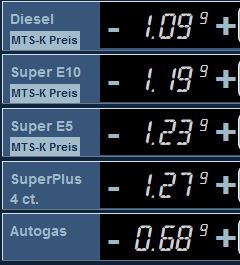
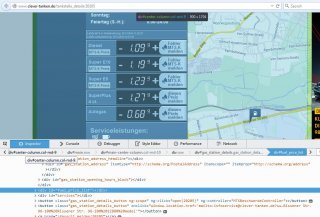
Hi JohnOne, i've tried to use the _IE options to get the value. The best result was to read the whole html to text - but this can't be the right way. I use the Firefox inspector to see which name, ID or ... this belongs to. I think, that all needed information shoud be found around the <div ID "fuel_price_list" - see "Firefox_Inspector.JPG". But i didn't know how i should look for this "ID" and how to get to 5 different prices into variables (maybe in one array?). So i stumple around to get this values - using debug and "try&error" I want to read these values (Petrol.jpg) every 30 minutes and store them in a excel sheet. 48 entries / day and over ~ 30 days. Thanks for helping me. Dizzy And : do you know how to change the title? There is a little misspelling there "Excel" ... #include <IE.au3> #include <MsgBoxConstants.au3> #include <Debug.au3> _DebugSetup() Local $oIE = _IECreate("http://www.clever-tanken.de/tankstelle_details/20205", 0, 0) _IELoadWait($oIE) ;Local $sText = _IEBodyReadText($oIE) Local $iNumFrames $oFrames = _IEFrameGetCollection ($oIE) ;_DebugReport("$oFrames = " & $oFrames) $iNumFrames = @extended ;_DebugReport("$iNumFrames = " & $iNumFrames) For $i = 0 to ($iNumFrames - 1) $oFrame = _IEFrameGetCollection ($oIE, $i ) msgBox(1, " var type " & VarGetType( $oFrame) , @error ) $oForms = _IEFormGetCollection ($oFrame) Next
-
Hi all, i've tried to get the prices of the different petrol sorts - but i didn't get them. As aou can see, there are "Diesel", "Super E10", "Super E5", "SuperPlus" and "Autogas". --> http://www.clever-tanken.de/tankstelle_details/20205 Can someone help me to get them from this site to a excel sheet? Thanks Dizzy
-
Hi, your code looks very good, but i'll get following error: "_FF Windows GetHandle General Error" and i didn't get any information about the actual title, artist ... Mayby you'll have a look? Thanks Dizzy (And: Is it possible to extend your script to save the album picture?)
-
Hi BrewManNH, thanks - i'll give it a try. Greets Dizzy
-
Hi, i was looking for an Autoit-script that scans an IP range and wrote the usual server parameters (CPU, RAM, Disk, etc.) into a central database but with no luck. Can anyone help me? Thanks Dizzy
-
 czardas reacted to a post in a topic:
loop excatly every 10 seconds
czardas reacted to a post in a topic:
loop excatly every 10 seconds
-
No problem - the code is good :-) Thanks Dizzy
-
Hi, thanks for your ideas and code. Maybe there was a small confusion. Yes, every PC will have a amount of drift over 24 hours, but this was not the problem. I just want to start my function 6 times a minute and that as good as possible exactly every 10 seconds. So i think, that the adlib method or the code from BrewManNH will almost do it for me. Problem solved - thanks! Dizzy
-
@BrewManNH : Yes, you're right ... sometimes life is so easy. Thanks for your solution. Dizzy
-
libRegister seems to be the right command for me ... I'll have to check this over some hours. Dizzy
-
Hi, thanks for reply. If tried the timerinit/ -diff function but this won't fit my task. E.g. Local $begin = TimerInit() $a = 1 Do Sleep(3000) Local $dif = TimerDiff($begin) ConsoleWrite("Info:" & $dif & @crlf) until $a = 0 The result is following: Info:2998.8729 Info:5998.9561 Info:8999.3238 Info:11999.4497 Info:15000.0982 Info:18000.2154 Info:21000.6013 Info:24001.1772 Info:27001.6252 Info:30002.4631 Info:33001.9012 Info:36002.9748 Info:39003.6952 Info:42002.9822 My job should run 24 hours or more ... I will save some system information exactly every 10 seconds (and 'yes' - the job will be done in less than 10 seconds ;-)). Is there a way to do this? @kylomas: i think this wan't work. If i use 2300 for the sleep, i will miss some 10'th steps. Thanks Dizzy
-
Hi together, i want to go through a Loop every 10 seconds. But depending the code inside the loop, the time differs. E. g. Do Select Case @SEC = 0 or @SEC = 10 or @SEC = 20 or @SEC = 30 or @SEC = 40 or @SEC = 50 ... do something ... end select Until $bHotKeyPressed How can i be sure that the loop will be done exactly on the 10'th of a second? Thanks for your help! Dizzy