c.haslam
-
Posts
747 -
Joined
-
Last visited
-
Days Won
1
c.haslam's Achievements

-
 emcodem reacted to a post in a topic:
Get string from pointer to memory [Solved]
emcodem reacted to a post in a topic:
Get string from pointer to memory [Solved]
-
How to check syntax without AutoIt saving the script?
c.haslam replied to c.haslam's topic in AutoIt GUI Help and Support
Thank you for your 2 cents. -
How to check syntax without AutoIt saving the script?
c.haslam replied to c.haslam's topic in AutoIt GUI Help and Support
To me, it is desirable to have a script that has bugs in it, bugs that AutoIt catches, not be saved automatically. It makes sense to be able to avoid saving such code until it has been fixed. -
How to check syntax without AutoIt saving the script?
c.haslam replied to c.haslam's topic in AutoIt GUI Help and Support
Thanks. Where are the various tools documented? -
ioa747 reacted to a post in a topic:
cDebug, an alternative to a graphical debugger
-
In SciTe, of course
-
So can either be used in all cases?
-
In some code I wrote years back, I see GuiSetState(@SW_SHOW,$frmEdit) but the Help for GuiSetState() has $SW_SHOW. Are $SW_SHOW and @SW_SHOW different?
-
Thanks. Looking at the example for _GUICtrlListView_AddSubItem() I see this: if you think of a Listview as a table, with 1-based rows and 1-based columns, an Item is column 1 and a SubItem is any other column. To add column n one has to _GUICtrlListView_InsertColumn for columns 1 to n-1 first.
-
Is there a way of populating a listview without using a printable character to delineate columns? (Perhaps I should write subitems rather than columns.) The examples appear to use the | character, but what if a cell can contain any keyboard character?
-
Thanks. How about adding a checkbox to the window? How can one catch a user clicking on it?
-
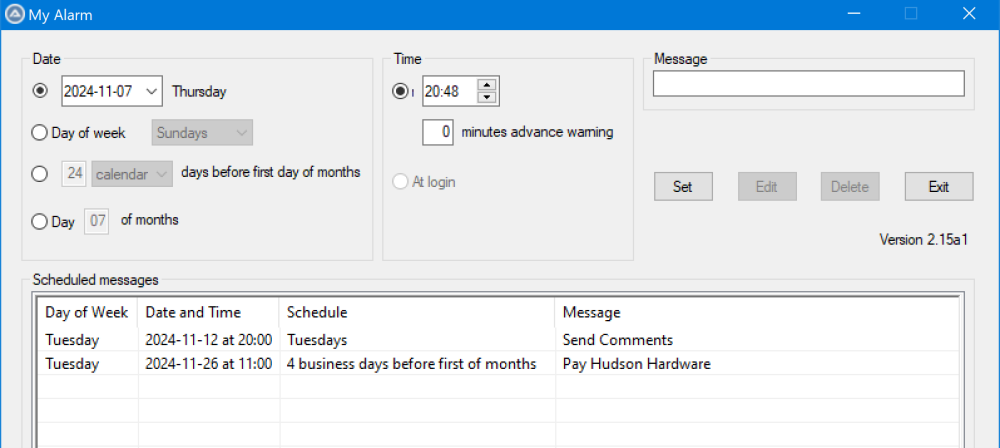
When user enters stuff in e.g. Date, Time and Message then clicks on Set the data appears in a Listview item. If the user clicks on a ListView item and presses Edit (which disables Set), the data of that item appears in the Date, Time and Message controls. minutes advance warning is also available. e.g. if he enters 10 in that control, rather than 0, for the Send Comments item, the Date and Time changes to 20:38 and the Message changes to 20:48 My script has been working for years, but there is/are subtle bugs, so the time has come for a rewrite.
-
How can I detect when the user clicks: In the ListView control, but not on an item? Outside the Listview control but in the window? The user may have clicked on another control or outside all controls.
-
Creating a "brushed up" Task Scheduler UDF?
c.haslam replied to water's topic in AutoIt General Help and Support
I see my error: DeleteExpiredTaskAfter has to be before registering. Thanks. -
Creating a "brushed up" Task Scheduler UDF?
c.haslam replied to water's topic in AutoIt General Help and Support
Its is at least 10 minutes since I ran the task. The endtime is set to 2 minutes after _NowCalc(). -
Creating a "brushed up" Task Scheduler UDF?
c.haslam replied to water's topic in AutoIt General Help and Support
I have changed my code to: #include "TaskScheduler.au3" Local $oService = _TS_Open() _TS_ErrorNotify(2) ; to MsgBox if _TS_TaskExists($oService,"\Test\starttime") Then _TS_TaskDelete($oService,"\Test\starttime") EndIf Local $startTime = _DateAdd("n",1,_NowCalc()) $startTime = StringReplace($startTime,"/","-") $startTime = StringReplace($startTime," ","T") Local $endTime = _DateAdd("n",2,_NowCalc()) $endTime = StringReplace($endTime,"/","-") $endTime = StringReplace($endTime," ","T") Local $oTaskDefinition = _TS_Wrapper_TaskCreate($oService, "", "") if $oTaskDefinition=0 then MsgBox(1,11,"bad") _TS_Wrapper_PrincipalSet($oTaskDefinition,$TASK_LOGON_INTERACTIVE_TOKEN) if @error<>0 then msgbox(1,13,"bad") _TS_Wrapper_TriggerDateTime($oTaskDefinition,$TASK_TRIGGER_TIME,0, 0, $startTime,$endTime) if @error<>0 then msgbox(1,15,"bad") _TS_Wrapper_ActionCreate($oTaskDefinition,"Notepad") if @error<>0 then msgbox(1,17,"bad") if _TS_FolderExists($oService,"\Test")=0 Then _TS_FolderCreate($oService,"\Test") EndIf _TS_Wrapper_TaskRegister($oService, "\Test","starttime",$oTaskDefinition, Default, Default,$TASK_LOGON_INTERACTIVE_TOKEN) if @error<>0 then msgbox(1,22,"bad") Local $ar = ["Settings|DeleteExpiredTaskAfter|PT20S"] _TS_TaskPropertiesSet($oTaskDefinition,$ar) if @error<>0 Then MsgBox(1,"DeleteExpiredTaskAfter",@error) MsgBox(1,30,"$startTime " & $startTime & " $endTime " & $endTime) Local $ar = _TS_TaskValidate($oService,"\Test\starttime") _TS_Close($oService) I see this: I see similar for lines 1198, 2017 and 2022. None of the msgBoxes show. NotePad opens as expected. I then close it. I do now have PT20S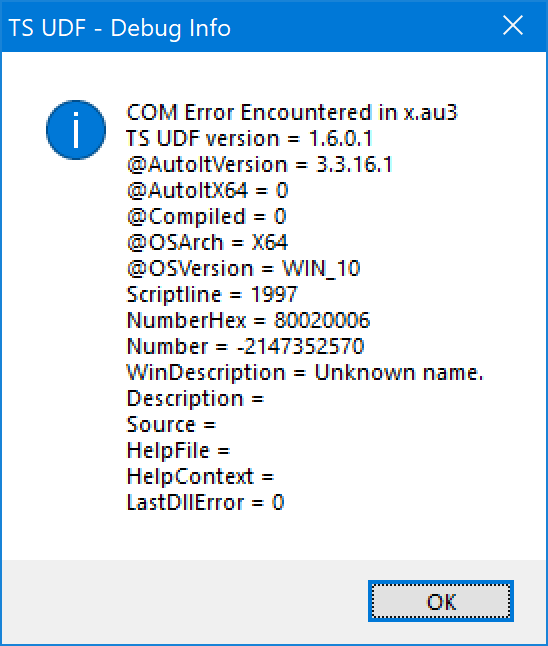
-
#AutoIt3Wrapper_AU3Check_Parameters
c.haslam replied to c.haslam's topic in AutoIt General Help and Support
Thank you