
Modify ↓
Opened on Oct 6, 2017 at 7:17:31 PM
Closed on Oct 7, 2017 at 7:13:57 PM
#3569 closed Bug (No Bug)
CmdLine parameter charset
| Reported by: | Owned by: | ||
|---|---|---|---|
| Milestone: | Component: | AutoIt | |
| Version: | 3.3.14.0 | Severity: | None |
| Keywords: | Cc: |
Description
I have script for get parameter as text with special charsets but i do not show as original line. How i can show as original? On this forum i find only How file open as UTF-8, etc. But this problem no.
cmd script:
@echo off
Test.exe "D:\Folder1\Folder2\ěščřžýáíéúů\Folder3" "green.txt"
exit
Test.au3 script:
#include <MsgBoxConstants.au3>
#include <file.au3>
#include <Array.au3>

Global $parameter
If Not $CmdLine[0] Then
    MsgBox(0, 'Info', 'Sorry but you not defined param for running.' & @CRLF & @CRLF & @CRLF & 'Examples:' & @CRLF & @CRLF & @ScriptName & ' "C:\Path\PathNext" "filename.ext"')
    Exit
EndIf

Global Enum $giParam_1,$giParam_2,$giParam_UBound
Global $aParams[$giParam_UBound]
For $i = 1 to UBound($CmdLine)-1
    If $i > $giParam_UBound Then
        MsgBox(0, 'Info', "More Params included than expected!" & @CRLF & @CRLF & " Accept Params is: " & $giParam_UBound)
        ;ExitLoop
        Exit
    EndIf
    $aParams[$i-1]=$CmdLine[$i]
Next

MsgBox(1, "Split", $aParams[$giParam_1] & "\" & $aParams[$giParam_2])
;MsgBox(1, "Split 2", $CmdLineRaw) ;;; have bug too

Exit
Bad output:
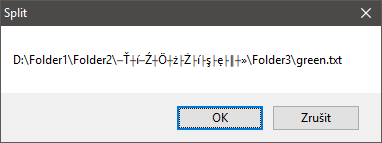
Attachments (0)
Change History (3)
comment:1 by , on Oct 7, 2017 at 5:10:19 PM
Version 0, edited on Oct 7, 2017 at 5:10:19 PM by (next)
comment:2 by , on Oct 7, 2017 at 7:13:49 PM
I am closing this as Nobug and let's continue the discussion in the forum:
https://www.autoitscript.com/forum/topic/190592-cmdline-parameter-charset/?do=findComment&comment=1368073
comment:3 by , on Oct 7, 2017 at 7:13:57 PM
| Resolution: | → No Bug |
|---|---|
| Status: | new → closed |
Note:
See TracTickets
for help on using tickets.

Can't replicate it and is working fine for me:
The MSGBOX shows:
Split
D:\Folder1\Folder2\ěščřžýáíéúů\Folder3\green.txt
OK Annuleren