
Opened on May 17, 2010 at 3:55:45 AM
Closed on May 19, 2010 at 10:04:24 AM
Last modified on May 25, 2010 at 4:44:57 AM
#1626 closed Bug (Fixed)
TCPSend( ) only transmits half simplified Chinese characters
| Reported by: | txj | Owned by: | Jpm |
|---|---|---|---|
| Milestone: | 3.3.7.0 | Component: | AutoIt |
| Version: | 3.3.6.0 | Severity: | None |
| Keywords: | TCPSend | Cc: |
Description
In AutoIt 3.3.6.0, run example in TCPRecv( ) first, then run example in TCPSend( ).
now, input some simplified Chinese characters in "Data for Server" dialog box, only half simplified Chinese characters diaplayed in "My Server" dialog box. see picture.
Attachments (1)
Change History (6)
by , on May 17, 2010 at 3:57:53 AM
| Attachment: | TCPSendBug.JPG added |
|---|
comment:1 by , on May 17, 2010 at 2:26:13 PM
In fact TCPSend/TCPRecv work with ANSI or binary. Not sure what can be done to have UNICODE chars going thru...
follow-up: 5 comment:2 by , on May 19, 2010 at 2:45:32 AM
The following works. From the examples you mention, change the client line 48 into
TCPSend($ConnectedSocket, StringToBinary($szData, 4))
and in the server, change lines 67+:
{{{ ; Try to receive (up to) 2048 bytes
;----------------------------------------------------------------
$recv = TCPRecv($ConnectedSocket, 2048, 1)
; If the receive failed with @error then the socket has disconnected
;----------------------------------------------------------------
If @error Then ExitLoop
; convert from UTF-8 to AutoIt native UTF-16
$recv = BinaryToString($recv, 4)
; Update the edit control with what we have received
}}}
This way, you transmit UTF-8 data. If the client has to send both binary and string data, you need to make the server aware of that so that it doesn't "decode from UTF-8" actual binary data that would instead need be passed verbatim.
comment:3 by , on May 19, 2010 at 9:38:43 AM
Thanks jchd,
I will add some doc info about this situation.
comment:4 by , on May 19, 2010 at 10:04:24 AM
| Milestone: | → 3.3.7.0 |
|---|---|
| Owner: | set to |
| Resolution: | → Fixed |
| Status: | new → closed |
Fixed by revision [5837] in version: 3.3.7.0
comment:5 by , on May 25, 2010 at 4:44:57 AM
Replying to jchd:
The following works. From the examples you mention, change the client line 48 into
TCPSend($ConnectedSocket, StringToBinary($szData, 4))
and in the server, change lines 67+:
{{{ ; Try to receive (up to) 2048 bytes
;----------------------------------------------------------------
$recv = TCPRecv($ConnectedSocket, 2048, 1)
; If the receive failed with @error then the socket has disconnected
;----------------------------------------------------------------
If @error Then ExitLoop
; convert from UTF-8 to AutoIt native UTF-16
$recv = BinaryToString($recv, 4)
; Update the edit control with what we have received
}}}
This way, you transmit UTF-8 data. If the client has to send both binary and string data, you need to make the server aware of that so that it doesn't "decode from UTF-8" actual binary data that would instead need be passed verbatim.
I change code as you mention above, all simplified Chinese characters send OK.
thank you, jchd.


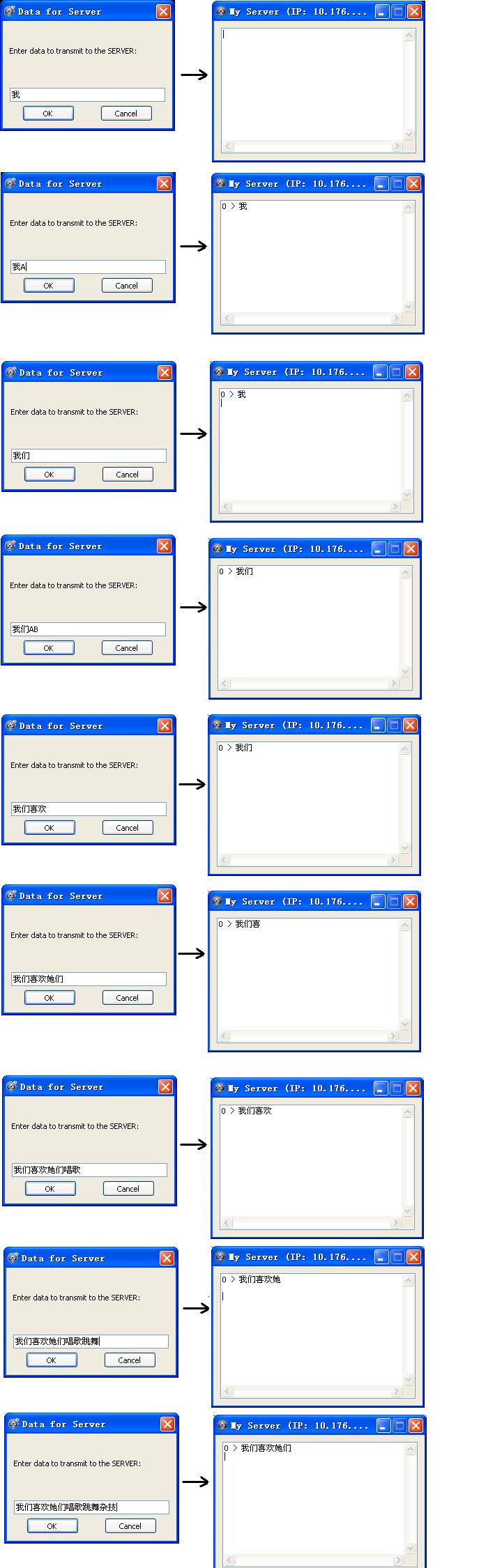
TCPSend( ) only sends half simplified Chinese characters