
Opened on Mar 13, 2008 at 9:28:53 AM
Closed on Mar 14, 2008 at 7:11:48 PM
Last modified on Mar 14, 2008 at 9:00:05 PM
#167 closed Bug (Fixed)
SciTe4AutoIt3 8-3-2008 Installs beta Aut2exe.exe
| Reported by: | JayMan | Owned by: | Jos |
|---|---|---|---|
| Milestone: | Future Release | Component: | SciTE4AutoIt |
| Version: | 3.2.10.0 | Severity: | |
| Keywords: | Compiler Aut2exe.exe SciTe | Cc: |
Description
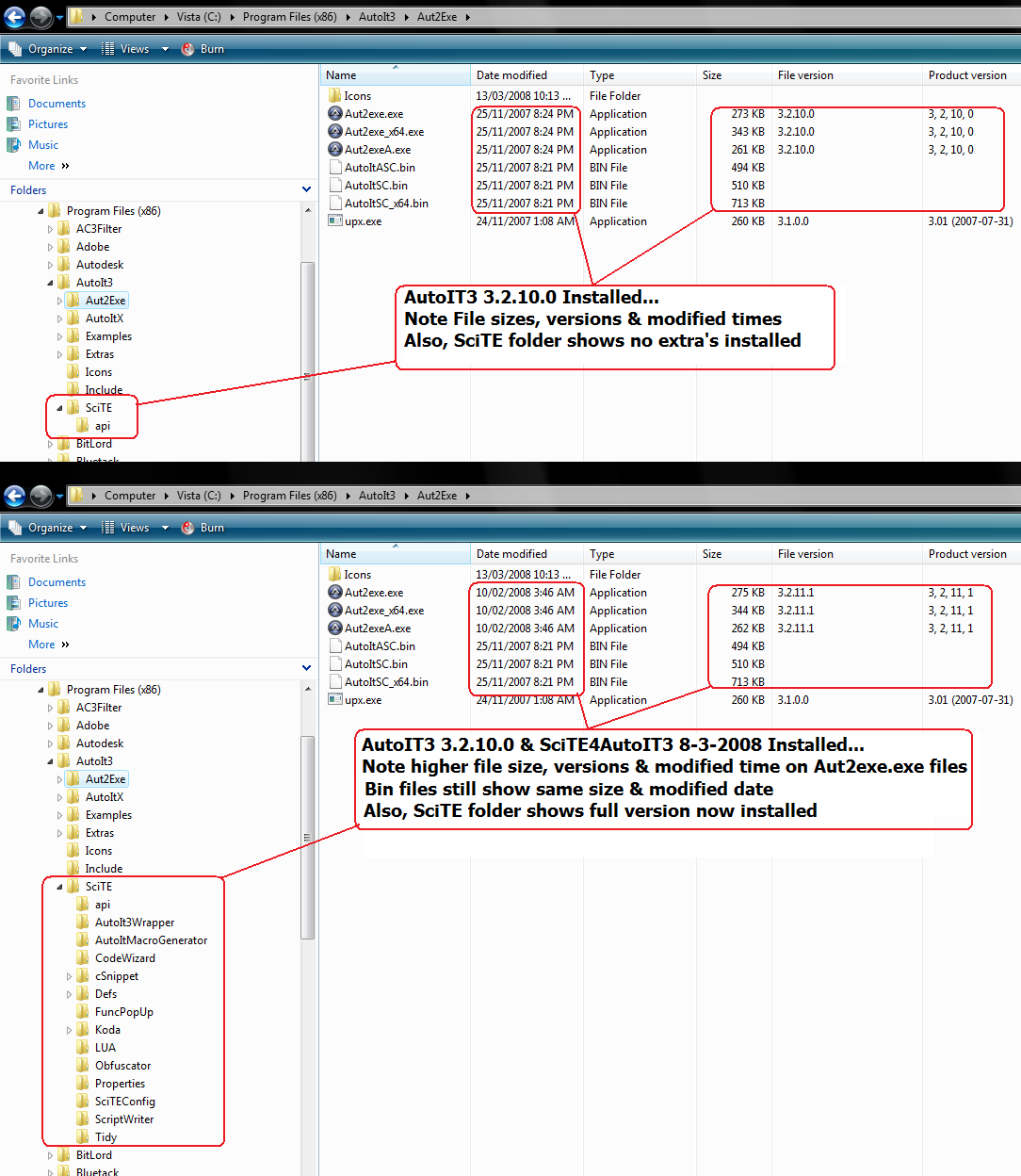
When installing SciTe3AutoIt3 released on 8-3-2008 (with definitions for 3.2.10.0 & Beta 3.2.11.1) it also replaces the Aut2exe.exe & Aut2exe_x64.exe in the 3.2.10.0 installation with the 3.2.11.1 versions.
This means any au3 files that are writting using the 3.2.10.0 definitions, actually get compiled with the beta au3 version. Meaning commands like RunAsSet() now fail.
Uninstalling everything & then installing just AutoIT3 3.2.10.0 & NOT the full SciTe4AutoIT3 gets this working correctly again.
I have confirmed this on XP Sp2 & Vista x64.
Attachments (1)
Change History (7)
follow-up: 2 comment:1 by , on Mar 13, 2008 at 10:04:29 AM
comment:2 by , on Mar 13, 2008 at 11:00:32 AM
Ofcourse i tested this... I spent most of today working out why the heck my script with a RunAsSet() stopped working after installing the latest SciTe4AutoIT3 version.
To replicate:
1) Install AutoIT3 3.2.10.0
2) Create a script using even just
RunAsSet()
3) Check version info of Aut2Exe.exe (shows 3.2.10.0)
4) Run Aut2Exe.exe & compile the script to an exe, run the exe & u'll have no errors
5) Install SciTe4AutoIT3 8-3-2008
6) Check version info of Aut2Exe.exe again (now shows 3.2.11.1)
7) Run Aut2Exe.exe & compile the script to an exe, run the exe & u'll now have the error "Unknown function name"
Let me know if you need more info... I can replicate this 100% of the time on 2 seperate PC's.
by , on Mar 13, 2008 at 11:28:58 AM
| Attachment: | SciTE4AutoIT3-8-3-2008bug.png added |
|---|
Screenshot showing file version changes
comment:3 by , on Mar 13, 2008 at 1:17:41 PM
yes thats true, the lexing is done by aut2exe and removed commands, like RunAsSet(), are not backwards compatible thus will cause this issue.
Looks like this is a "catch 22", I need the functionality (commandline parameters) of the new aut2exe with the updated version of AutoIt3Wrapper but that will cause this error.
Will check to see if there is an other option here...
comment:4 by , on Mar 13, 2008 at 2:38:30 PM
Maybe we should just get Jon to build and sign a special version of Aut2Exe that's compatible with 3.2.10.0 but which is slightly newer so that it behaves more how I have Aut2Exe working now. I both added several new slash-commands and relaxed the command-line parsing so that it didn't fail with invalid commands. I may have made these changes *before* any other changes to Aut2Exe so it might be as simple as saying, "Jon, build revision XXXX, sign it and upload it for people to use".
I'll try to remember to take a look later and see if there is such a 3.2.10.0 compatible revision of Aut2Exe which still incorporates all the other changes I made.
comment:5 by , on Mar 14, 2008 at 7:11:48 PM
| Resolution: | → Fixed |
|---|---|
| Status: | new → closed |
Uploaded a updated SciTE4AutoIt3 installer containing an aut2exe that is backwards compatible with the AutoIT3 3.2.10.0 version. (Thanks Valik)


This assumption is not correct. Did you check this with any of your compiled programs?
The aut2exe program is only a wrapper program. The *.bin files is determining the version of the runtime included in the output exe.
Jos