
Opened on Jan 2, 2012 at 6:05:41 PM
#2089 closed Bug (Fixed)
_IEFormSubmit gives WEnd^ ERROR
| Reported by: | Owned by: | ||
|---|---|---|---|
| Milestone: | Component: | Standard UDFs | |
| Version: | 3.3.8.0 | Severity: | None |
| Keywords: | _IEFormSubmit IE9 | Cc: |
Description
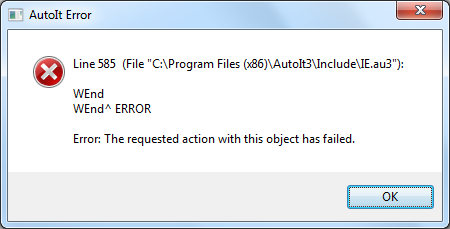
With AutoIt 3.2 and IE8 this works fine. With AutoIt 3.3.8.0 this code gives an error on _IEFormSubmit: AutoIt Error Line 585 (File "C:\program files\autoit3\Include\IE.au3"):
WEnd
WEnd ERROR
Error: The requested action with this object has failed.
#include <IE.au3>
#include <file.au3>
$oIE = _IECreate ("http://www.gmail.com")
$oForms = _IEFormGetCollection ($oIE)
$oForm = _IEFormGetObjByName ($oIE, "gaia_loginform")
$oEmail = _IEFormElementGetObjByName ($oForm, "Email")
_IEFormElementSetValue ($oEmail, "<gmail account>")
$oPasswd = _IEFormElementGetObjByName ($oForm, "Passwd")
_IEFormElementSetValue ($oPasswd, "<password>")
_IEFormSubmit ($oForm)
Attachments (2)
Change History (17)
follow-up: 2 comment:1 by , on Jan 3, 2012 at 6:58:56 AM
comment:2 by , on Jan 14, 2012 at 8:50:20 PM
Replying to Jpm:
Just an info Win7 x86/IE9 run OK
Did you provide a valid gmail username/password? The error is only given after a succesfull login.
by , on Jan 19, 2012 at 3:56:07 PM
| Attachment: | Erreur AutoIt.png added |
|---|
comment:3 by , on Jan 19, 2012 at 3:59:55 PM
I have the same error with Windows 7 and IE8.
My code is :
; Ouvrir une page Internet Explorer avec l'URL XXXXXXX
$sURL = "XXXXXXXXXXXX"
$oIE = _IECreate($sURL)
; Cliquer sur le lien correspondant pour poursuivre navigation (certificat)
_IELinkClickByText($oIE, "Poursuivre avec ce site Web (non recommandé).")
sleep(1000)
_IELinkClickByText($oIE, "Click here to sign in again")
sleep(1000)
; Saisir les informations de connexion et envoyer le formulaire
$o_form = _IEFormGetObjByName($oIE, "frmLogin")
$o_login = _IEFormElementGetObjByName($o_form, "username")
$o_password = _IEFormElementGetObjByName($o_form, "password")
_IEFormElementSetValue($o_login, "XXXXXXXXXX")
_IEFormElementSetValue($o_password, "XXXXXXXXXXX")
_IEFormSubmit($o_form)
Sleep(1000)
Thank you for your correction
follow-up: 5 comment:4 by , on Jan 19, 2012 at 8:21:59 PM
This is clear bug in IE.au3. It's unbelievable that code can be as dumb and at the same time that no one had reported the issue before.
I'll try to find out who is responsible for the situation.
comment:5 by , on Jan 21, 2012 at 8:46:59 PM
Replying to trancexx:
This is clear bug in IE.au3...
I'll try to find out who is responsible for the situation.
DaleHohm is creator of IE UDF.
comment:6 by , on Mar 21, 2012 at 5:29:10 PM
Hey guys, for what it's worth, I had a script that ran fine for over a year, then I upgraded to 3.3.8.1 and it started crashing inside a While/WEnd loop. It was bad scripting on my part, but it still shouldn't have caused the error:
While 1
If ...something...
ElseIf ...another thing...
EndIf
ContinueLoop
WEnd
It would hit "ContinueLoop" and say that it must be called inside a loop...
Also, the offending function, _IELoadWait, is exactly the same as it was a year ago, so how would that be causing an error now?
comment:7 by , on Apr 2, 2012 at 8:16:09 PM
Hello,
The problem just _IELoadWait and _IEGetObjectType function
In _IELoadWait, AutoIt Errror is recorded by the instruction _IEInternalRegister (Line 551)
Then, line 560, there is a call at _IEGetObjectType
In this function, we also _IEInternalRegister, but especially in the end we make _IEInternalDeRegister that resets AutoIt Error to its initial value
Result: No functionality to trap COM errors
In Pj : IE.zip (Correction for this ticket)
comment:8 by , on Apr 12, 2012 at 8:39:35 PM
Dear thtioxine@…
I tested with your patch and the result is: There is no error thrown but the problem is that function call _IEFormSubmit() could not return and the program just hang at that line.
comment:9 by , on Apr 13, 2012 at 4:55:55 AM
I tried again with the patch IE.au3 today as follow:
- added to my program code "_IELoadWaitTimeout(10000)"
- when calling _IEFormSubmit(), program just wait until timeout then it print out the following error:
--> IE.au3 V2.4-0 Error from function _IELoadWait, $_IEStatus_GeneralError (Invalid Error Status - Notify IE.au3 developer)
follow-up: 11 comment:10 by , on May 13, 2012 at 10:03:20 PM
Woks fine if run .au3 file.
But after compile to .exe? i have "Line 1438 Error: The requested action with this object has failed" each time when i try to run this .exe
comment:11 by , on May 13, 2012 at 10:10:13 PM
Replying to sickm1nd:
Woks fine if run .au3 file.
But after compile to .exe? i have "Line 1438 Error: The requested action with this object has failed" each time when i try to run this .exe
This problem appears when i try to use obfuscator. Without obfuscator .exe works fine
comment:12 by , on May 23, 2012 at 4:04:13 PM
| Component: | AutoIt → Standard UDFs |
|---|
comment:13 by , on Aug 10, 2012 at 9:03:55 PM
When I use the IE.au3 posted here the WEnd error is gone, bust now I get:
--> IE.au3 V2.4-0 Warning from function _IEFormGetObjByName, $_IEStatus_NoMatch
--> IE.au3 V2.4-0 Error from function _IEFormElementGetObjByName, $_IEStatus_InvalidDataType
--> IE.au3 V2.4-0 Error from function _IEFormElementSetValue, $_IEStatus_InvalidDataType
--> IE.au3 V2.4-0 Error from function _IEFormElementGetObjByName, $_IEStatus_InvalidDataType
--> IE.au3 V2.4-0 Error from function _IEFormElementSetValue, $_IEStatus_InvalidDataType
--> IE.au3 V2.4-0 Error from function _IEFormSubmit, $_IEStatus_InvalidDataType
So this seems not to be the solution.
comment:14 by , on Apr 2, 2013 at 11:25:06 PM
This issue is fixed in the 3.3.9.x beta stream. The code has not yet been released in a beta, but is posted here: http://www.autoitscript.com/forum/files/file/227-ieau3/ and can be used with the 3.3.9.x beta versions.
The code takes advantage of the new autoit version changing COM errors to non-fatal and no longer required in internal COM error handler in IE.au3.
There certainly was a logic error in IE.au3 that allowed this to happen, but this code was released and unchanged for years and only recent AutoIt versions/IE versions experience the issue for some reason.
Dale
comment:15 by , on Apr 7, 2013 at 10:19:25 AM
| Resolution: | → Fixed |
|---|---|
| Status: | new → closed |


Just an info Win7 x86/IE9 run OK