
Modify ↓
Opened on Feb 8, 2026 at 2:51:45 PM
#4070 closed Feature Request (Completed)
CHM HelpFile should open externall links in default windows browser
| Reported by: | mLipok | Owned by: | Jpm |
|---|---|---|---|
| Milestone: | 3.3.19.0 | Component: | Documentation |
| Version: | Severity: | None | |
| Keywords: | Cc: |
Description (last modified by )
For example in Running under Windows 64-bit Edition section of the CHM HelpFile
there is:
<a href="http://msdn.microsoft.com/library/default.asp?url=/library/en-us/winprog64/winprog64/file_system_redirector.asp">MSDN</a>
which acts like:
but it should be:
<a href="http://msdn.microsoft.com/library/default.asp?url=/library/en-us/winprog64/winprog64/file_system_redirector.asp" target="_blank">MSDN</a>
which acts like:
The only change is to use <a href=.......... target="_blank">MSDN</a>
In such case it will open the links out of the CHM file (in deffault Windows Browser) and you avoid errors like in the attached screenshot.
Attachments (1)
Change History (5)
by , on Feb 8, 2026 at 2:52:49 PM
| Attachment: | AutoIt HelpFile - błąd skryptu.png added |
|---|
comment:1 by , on Feb 8, 2026 at 2:53:42 PM
| Description: | modified (diff) |
|---|
comment:2 by , on Feb 8, 2026 at 2:55:25 PM
| Description: | modified (diff) |
|---|
comment:4 by , on Feb 20, 2026 at 7:45:40 AM
| Milestone: | → 3.3.19.0 |
|---|---|
| Owner: | set to |
| Resolution: | → Completed |
| Status: | new → closed |
Added by revision [13291] in version: 3.3.19.0
Note:
See TracTickets
for help on using tickets.


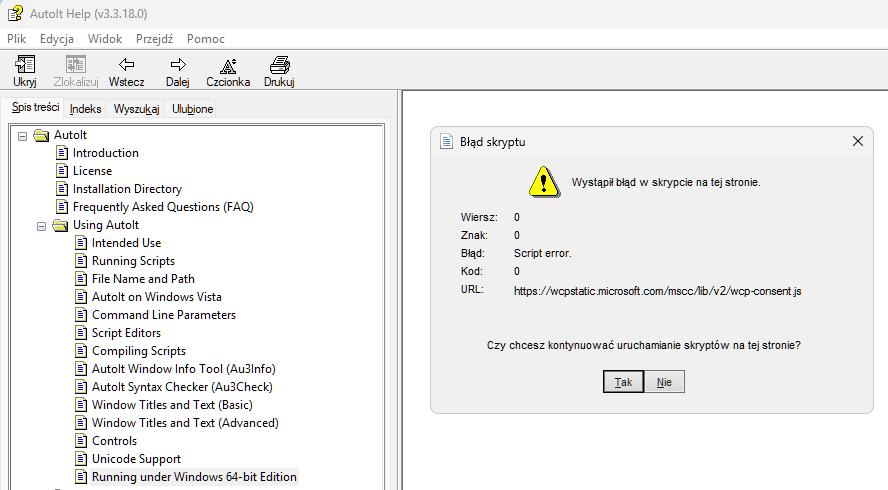
AutoIt CHM HelpFil - script error when click the MSDN link