
Opened on Jan 31, 2008 at 11:58:06 AM
Closed on Feb 1, 2008 at 10:46:23 PM
Last modified on Feb 2, 2008 at 2:34:06 AM
#91 closed Bug (No Bug)
"_ScreenCapture_CaptureWnd" does not work on Win2k
| Reported by: | Moto | Owned by: | Gary |
|---|---|---|---|
| Milestone: | Component: | Standard UDFs | |
| Version: | 3.2.10.0 | Severity: | |
| Keywords: | ScreenCapture | Cc: |
Description
When I try to use "_ScreenCapture_CaptureWnd" function defined in "ScreenCapture.au3" on Windows 2000 OS, it produces following error
---------------------------
Fatal Error
---------------------------
AVector: []: Out of bounds.
---------------------------
OK
---------------------------
However if I try the same thing on Windows XP, it takes screenshot properly.
Following is the script which I run.
#include<ScreenCapture.au3>
_ScreenCapture_CaptureWnd("test.bmp", WinGetHandle(""))
I faced this problem in AutoIt version "3.2.10.0"
Attachments (1)
Change History (5)
by , on Jan 31, 2008 at 11:58:55 AM
| Attachment: | screencapture.png added |
|---|
comment:1 by , on Feb 1, 2008 at 10:01:44 AM
Does the example in the help file work or give you an error also?
This example:
#include <ScreenCapture.au3>

_Main()

Func _Main()
   Local $hGUI

   ; Create GUI
   $hGUI = GUICreate("Screen Capture", 400, 300)
   GUISetState()

   ; Capture window
   _ScreenCapture_CaptureWnd (@MyDocumentsDir & "\GDIPlus_Image.jpg", $hGUI)

EndFunc   ;==>_Main
follow-up: 4 comment:2 by , on Feb 1, 2008 at 10:06:59 AM
Forgot because Win2k doesn't have GDIPlus included you have to install it.
Do you have it installed?
comment:3 by , on Feb 1, 2008 at 10:46:23 PM
| Resolution: | → nobug |
|---|---|
| Status: | new → closed |
comment:4 by , on Feb 2, 2008 at 2:34:06 AM
Do you have it installed?
No I did not install it. And now I checked it does work for both Au3 script and the compiled executable with the dll.
Forgot to check "GDIPlus.au3".
Thanks.


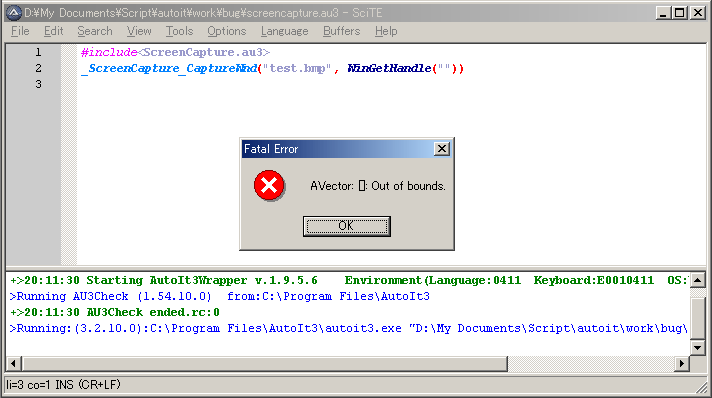
Screenshot of the screencapture error message.