littleclown
-
Posts
123 -
Joined
-
Last visited
littleclown's Achievements

Adventurer (3/7)
0
Reputation
-
Hello. This is a really simple code to show you the percent of the people that hate something in this moment. There is no GUI, just console output. #include <inet.au3> #include <string.au3> $maxper=0 $minper=100 Func _search($searchword) $searchword=StringReplace($searchword," ","+") $searchurl="http://www.google.com/search?hl=en&prmdo=1&tbs=qdr%3An10&tbm=blg&q=%22"& $searchword & "%22&aq=f&aqi=g8g-c1g1&aql=f&oq=" $source=_INetGetSource($searchurl) $result=_StringBetween($source,"<div id=resultStats>About "," results<nobr>") $result=StringReplace($result[0],",","") Return $result EndFunc Do $ihate=_search("i+hate") $ilike=_search("i+like") $tper= 100 / ($ihate + $ilike) $per = round($ihate * $tper,2) consolewrite($per & @CRLF) sleep(10000) until 5=6 The idea is so simple - I search in all blog posts in the last 10 minutes for the words "I hate" and "I like", and get the percent of the "I hate" results count. Its fun If you have ideas for other interesting statistics - please share with me .
-
arduino command line tool
littleclown replied to littleclown's topic in AutoIt General Help and Support
Hi again.Maybe http://bitlash.net/wiki/start can be the code from Arduino side. This is a language that can be triggered directly from serial port connection. Now I try to run the test . EDIT: I test it and works just great. The short story: bitlash is a library that can be used to communicate with Arduino from serial port. For example if you send to Arduino using serial connection: print d13 Will return you the result from digital pin 13. But bitlash have a lot of other function. The full list is here: http://bitlash.net/wiki/functions You can send all these function to serial and they will be executed on the board. You can create functions and start it. The function will be written in the EEPROM memoty and will be there even if you power cycle the board. EDIT 2: There is just no sense to recreate some of the bitlash functions in new commands. I will just try to find good command line based program to send command to serial port. I found this one: http://www.comp.lancs.ac.uk/~albrecht/sw/terminal/index.html and will se is this work -
arduino command line tool
littleclown replied to littleclown's topic in AutoIt General Help and Support
OK. Here is my first step. Very simple command line tool that prepare commands to be sent true serial to arduino board. The syntax is very close to the original arduino commands. Some examples: comduino digitalWrite 10 HIGH comduino digitalWrite A3 LOW comduino analogRead 5 comduino digitalRead 5 This is the full list of commands actually - just digitalwrite, digitalread and analogwrite. With these 3 simple commands you can control all pins and all environment connected to the board You can use analog ports as digital - the script will check for this. There is some basic debug information and error messages if you put something wrong. You can see some serial communication related lines. I will use ini file for serial port configuration. Please comment! #Region ;**** Directives created by AutoIt3Wrapper_GUI **** #AutoIt3Wrapper_Change2CUI=y #EndRegion ;**** Directives created by AutoIt3Wrapper_GUI **** #include 'CommMG.au3' Global $CMPort = 25 ; Port Global $CmBoBaud = 9600 ; Baud Global $CmboDataBits = 8 ; Data Bits Global $CmBoParity = "none" ; Parity Global $CmBoStop = 1 ; Stop Global $setflow = 2 ; Flow Global $sportSetError = '' $write=-1 _CommSetPort($CMPort, $sportSetError, $CmBoBaud, $CmboDataBits, $CmBoParity, $CmBoStop, $setflow) if $cmdLine[0] < 2 Then ConsoleWrite($cmdLine[0] & "Wrong number of parameters. You need at least command and pin parameter to run this program") Exit EndIf $cmdCommand=$cmdLine[1] $cmdPin=$cmdLine[2] if $cmdLine[0] > 2 then $cmdWrite=$cmdLine[3] Else $cmdWrite=0 EndIf $pinType=1 ;Check da command parameter if StringInStr($cmdCommand,"digitalread",0) <> 0 Then $command=1 ElseIf StringInStr($cmdCommand,"digitalwrite",0) <> 0 Then $command=2 ElseIf StringInStr($cmdCommand,"analogread",0) <> 0 Then $command=3 Else ConsoleWrite("wrong command parameter. Use digitalRead, digitalWrite or AnalogRead") Exit EndIf ;Check the type of pin if stringinstr($cmdPin,"A",0)=0 Then $pinType=1 $pin=StringTrimLeft($cmdPin,1) Else $pinType=2 $pin=$cmdPin EndIf $pin=$pin+0 ;Check if pin is integer if IsInt($pin)=0 Then ConsoleWrite("Pin Parameter is not an Integer. Example for pin parameter - 1,2,3 or if you need to use analog pin as digital - A1,A2,A3") Exit EndIf ;Check if pin is positive if $pin<0 Then ConsoleWrite("Pin parameter can't be negative. Example for pin parameter - 1,2,3 or if you need to use analog pin as digital - A1,A2,A3") Exit EndIf ;IF the command is digitarwrite, read the write parameter... haha :) if $command=2 then if StringInStr($cmdWrite,"high",0) <> 0 Then $write=1 Elseif StringInStr($cmdWrite,"low",0) <> 0 Then $write=0 Else ConsoleWrite("Wrong write parameter. Use HIGH and LOW only") Exit EndIf EndIf ConsoleWrite("Command: " & $command & ", PIN: " & $PIN & ", Write: " & $write & ", PinType: " & $pinType) Exit -
arduino command line tool
littleclown replied to littleclown's topic in AutoIt General Help and Support
You know Arduino is not just a robot platform. For me this is the ultimate sensor interface to PC or to Arduino itself. And there is so many thinks that you can automate with sensors. Cost me 10 minutes to set arduino+autoit to send me sms every time when becames dark (its not useful with light sensor, but motion sensor or temp sensor - why not? ) -
Hello guys. Its strange, but nobody here talk about Arduino. For me Arduino is the ultimate physical automation platform - if you don't know what is it - use google and you will be impressed. I already use Autoit to communicate with my Arduino board via serial port and everything was fine. I have an idea - to create a command line tool that can communicate with Arduino in real time. For Example: tool.exe digitalport 10 output HIGH will change the output of the port 10 and some LED will be ON, or relay or whatever you want. tool.exe analogport 5 read will read the current from this port I think it is really possible. A lot of work, but possible. Will need to create AutoIt code and C code for it. When you upload the C code you will be able to use such application. If you have command line based Arduino control tool, you can create everything to control arduino or to detect sensor information, like light, gas, ultrasound swich etc. If you have ideas how to do this we can cooperate and just do it.
-
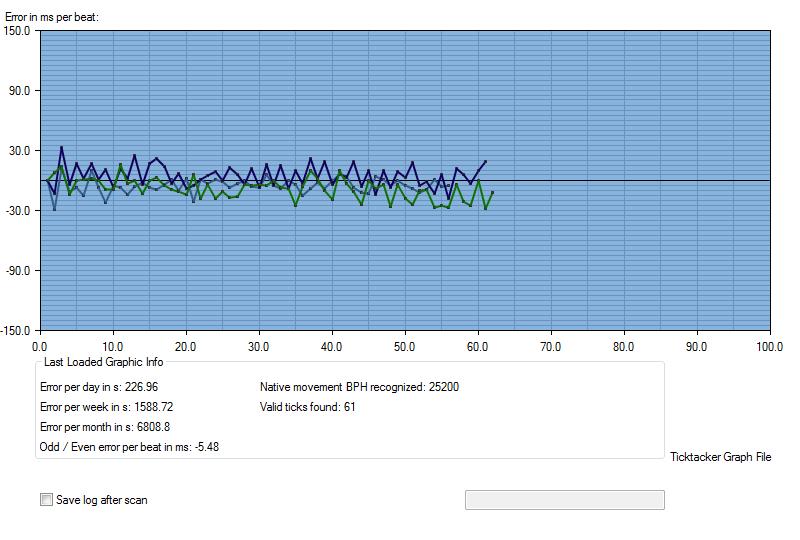
And one sample result from the tool
-
Hello. I have some progress, but don't have time to finalize this project. You can find all related files here: http://strelki.info/vibro.zip I use a lot of code from this forum, and a lot of my own ideas. linco command line recording tool is in the package too.
-
search in array for number bigger than X
littleclown replied to littleclown's topic in AutoIt General Help and Support
I just need to run it under 32 and 64 bit XP, Vista and windows 7. -
search in array for number bigger than X
littleclown replied to littleclown's topic in AutoIt General Help and Support
Let me check something. I use consolewrite - maybe the issue is there. Actually I try to analize wav file but on really low level (I know about bass, but i prefer to write it to my own). This is only 10 second wav file in a array . EDIT: 20 seconds! Thanks guys - maybe I just need somebody to think with me sometimes . I did not initialization issues, but can I be sure there will be no issues everywhere? I will distribute exe if it works. -
Hello. I need to search from the beginning in the huge ($ar[1000000]) array for string bigger than X, then write down the position and continue search for number bigger than X. In final I should have list with all positions on numbers bigger than X. I need to use an array functions for this because if i create a loop for all one million numbers I will have a huge delay (as far I can see array-oriented commands are really faster than everything else) Thank you in advance. If there is something like _ArrayFindAll but with > < options will be great.
-
Thanks I will try. I need wav because i will analise it at low level after that
-
SoundRecorder.exe just does not work for me in command line... i don't know why. mp3recorder is great tool, but is there a tool like this but output format to be WAV?
-
BASS Function Library (Sound and Music Functions)
littleclown replied to BrettF's topic in AutoIt Example Scripts
Thank you for the fast replies. C:\Program Files\AutoIt3\Include\BassConstants.au3(111,49) : WARNING: $BASS_INFO possibly not declared/created yet This error is related to BassConstants.au3 and its strange. Do I need lates beta for this or can run it on stable ver? -
BASS Function Library (Sound and Music Functions)
littleclown replied to BrettF's topic in AutoIt Example Scripts
Thank you very much, but can you give me valid link for download BassExt au3 & DLL files? I found some link to 4shared but it want me to register and pay for download. -
The example there just don't work. Dracil, do yo find a solution? I found here an example without bass, but there is a lot of noise in the recorder file. If somebody knows a little program with command line that I can use for recording will be great! Thanks in advance.