Tec
-
Posts
87 -
Joined
-
Last visited
Tec's Achievements

Wayfarer (2/7)
3
Reputation
-
 TekWeis reacted to a post in a topic:
Joining domain...
TekWeis reacted to a post in a topic:
Joining domain...
-
Duck reacted to a post in a topic:
Joining domain...
-
mvk25 reacted to a post in a topic:
Dynamic ContextMenu from ListView
-
Big thx for help M23 This help me alot
-
Hi, how can I create a Gui label like this: NO3 or PO4 or FeSO4 x 1H2O Is there a way too use different fontsize with one lable ? I can use different label with different fontsize but its a little bit stupid. Thx for help
-
#Include <GuiConstantsEx.au3> #include <WindowsConstants.au3> Opt("GUIOnEventMode", 1) HotKeySet("{F1}", "function1") HotKeySet("{F2}", "function2") HotKeySet("{F3}", "function3") HotKeySet("{F4}", "function4") $Form1_1 = GUICreate("Form1", 993, 701, 192, 114) GUISetOnEvent($GUI_EVENT_CLOSE, "function4") $filemenu = GUICtrlCreateMenu("&Menu") $MenuItem1 = GUICtrlCreateMenuItem("&About", $filemenu) GUICtrlSetOnEvent($MenuItem1, "function1") $MenuItem2 = GUICtrlCreateMenuItem("&Info", $filemenu) GUICtrlSetOnEvent($MenuItem2, "function2") $MenuItem3 = GUICtrlCreateMenuItem("&Help", $filemenu) GUICtrlSetOnEvent($MenuItem3, "function3") $MenuItem4 = GUICtrlCreateMenuItem("&Exit", $filemenu) GUICtrlSetOnEvent($MenuItem4, "function4") GUISetState(@SW_SHOW) While 1 Sleep( 100 ) WEnd Func function1() MsgBox(0, "test", "hello 1") EndFunc Func function2() MsgBox(0, "test", "hello 2") EndFunc Func function3() MsgBox(0, "test", "hello 3") EndFunc Func function4() Exit EndFunc
-
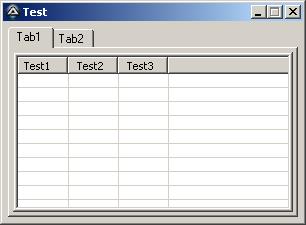
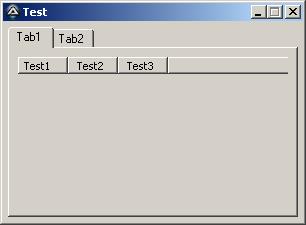
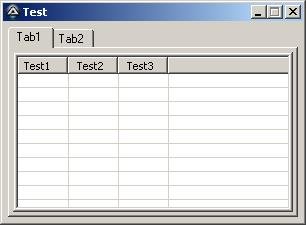
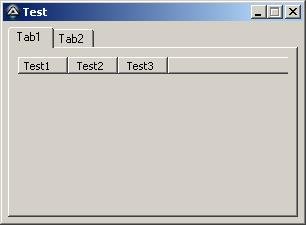
Hi I found mein problem.... $LVS_EX_FULLROWSELECT Without $LVS_EX_FULLROWSELECT I have no Problem with the Gui. With $LVS_EX_FULLROWSELECT I have a greyed Listview after lock System (Ctrl+Alt+Del) but only if I use Listview with Tabs. Without Tabs it works fine. <- Without FULLROWSELECT after lock System (Ctrl+Alt+Del) <- With FULLROWSELECT after lock System (Ctrl+Alt+Del) #NoTrayIcon #include <GUIConstantsEx.au3> #include <WindowsConstants.au3> #include <GuiListView.au3> Local $Gui = GUICreate("Test", 300, 200) Local $tab = GUICtrlCreateTab(5, 5, 290, 190) Local $tab1 = GUICtrlCreateTabItem("Tab1") Local $hListView = GUICtrlCreateListView("Test1 | Test2| Test3|", 10, 30, 280 , 160, -1, BitOR( $WS_EX_CLIENTEDGE, $LVS_EX_FULLROWSELECT, $LVS_EX_GRIDLINES)) ;Problem ;Local $hListView = GUICtrlCreateListView("Test1 | Test2| Test3|", 10, 30, 280 , 160, -1, BitOR( $WS_EX_CLIENTEDGE, $LVS_EX_GRIDLINES)) ; no Problem Local $tab2 = GUICtrlCreateTabItem("Tab2") GUISetState(@SW_SHOW) ;GUICtrlCreateListViewItem("a|b|c", $hListView) While 1 $msg = GUIGetMsg() Switch $msg Case $GUI_EVENT_CLOSE ExitLoop EndSwitch Sleep(10) WEnd Exit Have someone a solution for me or can test the code ? I need $LVS_EX_FULLROWSELECT...
-
Example with Buttons. Hope this help you. #include <GUIConstantsEx.au3> $x = 0 Dim $Button[6] $Gui = GUICreate("Test", 125, 34 ) $Btn_Start = GUICtrlCreateDummy() For $i = 1 To 5 $x = ($i - 1) * 25 $Button[$i] = GUICtrlCreateButton($i, $x, 5, 24, 24) Next $Btn_End = GUICtrlCreateDummy() GUISetState(@SW_SHOW) While 1 $Msg = GUIGetMsg() Switch $Msg Case $GUI_EVENT_CLOSE Exit Case $Btn_Start To $Btn_End For $i = 1 To UBound($Button) - 1 If $Msg == $Button[$i] Then MsgBox(0, "test", "Button: " & $Button[$i]) EndIf Next EndSwitch Sleep( 10) WEnd
-
#NoTrayIcon #include <GUIConstantsEx.au3> #include <WindowsConstants.au3> Local $Gui = GUICreate("Test", 300, 200) Local $tab = GUICtrlCreateTab(5, 5, 290, 190) Local $tab1 = GUICtrlCreateTabItem("Tab1") Local $hListView = GUICtrlCreateListView("Test1 | Test2| Test3", 10, 30, 280 , 160) Local $tab2 = GUICtrlCreateTabItem("Tab2") GUISetState(@SW_SHOW) While 1 $msg = GUIGetMsg() Switch $msg Case $GUI_EVENT_CLOSE ExitLoop EndSwitch Sleep(10) WEnd Exit With this small code I have the same problem with one difference. I need to lock (Ctrl+Alt+Del) my system two times befor the Listview is gray.
-
Hmm I test it on 2 WinXP SP3 Clients and a virtual Vista maschine. Always the same problem. If I start the test code above it looks good. If I press Ctrl+Alt+Del and go back the Scrollbar and some empty area from the listview are gray. If I minimize the Gui or scroll or change a Tab it is Ok... strange :-/ If I test the same code without GUICtrlCreateTab no problem with Ctrl+Alt+Del. But thx for testing jaberwocky6669
-
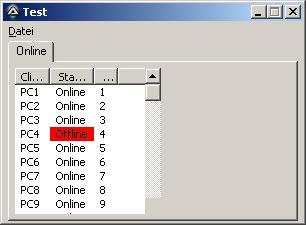
The first picture is after I lock/unlock my Computer. If I minimize and maximize the Gui or after first start it is ok (pic2). I have the Problem only with Tabs. Without Tabs I have no problem with Listview and lock/unlock. After lock/unlock an click on Scrollbar you can see the Scrollbar. See Screenshot.
-
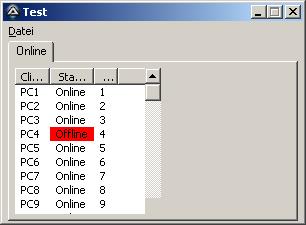
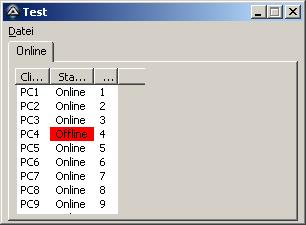
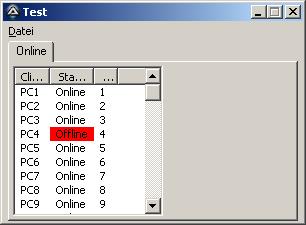
Hi I have some Problem with Tab and Listview. When I lock my Workstation WinXP SP3 and unlock, the Scrollbar not refresh. See Screenshot. Autoit Version 3.3.6.1 #include <GuiListView.au3> #include <GUIConstantsEx.au3> #include <WindowsConstants.au3> Opt("GUIOnEventMode", 1) $Gui = GUICreate("Test", 300, 200) GUISetOnEvent($GUI_EVENT_CLOSE, "Beenden") Local $menu1 = GUICtrlCreateMenu("&Datei",-1,2) Local $menu10 = GUICtrlCreateMenuItem("Aktualisiere Client",$menu1) Local $menu11 = GUICtrlCreateMenuItem("Aktualisiere AD",$menu1) Local $menu12 = GUICtrlCreateMenuItem("Exit",$menu1) Local $tab = GUICtrlCreateTab(5, 0, 290, 180) Local $tab1 = GUICtrlCreateTabItem("Online") Local $hListView = GUICtrlCreateListView("Client | Status| test", 10, 25, 150, 150) ;GUICtrlSendMsg($hListView, $LVM_SETEXTENDEDLISTVIEWSTYLE, $LVS_EX_GRIDLINES, $LVS_EX_GRIDLINES) GUIRegisterMsg($WM_NOTIFY, "WM_NOTIFY") Global $B_DESCENDING[_GUICtrlListView_GetColumnCount($hListView)] GUISetState() _test() While 1 Sleep(10) WEnd Exit Func Beenden() Exit EndFunc Func _test() _GUICtrlListView_DeleteAllItems($hListView) GUICtrlSetState($hListView, $GUI_DISABLE) Sleep( 3000 ) GUISetState(@SW_LOCK) For $a = 1 To 60 If $a = 4 Then GUICtrlCreateListViewItem("PC" & $a & "|Offline|" & $a, $hListView) Else GUICtrlCreateListViewItem("PC" & $a & "|Online|" & $a, $hListView) EndIf Sleep( 50 ) Next _GUICtrlListView_SetColumnWidth($hListView, 0, $LVSCW_AUTOSIZE) _GUICtrlListView_SetColumnWidth($hListView, 1, $LVSCW_AUTOSIZE) _GUICtrlListView_SetColumnWidth($hListView, 2, $LVSCW_AUTOSIZE) GUISetState(@SW_UNLOCK) GUICtrlSetState($hListView, $GUI_ENABLE) _ReduceMemory(@AutoItPid) EndFunc Func _ReduceMemory($i_PID = -1) If $i_PID <> -1 Then Local $ai_Handle = DllCall("kernel32.dll", 'int', 'OpenProcess', 'int', 0x1f0fff, 'int', False, 'int', $i_PID) Local $ai_Return = DllCall("psapi.dll", 'int', 'EmptyWorkingSet', 'long', $ai_Handle[0]) DllCall('kernel32.dll', 'int', 'CloseHandle', 'int', $ai_Handle[0]) Else Local $ai_Return = DllCall("psapi.dll", 'int', 'EmptyWorkingSet', 'long', -1) EndIf Return $ai_Return[0] EndFunc;==> _ReduceMemory() Func WM_NOTIFY($hWnd, $iMsg, $iwParam, $ilParam) Local $hWndFrom, $iIDFrom, $iCode, $tNMHDR, $hWndListView $hWndListView = $hListView If Not IsHWnd($hListView) Then $hWndListView = GUICtrlGetHandle($hListView) $tNMHDR = DllStructCreate($tagNMHDR, $ilParam) $hWndFrom = HWnd(DllStructGetData($tNMHDR, "hWndFrom")) $iCode = DllStructGetData($tNMHDR, "Code") Switch $hWndFrom Case $hWndListView Switch $iCode Case $LVN_COLUMNCLICK Local $tInfo = DllStructCreate($tagNMLISTVIEW, $ilParam) _GUICtrlListView_SimpleSort($hWndListView, $B_DESCENDING, DllStructGetData($tInfo, "SubItem")) Case $NM_CUSTOMDRAW ; http://msdn.microsoft.com/en-us/library/bb761817(VS.85).aspx Local $tCustDraw = DllStructCreate($tagNMLVCUSTOMDRAW, $ilParam) Local $iDrawStage = DllStructGetData($tCustDraw, "dwDrawStage") Switch $iDrawStage Case $CDDS_PREPAINT Return $CDRF_NOTIFYITEMDRAW ;request custom drawing of items Case $CDDS_ITEMPREPAINT Return $CDRF_NOTIFYSUBITEMDRAW Case Else ;case $CDDS_SUBITEM Local $iItem = DllStructGetData($tCustDraw, "dwItemSpec") Switch DllStructGetData($tCustDraw, "iSubItem") Case 1 If _GUICtrlListView_GetItemText($hWndListView, $iItem, 1) = "Offline" Then DllStructSetData($tCustDraw, "clrTextBk", 0x0000FF) Else DllStructSetData($tCustDraw, "clrTextBk", 0xffffff) EndIf Case Else DllStructSetData($tCustDraw, "clrTextBk", 0xffffff) EndSwitch Return $CDRF_NEWFONT EndSwitch EndSwitch EndSwitch Return $GUI_RUNDEFMSG EndFunc ;==>WM_NOTIFY Did I do something wrong ?
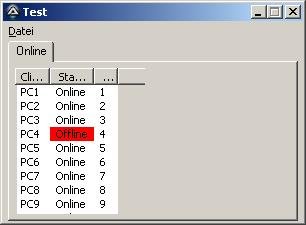
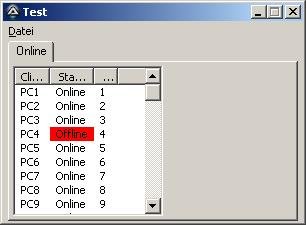
-
ListView Sort and row Background Color
Tec replied to Tec's topic in AutoIt General Help and Support
thx again KaFu -
ListView Sort and row Background Color
Tec replied to Tec's topic in AutoIt General Help and Support
Good morning I change the code to highlight the complete row. But two more question I have. 1. Is the code modification the right way ? It works for me but I am a little bit confusion about the Return Values $CDRF_NEWFONT and $CDRF_NOTIFYSUBITEMDRAW 2. Is there a simple way to highlight only the "offline" cell ? thx for help #include <GuiListView.au3> #include <GUIConstantsEx.au3> #include <WindowsConstants.au3> $Gui = GUICreate("Test", 300, 200) $hListView = GUICtrlCreateListView("Client | Status| test", 5, 0, 290, 250) GUICtrlSendMsg($hListView, $LVM_SETEXTENDEDLISTVIEWSTYLE, $LVS_EX_GRIDLINES, $LVS_EX_GRIDLINES) For $a = 1 To 10 If $a = 4 Then GUICtrlCreateListViewItem("PC" & $a & "|Offline|" & $a, $hListView) Else GUICtrlCreateListViewItem("PC" & $a & "|Online|" & $a, $hListView) EndIf Next GUIRegisterMsg($WM_NOTIFY, "WM_NOTIFY") GUISetState() Global $B_DESCENDING[_GUICtrlListView_GetColumnCount($hListView)] While 1 $msg = GUIGetMsg() Switch $msg Case $GUI_EVENT_CLOSE ExitLoop EndSwitch Sleep(10) WEnd Exit Func WM_NOTIFY($hWnd, $iMsg, $iwParam, $ilParam) Local $hWndFrom, $iIDFrom, $iCode, $tNMHDR, $hWndListView $hWndListView = $hListView If Not IsHWnd($hListView) Then $hWndListView = GUICtrlGetHandle($hListView) $tNMHDR = DllStructCreate($tagNMHDR, $ilParam) $hWndFrom = HWnd(DllStructGetData($tNMHDR, "hWndFrom")) $iCode = DllStructGetData($tNMHDR, "Code") Switch $hWndFrom Case $hWndListView Switch $iCode Case $LVN_COLUMNCLICK Local $tInfo = DllStructCreate($tagNMLISTVIEW, $ilParam) _GUICtrlListView_SimpleSort($hWndListView, $B_DESCENDING, DllStructGetData($tInfo, "SubItem")) Case $NM_CUSTOMDRAW Local $tCustDraw = DllStructCreate($tagNMLVCUSTOMDRAW, $ilParam) Local $iDrawStage = DllStructGetData($tCustDraw, "dwDrawStage") Switch $iDrawStage Case $CDDS_PREPAINT Return $CDRF_NOTIFYITEMDRAW ;request custom drawing of items Case $CDDS_ITEMPREPAINT Local $iItem = DllStructGetData($tCustDraw, "dwItemSpec") If _GUICtrlListView_GetItemText($hWndListView, $iItem, 1) = "Offline" Then DllStructSetData($tCustDraw, "clrTextBk", 0x0000FF) EndIf Return $CDRF_NOTIFYSUBITEMDRAW ;request drawing each cell separately EndSwitch #cs Local $iItem = DllStructGetData($tCustDraw, "dwItemSpec") Local $iSubItem = DllStructGetData($tCustDraw, "iSubItem") ;Local $hDC = DllStructGetData($tCustDraw, 'hdc') If $iSubItem = 1 Then If _GUICtrlListView_GetItemText($hWndListView, $iItem, 1) = "Offline" Then ConsoleWrite(_GUICtrlListView_GetItemText($hWndListView, $iItem, 1) & @CRLF) DllStructSetData($tCustDraw, "clrTextBk", 0x0000FF) ; in BGR EndIf EndIf Return $CDRF_NEWFONT #ce EndSwitch EndSwitch Return $GUI_RUNDEFMSG EndFunc ;==>WM_NOTIFY -
ListView Sort and row Background Color
Tec replied to Tec's topic in AutoIt General Help and Support
Big big thx Kafu That's help me alot -
Hi i need some help with Listview Sort and Background Color. Example: #include <GuiListView.au3> #include <GUIConstantsEx.au3> #include <WindowsConstants.au3> $Gui = GUICreate("Test", 300, 200) $hListView = GUICtrlCreateListView("Client | Status", 5, 0, 290, 250) GUICtrlSendMsg($hListView, $LVM_SETEXTENDEDLISTVIEWSTYLE, $LVS_EX_GRIDLINES, $LVS_EX_GRIDLINES) For $a = 1 To 10 if $a = 4 then GUICtrlCreateListViewItem("PC" & $a & "| Offline", $hListView) GUICtrlSetBkColor(-1, 0xFF0000) else GUICtrlCreateListViewItem("PC" & $a & "| Online", $hListView) EndIf Next GUISetState() GUIRegisterMsg($WM_NOTIFY, "WM_NOTIFY") Global $B_DESCENDING[_GUICtrlListView_GetColumnCount($hListView)] While 1 $msg = GUIGetMsg() Switch $msg Case $GUI_EVENT_CLOSE ExitLoop EndSwitch Sleep( 10 ) WEnd Exit Func WM_NOTIFY($hWnd, $iMsg, $iwParam, $ilParam) Local $hWndFrom, $iIDFrom, $iCode, $tNMHDR, $hWndListView $hWndListView = $hListView If Not IsHWnd($hListView) Then $hWndListView = GUICtrlGetHandle($hListView) $tNMHDR = DllStructCreate($tagNMHDR, $ilParam) $hWndFrom = HWnd(DllStructGetData($tNMHDR, "hWndFrom")) $iCode = DllStructGetData($tNMHDR, "Code") Switch $hWndFrom Case $hWndListView Switch $iCode Case $LVN_COLUMNCLICK Local $tInfo = DllStructCreate($tagNMLISTVIEW, $ilParam) _GUICtrlListView_SimpleSort($hWndListView, $B_DESCENDING, DllStructGetData($tInfo, "SubItem")) EndSwitch EndSwitch EndFunc I want to highlight all Offline clients. But how can I highlight the offline Clients if the order change? I read something about $NM_CUSTOMDRAW and read the post from Siao but i dont understand this. Need some small Example/help please.
-
How to install Windows from USB- WinSetupFromUSB Read RunOnceEx for applications install Search for silent install switch For net framework: http://www.msfn.org/board/topic/108344-net-framework-35-silent-installer/ Firefox : setup.exe /s start /wait setup.exe /S /C=%programfiles%\firefox Quicktime: msiexec /i Quicktime.msi /silent ...
-
Check this _Service_ UDF / Run your exe as Service ! Updated Using pure WinAPi, no external program