
BinaryBrother
-
Posts
904 -
Joined
-
Last visited
-
Days Won
3
Recent Profile Visitors
1,834 profile views







BinaryBrother's Achievements

-
 BinaryBrother reacted to a post in a topic:
Accessing a control using variables to build the ID
BinaryBrother reacted to a post in a topic:
Accessing a control using variables to build the ID
-
 BinaryBrother reacted to a post in a topic:
Use StringRegExp to cut only required word
BinaryBrother reacted to a post in a topic:
Use StringRegExp to cut only required word
-
Davidyese reacted to a post in a topic:
Use StringRegExp to cut only required word
-
Gianni reacted to a post in a topic:
Use StringRegExp to cut only required word
-
BinaryBrother reacted to a post in a topic:
Use StringRegExp to cut only required word
-

Use StringRegExp to cut only required word
BinaryBrother replied to Davidyese's topic in AutoIt General Help and Support
I've found this site to be very helpful when using RegExp. https://regexr.com/ -
BinaryBrother reacted to a post in a topic:
Disable/Enable specific network adapters
-
mLipok reacted to a post in a topic:
Startup Items in Specific Position
-
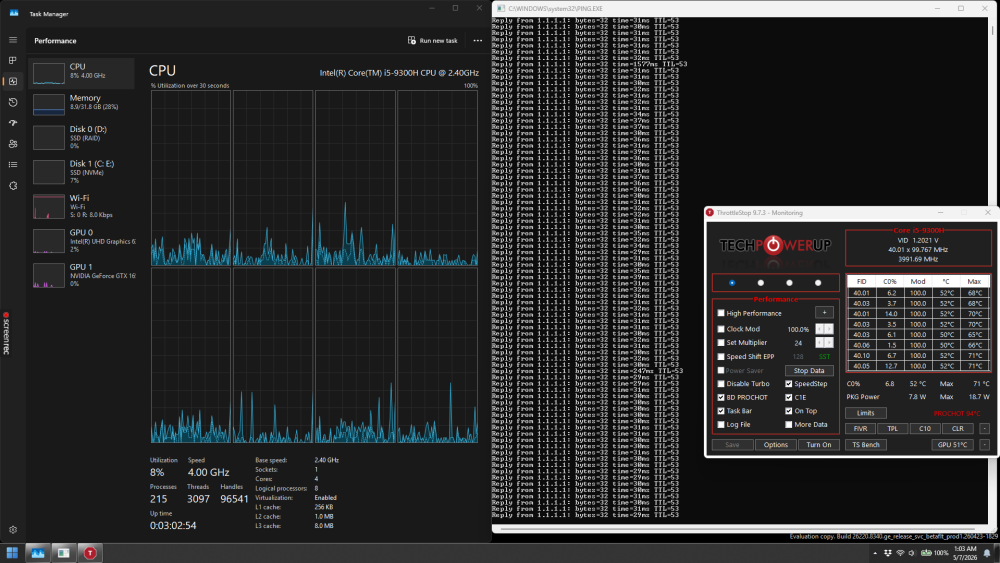
I was really bored and created a script that will open three things on my left monitor at logon of any user. I started by adding a Scheduled Task with Task Scheduler. General: Run with Highest Privileges Trigger: At Log On Action: Start a Program (My compiled WinPos Script) I know it's convoluted, I just had too much spare time so I went into error checking too much. Here's a screenshot. #RequireAdmin #Region ;**** Directives created by AutoIt3Wrapper_GUI **** #AutoIt3Wrapper_Compression=4 #AutoIt3Wrapper_UseUpx=y #AutoIt3Wrapper_Change2CUI=y #EndRegion ;**** Directives created by AutoIt3Wrapper_GUI **** #include <Misc.au3> Opt("WinTextMatchMode", 2) Local $TaskMgr[4] $TaskMgr[0] = "-1927,0,958,1047" ; Window Position $TaskMgr[1] = "Task Manager" ; Window Title $TaskMgr[2] = @SystemDir & "\Taskmgr.exe" ; Binary Location $TaskMgr[3] = "" ; Arguments Local $Ping[4] $Ping[0] = "-986,0,989,1044" ; Window Position $Ping[1] = @SystemDir & "\PING.EXE" ; Window Title $Ping[2] = @SystemDir & "\PING.EXE" ; Binary Location $Ping[3] = " -t 1.1.1.1" ; Arguments Local $ThrottleStop[4] $ThrottleStop[0] = "-572, 394, 574,487" ; Window Position $ThrottleStop[1] = "ThrottleStop 9.7.3 - Monitoring" ; Window Title $ThrottleStop[2] = "E:\Apps\ThrottleStop_9.7.3\ThrottleStop.exe" ; Binary Location $ThrottleStop[3] = "" ; Arguments Local $hDLL _Handle($TaskMgr) _Handle($Ping) _Handle($ThrottleStop) _WaitForExit() Func _WaitForExit() $hDLL = DllOpen("User32.dll") _Debug("MAIN: Press Return to Exit...") While 1 If _IsPressed($VK_RETURN, $hDLL) And WinActive(@ScriptFullPath) Then Exit EndIf Sleep(250) WEnd EndFunc Func _Handle($pArray) If IsArray($pArray) Then _Debug("_Handle(): $pArray is an Array.") Else _Error("_Handle(): $pArray is NOT an Array!") Return SetError(1, 0, False) EndIf If UBound($pArray) = 4 Then _Debug("_Handle(): $pArray is proper size.") Else _Error("_Handle(): $pArray is WRONG size!") Return SetError(2, 0, False) EndIf Local $lPos = StringSplit($pArray[0], ",") If IsArray($lPos) Then _Debug("_Handle(): $lPos is an Array!") Else _Error("_Handle(): $lPos is NOT an Array!") Return SetError(3, 0, False) EndIf If UBound($lPos) = 5 Then _Debug("_Handle(): $lPos is proper size.") Else _Error("_Handle(): $lPos is WRONG size!") Return SetError(4, 0, False) EndIf Local $lTitle = $pArray[1] If $lTitle <> "" Then _Debug("_Handle(): $lTitle: " & $lTitle) Else _Error("_Handle(): $lTitle cannot be blank!") Return SetError(5, 0, False) EndIf Local $lBinaryLocation = $pArray[2] If $lBinaryLocation <> "" Then _Debug("_Handle(): $lBinaryLocation: " & $lBinaryLocation) Else _Error("_Handle(): $lBinaryLocation cannot be blank!") Return SetError(6, 0, False) EndIf If FileExists($lBinaryLocation) Then _Debug("_Handle(): $lBinaryLocation file exists.") Else _Error("_Handle(): $lBinaryLocation file does NOT exist!") Return SetError(7, 0, False) EndIf Local $lArguments = $pArray[3] If $lArguments <> "" Then _Debug("_Handle(): $lArguments = " & $lArguments) Else _Debug("_Handle(): No $lArguments.") EndIf If WinExists($lTitle) Then _Debug("_Handle(): " & $lTitle & " already running!") Else ShellExecute($lBinaryLocation, $lArguments, @SystemDir) If Not @error Then _Debug("_Handle(): Executed $lBinaryLocation successfully.") Else _Error("_Handle(): FAILED to execute $lBinaryLocation!") Return SetError(8, 0, False) EndIf EndIf _Debug("_Handle(): Waiting for window to appear (30s)...") If WinWait($lTitle, "", 30) Then _Debug("_Handle(): Window appeared.") Else _Error("_Handle(): Timed out waiting for window to appear!") Return SetError(9, 0, False) EndIf If WinMove($lTitle, "", $lPos[1], $lPos[2], $lPos[3], $lPos[4]) Then _Debug("_Handle(): Moved window successfully.") Else _Error("_Handle(): Failed to move window!") Return SetError(10, 0, False) EndIf Return True EndFunc ;==>_Handle Func _Debug($pData) ConsoleWrite($pData & @CRLF) EndFunc ;==>_Debug Func _Error($pData) ConsoleWrite($pData & @CRLF) ConsoleWrite(">> ERROR DETECTED <<" & @CRLF & @CRLF) EndFunc ;==>_Error Simplified Version: #RequireAdmin #Region ;**** Directives created by AutoIt3Wrapper_GUI **** #AutoIt3Wrapper_Compression=4 #AutoIt3Wrapper_UseUpx=y #EndRegion ;**** Directives created by AutoIt3Wrapper_GUI **** #include <Misc.au3> Opt("WinTextMatchMode", 2) Local $TaskMgr[4] $TaskMgr[0] = "-1927,0,958,1047" ; Window Position $TaskMgr[1] = "Task Manager" ; Window Title $TaskMgr[2] = @SystemDir & "\Taskmgr.exe" ; Binary Location $TaskMgr[3] = "" ; Arguments Local $Ping[4] $Ping[0] = "-986,0,989,1044" ; Window Position $Ping[1] = @SystemDir & "\PING.EXE" ; Window Title $Ping[2] = @SystemDir & "\PING.EXE" ; Binary Location $Ping[3] = " -t 1.1.1.1" ; Arguments Local $ThrottleStop[4] $ThrottleStop[0] = "-572, 394, 574,487" ; Window Position $ThrottleStop[1] = "ThrottleStop 9.7.3 - Monitoring" ; Window Title $ThrottleStop[2] = "E:\Apps\ThrottleStop_9.7.3\ThrottleStop.exe" ; Binary Location $ThrottleStop[3] = "" ; Arguments _Handle($TaskMgr) _Handle($Ping) _Handle($ThrottleStop) Func _Handle($pArray) Local $lPos = StringSplit($pArray[0], ",") Local $lTitle = $pArray[1] Local $lBinaryLocation = $pArray[2] Local $lArguments = $pArray[3] ShellExecute($lBinaryLocation, $lArguments, @SystemDir) WinWait($lTitle, "") WinMove($lTitle, "", $lPos[1], $lPos[2], $lPos[3], $lPos[4]) Then EndFunc ;==>_Handle
-
- 1
-
-
It just looked like it took some effort to design and deploy. Kudos to the time invested.
-
 argumentum reacted to a post in a topic:
Disable or Overwrite ALT+F4
argumentum reacted to a post in a topic:
Disable or Overwrite ALT+F4
-
Disable or Overwrite ALT+F4
BinaryBrother replied to Dudeguy_'s topic in AutoIt General Help and Support
You know it's possible. GTA-V asks you if you want to quit the game when you ALT+F4. lol -
Github's Co-Pilot will hallucinate includes if you forgot to write the UDF in your script (half the time). And it's my favorite.
-
I figured it was something like that. You'd think after all the years on this forum I would have ran into this before. X) Edit: I'm getting older. I've probably forgotten more than I've learned. Thanks for the speedy responses! ^.^
-
Seems like that would trigger a syntax error. Thanks for the clarification.
-
$Var = 4 Switch $Var Case 1 ConsoleWrite("1") Case 2 Or 3 ConsoleWrite("2 or 3") Case 4, 5 ConsoleWrite("4 or 5") Case Else ConsoleWrite("Else") EndSwitch Console Output: "2 or 3" I'm missing something here... No matter what $Var is, console writes "2 or 3". Except for $Var = 1, which works as expected. Edit: Is the case matching because 3 is 3?
-
SOLVE-SMART reacted to a post in a topic:
Running web apps without opening browser? - (Moved)
-
@SOLVE-SMART, That Cheat Sheet in your signature is neat. @photonbuddy Checkout _INetGetSource() too.
-
I just interact with different AI's, including DeepSeek, when I run out of these magical coins. 😕 Here's my list, in order. Github Co-Pilot Gemini ChatGPT DeepSeek xAI and Perplexity. Got any coding AIs to share? ChatGPT has a tendency to be more "human", by acting like it knows what you're talking about, when it actually doesn't sometimes. It tries to get to know more about the context and grabs from lower quality sources.
-
argumentum reacted to a post in a topic:
Tidy/VSCode
-
VSCode is usually awesome. GitHub Co-Pilot is like cheating. Anything and everything I need is... was... at my fingertips. Now that Co-Pilot went paid, it's not as useful. Once it gets oriented on what you're trying to do, it literally generates large code-blocks of stuff you were just about to write.
-
argumentum reacted to a post in a topic:
Tidy/VSCode
-
I've been unable to re-produce the issue since I restarted VSCode. I'm currently running AutoIt v3.3.16.1.
-
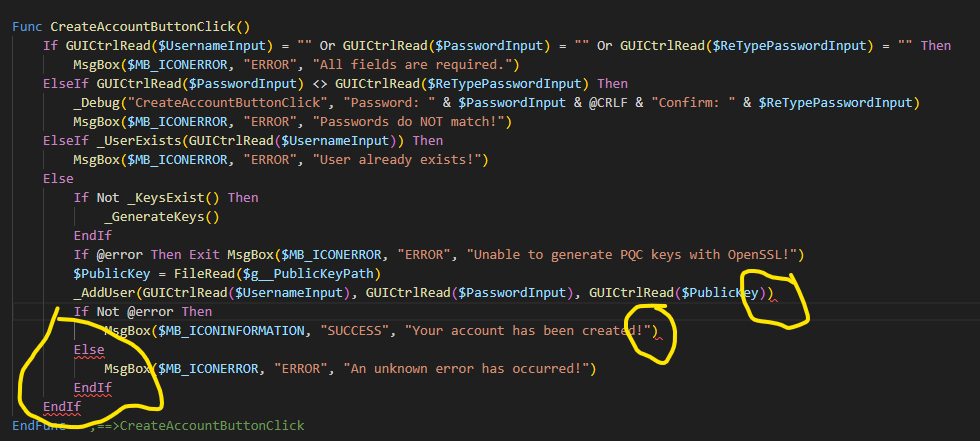
Thanks @argumentum. The VSCode/AutoIt.Damien isn't working exactly right for me... It runs just fine and the errors don't show up in scite. There's nothing wrong, but it's detecting errors. Edit: Relaunching the project folder fixes it. 😕
-
The one built into the latest VSCode with the AutoIt extension by Damien (I'm not sure how to check). I have seen this happen in the past with SciTe, I can't remember exactly what causes it, but if I close and reopen the project everything is fixed, Do you know how I can check the Tidy version in VSCode?
-
I have seen this happen in Scite, but this time it happened in VSCode. Anybody know why it's doing this? https://app.screencast.com/MVVLSyjGn2giL