MadMike
-
Posts
7 -
Joined
-
Last visited
MadMike's Achievements

Seeker (1/7)
0
Reputation
-
yeah I think I'll need to look at all of the Dll control set but I think more than that, I'm missing something in the fundamental call to the Dll, need to test to make sure its returning true I've added in an If loop here to only send up the message boxes if the array '$result' works, so far it doesn't I've also found out that the return values are Boolean and according to to a topic in the Developer Forums on Dll Calls, its classed as an 'int' type also the call to the function is not a stdcall like most, since it uses cdecl calls instead (read that somewhere, will link it tomorrow) $dll = DllOpen("windowsaccessbridge.dll") $hwnd = WinGetHandle("[Class:SunAWTFrame]") ControlFocus("[Class:SunAWTFrame]","JMenu Usage Demo", "") DllCall($dll, "int:cdecl", "initializeAccessBridge()") DllCall($dll, "int:cdecl", "IsJavaWindow([Class:SunAWTFrame]") $result = DllCall($dll, "int:cdecl", "GetAccessibleContextFromHWND($hWnd, $vmID, $ac)", "int", $hwnd, "int", 32, "int", 32) If Not @error Then msgbox(0, "HWND Target", $result[0]) ; Text returned in param 0 msgbox(0, "Long *vmID", $result[1]) ; Text returned in param 1 msgbox(0, "AccessibleContext *ac", $result[2]) ; Text returned in param 2 EndIf how can I check to make sure the .dll was called right and initialized correctly??
-
Hey Antiec, I've just started a topic Scripting to a Java Based GUI over here Got some script up and I'm just at the exact same point as you. Unfortunately I dont know why its doing that... just yet, but I'm learning Have you made sure you initialized the WindowsAccessBridge.dll check out this website, very handy Java Access Bridge API Specification
-
Thanks for that ssubirias3 That way does work, I know it can all be done that way, but I want to make it smarter than that I have found another solution though, which seems like it might work.... By using Java Ferret (Java's version of Auto-It's Window Info program) I can get the handles and classnames to call by installing the Java Access Bridge and its incorporated dll, windowsaccessbridge.dll, I should be able to use a DllCall() to the Dll and then select menus through this. This would be a much smarter approach. The following code is something I'm trying to get working. By using an example Java Swing program, I tried to find the controls in it using the Java Ferret. Now I know my call to the command prompt ain't the cleanest, but I don't care about it for the moment, I really wasn't bothereb being perfect about it, I can clean that later. Run("cmd.exe") WinWaitActive("C:\WINDOWS\system32\cmd.exe") Send( "cd \Progra~1\Java\jdk1.6.0_02\bin{ENTER}") Send( "java JMenuDemo{ENTER}") ; Wait for the JMenu Usage Demo to become active - it is titled "JMenu Usage Demo" on English systems WinWaitActive("JMenu Usage Demo") WinActivate ( "JMenu Usage Demo" ) AutoItSetOption("SendKeyDelay", 400) $dll = DllOpen("windowsaccessbridge.dll") $hwnd = ControlClick("[Class:SunAWTFrame]", "&Menu 1", "", "left", 1) $menu = ControlClick("[Class:SunAWTFrame]", "Menu Item with PlainText", "","left", 1) ControlFocus("[Class:SunAWTFrame]","JMenu Usage Demo") DllCall($dll, "void", "Windows_run") DllCall($dll, "void", "AccessBridge_FocusGainedFP", "hwnd", $hwnd) DllCall($dll, "void", "setMouseClickedFP(MouseClickedDelegate fp)") What the program should do, is open up this Java Swing application, set the focus to the menu_bar, select first menu option, this will result in the program placing text in the window area. I figure the problem is in the DllCall()'s Here's the dump from Java Ferret based on the above actions of my program State changed event: old = focused; new = (null) Version Information: Java virtual machine version: 1.6.0_02 Access Bridge Java class version: 1.6.0_02 Access Bridge Java DLL version: AccessBridge 2.0 Access Bridge Windows DLL version: AccessBridge 2.0 AccessibleContext information: Name: Description: Role: text Role in en_US locale: text States: enabled,focusable,visible,showing,opaque,multiple line States in en_US locale: enabled,focusable,visible,showing,opaque,multiple line Index in parent: 0 Children count: 0 Bounding rectangle: [6, 52, 493, 293] Top-level window name: JMenu Usage Demo Top-level window role: frame Parent name: Parent role: viewport Visible descendents count: 0 AccessibleActions info: Number of actions: 55 Action 0 name: insert-content Action 1 name: delete-previous Action 2 name: delete-next Action 3 name: set-read-only Action 4 name: delete-previous-word Action 5 name: delete-next-word Action 6 name: set-writable Action 7 name: cut-to-clipboard Action 8 name: copy-to-clipboard Action 9 name: paste-from-clipboard Action 10 name: page-up Action 11 name: page-down Action 12 name: selection-page-up Action 13 name: selection-page-down Action 14 name: selection-page-left Action 15 name: selection-page-right Action 16 name: insert-break Action 17 name: beep Action 18 name: caret-forward Action 19 name: caret-backward Action 20 name: selection-forward Action 21 name: selection-backward Action 22 name: caret-up Action 23 name: caret-down Action 24 name: selection-up Action 25 name: selection-down Action 26 name: caret-begin-word Action 27 name: caret-end-word Action 28 name: selection-begin-word Action 29 name: selection-end-word Action 30 name: caret-previous-word Action 31 name: caret-next-word Action 32 name: selection-previous-word Action 33 name: selection-next-word Action 34 name: caret-begin-line Action 35 name: caret-end-line Action 36 name: selection-begin-line Action 37 name: selection-end-line Action 38 name: caret-begin-paragraph Action 39 name: caret-end-paragraph Action 40 name: selection-begin-paragraph Action 41 name: selection-end-paragraph Action 42 name: caret-begin Action 43 name: caret-end Action 44 name: selection-begin Action 45 name: selection-end Action 46 name: default-typed Action 47 name: insert-tab Action 48 name: select-word Action 49 name: select-line Action 50 name: select-paragraph Action 51 name: select-all Action 52 name: unselect Action 53 name: toggle-componentOrientation Action 54 name: dump-model I've also attached the Java Swing Application I'm testing with, you'll need to rename it to a .java file, compile it and run it yourselves Java Access Bridge and Java Ferret are freely available on Sun Microsystem's Java Site Am I making this too awkward?? if so, I'll just go off on my own and do it Just thought there seemed to be quite a few people on these forums looking to do this, developers and noobs alike JMenuDemo.txt
-
There's actually a few topics based on this throughout the forums, but none have been seen through and it seems no one has really gotten anywhere with them either. How to automate Java windows/controls?
-
How to automate Java windows/controls?
MadMike replied to Jon's topic in AutoIt Technical Discussion
Sorry I'm not an experienced developer just yet but I'm very interested if anyone has made any progress on this as well. I've lookep up a load of how to automate Java windows/controls and this Java Access Bridge seems the best way. I've been trying to use the Java Access Bridge and the Java Ferret and I'm not having much luck. Just have to use DllCall to the WindowsAccessBridge.dll with the Java Access Bridge then I can start making calls to the classes within the program. -
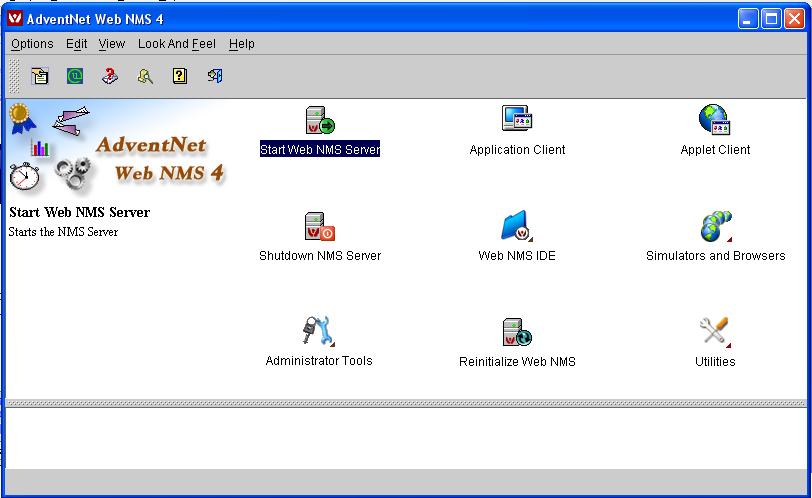
Yeah, I have the SciTE4AutoIt3 program and I've written a few well working scripts as a basic test of its capabilites. but to use the ControlClick(), ControlCommand(), ControlSend(), and ControlFocus() commands, I need Control ID's and ClassnameNN's and that kinda thing, which I cannot obtain through the AutoIt Window Info utility. All it gives me is the main window information and nothing of its contents like it would for most windows. I've attached a pic of the program. I want to be able to click on the Icon, tis a java program. I cant get control ID's for any of the icons, I cant seem to get the option menus to open with winmenuselect() either. What I've been doing so far is using Send("!v") commands to the program and selecting things this way and by using MouseClick( "left" ,515, 220,2) to click on the icons, however the menu changes upon selecting icons and i want to know is there another way to access these??
-
Heya, this is my first post, Am very new to Auto-It and i'm very impressed with its abilities. I've searched the forums high and low for help with this problem, but don't seem to be having any luck. Hope it isn't already posted, sorry if it is. Anyway, here's what I want to do. I'm running a program called Web NMS 4, a network configuring and monitoring tool. Its a Java application. I can access the menus and click on certain points in the window using the mouse co-ordinates or by using Send("!f") {ENTER} and all that stuff, however, I want to do it a lot smarter and make it better at knowing what its clicking as opposed to just clicking on a co-ordinate. I want to know is it possible to be able to read text within this java application and then compare it to see if its the button I want to click. Also, I need to be able to click an expanding tree format in one part of the screen, then into another window (which is contained within the current window, cannot be moved outside it). Thanks for any help you can give.