GAM
-
Posts
98 -
Joined
-
Last visited
GAM's Achievements

Wayfarer (2/7)
0
Reputation
-
ok got it....I think that should run as an administrator then it will work. So far cmd is not running as an administrator
-
I tried with "k" to capture the output. The command prompt appears with directory displaying "C:\automation>" It stops there. The next statement I was expecting was "perl updatesource.pl"
-
Correct that the capture of the command prompt
-
I tried the above statements but did not work. The actual command in CMD looks like... c:\automation>perl updatesource.pl
-
Am trying to execute perl script from autoit script but its not running. Th command that I have given is... $rootDir = automation Run("cmd.exe /" & "C:\" & $rootDir & "\updatesource.pl") Can someone help please!
-
Read the selected values from UI and write it in text file
GAM replied to GAM's topic in AutoIt General Help and Support
-
Read the selected values from UI and write it in text file
GAM replied to GAM's topic in AutoIt General Help and Support
Thanks you again AutoBert. Yes, I wanted almost the same, may be few changes here and there which I guess I will be able to manage. Thanks a million -
Read the selected values from UI and write it in text file
GAM replied to GAM's topic in AutoIt General Help and Support
Hi, I have made further changes to the code to print the "Products" per scenario. I have now added 3 more testboxes (VMName, Username and Password). I wanted the TEXT/CONTENTS entered inside these boxes to be printed too in the text file, something like "vname, username, password" per tab. Can ask you favor again to help me out for this extended feature? The modified code... #include <ColorConstants.au3> #include <GUIConstants.au3> #include <FileConstants.au3> #include <StringConstants.au3> #include <MsgBoxConstants.au3> Global $main_GUI, $ok_button, $cancel_button Global $idProduct[5][10][8] Global $idCreds[5][3] Global $iLabel[5][3] ; This window has 2 ok/cancel-buttons $main_GUI = GUICreate("Planner", 1000, 700, -1, -1) $ok_button = GUICtrlCreateButton(" OK ", 400, 650, 100, 30) $cancel_button = GUICtrlCreateButton(" Cancel ", 530, 650, 100, 30) ; Create the first child window that is implemented into the main GUI $child1 = GUICreate("", 940, 547, 25, 82, BitOR($WS_CHILD, $WS_TABSTOP), -1, $main_GUI) $child_tab = GUICtrlCreateTab(5, 5, 929, 539) $child11tab = GUICtrlCreateTabItem(":: Win 7 ::") ;GUICtrlCreateInput("Username", 20, 70, 100, 25) UI_Scenario_Products(0) $child12tab = GUICtrlCreateTabItem(":: Win 8 ::") UI_Scenario_Products(1) $child13tab = GUICtrlCreateTabItem(":: Win 8.1 ::") UI_Scenario_Products(2) $child14tab = GUICtrlCreateTabItem(":: Win 10 ::") UI_Scenario_Products(3) $child15tab = GUICtrlCreateTabItem(":: Win 10.1 ::") UI_Scenario_Products(4) GUICtrlCreateTabItem("") GUISetState() ; Create the second child window that is implemented into the main GUI $child2 = GUICreate("", 940, 355, 25, 82, BitOR($WS_CHILD, $WS_TABSTOP), -1, $main_GUI) ;$listview2 = GUICtrlCreateListView("Col1|Col2",10,10,910,315,-1,$WS_EX_CLIENTEDGE) $child_tab = GUICtrlCreateTab(5, 5, 930, 335) $child11tab = GUICtrlCreateTabItem(":: Win 7 ::") $child12tab = GUICtrlCreateTabItem(":: Win 8 ::") $child13tab = GUICtrlCreateTabItem(":: Win 8.1 ::") $child14tab = GUICtrlCreateTabItem(":: Win 10 ::") $child15tab = GUICtrlCreateTabItem(":: Win 2K8 R2 ::") $child11tab = GUICtrlCreateTabItem(":: Win 2012 R2 ::") $child12tab = GUICtrlCreateTabItem(":: Win 2016 ::") ; Switch back the main GUI and create the tabs GUISwitch($main_GUI) $main_tab = GUICtrlCreateTab(10, 50, 970, 590) $child1tab = GUICtrlCreateTabItem(" 32 Bit ") $child2tab = GUICtrlCreateTabItem(" 64 Bit ") GUICtrlCreateTabItem("") GUICtrlSetBkColor(-1, 0xFFFFCC) GUISetState() Dim $sMenutext While 1 $msg = GUIGetMsg(1) Switch $msg[0] Case $GUI_EVENT_CLOSE, $cancel_button ExitLoop Case $ok_button $hOutFile = FileOpen('products.txt', $FO_OVERWRITE) $DisplayCreds =" " For $iTab = 0 To 4 $AllCred = "" For $iCreds = 0 To 2 $AllCred = GUICtrlRead($idCreds[$iTab][$iCreds], $GUI_READ_EXTENDED) $AllCred = " " + $AllCred Next $FullScenario = "" For $iScenarios = 0 To 9 $PPs ="" For $iProducts = 0 To 7 If Not(GUICtrlRead($idProduct[$iTab][$iScenarios][$iProducts]) = "") Then $PPs = $PPs & "~" & GUICtrlRead($idProduct[$iTab][$iScenarios][$iProducts]) EndIf Next $FullScenario = $FullScenario & @TAB & StringTrimLeft($PPs, 1) Next If Not(StringStripWS($FullScenario, $STR_STRIPLEADING + $STR_STRIPTRAILING) = "") Then FileWriteLine($hOutFile, "|" & StringStripWS($FullScenario, $STR_STRIPLEADING + $STR_STRIPTRAILING) & "|") EndIf Next FileClose($hOutFile) Case $main_tab Switch GUICtrlRead($main_tab) Case 0 GUISetState(@SW_HIDE, $child2) GUISetState(@SW_SHOW, $child1) Case 1 GUISetState(@SW_HIDE, $child1) GUISetState(@SW_SHOW, $child2) EndSwitch EndSwitch WEnd Func UI_Scenario_Products($iTab) $Top = 150 $Left = 120 $CredLeft = 200 For $iCreds = 0 To 2 $iLabel[$iTab][$iCreds] = GUICtrlCreateLabel("Parameter" & $iCreds + 1, $CredLeft, 70, 100, 25) $idCreds[$iTab][$iCreds] = GUICtrlCreateInput("", $CredLeft, 90, 100, 25) $InputSeletectItem = GUICtrlSetData($idCreds[$iTab][$iCreds], "", "") $CredLeft = $CredLeft + 210 Next For $iScenarios = 0 To 9 $idScenario = GUICtrlCreateLabel("Scenario - " & $iScenarios + 1, 20, $Top, 100, 25) For $iProducts = 0 To 7 $idProduct[$iTab][$iScenarios][$iProducts] = GUICtrlCreateCombo("", $Left, $Top, 100, 25) $ComboSeletectItem = GUICtrlSetData($idProduct[$iTab][$iScenarios][$iProducts], "AAA 88 RP1|AAA 88 RP2|AAA 88 RP3|AAA 88 RP4|AAA 88 RP5|AAA 88 RP6|AAA 88 RP7|AAA 88 RP8|BBB 88 RP1|BBB 88 RP2|BBB 88 RP3", "") $Left = $Left + 100 Next $Top = $Top + 35 $Left = 120 Next EndFunc ;==>UI_Scenario_Products -
Read the selected values from UI and write it in text file
GAM replied to GAM's topic in AutoIt General Help and Support
Hi AutoBert, Thanks a ton for the help.! This is exactly what am looking for. Yeah like you mentioned I will polish the output in a different format. Thanks again for the help!! -
Read the selected values from UI and write it in text file
GAM replied to GAM's topic in AutoIt General Help and Support
; Example of TAB in TAB ctrl #include <GUIConstants.au3> Global $main_GUI,$ok_button,$cancel_button ; This window has 2 ok/cancel-buttons $main_GUI = GUICreate("TAB in TAB",1000,700,-1,-1) $ok_button = GUICtrlCreateButton(" OK ",400,650,100,30) $cancel_button = GUICtrlCreateButton(" Cancel ",530,650,100,30) ; Create the first child window that is implemented into the main GUI $child1 = GUICreate("",940,547,25,82,BitOr($WS_CHILD,$WS_TABSTOP),-1,$main_GUI) $child_tab = GUICtrlCreateTab(5,5,929,539) $child11tab = GUICtrlCreateTabItem(":: Win 7 ::") GUICtrlCreateLabel("Username", 20, 70, 100, 25) UI_Scenario_Products() $child12tab = GUICtrlCreateTabItem(":: Win 8 ::") UI_Scenario_Products() $child13tab = GUICtrlCreateTabItem(":: Win 8.1 ::") UI_Scenario_Products() $child14tab = GUICtrlCreateTabItem(":: Win 10 ::") UI_Scenario_Products() $child15tab = GUICtrlCreateTabItem(":: Win 10.1 ::") UI_Scenario_Products() GUICtrlCreateTabItem("") GUISetState() ; Create the second child window that is implemented into the main GUI $child2 = GUICreate("",940,355,25,82,BitOr($WS_CHILD,$WS_TABSTOP),-1,$main_GUI) ;$listview2 = GUICtrlCreateListView("Col1|Col2",10,10,910,315,-1,$WS_EX_CLIENTEDGE) $child_tab = GUICtrlCreateTab(5,5,930,335) $child11tab = GUICtrlCreateTabItem(":: Win 7 ::") $child12tab = GUICtrlCreateTabItem(":: Win 8 ::") $child13tab = GUICtrlCreateTabItem(":: Win 8.1 ::") $child14tab = GUICtrlCreateTabItem(":: Win 10 ::") $child15tab = GUICtrlCreateTabItem(":: Win 2K8 R2 ::") $child11tab = GUICtrlCreateTabItem(":: Win 2012 R2 ::") $child12tab = GUICtrlCreateTabItem(":: Win 2016 ::") ; Switch back the main GUI and create the tabs GUISwitch($main_GUI) $main_tab = GUICtrlCreateTab(10,50,970,590) $child1tab = GUICtrlCreateTabItem(" 32 Bit ") $child2tab = GUICtrlCreateTabItem(" 64 Bit ") GUICtrlCreateTabItem("") GUISetState() Dim $sMenutext While 1 $msg = GUIGetMsg(1) Switch $msg[0] Case $GUI_EVENT_CLOSE, $cancel_button ExitLoop Case $main_tab Switch GUICtrlRead($main_tab) Case 0 GUISetState(@SW_HIDE,$child2) GUISetState(@SW_SHOW,$child1) Case 1 GUISetState(@SW_HIDE,$child1) GUISetState(@SW_SHOW,$child2) EndSwitch EndSwitch WEnd Func UI_Scenario_Products() $Top = 150 $Left = 120 For $scenarios = 1 To 10 Step 1 $idScenario = GUICtrlCreateLabel("Scenario - " & $scenarios, 20, $Top, 100, 25) For $Products = 1 To 8 Step 1 $idProduct = GUICtrlCreateCombo("", $Left, $Top, 100, 25) $ComboSeletectItem = GUICtrlSetData($idProduct, "AAA 88 RP1|AAA 88 RP2|AAA 88 RP3|AAA 88 RP4|AAA 88 RP5|AAA 88 RP6|AAA 88 RP7|AAA 88 RP8|BBB 88 RP1|BBB 88 RP2|BBB 88 RP3", "") $Left = $Left + 100 Next $Top = $Top + 35 $Left = 120 Next EndFunc -
Read the selected values from UI and write it in text file
GAM replied to GAM's topic in AutoIt General Help and Support
Hi AutoBert, I have attached the temp.au3 file easy view. temp.au3 -
Read the selected values from UI and write it in text file
GAM replied to GAM's topic in AutoIt General Help and Support
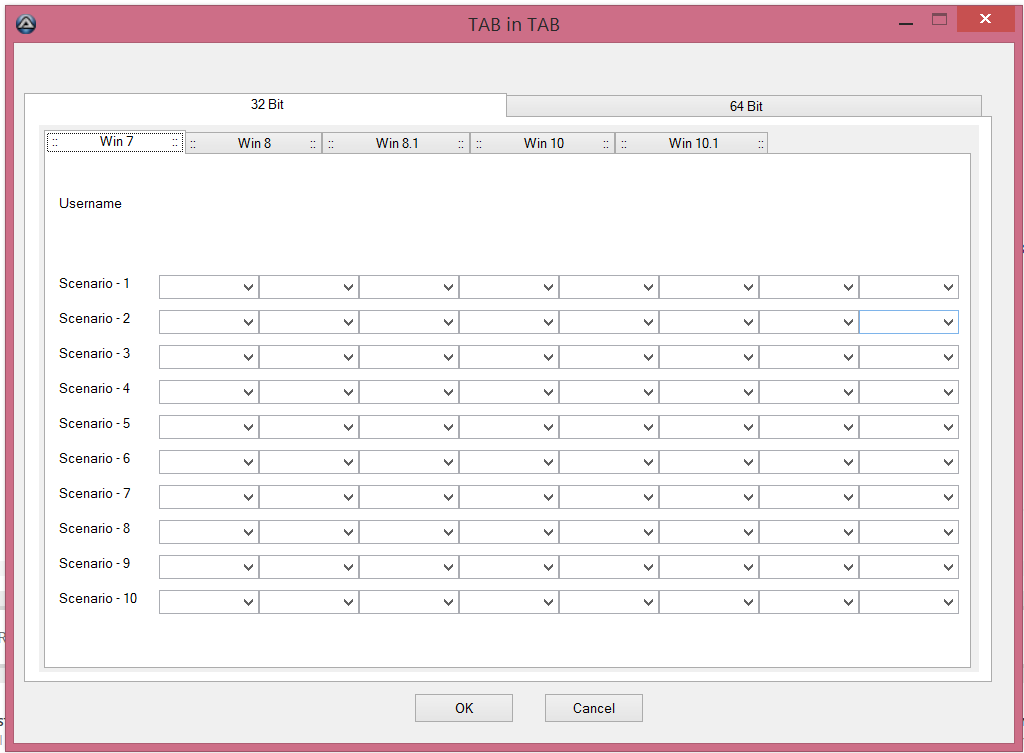
UI looks like this...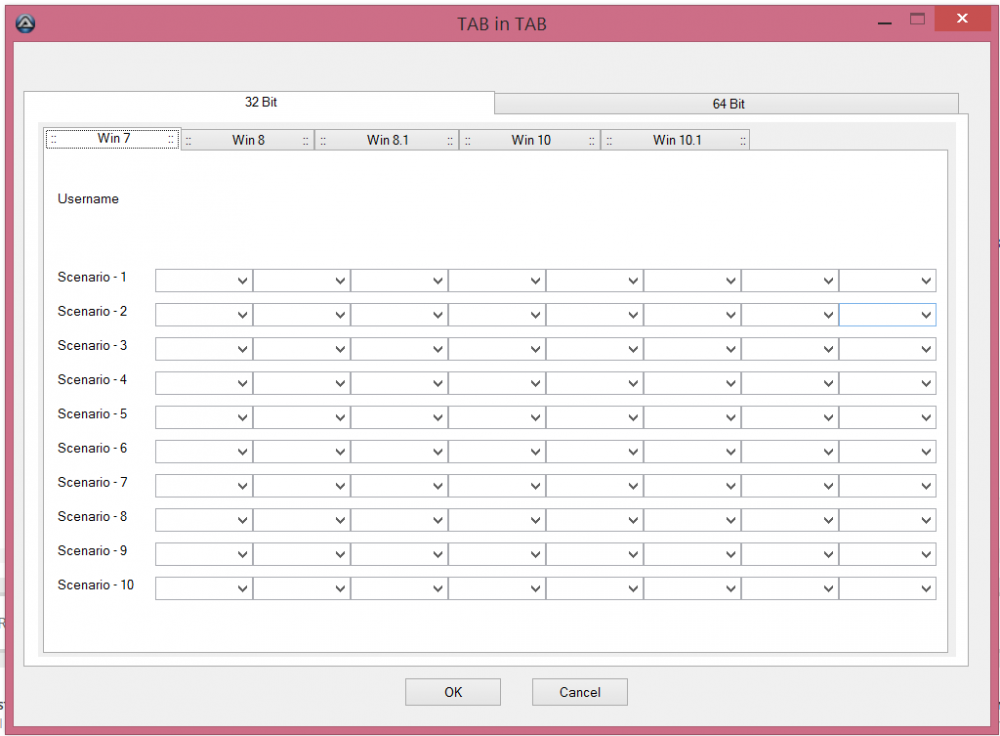
-
Hi All, I have created a script to meet my automation need. The plan is to read the contents of the selected items in UI and then write the same to a text file. The code that I have with me is as below. Can someone please help me how to write the selected values to a text file? ; Example of TAB in TAB ctrl #include <GUIConstants.au3> Global $main_GUI,$ok_button,$cancel_button ; This window has 2 ok/cancel-buttons $main_GUI = GUICreate("TAB in TAB",1000,700,-1,-1) $ok_button = GUICtrlCreateButton(" OK ",400,650,100,30) $cancel_button = GUICtrlCreateButton(" Cancel ",530,650,100,30) ; Create the first child window that is implemented into the main GUI $child1 = GUICreate("",940,547,25,82,BitOr($WS_CHILD,$WS_TABSTOP),-1,$main_GUI) $child_tab = GUICtrlCreateTab(5,5,929,539) $child11tab = GUICtrlCreateTabItem(":: Win 7 ::") GUICtrlCreateLabel("Username", 20, 70, 100, 25) UI_Scenario_Products() $child12tab = GUICtrlCreateTabItem(":: Win 8 ::") UI_Scenario_Products() $child13tab = GUICtrlCreateTabItem(":: Win 8.1 ::") UI_Scenario_Products() $child14tab = GUICtrlCreateTabItem(":: Win 10 ::") UI_Scenario_Products() $child15tab = GUICtrlCreateTabItem(":: Win 10.1 ::") UI_Scenario_Products() GUICtrlCreateTabItem("") GUISetState() ; Create the second child window that is implemented into the main GUI $child2 = GUICreate("",940,355,25,82,BitOr($WS_CHILD,$WS_TABSTOP),-1,$main_GUI) ;$listview2 = GUICtrlCreateListView("Col1|Col2",10,10,910,315,-1,$WS_EX_CLIENTEDGE) $child_tab = GUICtrlCreateTab(5,5,930,335) $child11tab = GUICtrlCreateTabItem(":: Win 7 ::") $child12tab = GUICtrlCreateTabItem(":: Win 8 ::") $child13tab = GUICtrlCreateTabItem(":: Win 8.1 ::") $child14tab = GUICtrlCreateTabItem(":: Win 10 ::") $child15tab = GUICtrlCreateTabItem(":: Win 2K8 R2 ::") $child11tab = GUICtrlCreateTabItem(":: Win 2012 R2 ::") $child12tab = GUICtrlCreateTabItem(":: Win 2016 ::") ; Switch back the main GUI and create the tabs GUISwitch($main_GUI) $main_tab = GUICtrlCreateTab(10,50,970,590) $child1tab = GUICtrlCreateTabItem(" 32 Bit ") $child2tab = GUICtrlCreateTabItem(" 64 Bit ") GUICtrlCreateTabItem("") GUISetState() Dim $sMenutext While 1 $msg = GUIGetMsg(1) Switch $msg[0] Case $GUI_EVENT_CLOSE, $cancel_button ExitLoop Case $main_tab Switch GUICtrlRead($main_tab) Case 0 GUISetState(@SW_HIDE,$child2) GUISetState(@SW_SHOW,$child1) Case 1 GUISetState(@SW_HIDE,$child1) GUISetState(@SW_SHOW,$child2) EndSwitch EndSwitch WEnd Func UI_Scenario_Products() $Top = 150 $Left = 120 For $scenarios = 1 To 10 Step 1 $idScenario = GUICtrlCreateLabel("Scenario - " & $scenarios, 20, $Top, 100, 25) For $Products = 1 To 8 Step 1 $idProduct = GUICtrlCreateCombo("", $Left, $Top, 100, 25) $ComboSeletectItem = GUICtrlSetData($idProduct, "AAA 88 RP1|AAA 88 RP2|AAA 88 RP3|AAA 88 RP4|AAA 88 RP5|AAA 88 RP6|AAA 88 RP7|AAA 88 RP8|BBB 88 RP1|BBB 88 RP2|BBB 88 RP3", "") $Left = $Left + 100 Next $Top = $Top + 35 $Left = 120 Next EndFunc
-
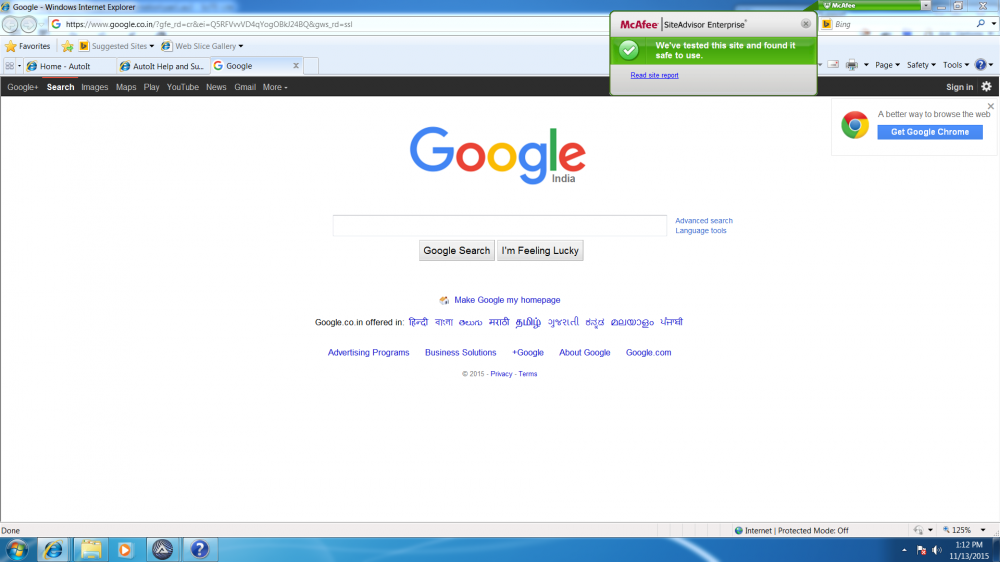
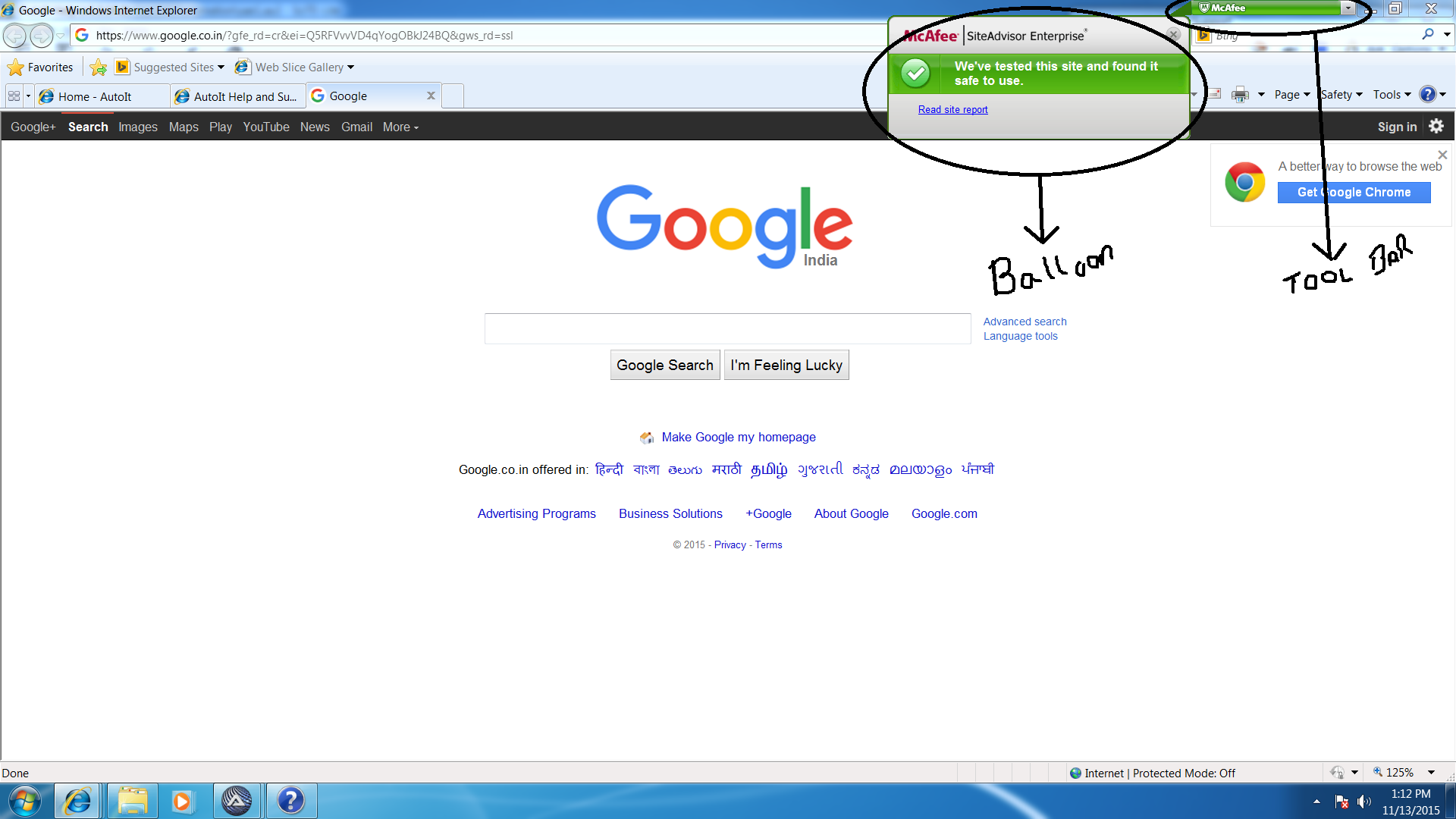
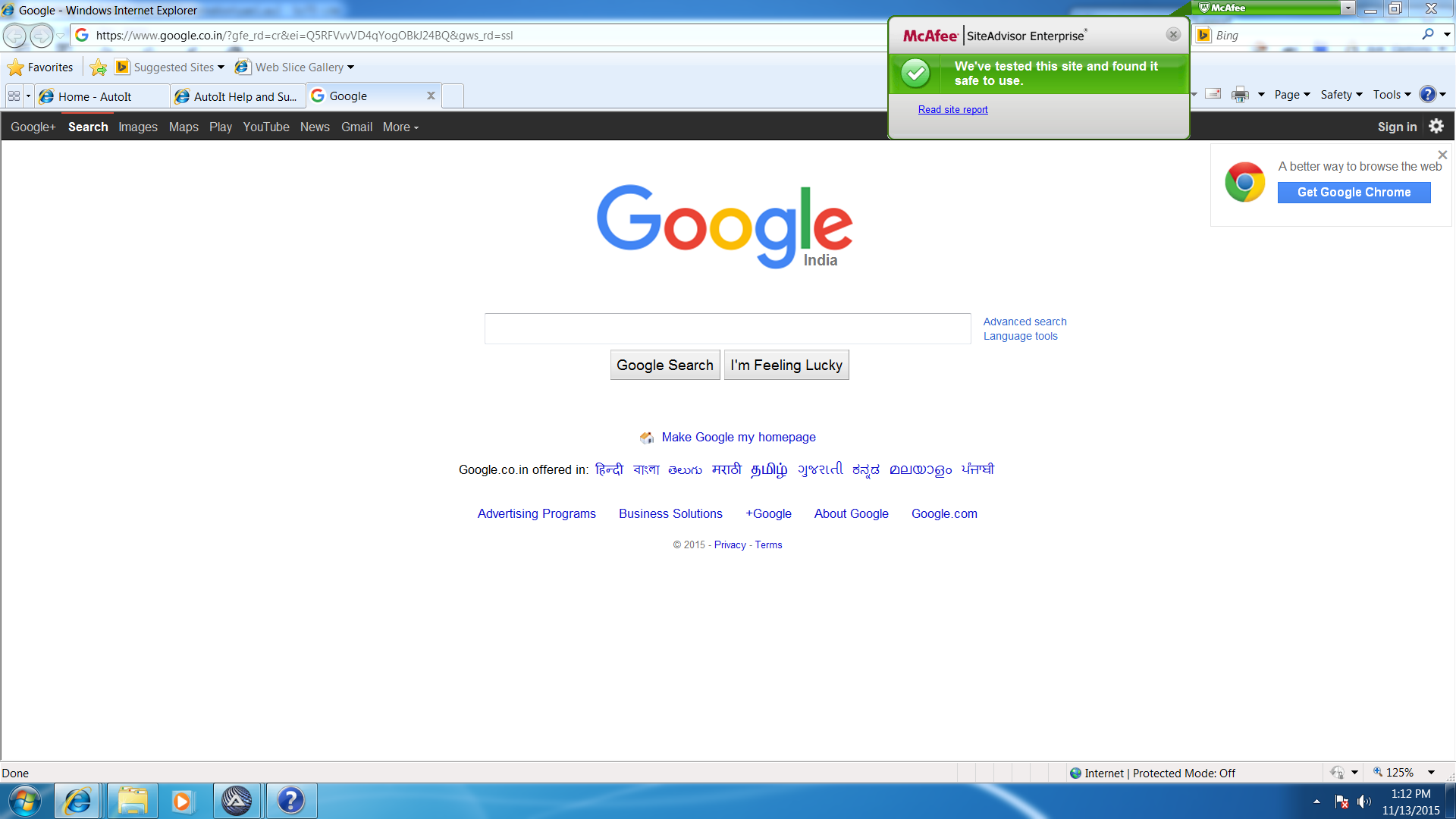
Hi, Am trying to automate my test cases of my product where one of the features is to "hover over the mouse" on the "McAfee tool bar" on IE. Once the mouse is hover overed a balloon appears with some text which I would like to read it via autoit. I have attached the image for better understanding! Can someone help me out in this please!
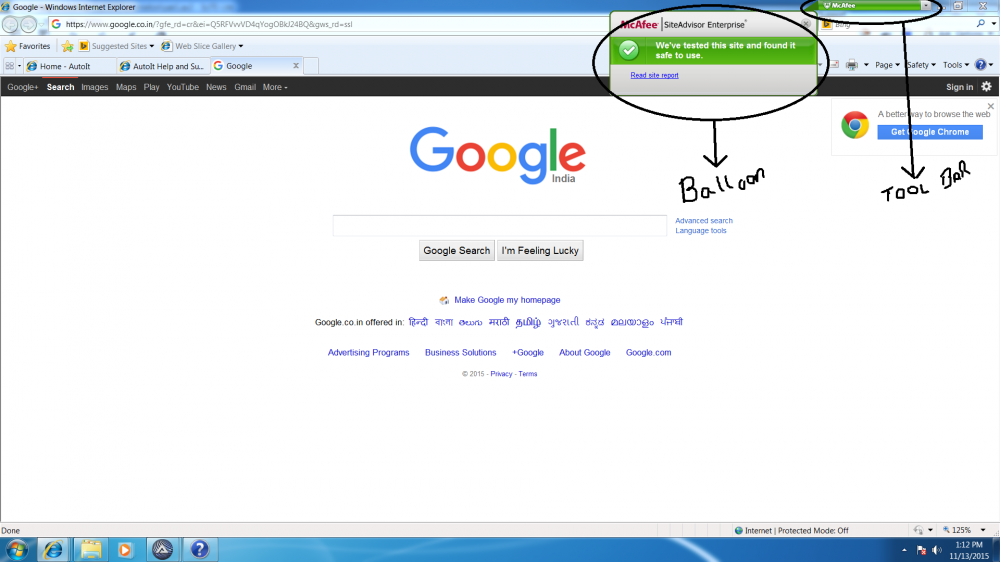
-
Hi, Am trying to automate my test cases of my product where one of the features is to "hover over the mouse" on the "McAfee tool bar" on IE. Once the mouse is hover overed a balloon appears with some text which I would like to read it via autoit. I have attached the image for better understanding! Can someone help me out in this please!