ManojB
-
Posts
8 -
Joined
-
Last visited
ManojB's Achievements

Seeker (1/7)
0
Reputation
-
Displaying text in Alphablend Window/Control
ManojB replied to ManojB's topic in AutoIt GUI Help and Support
Please see the attachment. I've used Arial, 11.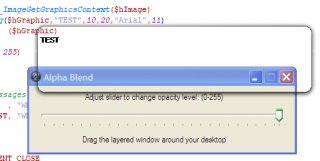
-
Hi Koshy, I'm interested in the same thing. But I'm a nebiew. If you have solved the problem, could you please share it with me. I need Launchy type skinning window. Could you please help me.
-
PNG as GUI, drop shadows, curved edges, you name it
ManojB replied to lod3n's topic in AutoIt Example Scripts
I'm using AutoIt v3.2.12.0. This cleaned up code throws many errors in my system. Could you please help me out. -
Displaying text in Alphablend Window/Control
ManojB replied to ManojB's topic in AutoIt GUI Help and Support
This doesn't help the situation. The displayed text seems to be bricky type. (No Smoothness). Please go through my code CODE#include <GDIPlus.au3> #include <WinAPI.au3> #include <WindowsConstants.au3> #include <GuiConstantsEx.au3> Opt("MustDeclareVars", 1) ; ==================================================================================================== =========================== ; Description ...: Shows how to create an alpha blended form ; Author ........: Paul Campbell (PaulIA) ; Notes .........: The images used for this demo MUST be 32 bpp with alpha channel ; Credits .......: Thanks to lod3n for supplying links to the technical documentation that was necessary to build this demo ; ==================================================================================================== =========================== ; ==================================================================================================== =========================== ; Global constants ; ==================================================================================================== =========================== Global Const $AC_SRC_ALPHA = 1 ; ==================================================================================================== =========================== ; Global variables ; ==================================================================================================== =========================== Global $hGUI1, $hGUI2, $iLabel1, $iLabel2, $iSlider, $hImage ; Create GUI $hGUI1 = GUICreate("Alpha Blend", 400, 100) $iLabel1 = GUICtrlCreateLabel ("Adjust slider to change opacity level: (0-255)", 84, 10, 380, 20) $iSlider = GUICtrlCreateSlider(10, 32, 380, 40) $iLabel2 = GUICtrlCreateLabel ("Drag the layered window around your desktop" , 80, 74, 380, 20) GUICtrlSetLimit($iSlider, 255, 0) GUICtrlSetData ($iSlider, 255) GUISetState() ; Create layered child window $hGUI2 = GUICreate("Test", 250, 250, -1, -1, -1, $WS_EX_LAYERED, $hGUI1) ; Load layered image _GDIPlus_Startup() ;$hImage = _GDIPlus_ImageLoadFromFile(@ScriptDir & "\Images\Button.png") $hImage = _GDIPlus_ImageLoadFromFile(@ScriptDir & "\Images\alpha.png") Local $hGraphic = _GDIPlus_ImageGetGraphicsContext($hImage) _GDIPlus_GraphicsDrawString($hGraphic,"TEST",10,20,$sFont="Arial",9) _GDIPlus_GraphicsDispose ($hGraphic) SetBitMap($hGUI2, $hImage, 255) GUISetState() ; Register notification messages GUIRegisterMsg($WM_HSCROLL , "WM_HSCROLL" ) GUIRegisterMsg($WM_NCHITTEST, "WM_NCHITTEST") ; Loop until user exits do until GUIGetMsg() =$GUI_EVENT_CLOSE ; Release resources _GDIPlus_ImageDispose($hImage) _GDIPlus_Shutdown() ; ==================================================================================================== =========================== ; Handle the WM_HSCROLL notificaton so that we can change the opacity in real time ; ==================================================================================================== =========================== Func WM_HSCROLL($hWnd, $iMsg, $iwParam, $ilParam) SetBitMap($hGUI2, $hImage, GUICtrlRead($iSlider)) EndFunc ; ==================================================================================================== =========================== ; Handle the WM_NCHITTEST for the layered window so it can be dragged by clicking anywhere on the image. ; ==================================================================================================== =========================== Func WM_NCHITTEST($hWnd, $iMsg, $iwParam, $ilParam) if ($hWnd = $hGUI2) and ($iMsg = $WM_NCHITTEST) then Return $HTCAPTION EndFunc ; ==================================================================================================== =========================== ; SetBitMap ; ==================================================================================================== =========================== Func SetBitmap($hGUI, $hImage, $iOpacity) Local $hScrDC, $hMemDC, $hBitmap, $hOld, $pSize, $tSize, $pSource, $tSource, $pBlend, $tBlend $hScrDC = _WinAPI_GetDC(0) $hMemDC = _WinAPI_CreateCompatibleDC($hScrDC) $hBitmap = _GDIPlus_BitmapCreateHBITMAPFromBitmap($hImage) $hOld = _WinAPI_SelectObject($hMemDC, $hBitmap) $tSize = DllStructCreate($tagSIZE) $pSize = DllStructGetPtr($tSize ) DllStructSetData($tSize, "X", _GDIPlus_ImageGetWidth ($hImage)) DllStructSetData($tSize, "Y", _GDIPlus_ImageGetHeight($hImage)) $tSource = DllStructCreate($tagPOINT) $pSource = DllStructGetPtr($tSource) $tBlend = DllStructCreate($tagBLENDFUNCTION) $pBlend = DllStructGetPtr($tBlend) DllStructSetData($tBlend, "Alpha" , $iOpacity ) DllStructSetData($tBlend, "Format", $AC_SRC_ALPHA) _WinAPI_UpdateLayeredWindow($hGUI, $hScrDC, 0, $pSize, $hMemDC, $pSource, 0, $pBlend, 2) _WinAPI_ReleaseDC (0, $hScrDC) _WinAPI_SelectObject($hMemDC, $hOld) _WinAPI_DeleteObject($hBitmap) _WinAPI_DeleteDC ($hMemDC) EndFunc
-
Could you please post an example for this ?Thanks in advance
-
Displaying text in Alphablend Window/Control
ManojB replied to ManojB's topic in AutoIt GUI Help and Support
Wow! That much simple... Thanks for helping me out. Why this string is displayed weird/not smooth finish ? Is there any way to do that? -
Following code is an example file that demonstrates the Alphablend capabilities of AutoIt. (This file is included in the AutoIt installation). I tried to display text in the layered window, ie, the alpha blended window; but ended in vein. Can you help me to figure it out how it can be done. CODE #include <GDIPlus.au3> #include <WinAPI.au3> #include <WindowsConstants.au3> #include <GuiConstantsEx.au3> Opt("MustDeclareVars", 1) ; ==================================================================================================== =========================== ; Description ...: Shows how to create an alpha blended form ; Author ........: Paul Campbell (PaulIA) ; Notes .........: The images used for this demo MUST be 32 bpp with alpha channel ; Credits .......: Thanks to lod3n for supplying links to the technical documentation that was necessary to build this demo ; ==================================================================================================== =========================== ; ==================================================================================================== =========================== ; Global constants ; ==================================================================================================== =========================== Global Const $AC_SRC_ALPHA = 1 ; ==================================================================================================== =========================== ; Global variables ; ==================================================================================================== =========================== Global $hGUI1, $hGUI2, $iLabel1, $iLabel2, $iSlider, $hImage ; Create GUI $hGUI1 = GUICreate("Alpha Blend", 400, 100) $iLabel1 = GUICtrlCreateLabel ("Adjust slider to change opacity level: (0-255)", 84, 10, 380, 20) $iSlider = GUICtrlCreateSlider(10, 32, 380, 40) $iLabel2 = GUICtrlCreateLabel ("Drag the layered window around your desktop" , 80, 74, 380, 20) GUICtrlSetLimit($iSlider, 255, 0) GUICtrlSetData ($iSlider, 255) GUISetState() ; Create layered child window $hGUI2 = GUICreate("Test", 250, 250, -1, -1, -1, $WS_EX_LAYERED, $hGUI1) ; Load layered image _GDIPlus_Startup() $hImage = _GDIPlus_ImageLoadFromFile(@ScriptDir & "\Images\Button.png") ;~ $hImage = _GDIPlus_ImageLoadFromFile(@ScriptDir & "\Images\Torus.png") SetBitMap($hGUI2, $hImage, 255) GUISetState() ; Register notification messages GUIRegisterMsg($WM_HSCROLL , "WM_HSCROLL" ) GUIRegisterMsg($WM_NCHITTEST, "WM_NCHITTEST") ; Loop until user exits do until GUIGetMsg() =$GUI_EVENT_CLOSE ; Release resources _GDIPlus_ImageDispose($hImage) _GDIPlus_Shutdown() ; ==================================================================================================== =========================== ; Handle the WM_HSCROLL notificaton so that we can change the opacity in real time ; ==================================================================================================== =========================== Func WM_HSCROLL($hWnd, $iMsg, $iwParam, $ilParam) SetBitMap($hGUI2, $hImage, GUICtrlRead($iSlider)) EndFunc ; ==================================================================================================== =========================== ; Handle the WM_NCHITTEST for the layered window so it can be dragged by clicking anywhere on the image. ; ==================================================================================================== =========================== Func WM_NCHITTEST($hWnd, $iMsg, $iwParam, $ilParam) if ($hWnd = $hGUI2) and ($iMsg = $WM_NCHITTEST) then Return $HTCAPTION EndFunc ; ==================================================================================================== =========================== ; SetBitMap ; ==================================================================================================== =========================== Func SetBitmap($hGUI, $hImage, $iOpacity) Local $hScrDC, $hMemDC, $hBitmap, $hOld, $pSize, $tSize, $pSource, $tSource, $pBlend, $tBlend $hScrDC = _WinAPI_GetDC(0) $hMemDC = _WinAPI_CreateCompatibleDC($hScrDC) $hBitmap = _GDIPlus_BitmapCreateHBITMAPFromBitmap($hImage) $hOld = _WinAPI_SelectObject($hMemDC, $hBitmap) $tSize = DllStructCreate($tagSIZE) $pSize = DllStructGetPtr($tSize ) DllStructSetData($tSize, "X", _GDIPlus_ImageGetWidth ($hImage)) DllStructSetData($tSize, "Y", _GDIPlus_ImageGetHeight($hImage)) $tSource = DllStructCreate($tagPOINT) $pSource = DllStructGetPtr($tSource) $tBlend = DllStructCreate($tagBLENDFUNCTION) $pBlend = DllStructGetPtr($tBlend) DllStructSetData($tBlend, "Alpha" , $iOpacity ) DllStructSetData($tBlend, "Format", $AC_SRC_ALPHA) _WinAPI_UpdateLayeredWindow($hGUI, $hScrDC, 0, $pSize, $hMemDC, $pSource, 0, $pBlend, $ULW_ALPHA) _WinAPI_ReleaseDC (0, $hScrDC) _WinAPI_SelectObject($hMemDC, $hOld) _WinAPI_DeleteObject($hBitmap) _WinAPI_DeleteDC ($hMemDC) EndFunc AlphaBlend.au3
-
Is there any way to configure cvsWrapper/Scite to use any other diff tool instead of WinMerge