makeinstall
-
Posts
19 -
Joined
-
Last visited
makeinstall's Achievements

Seeker (1/7)
0
Reputation
-
GUI doesnt scroll when new data is added to it
makeinstall replied to makeinstall's topic in AutoIt GUI Help and Support
Melba: So I was just missing the extra descriptor of: $WS_VSCROLL? [rolls eyes] -
I am creating a GUI to inform users of the progress of a script and if the script stops, why it did so (and action they have to take to make it work). The problem is that as soon as the window is full of data/information, it doesn't scroll and so new info is lost as it is hidden by the GUI. What I have so far is this. If anyone can see what schoolboy error I've made or if there is a cleaner more elegant way to do this, please do point it out. All help is appreciated. ; // some code happens here ; // & so we send message to user of its response GUICtrlSetData($hList, "This is a message to say something happened") ;Loop to keep GUI polling While 1 $nMsg = GUIGetMsg() Switch $nMsg Case $GUI_EVENT_CLOSE Exit EndSwitch WEnd ; FUNCTION TO SET UP GUI Func _CreateGUI() $hGUI = GUICreate("Lotus Notes Roaming", 320, 500, -1, -1) $hList = GUICtrlCreateList("", 5, 57, 308, 435, BitOR($LBS_NOSEL, $WS_BORDER)) GUICtrlSetData(-1, "Welcome.....||") $Pic1 = GUICtrlCreatePic("images\notesLogo.bmp", 2, 5, 50, 50, BitOR($SS_NOTIFY, $WS_GROUP, $WS_CLIPSIBLINGS)) $Label1 = GUICtrlCreateLabel("ROAMING NOTES PROFILE", 58, 15, 257, 30) GUICtrlSetFont(-1, 14, 400, 0, "Arial") GUISetState(@SW_SHOW) EndFunc ;==>_CreateGUI
-
Writing drive mappings to an array
makeinstall replied to makeinstall's topic in AutoIt General Help and Support
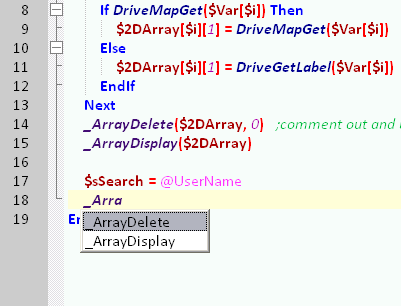
Thanks for the reply and help. I've been working through that code to try and understand the whole 2D array so that I can create & manipulate myself in future. A bizarre thing is happening now in that I'm writing some code to search the array but the auto complete in SCiTE doesn't seem to be aware of Array UDF. It sees _ArrayDelete & _ArrayDisplay but none of the others, especially _ArraySearch (See attached screencap). I've tried reinstalling SCiTE but it doesn't resolve it. Weirdness!
-
Writing drive mappings to an array
makeinstall replied to makeinstall's topic in AutoIt General Help and Support
I would hazard a guess that it is not a Novell environment. Anyone else have any suggestions on how to dump the mappings and corresponding drive letter into a multi array? -
Writing drive mappings to an array
makeinstall replied to makeinstall's topic in AutoIt General Help and Support
Er..... not quite sure. Know a quick way I can check considering that I do not have server/domain admin? -
Sorry about the ambiguous title but I will try to explain what I am doing. I need to read a users drive mappings (the server path & letter its mapped to) and then do a check to find a particular drive and respond back with the mapped letter. For instance: $var = DriveGetDrive( "all" ) If NOT @error Then For $i = 1 to $var[0] ConsoleWrite($var[$i]& " " & DriveMapGet ($var[$i]) & @CRLF) Next EndIf This will display all the drives with the paths mapped. What I need to do is run a check after to see which drive is the users personal network folder. I have tried to read up on multi arrays but cannot quite grasp how to dump the data into the multidimensional array (it would only require 2 columns)so it would look like this: drive | mapping | c: d: i: \\LON5\IT$ k: \\LON6\LUC m: \\LON5\MIS$ r: \\LON5\DEVELOP$ s: \\LON5\ISD$ u: \\LON5\gbxxxx$ w: \\LON5\NETAPPS Once its in the array, I would need to check which letter was mapped to the users ID (@username). In the above example: gbxxx$ = U. Any and all help is appreciated! Thanks Chris
-
Thanks for your help. The way you have approached the code intrigues me as I think I'm far too linear. I've changed the file locations and the array of hostnames but I get this error from your code:
-
Thanks for the reply. I've adjusted the trailing slash - well spotted! The output of all the CSV's looks like this (with the first couple of entries obfuscated obviously):
-
I am trying to create several CSV files for multi function devices that hold address book data of several hundred users. Each device requires its own information on the first 5 lines of the file so to cut down on my time, I am trying to create it dynamically whilst only maintaining one master address book. At the top of each CSV file, something like the following should be created: But this data for ALL of the machines is being placed at the top of every CSV file created for each device. I can't help but think it's a silly schoolboy error that I'm too snow blind to see. Any help/advice is greatly appreciated. The script is as follows: ;############################################################################ ; INCLUDES #NoTrayIcon #include <Array.au3> #Include <Misc.au3> #include <File.au3> #include <GUIListBox.au3> #include <Constants.au3> #include <WindowsConstants.au3> #include <ListboxConstants.au3> #include <ButtonConstants.au3> #include <GUIConstantsEx.au3> #include <StaticConstants.au3> ;############################################################################ ;# Prevents 2 scripts running _Singleton(@ScriptName) ;############################################################################ ; CONSTANTS ; LOCATIONS OF FILES ; Master CSV location Dim Const $masterCSV = "\\PATH\TO\FOLDER\MasterList.csv" Dim Const $CSVfolder = "\\PATH\TO\FOLDER\MachineCSV\" ; CSV FILE CONSTANTS ; closing commas that fill out the rest of the empty fields Dim Const $closingCommas = ",,,,,,,,,,,,,,,,,,,,,,,,,,,,,,,,,,,,,,,,,,,,,,," ; Constant for first 5 lines of csv data Dim Const $leadingData = "#Registration Data" & $closingCommas & @CRLF & "#Format Version:3.1.5.0" & $closingCommas & @CRLF & "#Export Date: " ; Declare other vars Dim $device ; GUI Declarations Dim $hGUI, $hList, $hButton ;############################################################################ ; Machine Reg Data ; Sets up constants with the first 4 lines of data required by the CSV file, as unique machine ID ; MACHINE HOSTNAME ARRAY ; If machine list changes, alter this list and the number in the array Global $hostname [13] $hostname[0] = "RNPC210BD" $hostname[1] = "RNPC1F5B9" $hostname[2] = "RNPC210AB" $hostname[3] = "RNPC1F447" $hostname[4] = "RNPC1F361" $hostname[5] = "RNPBCE85A" $hostname[6] = "RNPC20FCF" $hostname[7] = "RNP9C1AF6" $hostname[8] = "RNPC1E336" $hostname[9] = "RNPC21A78" $hostname[10] = "RNPFD5270" $hostname[11] = "RNPE0E9C8" $hostname[12] = "RNPB9762D" ;############################################################################ ; PROCESS ; Creates GUI for user feedback _CreateGUI() GUICtrlSetData($hList, "This will now create the address book for each |of the following MFD devices:||") ; start TCP services TCPStartup() For $device in $hostname ; resolve hostname to IP address $machineIP = TCPNameToIP($device) ; create copy of masterCSV file & name it $hostname.csv ;_copyCSV($masterCSV, $CSVfolder, $device) ; Compile export date with trailing commas $date = @MDAY & "/" & @MON & "/" & @YEAR & " " & @HOUR & ":" & @MIN & ":" & @SEC & $closingCommas & @CRLF ; Build vars for hostname & IP address $hostData = "#Device Name: " & $device & $closingCommas & @CRLF & "#Address: " & $machineIP & $closingCommas ; Compile all 5 lines of data in one string $machineData = $leadingData & $date & $hostData ; Write to file: line 1 _writeMachineData($machineData) ;console/GUI display GUICtrlSetData($hList, $device &"|") Next GUICtrlSetData($hList, "..............|") ; GUICtrlSetData($hList, "") GUICtrlSetData($hList, "The script has now completed successfully |and will close in 5 seconds.") Sleep(5000) Exit ;GUI polling While 1 $nMsg = GUIGetMsg() Switch $nMsg Case $GUI_EVENT_CLOSE Exit EndSwitch WEnd ;############################################################################ ; FUNCTIONS ; function copies the master csv file and names the copy to the device hostname Func _copyCSV($masterCSV, $CSVfolder, $device) ; Declarations local $fileCopy ; Copy masterCSV $fileCopy = FileCopy($masterCSV, $CSVfolder & "\" & $device & ".csv") if $fileCopy = @error Then ; create GUI msg that it didnt work Else ; GUI msg confirms EndIf EndFunc ; FUNCTION to write line to file Func _writeMachineData($machineData) $csvPath = $CSVfolder & "\" & $device & ".csv" $writeData = _FileWriteToLine($csvPath, 1, $machineData, 0) If $writeData = @error Then ; GUI Update with error message ;GUICtrlSetData($hList, "Checking U drive exists.....|") Else ; GUI Update that its complete EndIf EndFunc ; GUI Creation Func _CreateGUI() $hGUI = GUICreate("MFD Address book duplicator", 320, 350, 396, 210) $hList = GUICtrlCreateList("", 5, 57, 308, 280, BitOR($WS_VSCROLL, $LBS_NOSEL)) GUICtrlSetData(-1, "Welcome.....|") $Label1 = GUICtrlCreateLabel("MFD Address book", 58, 15, 257, 30) GUICtrlSetFont(-1, 14, 400, 0, "Verdana") GUISetState(@SW_SHOW) EndFunc ;==>_CreateGUI
-
Simple script progress feedback to a GUI
makeinstall replied to makeinstall's topic in AutoIt GUI Help and Support
Sorry to bump this back up but I have some more questions about the styling of a GUI: When I have sent various statements to the GUI through GUICtrlSetData($hList, "[message.....]"), it does not scroll when the listbox area fills up. How can I do this? I have tried looking through the styles list but cannot see one associated with 'overflow'. Also, is there anyway to style the text being sent to the GUI? Style as in send in bold or italics for instance? Once again, TIA anyone who can help. -
Simple script progress feedback to a GUI
makeinstall replied to makeinstall's topic in AutoIt GUI Help and Support
Thanks for the prompt reply. The main function that sends data to the GUI is GUICtrlSetData? So I would just insert that function call at the various places in my script to indicate a milestone has been reached / about to be executed, with the GUI creation at the start & the While loop at the end? Looking structure wise something like this? #includes GUICreate() GUISetState() ; my script function calls GUICtrlSetData($hList, $messageToDisplay) ;etc etc While 1 ; blah blah Wend Also, where can I find more about the various calls of globals such as "$LBS_NOSEL" because I cant seem to find a page that lists them all like in the docs for @macros or functions? Once again, thanks for your help. -
I'm trying to work out the best way to get simple visual feedback of what the script is doing but without using msgbox as I do not want the script to pause, awaiting user input. For instance, one script I'm working on downloads a zip file from a server and displays a progress bar but leading up to that, it checks the local folder structure exists [if not, creates] and if a copy of the file exists locally & deletes if it does. How can I have a simple panel that says something like?: - checking if folder structure exists.... - it does not so will create.... - folders created. - checking if remote file exists.... - it does. beginning download.... etc etc There might be a very simple solution but I haven't really done anything with a GUI as of yet so its all new territory and everything I have read so far has been confusing so I would really appreciate if anyone could tell me what functions I should be reading up on. Thanks in advance for any help or pointers anyone can offer.
-
Hello! Im writing a script that will download a file on a local network (actually across a WAN) and I would like to create a progress meter to let the user know something is happening. I have found a few download scripts but they are all based on internet files rather that local ones and so the macro @InetGetBytesRead doesn't work. Is there a local file version of @InetGetBytesRead or a better way to do a progress meter for a WAN file download? Thanks
-
Excellent! Thank you very much. You are most kind and gracious!
-
Hello all, Im still quite new to AutoIT scripting and so Ive probably overlooked something really simple but I wondered if there was a way of having a window display what stage the script was at? Sort of like a live feedback rather than a constant stream of msgbox's popping up each time. Thanks for any help or information.