iameaten
-
Posts
5 -
Joined
-
Last visited
iameaten's Achievements

Seeker (1/7)
0
Reputation
-
Start, Stop, Pause and get status of NT Services
iameaten replied to CatchFish's topic in AutoIt Example Scripts
HI There, Thanks for this code ,I have same requirement but that is for XP. can I use the same code on professional XP to start and pause running processeds. Thanks Chetan J. -
Hi , I am facing the same issue. i my case i have used WinWaitActive and then WinClose.but in some pop ups there are no TITLE. WinWaitActive and WinClose required title as parameter. can you please tell me if there are no title then how can i close that pop-up. I have already posted topic on the this issue. How to close any POP-UPs if there is no title?? please provide your suggestion. Thanks, Chetan J.
-
C# How to close all IE POP-UPs if there is no title???
iameaten replied to iameaten's topic in AutoItX Help and Support
I am crawling client’s website and in my crawling application I have simulate IE and FireFox both. So you are right that this is FF error not IE error. Second things I am getting popups with TITLES like “Server Authentication” , “Opening favicon.ico” and “[REGEXPTITLE:Security Alert]” and many more. And application is able to manage them properly.(you may be right that this popup are from application) Question is still there how can I manage any popups If there is no title and popup contain button like OK,OK-CANCEL. Because functions like WinExists ,WinActivate ,ControlClick of the Autoit required Title. Please suggest me how to close any popup which has no title. Thanks, Chetan J. -
C# How to close all IE POP-UPs if there is no title???
iameaten replied to iameaten's topic in AutoItX Help and Support
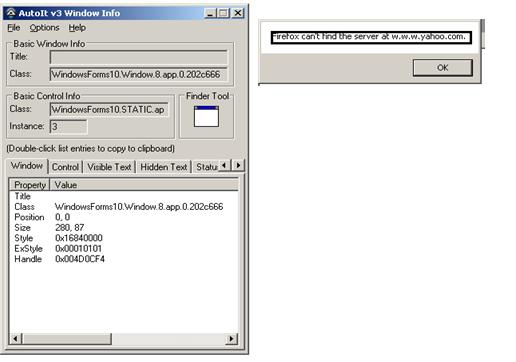
Thanks Richard for your interest. can you please provide more details on your reply. because i have done enormous R&D on this as u suggest but it is not working. My problem is popwindow without title. see attached screen shoot. see my changed code option 1 if (1 == jd.WinExists("", "Firefox can't find the server at")) { string wintext = jd.WinGetText("", "Firefox can't find the server at"); if (wintext.Contains("Firefox can't find the server at")) { jd.WinActivate("", "Firefox can't find the server at"); jd.WinClose("", "Firefox can't find the server at"); } } Option 2 if (1 == jd.WinExists("", "[CLASS:WindowsForms10.window.8.app.0.202c666]")) { String mm=jd.ControlGetHandle("", "[Class:#WindowsForms10.window.8.app.0.202c666]", "&OK"); if (mm != "") { jd.WinActivate("", "[CLASS:WindowsForms10.window.8.app.0.202c666]"); jd.WinClose("", "[CLASS:WindowsForms10.window.8.app.0.202c666]"); } } Both the options are not working. any idea how can i close any IE Popups in one code. Thanks, Chetan J.
-
Hi friends, I am using Autoit in my C# application(AutoItX3Lib). As per my application I am crawling different client websites through stimulating IE and Firefox browser. I am facing popup problem , because during crawling few popups come at any time and they hang the application in between until I close appropriate button(like OK, Cancel etc). I have managed few well known popups with below code. using System.Text; using AutoItX3Lib; using System.Windows.Forms; namespace PopupController { public partial class Form1 : Form { public Form1() { InitializeComponent(); } private void popupcontr_Tick(object sender, EventArgs e) { AutoItX3Class aX3C; try { aX3C = new AutoItX3Class(); aX3C.AutoItSetOption("WinTitleMatchMode", 4); ///////////////////// //// TITLE PART : when there is proper title... //http://code.google.com/p/scite-ru/source/browse/trunk/pack/api/au3.api /////////////////// if (1 == aX3C.WinExists("[REGEXPTITLE:.*Microsoft Internet Explorer.*]", "")) { aX3C.WinActivate("[REGEXPTITLE:.*Microsoft Internet Explorer.*]", ""); aX3C.WinClose("[REGEXPTITLE:.*Microsoft Internet Explorer.*]", ""); } if (1 == aX3C.WinExists("Opening favicon.ico", "")) { aX3C.WinActivate("Opening favicon.ico", ""); aX3C.WinClose("Opening favicon.ico", ""); } if (1 == aX3C.WinExists("[REGEXPTITLE:Security Warning]", "")) { if (aX3C.WinGetText("[REGEXPTITLE:Security Warning]", "").Length != 0) { aX3C.WinActivate("[REGEXPTITLE:Security Warning]", ""); aX3C.WinClose("[REGEXPTITLE:Security Warning]", ""); } } if (1 == aX3C.WinExists("[REGEXPTITLE:Security Alert]", "")) { if (aX3C.WinGetText("[REGEXPTITLE:Security Alert]", "").Length != 0) { aX3C.WinActivate("[REGEXPTITLE:Security Alert]", ""); aX3C.WinClose("[REGEXPTITLE:Security Alert]", ""); } } //////////////////////////////////////////////////////////////// // MESSAGE PART : when there are no title and just message only ///////////////////////////////////////////////////////////////// if (1 == aX3C.WinExists("", "You have requested an encrypted page")) { string wintext = aX3C.WinGetText("", "You have requested an encrypted page"); if (wintext.Contains("You have requested an encrypted page") ) { aX3C.WinActivate("", "You have requested an encrypted page"); aX3C.WinClose("", "You have requested an encrypted page"); } } if (1 == aX3C.WinExists("", "Firefox can't find the server at")) { string wintext = aX3C.WinGetText("", "Firefox can't find the server at"); if (wintext.Contains("Firefox can't find the server at")) { aX3C.WinActivate("", "Firefox can't find the server at"); aX3C.WinClose("", "Firefox can't find the server at"); } } if (1 == aX3C.WinExists("", "The certificate is only valid for")) { string wintext = aX3C.WinGetText("", "The certificate is only valid for"); if (wintext.Contains("The certificate is only valid for")) { aX3C.WinActivate("", "The certificate is only valid for"); aX3C.WinClose("", "The certificate is only valid for"); } } if (1 == aX3C.WinExists("", "The certificate is not trusted")) { string wintext = aX3C.WinGetText("", "The certificate is not trusted"); if (wintext.Contains("The certificate is not trusted")) { aX3C.WinActivate("", "The certificate is not trusted"); aX3C.WinClose("", "The certificate is not trusted"); } } For this I am collecting all different messages and title from AUTOIT and incorporate it in my coding and update my program everyday. But it seems that it is endless process as I don’t know what kind of popups are there on Internet. Questions Is there any code to close all IE popups if title is available or not available??? How can I click ok , cancel button through program with minimum coding??? Guys Please help me as I am running out of time. Thanks, Chetan J.