Christian Blackburn
-
Posts
99 -
Joined
-
Last visited
Christian Blackburn's Achievements

Wayfarer (2/7)
0
Reputation
-
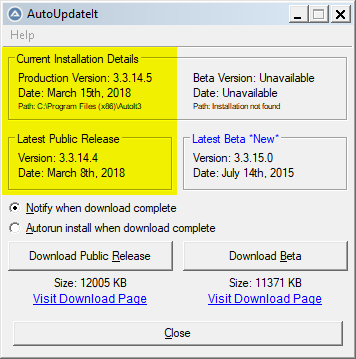
Hi Guys, Just a quick bug report. AutoUpdateIt is currently failing to detect the latest public release 3.3.14.5. Christian Blackburn, A+, Network+
-
Hi Guys, I would like to dynamically enable/disable context menu items. Apparently, that isn't yet supported. Does anyone have a workaround? Thanks, Christian Blackburn
-
Hi Malkey and AnthonyJr2, Thank you both very much for your tips. Anthony's code worked great. Sorry I failed to give credit where it was plainly due. Thanks, Christian Blackburn
-
 Christian Blackburn reacted to a post in a topic:
Can't get InputBox with custom Height horizontally centered
Christian Blackburn reacted to a post in a topic:
Can't get InputBox with custom Height horizontally centered
-
Hi Malkey, Thank you very much. I wish "-1" was acceptable, but your "default" keyword that I didn't know about worked like a charm. Thanks, Christian Blackburn
-
Christian Blackburn reacted to a post in a topic:
Can't get InputBox with custom Height horizontally centered
-
Hi Guys, I've set the vertical height of my InputBox to the screen resolution height minus the taskbar. The height bit works great, but consequentially the window is no longer centered. The first 0 in the InputBox parameters below is the Left property. I can't set it to -1 nor just omit it leaving a comma as in ".. $Usable_Screen_Area[3],, 0". Is there any easy way to get my Window centered shy of a separate program that launches just before, waits for my InputBox, an then centers it. I would think -1 would just equate to centered, but it isn't valid input according to SciTe. ;Needed to get usable screen area #include <WinAPI.au3> ;$Usable_Screen_Area[3] = screen height minus the taskbar on the current screen which may or may not have a taskbar Local $Usable_Screen_Area = _GetDesktopArea() ;The M2 means a 1-2 character value is required, $Usable_Screen_Area[3] is the screen's height minus the taskbar if there's a taskbar on the current screen $Response = InputBox("Simulator", "Please enter the index you'd like to simulate?" & @CR & $Options, "", " M2", -1, $Usable_Screen_Area[3],0, 0) Thanks for your help, Christian
-
sending email fails with error code 50
Christian Blackburn replied to mbatscribe's topic in AutoIt General Help and Support
Hi Jos, There's no telling how long anything will be supported by Microsoft. Since it works and works better than what we have now I see no issue. Also isn't INET a COM object as well? I suppose there could be a Win32API version, but I know I had an INET object in VB6 as well. Cheers, Christian -
sending email fails with error code 50
Christian Blackburn replied to mbatscribe's topic in AutoIt General Help and Support
Hi AutoBert, Your e-mail code is much better than the iNet option included with AutoIt. Yours supports file attachments and HTML e-mail, both of which are lacking in the built in function. I don't know who to ask to get your _InetSMTPMail object in to the main program, but you've got my vote. Thanks, Christian Blackburn -
Christian Blackburn reacted to a post in a topic:
sending email fails with error code 50
-
Hi emarel15, Sorry dude, I have no idea how your question has lingered this long. There are any number of ways to communicate. You can use a text or INI file and read and write message #'s. You can have a hidden label in each program and change the text as needed. Or you can do the preferred method which I think is the API call SendMessage with WM_USER as the command. Is communication one way or bi-directional and what are you trying to communicate? Good luck, Christian
-
False Positive Virus in AVG 8
Christian Blackburn replied to Christian Blackburn's topic in AutoIt General Help and Support
Hi Richard, There's no support for AVG free edition, so I'm hoping that someone with a commercial copy will report "our" issue to technical support. Cheers, Christian -
Hi Gang, Is everyone getting a false positive, BackDoor.Generic9.BAVN infection with their AutoIT apps in AVG 8? It looks like they've written another half-ass set of signatures again. My malicious (and I laugh) code is this: #Region ;**** Directives created by AutoIt3Wrapper_GUI **** #AutoIt3Wrapper_icon=HKServ.ico #EndRegion ;**** Directives created by AutoIt3Wrapper_GUI **** Opt("MustDeclareVars", 1) ProcessClose("HKServ.exe") ProcessClose("HKWnd.exe") Run("C:\Program Files\SONY\HotKey Utility\HKServ.exe") I'd attached the "infected" .exe but not only can I not upload it to VirusTotal.com, but I also can't zip it and then upload it. In any event it's compiled with the most recent stable version from June 12th, I believe. Cheers, Christian Sony_Hotkey_Restarter.au3
-
Hi Valuater, Using your "naming conflict" two controls with Alt+O accelerators, you will actually make it to where Alt+O won't work with the button either. Using the code I provided (not your modification) you should be able to use Alt+O and have that flat button be a tabstop. Cheers, Christian
-
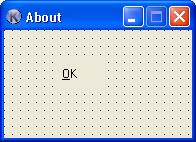
Hi eagle4life69, You should be able to just use $BS_FLAT and or $BS_PushBox, but for some reason that doesn't work. Can somebody shed some light on this? I think it has to do with the Windows XP manifest (is it called?). How can Eagle and I disable that? Here's some lousy code to exemplify the problem: #include <GUIConstants.au3> $Form1 = GUICreate("About", 189, 109, 303, 219) $Button1 = GUICtrlCreateButton("&OK", 56, 32, 43, 25, BitOr($BS_FLAT, $BS_PUSHBOX) ) GUISetState(@SW_SHOW) While 1 $nMsg = GUIGetMsg() If $nMsg = $button1 Then msgbox(4096, "huh?", "I should be flat and have no border!") EndIf WEnd Notice the attached screenshot, showing how Koda thinks a button with those styles should look. Thanks, Christian
-
Hi Valuater, Thanks for the suggestion, that's certainly a pretty option and would be more than satisfactory in most cases. However, I'm specifically writing a performance application and so in this instance it must be free of bloat. Thanks, Christian
-
Hi Valuater, I would like to agree, but the most obvious problem with that is with underlined accelerators like "&OK". If you make a label that reads "&OK", pressing Alt+O won't work. Also, I haven't been able to get them to behave as a tabstop either. Cheers, Christian
-
So long as we're all agreement that we have no freaking idea what that's there for . The treeview is an instantiatable windows component so we wouldn't need to store any artwork for that. However, I think you were just saying that's what it looks like, not that's what it is.