


Champak
-
Posts
1,553 -
Joined
-
Last visited
-
Days Won
1
Recent Profile Visitors
2,298 profile views











Champak's Achievements

-
I haven't actually tested this and I'm not near my system, but just curious if I will be going down the right path in order to resolve my issue. Sometimes the app stops monitoring, I guess it happens when the computer goes to sleep or hibernation. So I want something that will automatically start monitoring again if this issue is detected. Looking at the OP from the simple notification example will something like this do what I want? I don't want to do the whole creation thing again, because it would interfere with too many other things in the app. Thanks. If @Error Then ; Do something because notifications will not come from this thread! ConsoleWrite('Error: _RDC_GetData() - ' & @Error & ', ' & @Extended & ', ' & _RDC_GetDirectory($lParam) & @CR) GUIRegisterMsg($WM_RDC, 'WM_RDC') Return 0 EndIf
-
DELETE THIS
-
_FileGetProperty - Retrieves the properties of a file
Champak replied to BrewManNH's topic in AutoIt Example Scripts
This function strip apostrophes from the paths string. Is there a specific reason why? I have a particular path that has an apostrophe in it and was going out my mind trying to figure out why this wasn't working until I saw that. Everything seems to work fine once that was commented out, so just curious as to why that would have been put in in the first place. Thanks. -
Thanks all
-
I'm trying to jump to a case if certain conditions are met in a preceding case. I tried coding it like the example below, but it doesn't work. It works up to "case $ccc, $ddd" but it doesn't then jump to "case $hhh". Is there some way to accomplish this? func something() switch $22 case $aaa, $bbb, $ccc, $ddd, $eee switch $22 case $ccc, $ddd $22 = $hhh endswitch case $fff case $ggg case $hhh ;Something else here case $iii endswitch Endfunc
-
Odd thing happening that I'm not understanding. The two types of files I'm working with are jpg and mp4. The comments are not inserted as expected. They are writing to the mp4 but not the jpg. When I manually put them in the property details by right clicking the file and then execute the following: $File0 = $Path&"2019-06-13_191943_V.MP4" ShellExecute($exifPath, ' -a -u -g1 "' & $File0 & '"', "", "OPEN", @SW_SHOW) Under jpg files they are showing up under the tag "XP Comment" and under the the mp4 file they don't show at all....but in windows explorer I can see the comment. Any ideas? 1/ How do I output the shell printout to the console or a text file? I tried a good dozen variations, but nothing is working. 2/ Is there a "tags" tag? When I tried it, it said I had to specify a tag, not just use tag. I'm wondering if it is called something else.
-
 argumentum reacted to a post in a topic:
Set file properties
argumentum reacted to a post in a topic:
Set file properties
-
 Champak reacted to a post in a topic:
Set file properties
Champak reacted to a post in a topic:
Set file properties
-
ahh, but you did not ask a question, you made a statement. And my response stated replying to everyone asking a question. So no need to feel left out, you weren't technically overlooked....but now you got your shoutout lol . Thanks to all for the assistance.
-
Could you give an example of how you used it to write? Appreciate that, but that doesn't negate me from replying to a question asked of me. Also, I do know of other explorers/programs that I can use to input that info, but I'm looking for a way to do it within the app that I made as part of a larger function. Thanks.
-
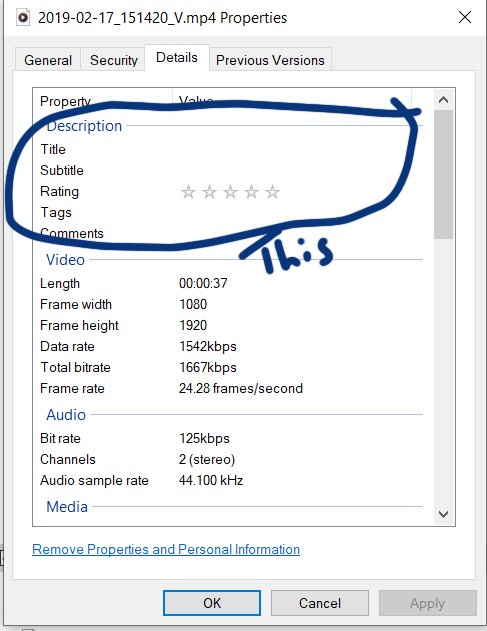
The standard description section....I don't know if that's called meta info.
-
Is there a way to set the file properties, specifically title and comment? I found one post, but apparently that's only for the older windows. I'm using wind 10.
-
 ioa747 reacted to a post in a topic:
FileSetTime is not working correctly for me
ioa747 reacted to a post in a topic:
FileSetTime is not working correctly for me
-
FileSetTime is not working correctly for me
Champak replied to Champak's topic in AutoIt General Help and Support
Thanks all. -
I'm grabbing the name of a file, which is the date and time, and setting it to the modified date. The problem is it is the date gets set properly but the time doesn't...it's off by -1hr, and I'm verifying it beforehand. The input format varies as 2022-02-02_083224_P.jpg ----- YYYY-MM-DD_HHMMSS Func _Set_File_Dates($sFileSelect) $aDirContent_New = StringSplit($sFileSelect, "|", 2) For $i = UBound($aDirContent_New) - 1 to 0 Step - 1 $FileNameDate = StringSplit($aDirContent_New[$i], "\", 2) $aFileNameDate = StringSplit($FileNameDate[UBound($FileNameDate)-1], "_", 2) $NewTime = $aFileNameDate[0] & $aFileNameDate[1] $NewTime = StringRegExp($NewTime, "\d+", 3) _ArrayDisplay($NewTime) $NewTime = $NewTime[0] & $NewTime[1] & $NewTime[2] MsgBox(0,"new date", $NewTime) FileSetTime ( $aDirContent_New[$i], $NewTime, $FT_MODIFIED) Next ;Exit EndFunc Any help?
-
argumentum reacted to a post in a topic:
justify hotkey in menu
-
Thanks.
-
How can I justify the hotkey text (or anything) to the right of the menu while the "primary" text of the menu stays to the left?
-
argumentum reacted to a post in a topic:
Help with best way to do this function
-
Help with best way to do this function
Champak replied to Champak's topic in AutoIt General Help and Support
Thanks. I'll see what I can grasp from this....but it looks worse than regexp lol.