

cramaboule
-
Posts
351 -
Joined
-
Last visited





.thumb.gif.f0fcf5626c0e51d894959a28cd718fe7.gif)

cramaboule's Achievements

-
 ioa747 reacted to a post in a topic:
[SOLVED] Help With _FileListToArrayRec()
ioa747 reacted to a post in a topic:
[SOLVED] Help With _FileListToArrayRec()
-

[SOLVED] Help With _FileListToArrayRec()
cramaboule replied to cramaboule's topic in AutoIt General Help and Support
$aDir = _FileListToArrayRec($aDrive[$i], "cramy;*25", $FLTA_FOLDERS, $FLTAR_RECUR, $FLTAR_NOSORT, $FLTAR_FULLPATH) Arrr,.... that's the syntax I was looking for ! Thanks -
cramaboule reacted to a post in a topic:
[SOLVED] Help With _FileListToArrayRec()
-
Hello, I am searching files (e.g.) *.jpg inside (e.g.) 'cramy' folders like C:\AutoIt\[some folders]\cramy\*.jpg AND as well .jpg inside folders ending with 25: C:\AutoIt\[some folders]\[some folders]\[some folders]\*25\*.jpg I have some code: Local $aJPG[1]=[0], $aOtherJPG[1]=[0] For $i = 1 To $aDrive[0] $aJPG = _FileListToArrayRec($aDrive[$i] & "\", "cramy", $FLTA_FOLDERS, $FLTAR_RECUR, $FLTAR_NOSORT, $FLTAR_FULLPATH) For $j = 1 To aJPG[0] $aFic1 = _FileListToArray($aJPG[$j], "*.jpg", $FLTA_FILES, True) $num = _ArrayConcatenate(aJPG, aJPG1, 1) $aJPG[0] = $num - 1 Next $aOtherJPG = _FileListToArrayRec($aDrive[$i] & "\", "*25", $FLTA_FOLDERS, $FLTAR_RECUR, $FLTAR_NOSORT, $FLTAR_FULLPATH) For $j = 1 To $aOtherJPG[0] $aOtherJPG1 = _FileListToArray($aOtherJPG[$j], "*.jpg", $FLTA_FILES, True) $num = _ArrayConcatenate($aOtherJPG, $aOtherJPG1, 1) aOtherJPG[0] = $num - 1 Next Next Is it possible to shorten the code ? I tried: $aJPG = _FileListToArrayRec($aDrive[$i] & '\', 'cramy||;*25||', $FLTA_FOLDERS, $FLTAR_RECUR, $FLTAR_NOSORT, $FLTAR_FULLPATH) But it doesn't work ! Thanks for your help! C.
-
Hi, Found it again, and digging a bit: As today on W11 25H2 AutoIt Version: 3.3.18.0 'If' is slightly faster than Select (0.3 ms) When doing comparaison on numeric variable: Local $Val = 0 If $Val = 6 Then ; EndIf Is way faster than: Local $Val If $Val = 6 Then ; EndIf same as: Local $Val = '' If $Val = 6 Then ; EndIf and the slowest is: Local $Val = '0' If $Val = '6' Then ; EndIf On those tests above NOT compiled prg run faster than compiled in X64. X86 is the slowest. Compression seems to have no impact on timing.
-
cramaboule reacted to a post in a topic:
AutoIt v3.3.18.0 Released
-
cramaboule reacted to a post in a topic:
Barcode - UDF
-
cramaboule reacted to a post in a topic:
How do you handle password in your code ?
-
cramaboule reacted to a post in a topic:
How do you handle password in your code ?
-
How do you handle password in your code ?
cramaboule replied to cramaboule's topic in AutoIt General Help and Support
@BigDaddyO, Nice solution. But you need username and password to access to your db? -
cramaboule reacted to a post in a topic:
How do you handle password in your code ?
-
How do you handle password in your code ?
cramaboule replied to cramaboule's topic in AutoIt General Help and Support
thanks... it is good if you prompt with inputbox... but in my case it is silent running script... thus making somehow clear and encrypted -
How do you handle password in your code ?
cramaboule replied to cramaboule's topic in AutoIt General Help and Support
Of course when possible, I'd ask password in inputbox,... but for servers who runs script unattended,... it is a bit more complicated ! Of course, exe, is the first barrier, but I always save my au3 files obviously. Will see the Windows Credential Manager -
cramaboule reacted to a post in a topic:
How do you handle password in your code ?
-
How do you handle password in your code ?
cramaboule replied to cramaboule's topic in AutoIt General Help and Support
Hummmmm good idea ! will look at it ! C. -
How do you handle password in your code ?
cramaboule replied to cramaboule's topic in AutoIt General Help and Support
Obviously... but I do not want the clear pw in my code. -
cramaboule reacted to a post in a topic:
How do you handle password in your code ?
-
cramaboule reacted to a post in a topic:
How do you handle password in your code ?
-
cramaboule reacted to a post in a topic:
How do you handle password in your code ?
-
How do you handle password in your code ?
cramaboule replied to cramaboule's topic in AutoIt General Help and Support
Hi @SOLVE-SMART, Well, some code are only for me, some other are on my network or on servers running here and there... Obviously, I won't make any sensitif info on Github public... --> Use the secret management of GitHub --> secrets are encrypted separately more info on those? -
How do you handle password in your code ?
cramaboule replied to cramaboule's topic in AutoIt General Help and Support
Not bad -
Hello, I have several scripts that has password in it. Like: Run(@ComSpec & " /c " & '"C:\Program Files\PuTTY\plink.exe" -ssh -pw Pa$$w0rd administrator@192.168.1.1','', @SW_HIDE) $sUsername = 'administrator' $sPassword = 'Pa$$w0rd' How do you handle password? because it is in clear in a "text" file. or Do you have some idea for more security ? Thanks in advance. C.
-
ioa747 reacted to a post in a topic:
[Solved] PNG scaled down to GUI, cropped
-
[Solved] PNG scaled down to GUI, cropped
cramaboule replied to cramaboule's topic in AutoIt GUI Help and Support
the _GDIPlus_ImageScale() can have some floats... soooo yeeeee this is why! -
[Solved] PNG scaled down to GUI, cropped
cramaboule replied to cramaboule's topic in AutoIt GUI Help and Support
Thanks, yes it is playing around... but I think my solution works with upscale and downscale -
MattyD reacted to a post in a topic:
[Solved] PNG scaled down to GUI, cropped
-
[Solved] PNG scaled down to GUI, cropped
cramaboule replied to cramaboule's topic in AutoIt GUI Help and Support
After digging into my script I found a small bug or improvement in the code of @UEZ in the UDF of GDI+ _GDIPlus_ImageScale() : I added Floor($iNewWidth), Floor($iNewHeight) Here is my script working nicely 😄 #include <GDIPlus.au3> #include <GUIConstantsEx.au3> #include <MsgBoxConstants.au3> #include <WindowsConstants.au3> #include <StaticConstants.au3> Local $idPic, $idPic1 GUICreate('Test', 200, 500, 1050, 50) ;Create a GUI GUISetBkColor(0xFFFFFF) $idPic = _GUICtrlCreatePngScale(@ScriptDir & "\big-green.png", 5, 5, .035) $idPic1 = _GUICtrlCreatePngScale(@ScriptDir & "\big-green.png", 5, 200, 1) $idPic2 = GUICtrlCreatePic(@ScriptDir & "\green.bmp", 5, 300, 100, 100) GUICtrlSetPos($idPic1, 5, 150, 100, 100) GUISetState(@SW_SHOW) While 1 Switch GUIGetMsg() Case $GUI_EVENT_CLOSE Exit Case $idPic MsgBox($MB_TOPMOST, "Information", "PNG 1 image was clicked") Case $idPic1 MsgBox($MB_TOPMOST, "Information", "PNG 2 image was clicked") Case $idPic2 MsgBox($MB_TOPMOST, "Information", "PNG 3 image was clicked") EndSwitch WEnd Func _GUICtrlCreatePngScale($_sName, $_left, $_top, $_iScale = 1) _GDIPlus_Startup() Local $_hImage = _GDIPlus_ImageLoadFromFile($_sName) ;The PNG image that you want to display Local $B_Scaled = _GDIPlus_ImageScaleNew($_hImage, $_iScale, $_iScale) Local $_idPic = GUICtrlCreatePic("", $_left, $_top, 20, 20) GUICtrlSendMsg($_idPic, 0x0172, 0, _GDIPlus_BitmapCreateHBITMAPFromBitmap($B_Scaled)) _WinAPI_DeleteObject($_hImage) ;some clean up _GDIPlus_ImageDispose($B_Scaled) _GDIPlus_Shutdown() Return $_idPic EndFunc ;==>_GUICtrlCreatePngScale Func _GDIPlus_ImageScaleNew($hImage, $iScaleW, $iScaleH, $iInterpolationMode = $GDIP_INTERPOLATIONMODE_HIGHQUALITYBICUBIC) Local $iWidth = _GDIPlus_ImageGetWidth($hImage) If @error Then Return SetError(1, 0, 0) Local $iHeight = _GDIPlus_ImageGetHeight($hImage) If @error Then Return SetError(2, 0, 0) Local $iNewWidth = $iWidth * $iScaleW Local $iNewHeight = $iHeight * $iScaleH Local $hBitmap = _GDIPlus_BitmapCreateFromScan0($iNewWidth, $iNewHeight) If @error Then Return SetError(3, 0, 0) Local $hBmpCtxt = _GDIPlus_ImageGetGraphicsContext($hBitmap) _GDIPlus_GraphicsSetInterpolationMode($hBmpCtxt, $iInterpolationMode) _GDIPlus_GraphicsSetPixelOffsetMode($hBmpCtxt, $GDIP_PIXELOFFSETMODE_HIGHQUALITY) Local $hIA = _GDIPlus_ImageAttributesCreate() __GDIPlus_ImageAttributesSetImageWrapMode($hIA) If @error Then _GDIPlus_ImageAttributesDispose($hIA) _GDIPlus_GraphicsDispose($hBmpCtxt) _GDIPlus_BitmapDispose($hBitmap) Return SetError(4, 0, 0) EndIf _GDIPlus_GraphicsDrawImageRectRect($hBmpCtxt, $hImage, 0, 0, $iWidth, $iHeight, 0, 0, Floor($iNewWidth), Floor($iNewHeight), $hIA) _GDIPlus_ImageAttributesDispose($hIA) _GDIPlus_GraphicsDispose($hBmpCtxt) Return $hBitmap EndFunc ;==>_GDIPlus_ImageScale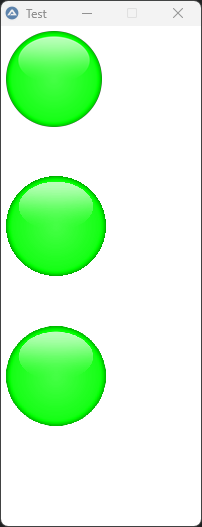
-
Here is an exemple of the PNG scaled down based on this script : https://www.autoitscript.com/forum/topic/200086-display-png-images/#findComment-1498721 Here is my script: but the png is cropped 1 or 2 px The others looks bad any hint how to fix it ? #include <GDIPlus.au3> #include <GUIConstantsEx.au3> #include <MsgBoxConstants.au3> #include <WindowsConstants.au3> #include <StaticConstants.au3> Local $idPic, $idPic1 GUICreate('Test', 200, 500, 1050, 50) ;Create a GUI GUISetBkColor(0xFFFFFF) $idPic = _GUICtrlCreatePngScale(@ScriptDir & "\big-green.png", 5, 5, .035) $idPic1 = _GUICtrlCreatePngScale(@ScriptDir & "\big-green.png", 5, 200, 1) $idPic2 = GUICtrlCreatePic(@ScriptDir & "\green.bmp", 5, 300, 100, 100) GUICtrlSetPos($idPic1, 5, 150, 100, 100) GUISetState(@SW_SHOW) While 1 Switch GUIGetMsg() Case $GUI_EVENT_CLOSE Exit Case $idPic MsgBox($MB_TOPMOST, "Information", "PNG 1 image was clicked") Case $idPic1 MsgBox($MB_TOPMOST, "Information", "PNG 2 image was clicked") Case $idPic2 MsgBox($MB_TOPMOST, "Information", "PNG 3 image was clicked") EndSwitch WEnd Func _GUICtrlCreatePngScale($_sName, $_left, $_top, $_iScale = 1) _GDIPlus_Startup() Local $_hImage = _GDIPlus_ImageLoadFromFile($_sName) ;The PNG image that you want to display Local $B_Scaled = _GDIPlus_ImageScale($_hImage, $_iScale, $_iScale) Local $_idPic = GUICtrlCreatePic("", $_left, $_top, 20, 20) GUICtrlSendMsg($_idPic, 0x0172, 0, _GDIPlus_BitmapCreateHBITMAPFromBitmap($B_Scaled)) _WinAPI_DeleteObject($_hImage) ;some clean up _GDIPlus_ImageDispose($B_Scaled) _GDIPlus_Shutdown() Return $_idPic EndFunc ;==>_GUICtrlCreatePngScale green.BMP