lyledg
-
Posts
287 -
Joined
-
Last visited
lyledg's Achievements

Universalist (6/7)
0
Reputation
-
Problems with WinMove in WindowsPE
lyledg replied to davmatt's topic in AutoIt General Help and Support
Hi David Did you ever get a resolution to this, as I am experiencing the same thing in an OSD task sequence? Cheers -
Launching HTA in WinPE with Autoit
lyledg replied to lyledg's topic in AutoIt General Help and Support
Bump -
I am currently launching the code below from a x86 WinPE session. The Autoit script looks for a window called "Installation Progress" (Which btw is a another spawned program from WinPE) and attempts to minimize it, and then subsequently launches mshta.exe to display an HTA, which is supplied through command line argument. The windows only minimizes when I move my mouse over the "Installation Progress", and once it the HTA exits I again have to move the mouse over the minimized window to restore it to it's original position. So the script is working, sort of...but with manual intervention. Any ideas how to fix this? Cheers #Region ;**** Directives created by AutoIt3Wrapper_GUI **** #AutoIt3Wrapper_icon=Images\winicon.ico #EndRegion ;**** Directives created by AutoIt3Wrapper_GUI **** #include <file.au3> Global $WindowName, $logfile, $val AutoItSetOption("WinTitleMatchMode", 4) ;Set the Windows Name Properties for the Task sequence $WindowName = "Installation Progress" ;$WindowName = "Untitled - Notepad" $logfile = @WindowsDir & "\Temp\installation.log" _FileWriteLog($logfile, " " & "Version 1.03") If $CmdLine[0] = 0 Then _FileWriteLog($logfile, " " & "ERROR 55: Not enough command line arguments supplied, exiting") Exit ElseIf Not FileExists(@ScriptDir & "\" & $CmdLine[1]) Then _FileWriteLog($logfile, " " & " ERROR 56: " & @ScriptDir & "\" & $CmdLine[1] & " file not found, exiting...") Exit Else _FileWriteLog($logfile, " " & @ScriptDir & "\" & $CmdLine[1] & " file found, starting execution of script") EndIf ;Get the handle of the Active Window $handle = WinGetHandle($WindowName, "") If @error Then _FileWriteLog($logfile, " " & $WindowName & " has not been found....waiting for it.") Else _FileWriteLog($logfile, " " & $WindowName & " window has been found, hiding it now.") WinSetState($handle, "", @SW_MINIMIZE) ; Wait for mshta.exe to execute _FileWriteLog($logfile, " About to Launch command: " & @SystemDir & "\mshta.exe " & '"' & @ScriptDir & "\" & $CmdLine[1] & '"') $val = ShellExecuteWait(@SystemDir & "\mshta.exe ", '"' & @ScriptDir & "\" & $CmdLine[1] & '"', @SystemDir, "", @SW_MAXIMIZE) If $val <> 0 Then _FileWriteLog($logfile, "Error launching Mshta.exe...") MsgBox(262160, "Error", "Error launching Mshta.exe") Exit Else _FileWriteLog($logfile, " Mshta.exe successfully launched with supplied command line paramater") _FileWriteLog($logfile, " " & "Showing Task Sequence window again") WinSetState($handle, "", @SW_RESTORE) _FileWriteLog($logfile, " Exiting... ") Exit EndIf EndIf
-
Disable $LVS_EX_CHECKBOXES in Listview
lyledg replied to lyledg's topic in AutoIt GUI Help and Support
Thanks Gary and MScreator -
Disable $LVS_EX_CHECKBOXES in Listview
lyledg replied to lyledg's topic in AutoIt GUI Help and Support
Hey Gary...not sure I understand StateImage ? -
Disable $LVS_EX_CHECKBOXES in Listview
lyledg replied to lyledg's topic in AutoIt GUI Help and Support
Hi Mate Yes, that is getting close, but I don't want to remove ALL checkboxes for the whole Listview control, but only one item that is say selected? -
I have a listview with checkboxes enabled and was wondering if there is a way to disable or remove the checkbox from an item that was added to the Listview control? I am using _GUICtrlListView_Create Cheers
-
Great stuff Siao!!! However, I see in the Func BuildExampleTree($treeID) you uses GUICtrlCreateTreeViewItem. I am wanting to use the newer _GUICtrlTreeView_Add function as I want to include icons in the treeview dislpay. So, am I right in thinking this code below could work, or could you show me how your script could be adapted to include those new functions, as mentioned before? Func BuildExampleTree($treeID) Local $ti, $tsi, $i, $j, $k $ti = _GUICtrlTreeView_Add ($treeID, 0, "Select All") _GUICtrlTreeView_BeginUpdate ($treeID) For $i = 1 To 5 $tsi = _GUICtrlTreeView_AddChild($i, $ti, "1-") If $i = 3 Then For $j = 1 To 3 $tssi = _GUICtrlTreeView_AddChild($i & '-' & $j,$tsi, "1-") If $j = 2 Then For $k = 1 To 4 _GUICtrlTreeView_AddChild($i & '-' & $j & '-' & $k, $tssi, "1-") Next EndIf Next EndIf Next _GUICtrlTreeView_EndUpdate ($treeID) _GUICtrlTreeView_Add ($treeID, 1, "2") _GUICtrlTreeView_Expand($treeID, 0, True) ; ControlTreeView('', '', $treeID, "Expand", '#0') ; ControlTreeView('', '', $treeID, "Expand", '#0|#2') ; ControlTreeView('', '', $treeID, "Expand", '#0|#2|#1') EndFunc
-
As always MS...you deliver! But one last question, how could this be adapted for use with the new function _GUICtrlTreeView_Create, rather than GUICtrlCreateTreeView Cheers, you really are a good programmer! Edit: Replaced GUICtrlCreateTreeViewItem with GUICtrlCreateTreeView
-
I have found this post relating to my post... http://www.autoitscript.com/forum/index.php?showtopic=64545 However, it seems to use Opt("GUIOnEventMode", 1) Which breaks my gui especially if I have child windows...If I use this option they don't apprea I know I am doing something wrong.. If someone has the time, could they please post an example of where Opt("GUIOnEventMode", 1) is used with child windows so that I can get a better understanding of it's use..I never have grasped that concept and would appreciate any help Cheers PS: MsCreator...great exmaple as always mate...you are a genius!
-
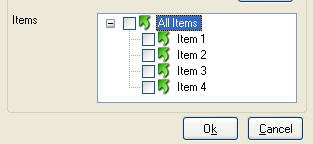
Hey guys I have a treeview with 4 check boxes and a parent "All Items" Checkbox. How can I check all checkboxes if the "All Items" option is used.. See attached pic for a better understanding I have this function thus far.... $hItem = _GUICtrlTreeView_GetFirstItem($hTreeView) $iItemCount = _GUICtrlTreeView_GetCount($hTreeView) For $n = 0 To $iItemCount - 1 $sText = _GUICtrlTreeView_GetText($hTreeView, $hItem) $boolChecked = _GUICtrlTreeView_GetChecked($hTreeView, $hItem) ConsoleWrite("Debug: Index: " & $n & " Handle: " & $hItem & " Text: " & $sText & " Checked: " & $boolChecked & @LF) $hItem = _GUICtrlTreeView_GetNext($hTreeView, $hItem) EndIf Next Any help would be greatly appreciated! Cheers EDIT: typo
-
Solved! #include <GuiConstants.au3> $GUI = GUICreate("Test Edit") $Edit = GUICtrlCreateEdit("", 20, 50, 150, 150) $Button = GUICtrlCreateButton("Button", 20, 210) GUICtrlSetState(-1, $Gui_Focus) GUISetState() While 1 $Msg = GUIGetMsg() Switch $Msg Case -3 Exit EndSwitch If _IsFocused($GUI, $Edit) Then Sleep(20) HotKeySet("{TAB}", "TabPress") Else HotKeySet("{TAB}") EndIf WEnd Func TabPress() ;$OldClip = ClipGet() ;ClipPut(@TAB) ;Send("+{INSERT}") ;ClipPut($OldClip) Send("^{TAB}") ;This is the tip from Siao - Thanks! EndFunc Func _IsFocused($hWnd, $nCID) Return ControlGetHandle($hWnd, '', $nCID) = ControlGetHandle($hWnd, '', ControlGetFocus($hWnd)) EndFunc Thanks to MSCreator and Siao http://www.autoitscript.com/forum/index.ph...p;hl=_IsFocused
-
Unfortunately that does not work Adjusted code below #include <GuiConstantsEx.au3> #include <GuiListView.au3> #include <GuiImageList.au3> Opt('MustDeclareVars', 1) $Debug_LV = False ; Check ClassName being passed to ListView functions, set to True and use a handle to another control to see it work Global $LISTVIEW Global Const $Yes = 6, $No = 7 HotKeySet("{Delete}", "_Removeitem") _Main() Func _Main() Local $GUI, $hImage $GUI = GUICreate("(External) ListView Create", 600, 500) $LISTVIEW = _GUICtrlListView_Create ($GUI, "", 2, 2, 394, 268) _GUICtrlListView_SetExtendedListViewStyle ($LISTVIEW, BitOR($LVS_EX_GRIDLINES, $LVS_EX_FULLROWSELECT, $LVS_EX_SUBITEMIMAGES)) GUISetState() ; Load images $hImage = _GUIImageList_Create () _GUIImageList_Add ($hImage, _GUICtrlListView_CreateSolidBitMap ($LISTVIEW, 0xFF0000, 16, 16)) _GUIImageList_Add ($hImage, _GUICtrlListView_CreateSolidBitMap ($LISTVIEW, 0x00FF00, 16, 16)) _GUIImageList_Add ($hImage, _GUICtrlListView_CreateSolidBitMap ($LISTVIEW, 0x0000FF, 16, 16)) _GUICtrlListView_SetImageList ($LISTVIEW, $hImage, 1) ; Add columns _GUICtrlListView_InsertColumn ($LISTVIEW, 0, "Column 1", 100) _GUICtrlListView_InsertColumn ($LISTVIEW, 1, "Column 2", 100) _GUICtrlListView_InsertColumn ($LISTVIEW, 2, "Column 3", 100) ; Add items _GUICtrlListView_AddItem ($LISTVIEW, "Row 1: Col 1", 0) _GUICtrlListView_AddSubItem ($LISTVIEW, 0, "Row 1: Col 2", 1) _GUICtrlListView_AddSubItem ($LISTVIEW, 0, "Row 1: Col 3", 2) _GUICtrlListView_AddItem ($LISTVIEW, "Row 2: Col 1", 1) _GUICtrlListView_AddSubItem ($LISTVIEW, 1, "Row 2: Col 2", 1) _GUICtrlListView_AddItem ($LISTVIEW, "Row 3: Col 1", 2) ; Loop until user exits Do Until GUIGetMsg() = $GUI_EVENT_CLOSE GUIDelete() EndFunc ;==>_Main Func _Removeitem() Local $win, $CurrentIndexSelected, $State $Win = WinActive("(External) ListView Create") If $Win <> 0 Then $State = GUICtrlGetState($LISTVIEW) msgbox (0,"state",StringFormat("GUICtrlRead=%d\nGUICtrlGetState=%d",GUICtrlRead($LISTVIEW),GUICtrlGetState($LISTVIEW))) $CurrentIndexSelected = _GUICtrlListView_GetNextItem($LISTVIEW) ;Get the item index in the listview If $CurrentIndexSelected <= -1 Then MsgBox(262192, "No items", "No items to delete") Else If MsgBox(262180, "Remove", "Are you sure you want to delete the highlighted item(s)?") = $Yes Then _GUICtrlListView_DeleteItemsSelected(ControlGetHandle("", "", $LISTVIEW)) Else Return EndIf EndIf Else HotKeySet("{Delete}") EndIf EndFunc Also, see attached document for screenshots _GUICtrlListView_Create_focus.doc
-
~ bump
-
Need GUI..I have no prog experience..Suggestions?
lyledg replied to wowmarkb's topic in AutoIt GUI Help and Support
Best way to learn is to read, reasearch and learn from the info we have given you, and then try do a simple example to get advice... Trying to learn a programming language parrot fashion will only be a lot harder than trying to teach yourself, but with the advice from a lot of guys here that will guide you it will become easier... Good luck