erezlevi
-
Posts
435 -
Joined
-
Last visited
erezlevi's Achievements

Universalist (7/7)
0
Reputation
-
POP-3 attachment Base64 not working
erezlevi replied to erezlevi's topic in AutoIt General Help and Support
yes. -
POP-3 attachment Base64 not working
erezlevi replied to erezlevi's topic in AutoIt General Help and Support
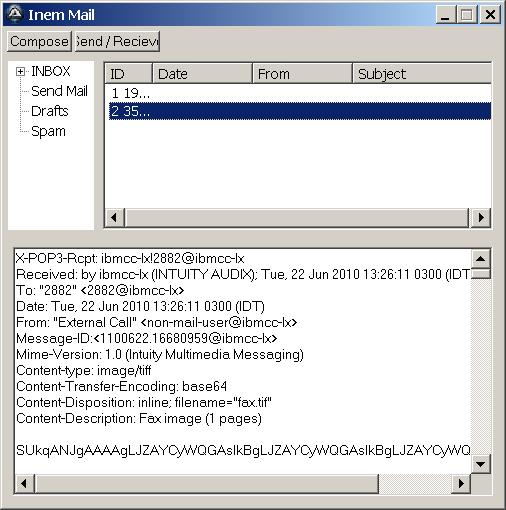
I am attaching a print screen shot of what I am receving.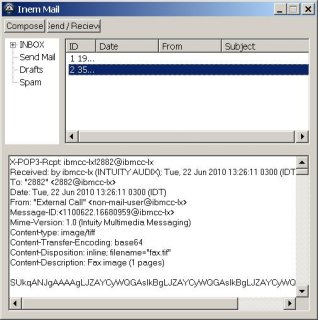
-
hi, I have used _pop3.au3 for retreiving mail messages. Since my message has an attachement, I've seen on posts here that it needs to convert to Base64, tried it using _base64.au3 but I got nothing when saving it as .Tiff file. any idea ?
-
hi, can someone help me traslate this VB to AutoIt I tried more then 3 hours and nothing happens: VB code: set inter = WScript.CreateObject("InterExe.Interface") WScript.ConnectObject inter,"inter_" inter.Initialize(0) Dim status status = true Do While status WScript.Sleep 100 Loop inter.Terminate Sub inter_InterData(data) MsgBox "new data=" & data End Sub AutoIt Code (not working) [code] $oInter = ObjCreate("InterExe.Interface") ObjEvent($oInter, "inter_", "InterData") $oInter.Initialize(0) While 1 Sleep(50) WEnd $oInter.Terminate("all") Func inter_InterData() MsgBox(0, " a function was called!", "") EndFunc ;==>moshe
-
hi, can someone help me traslate this VB to AutoIt I tried more then 3 hours and nothing happens: VB code: set inter = WScript.CreateObject("InterExe.Interface") WScript.ConnectObject inter,"inter_" inter.Initialize(0) Dim status status = true Do While status WScript.Sleep 100 Loop inter.Terminate Sub inter_InterData(data) MsgBox "new data=" & data End Sub AutoIt Code (not working) $oInter = ObjCreate("InterExe.Interface") ObjEvent($oInter, "inter_", "InterData") $oInter.Initialize(0) While 1 Sleep(50) WEnd $oInter.Terminate("all") Func inter_InterData() MsgBox(0, " a function was called!", "") EndFunc ;==>moshe
-
how can I create a right click choices like in windows desktop right click (see pic) right click question.bmp
-
hi, can someone tell me how to create a GUI so that its size will automatically be full screen, and if I move the script to an 1024/726 resolution it will do so automatically and if changed to 800/600 the same thing.
-
I am sorry, but I am with auto-IT for 3 years now. so if I post something it is usualy after reading help-file, reading auto-it Example scripts, searching in the forum and other.
-
it doesn't work did you test it on the code? i've added it but it does nothing.
-
why can't I create a line inside a tab item? #include <File.au3> #include <Array.au3> #include <GUIconstants.au3> #include <String.au3> #include <FontConstants.au3> #include <GUIConstantsEx.au3> #include <GuiListView.au3> #include <ListViewConstants.au3> #include <StructureConstants.au3> #include <WinAPI.au3> #include <WindowsConstants.au3> $GUI = GUICreate("Percent Allocation", 500, 400, 30, 30) GUISetFont(11, 600) $tab = GUICtrlCreateTab(50, 20, 400, 310 ) $TAB1 = GUICtrlCreateTabItem("sun") $Line=GUICtrlCreateGraphic (90,90,100,15) $Line1=GUICtrlSetGraphic (-1,$GUI_GR_LINE,70,90) GUICtrlCreateLabel ("HOUR",80,70) GUICtrlCreateLabel ("skill-881",170,70) GUICtrlCreateLabel ("07:00-09:00",60,110) GUICtrlCreateLabel ("09:00-11:00",60,140) GUICtrlCreateLabel ("11:00-13:00",60,170) GUICtrlCreateLabel ("13:00-15:00",60,200) GUICtrlCreateLabel ("15:00-17:00",60,230) GUICtrlCreateLabel ("17:00-19:00",60,260) $TAB2 = GUICtrlCreateTabItem("mon") $Line=GUICtrlCreateGraphic (90,90,100,15) $Line1=GUICtrlSetGraphic (-1,$GUI_GR_LINE,70,90) GUICtrlCreateLabel ("HOUR",80,70) GUICtrlCreateLabel ("skill-881",170,70) GUICtrlCreateLabel ("07:00-09:00",60,110) GUICtrlCreateLabel ("09:00-11:00",60,140) GUICtrlCreateLabel ("11:00-13:00",60,170) GUICtrlCreateLabel ("13:00-15:00",60,200) GUICtrlCreateLabel ("15:00-17:00",60,230) GUICtrlCreateLabel ("17:00-19:00",60,260) $TAB3 = GUICtrlCreateTabItem("tue") $TAB4 = GUICtrlCreateTabItem("wed") $TAB5 = GUICtrlCreateTabItem("thu") $TAB6 = GUICtrlCreateTabItem("fri") $TAB7 = GUICtrlCreateTabItem("sat") GUICtrlCreateTabItem("") GUISetOnEvent($GUI_EVENT_CLOSE, '_exit') GUISetState() While 1 $tabbing=GUICtrlRead ($tab) ;MsgBox (0,"this is tabbing",$tabbing) sleep (4000) WEnd Func _exit() Exit EndFunc ;==>_exit
-
hi, is there a way that after creating the .exe file dubugging will work and write the steps been done by the .exe to a txt file?
-
Citrix support for my auto-it script
erezlevi replied to erezlevi's topic in AutoIt General Help and Support
thanks, the @username should help here, if that is the case. -
hi, I have a real-time monitoring script. it needs to run both on winXP and Win2003, but also on Citrix clients. I know what citrix can do, but I don't know about citrix enough, this is why I am asking here. my code is using the 'c:\' to write into a file what have been recieved via TCPrecv command. if a user open-up a citrix session and runs that auto-it script does he has a virtual 'c:\' of his own or is it shared on the Citrix server for all users? what I am asking is if another user is openning the same auto-it script while the other user also opened it, they both write to the same file in c:\ ? Thanks,
-
hi the font is Arial. don't mind about it anymore it is solved now, I'v built the table using the GUIctrlcreategraphic function.
-
i've posted it it is the tumbnail. use save target as when right click on it and name it C:\table2.jpg