


Rodger
-
Posts
82 -
Joined
-
Last visited
Rodger's Achievements

Wayfarer (2/7)
0
Reputation
-
Hello, I am using the function "_ExcelReadArray" of an Excel UDF (ExcelCom_UDF.au3). The code of the function is : ;=============================================================================== ; ; Description: Create an array from a row or column of the active worksheet. ; Syntax: $array = _ExcelReadArray($oExcel, $iStartRow, $iStartColumn, $iNumCells, $iDirection = 0, $iIndexBase = 0) ; Parameter(s): $oExcel - Excel object opened by a preceding call to _ExcelBookOpen() or _ExcelBookNew() ; $iStartRow - The table row to start reading the array from ; $iStartColumn - The table column to start reading the array from ; $iNumCells - The number of cells to read into the array ; $iDirection - The direction of the cells to read into array (0=right, 1=down) ; $iIndexBase - Specify whether array created is to have index base of either 0 or 1 ; Requirement(s): None ; Return Value(s): On Success - Returns an array with the specified cell contents ; On Failure - Returns 0 and sets @error on errors: ; @error=1 - Specified object does not exist ; @error=2 - Parameter out of range ; @extended=0 - Row out of range ; @extended=1 - Column out of range ; @error=3 - Invalid number of cells ; @error=4 - Invalid direction parameter ; Author(s): SEO <locodarwin at yahoo dot com> ; Note(s): None ; ;=============================================================================== Func _ExcelReadArray($oExcel, $iStartRow, $iStartColumn, $iNumCells, $iDirection = 0, $iIndexBase = 0) Local $aArray[$iNumCells + $iIndexBase] If NOT IsObj($oExcel) Then Return SetError(1, 0, 0) If $iStartRow < 1 Then Return SetError(2, 0, 0) If $iStartColumn < 1 Then Return SetError(2, 1, 0) If NOT IsNumber($iNumCells) Or $iNumCells < 1 Then Return SetError(3, 0, 0) If $iDirection < 0 Or $iDirection > 1 Then Return SetError(4, 0, 0) If NOT $iDirection Then ;_ExcelSheetActivate($oExcel, $oExcel.Activesheet.Name) For $xx = $iIndexBase To Ubound($aArray) - 1 $aArray[$xx] = $oExcel.Activesheet.Cells($iStartRow, ($xx - $iIndexBase) + $iStartColumn).Value Next Else ;_ExcelSheetActivate($oExcel, $oExcel.Activesheet.Name) For $xx = $iIndexBase To Ubound($aArray) - 1 $aArray[$xx] = $oExcel.Activesheet.Cells(($xx - $iIndexBase) + $iStartRow, $iStartColumn).Value Next EndIf If $iIndexBase Then $aArray[0] = Ubound($aArray) - 1 Return $aArray EndFunc ;==>_ExcelReadArray When I want to call this function a few times after eachother it suddenly gives me error message "The requested action of this object has failed $aArray[$xx] = $oExcel.Activesheet.Cells(($xx - $iIndexBase) + $iStartRow, $iStartColumn).Value $aArray[$xx] = $oExcel.Activesheet.^ ERROR I also tried "$aArray[$xx] = $oExcel.ActiveWorkBook.Activesheet.Cells(($xx - $iIndexBase) + $iStartRow, $iStartColumn).Value but this is also a nogo Any idea's why it's giving me the error after running the function a few times. Thanks for the respons, Rodger
-
Outlook 2147467260 error - (Moved)
Rodger replied to Rodger's topic in AutoIt General Help and Support
I get the below message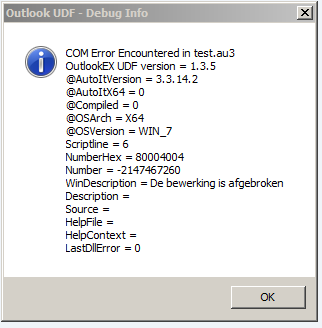
-
Outlook 2147467260 error - (Moved)
Rodger replied to Rodger's topic in AutoIt General Help and Support
My Outlook is 32bits and my Windows is 64bits. I also tried : $sCurrentUser = $oNameSpace.CurrentUser.Name I am not able to get the script working. -
Outlook 2147467260 error - (Moved)
Rodger replied to Rodger's topic in AutoIt General Help and Support
I compile it as 32bit. #Region ;**** Directives created by AutoIt3Wrapper_GUI **** #AutoIt3Wrapper_UseX64=n #EndRegion ;**** Directives created by AutoIt3Wrapper_GUI **** #include "OutlookEX.au3" -
Outlook 2147467260 error - (Moved)
Rodger replied to Rodger's topic in AutoIt General Help and Support
I run the 32 bits version. If I don't start outlook and run the script, I get the below "Name unknown" error: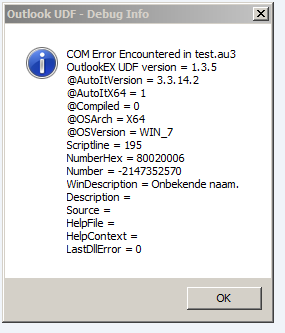
-
Outlook 2147467260 error - (Moved)
Rodger replied to Rodger's topic in AutoIt General Help and Support
The only thing I know is that outlook is local on my desktop. -
Outlook 2147467260 error - (Moved)
Rodger replied to Rodger's topic in AutoIt General Help and Support
It looks like my company does not allow any external program interacting with Outlook 2016 (Office 365). I tried the function : _OL_AccountGet($oOL) It fails on these two lines in the function : $aAccount[$iIndex][2] = $oAccount.SMTPAddress $aAccount[$iIndex][3] = $oAccount.UserName -
Outlook 2147467260 error - (Moved)
Rodger replied to Rodger's topic in AutoIt General Help and Support
I had a lot of comments at the top which I removed from the code before inserting it in the topic. It does not change the errormessage, it still occurs at line: $sCurrentUser = $oNameSpace.CurrentUser -
Outlook 2147467260 error - (Moved)
Rodger replied to Rodger's topic in AutoIt General Help and Support
#include "OutlookEX.au3" _OL_ErrorNotify(2) $oOutlook = _OL_Open() If @error <> 0 Then Exit MsgBox(16, "Outlook", "Error creating a connection to Outlook. @error = " & @error & ", @extended = " & @extended) If isObj($oOutlook) Then ConsoleWrite("OBJECT" & @CRLF) Else ConsoleWrite("NO OBJECT" & @CRLF) EndIf $oNameSpace = $oOutlook.GetNameSpace("MAPI") If @error <> 0 Then Exit MsgBox(16, "Outlook", "Namespace Error. @error = " & @error & ", @extended = " & @extended) If isObj($oNameSpace) Then ConsoleWrite("OBJECT" & @CRLF) Else ConsoleWrite("NO OBJECT" & @CRLF) EndIf $sCurrentUser = $oNameSpace.CurrentUser If @error <> 0 Then Exit MsgBox(16, "Outlook", "Namespace Error. @error = " & @error & ", @extended = " & @extended) If isObj($sCurrentUser) Then ConsoleWrite("OBJECT" & @CRLF) Else ConsoleWrite("NO OBJECT" & @CRLF) EndIf _OL_Close($oOutlook) Exit -
Outlook 2147467260 error - (Moved)
Rodger replied to Rodger's topic in AutoIt General Help and Support
_OL_ErrorNotify give the below information; "Afgebroken" means aborted.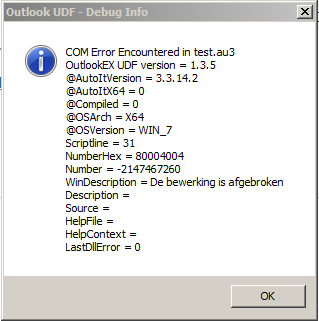
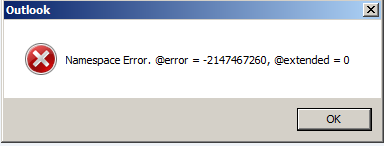
-
Hello, My company uses Outlook 2016 (Office 365). When I run the below script the line "$sCurrentUser = $oNameSpace.CurrentUser" gives a "2147467260" abort error back. #include "OutlookEX.au3" _OL_ErrorNotify(2) $oOutlook = _OL_Open() If @error <> 0 Then Exit MsgBox(16, "Outlook", "Error creating a connection to Outlook. @error = " & @error & ", @extended = " & @extended) If isObj($oOutlook) Then ConsoleWrite("OBJECT" & @CRLF) Else ConsoleWrite("NO OBJECT" & @CRLF) EndIf $oNameSpace = $oOutlook.GetNameSpace("MAPI") If @error <> 0 Then Exit MsgBox(16, "Outlook", "Namespace Error 2. @error = " & @error & ", @extended = " & @extended) If isObj($oNameSpace) Then ConsoleWrite("OBJECT" & @CRLF) Else ConsoleWrite("NO OBJECT" & @CRLF) EndIf $sCurrentUser = $oNameSpace.CurrentUser If @error <> 0 Then Exit MsgBox(16, "Outlook", "Namespace Error 3. @error = " & @error & ", @extended = " & @extended) If isObj($sCurrentUser) Then ConsoleWrite("OBJECT" & @CRLF) Else ConsoleWrite("NO OBJECT" & @CRLF) EndIf _OL_Close($oOutlook) Exit When I run this at home (Outlook 2019) the script works fine. Am I missing something ? Thanks for any feedback. Rodger
-
Rebar Resize doesn't work with WM_NOTIFY
Rodger replied to Rodger's topic in AutoIt General Help and Support
When i used the GUICtrlSendToDummy( $idRebarResize ) the rebar starts flickering but the Case $GUI_EVENT_MAXIMIZE, $GUI_EVENT_RESTORE did the job. Thank you LarsJ -
Hello, When running the below code and you maximize the GUI, the resize of the Rebar doesn't work properly. When you "disable" the line "GUIRegisterMsg($WM_NOTIFY, "WM_NOTIFY")" the resize of the Rebar works fine. Does anybody know why this happens ? Thanks, Rodger #include <GuiComboBox.au3> #include <GUIConstantsEx.au3> #include <GuiDateTimePicker.au3> #include <GuiEdit.au3> #include <GuiReBar.au3> #include <GuiToolbar.au3> #include <WindowsConstants.au3> Global $g_hReBar Example() Func Example() Local $hGui, $idBtnExit, $hToolbar, $hCombo, $hDTP, $hInput Local Enum $e_idNew = 1000, $e_idOpen, $e_idSave, $idHelp $hGui = GUICreate("Rebar", 400, 396, -1, -1, BitOR($WS_MINIMIZEBOX, $WS_CAPTION, $WS_POPUP, $WS_SYSMENU, $WS_MAXIMIZEBOX)) GUIRegisterMsg($WM_NOTIFY, "WM_NOTIFY") GUIRegisterMsg($WM_SIZE, "WM_SIZE") ; create the rebar control $g_hReBar = _GUICtrlRebar_Create($hGui, BitOR($CCS_TOP, $WS_BORDER, $RBS_VARHEIGHT, $RBS_AUTOSIZE, $RBS_BANDBORDERS)) ; create a toolbar to put in the rebar $hToolbar = _GUICtrlToolbar_Create($hGui, BitOR($TBSTYLE_FLAT, $CCS_NORESIZE, $CCS_NOPARENTALIGN)) ; Add standard system bitmaps Switch _GUICtrlToolbar_GetBitmapFlags($hToolbar) Case 0 _GUICtrlToolbar_AddBitmap($hToolbar, 1, -1, $IDB_STD_SMALL_COLOR) Case 2 _GUICtrlToolbar_AddBitmap($hToolbar, 1, -1, $IDB_STD_LARGE_COLOR) EndSwitch ; Add buttons _GUICtrlToolbar_AddButton($hToolbar, $e_idNew, $STD_FILENEW) _GUICtrlToolbar_AddButton($hToolbar, $e_idOpen, $STD_FILEOPEN) _GUICtrlToolbar_AddButton($hToolbar, $e_idSave, $STD_FILESAVE) _GUICtrlToolbar_AddButtonSep($hToolbar) _GUICtrlToolbar_AddButton($hToolbar, $idHelp, $STD_HELP) ; create a combobox to put in the rebar $hCombo = _GUICtrlComboBox_Create($hGui, "", 0, 0, 120) _GUICtrlComboBox_BeginUpdate($hCombo) _GUICtrlComboBox_AddDir($hCombo, @WindowsDir & "\*.exe") _GUICtrlComboBox_EndUpdate($hCombo) ; create a date time picker to put in the rebar $hDTP = _GUICtrlDTP_Create($hGui, 0, 0, 190) ; create a input box to put in the rebar ; $hInput = GUICtrlCreateInput("Input control", 0, 0, 120, 20) $hInput = _GUICtrlEdit_Create($hGui, "Input control", 0, 0, 120, 20) ; default for add is append ; add band with control _GUICtrlRebar_AddBand($g_hReBar, $hCombo, 120, 200, "Dir *.exe") ; add band with date time picker _GUICtrlRebar_AddBand($g_hReBar, $hDTP, 120) ; add band with toolbar to beginning of rebar _GUICtrlRebar_AddToolBarBand($g_hReBar, $hToolbar, "", 0) ;add another control ; _GUICtrlRebar_AddBand($g_hReBar, GUICtrlGetHandle($hInput), 120, 200, "Name:") _GUICtrlRebar_AddBand($g_hReBar, $hInput, 120, 200, "Name:") $idBtnExit = GUICtrlCreateButton("Exit", 150, 360, 100, 25) GUISetState(@SW_SHOW) While 1 Switch GUIGetMsg() Case $GUI_EVENT_CLOSE, $idBtnExit Exit EndSwitch WEnd EndFunc ;==>Example Func WM_NOTIFY($hWnd, $iMsg, $wParam, $lParam) #forceref $hWnd, $iMsg, $wParam Local $hWndFrom, $iIDFrom, $iCode, $tNMHDR Local $tAUTOBREAK, $tAUTOSIZE, $tNMREBAR, $tCHEVRON, $tCHILDSIZE, $tOBJECTNOTIFY $tNMHDR = DllStructCreate($tagNMHDR, $lParam) $hWndFrom = HWnd(DllStructGetData($tNMHDR, "hWndFrom")) $iIDFrom = DllStructGetData($tNMHDR, "IDFrom") $iCode = DllStructGetData($tNMHDR, "Code") Switch $hWndFrom Case $g_hReBar Switch $iCode Case $RBN_AUTOBREAK ; Notifies a rebar's parent that a break will appear in the bar. The parent determines whether to make the break ; Return value not used Case $RBN_AUTOSIZE ; Sent by a rebar control created with the $RBS_AUTOSIZE style when the rebar automatically resizes itself ; Return value not used Case $RBN_BEGINDRAG ; Sent by a rebar control when the user begins dragging a band Return 0 ; to allow the rebar to continue the drag operation ; Return 1 ; nonzero to abort the drag operation Case $RBN_CHEVRONPUSHED ; Sent by a rebar control when a chevron is pushed ; When an application receives this notification, it is responsible for displaying a popup menu with items for each hidden tool. ; Use the rc member of the NMREBARCHEVRON structure to find the correct position for the popup menu ; Return value not used Case $RBN_CHILDSIZE ; Sent by a rebar control when a band's child window is resized ; Return value not used Case $RBN_DELETEDBAND ; Sent by a rebar control after a band has been deleted ; Return value not used Case $RBN_DELETINGBAND ; Sent by a rebar control when a band is about to be deleted ; Return value not used Case $RBN_ENDDRAG ; Sent by a rebar control when the user stops dragging a band ; Return value not used Case $RBN_GETOBJECT ; Sent by a rebar control created with the $RBS_REGISTERDROP style when an object is dragged over a band in the control ; Return value not used Case $RBN_HEIGHTCHANGE ; Sent by a rebar control when its height has changed ; Rebar controls that use the $CCS_VERT style send this notification message when their width changes ; Return value not used Case $RBN_LAYOUTCHANGED ; Sent by a rebar control when the user changes the layout of the control's bands ; Return value not used Case $RBN_MINMAX ; Sent by a rebar control prior to maximizing or minimizing a band ; Return 1 ; a non-zero value to prevent the operation from taking place Return 0 ; zero to allow it to continue EndSwitch EndSwitch Return $GUI_RUNDEFMSG EndFunc ;==>WM_NOTIFY Func WM_SIZE($hWnd, $iMsg, $iwParam, $ilParam) $wPos = WinGetPos($hWnd) ControlMove($hWnd, "", $g_hReBar, 0, 0, $wPos[2]) Return $GUI_RUNDEFMSG EndFunc
-
Thanks for helping me in the right direction and I solved it: $oTable = $oDoc.Sections(1).Headers(1).Range.Tables(1) $asResult = _Word_DocTableRead($oDoc, $oTable, 1)
-
This is my code: #include <Word.au3> #include <Array.au3> $oWord = _Word_Create() $oDoc = _Word_DocOpen($oWord, "sjabloon.doc", Default, Default, True) $oDoc.Sections(1).Headers(1).Range.Select() $asResult = _Word_DocTableRead($oDoc.Tables(1),1) _ArrayDisplay($asResult) $oDoc.Activewindow.View.Type = 6 It doesn't work.