iXX
-
Posts
62 -
Joined
-
Last visited
iXX's Achievements

-
[Solved] Get Full Path of process - both x86 & x64.
iXX replied to iXX's topic in AutoIt General Help and Support
Thank You! This works! -
Hi! Looking for working code to get full path of process - both 32 & 64 bit. I tryed this bellow, but it works only for 32-bit processes, even if compiled for x64... Thanx for suggestions! Func _ProcessGetPath($vProcess) ;get the program path done by MrCreatoR Local $iPID = ProcessExists($vProcess) If NOT $iPID Then Return SetError(1, 0, -1) Local $aProc = DllCall('kernel32.dll', 'hwnd', 'OpenProcess', 'int', BitOR(0x0400, 0x0010), 'int', 0, 'int', $iPID) If NOT IsArray($aProc) OR NOT $aProc[0] Then Return SetError(2, 0, -1) Local $vStruct = DllStructCreate('int[1024]') Local $hPsapi_Dll = DllOpen('Psapi.dll') If $hPsapi_Dll = -1 Then $hPsapi_Dll = DllOpen(@SystemDir & '\Psapi.dll') If $hPsapi_Dll = -1 Then $hPsapi_Dll = DllOpen(@WindowsDir & '\Psapi.dll') If $hPsapi_Dll = -1 Then Return SetError(3, 0, '') DllCall($hPsapi_Dll, 'int', 'EnumProcessModules', _ 'hwnd', $aProc[0], _ 'ptr', DllStructGetPtr($vStruct), _ 'int', DllStructGetSize($vStruct), _ 'int_ptr', 0) Local $aRet = DllCall($hPsapi_Dll, 'int', 'GetModuleFileNameEx', _ 'hwnd', $aProc[0], _ 'int', DllStructGetData($vStruct, 1), _ 'str', '', _ 'int', 2048) DllClose($hPsapi_Dll) If NOT IsArray($aRet) OR StringLen($aRet[3]) = 0 Then Return SetError(4, 0, '') Return $aRet[3] EndFunc
-
[Solved] Reading ExitCode of runned CMD program.
iXX replied to iXX's topic in AutoIt General Help and Support
Yes, this works! Thank You very much!! -
[Solved] Reading ExitCode of runned CMD program.
iXX replied to iXX's topic in AutoIt General Help and Support
Just tryed, but while RunWait returns just needed ExitCode number, the edited script above pukes text of rar's progress.... -
[Solved] Reading ExitCode of runned CMD program.
iXX replied to iXX's topic in AutoIt General Help and Support
I know, for return exit code of program normally works RunWait, but in this case, how to program the timeout? If the program hangs or something, RunWait will wait forever... -
Hello! I need to run cmd line program and if it is running longer than defined time, kill it. I have it done by this script. But I dont know how to add next feature: If the program ends in-time, then read its Exit Code (It should be number from 0 to 255). PLS can anyone help? If FileChangeDir("C:\X") <> 1 Then Exit $PID = Run('"C:\Program Files\WinRAR\Rar.exe" A -TS -T "C:\X\Archive.RAR" *', "", @SW_HIDE) If @Error <> 0 Then Exit $C = TimerInit() While 1 Sleep(250) If ProcessExists($PID) = 0 Then ExitLoop If TimerDiff($C) > 10000 Then RunWait("TaskKill /F /PID " & $PID, "", @SW_HIDE) EndIf WEnd $ExitCode = "" ; ???? HOW-TO?
-
Thanks again! Yes, standard is Alt+F4. But if you have few other programs with exit by "Esc" and if you are get used for this, its super to have one more... Actually, I put it into "SciTEUser.properties" to work...
-
! Two more things: 1.) Is possible to exit SciTe with pressing Escape? 2.) What about non-blinking cursor?
-
! Thank You very much!
-
Hi! Please, is possible to have: keywords, numbers, operators and variables in bold font ? I probably know, how to change it's colour (in SciTEGlobal.properties): But what about font type? Thanks,
-
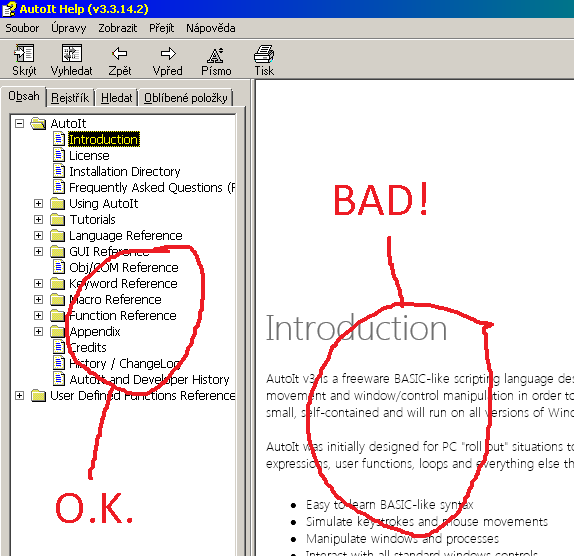
Please how to disable font smoothing in help file? This is very annoing problem to me...
-
[SOLVED] Running associated files as different user.
iXX replied to iXX's topic in AutoIt General Help and Support
Thanks, SOLVED! The proper code of the script is: RunAs ( "USER", @ComputerName, "PASSWORD", 1, '"C:\Program Files\Program\Program.exe"' & ' "' & $CmdLine[1] & '"' )Also, the " -r" parameter works too: RunAs ( "USER", @ComputerName, "PASSWORD", 1, '"C:\Program Files\Program\Program.exe"' & " -r" & ' "' & $CmdLine[1] & '"' )The " %*" parameter is not working, but even without it, it works like charm. Who knows, why was there... So, thanks again... -
[SOLVED] Running associated files as different user.
iXX replied to iXX's topic in AutoIt General Help and Support
OK; First, I figured out that the parameters probably are not necessary (After I delete them from registry and double click to some *.PRG file, it normally opens in Program.exe). So, I substitute the registry entry by this: And the script (C:\Scripts\Prg.au3) look like this: RunAs ( "USER", @ComputerName, "PASSWORD", 1, '"C:\Program Files\Program\Program.exe" "%1"' )Now, when I doubleclick to *.PRG file, the "Program.exe" is launched (under proper user), but with no *.PRG file loaded. Please, how to solve the handing over of the *.PRG file? -
Hi! Let say, I have (in windows registry) ".PRG" extension associated to: "C:\Program Files\Program\Program.exe" -r "%1" %* But now I need to run this *.PRG files as different user, probably using: RunAs ( "USER", "COMPUTER", "PASSWORD", 1, "C:\Program Files\Program\Program.exe" -r "%1" %*" ) Please help me to: 1.) modify my registry 2.) write the script Thanks
-
Hi! Is there any "waiter" for less than 10ms? Minimum for sleep is Sleep(10) - 10ms. I can imagine only this: $X = TimerInit() While TimerDiff($X) < 1 WEnd But this eats toooo much of CPU time, actually all the CPU. Any idea?