bumsbomber
-
Posts
5 -
Joined
-
Last visited
bumsbomber's Achievements

Seeker (1/7)
0
Reputation
-
Can't control SysListView32 in VirtualDub
bumsbomber replied to bumsbomber's topic in AutoIt General Help and Support
Damnit, you're right! It stands in the documentation and i've read it, but I didn't knew I've had installed or compiled with AutoIt x64. Now it works fine Big thanks. -
Can't control SysListView32 in VirtualDub
bumsbomber replied to bumsbomber's topic in AutoIt General Help and Support
Oh, of course, sorry! >>>> Window <<<< Title: Filters Class: #32770 Position: 361, 162 Size: 521, 357 Style: 0x94CC004C ExStyle: 0x00010100 Handle: 0x000404E0 >>>> Control <<<< Class: SysListView32 Instance: 1 ClassnameNN: SysListView321 Name: Advanced (Class): [CLASS:SysListView32; INSTANCE:1] ID: 1023 Text: Position: 11, 11 Size: 405, 284 ControlClick Coords: 193, 31 Style: 0x5001880D ExStyle: 0x00000204 Handle: 0x00020500 >>>> Mouse <<<< Position: 569, 230 Cursor ID: 0 Color: 0xFFFFFF >>>> StatusBar <<<< >>>> ToolsBar <<<< >>>> Visible Text <<<< OK Cancel &Add... &Delete Move &Up Move D&own C&ropping... &Configure... &Blend &Show image formats Show &pixel aspect ratios Show &frame rates O&ptions... >>>> Hidden Text <<<< What tell's it to a pro? ^^ -
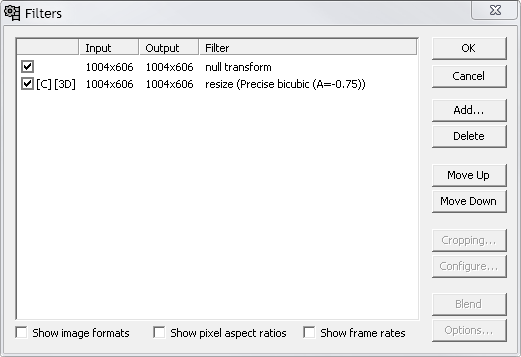
Hi I hope there are people out there which have installed VirtualDub (Open Source) or are willing to install it to help me What I want to do: I want to see what filters are set and being able to (de-)select, delete or manipulate them... Problem: I don't get all the informations I need out of the SysListView32 control and so I can't manipulate it with AutoIt. Some commands work (like "GetItemCount"), but most does not (like "GetText"). The control seems to be no default SysListView32 - Please look at the attachement if you don't have installed VirtualDub. Example: Open up VirtualDub, press CTRL+F to open up the filters dialog, and add some filters of your choice and "null transform" as I use it's name in the example code. Then run the code below. #Include <GuiListView.au3> $filters_title = "[TITLE:Filters]" $filters_cid = "[CLASS:SysListView32; INSTANCE:1]" $filters_hwnd = ControlGetHandle($filters_title,"",$filters_cid) $clv_filters_count = ControlListView($filters_title,"",$filters_cid,"GetItemCount") $clv_filters_select = ControlListView($filters_title,"",$filters_cid,"GetSelected") $clv_filters_text = ControlListView($filters_title,"",$filters_cid,"GetText", 0, 0) ; does not work $clv_filters_0trans = ControlListView($filters_title,"",$filters_cid,"FindItem","null transform") ; does not work $gui_filters_count = _GUICtrlListView_GetItemCount($filters_hwnd) $gui_filters_select = _GUICtrlListView_GetItemSelected ($filters_hwnd,1) $gui_filters_text = _GUICtrlListView_GetItemTextString($filters_hwnd,-1) ; Only 3 separators as result $gui_filters_0trans = _GUICtrlListView_FindText($filters_hwnd,"null transform",-1,True) ; I get a 10-char number (?) ConsoleWrite("ControlListView ::: " & "Filter Count: " & $clv_filters_count & " / Selected: " & $clv_filters_select & " / Item Text: " & $clv_filters_text & " / null transform: " & $clv_filters_0trans & @CRLF) ConsoleWrite("_GUICtrlListView ::: " & "Filter Count: " & $gui_filters_count & " / Selected: " & $gui_filters_select & " / Item Text: " & $gui_filters_text & " / null transform: " & $gui_filters_0trans & @CRLF) Any chance I can work with the control? I really hope you can help me
-
Ok, please try this code, you you will understand what I do and what I want to do Remember to change the first two variables due to localization issues. E.g. set "Open" in the 1st, "File" in the 2nd. Start notepad first, then the script. ; Please replace "Öffnen" below with the title name of the open dialog of notepad global $OpenDialogTitle = "[TITLE:Öffnen;CLASS:#32770]" ; Please replace "Datei" below with the correct "file type" label you get as visible text (e.g. just "File") global $FileNameRegex = "(?s).*name:(.*\w{3}(?-s))(?s).*Datei{1}" Init() Func Init() While 1 Sleep(100) If WinExists($OpenDialogTitle) Then OpenExternal() EndIf If Not WinExists("[CLASS:Notepad]") Then Exit WEnd EndFunc Func OpenExternal() ; This opens the preferences of a selected file, just as example. $FileNameOld = False While WinExists($OpenDialogTitle) Sleep(100) $FileNameNew = CheckForFiles() If $FileNameNew <> False Then If $FileNameOld <> $FileNameNew[0] Then $FileNameOld = $FileNameNew[0] Send("{APPSKEY}{I}") EndIf EndIf WEnd EndFunc Func CheckForFiles() ; This looks for filenames in the open dialog of notepad $DialogText = WinGetText($OpenDialogTitle) $FileName = StringRegExp($DialogText, $FileNameRegex, 1) Return $FileName EndFunc Instead of opening the properties window with some keystrokes, I want to open the file with a shell registered program. So when I e.g. click on a file like "hello.text", it get opened immediately in Firefox through the shell. If I double click the file, it should get opened in both, Firefox and in notepad.
-
Hi I want to open a selected file of a windows dialog with a special program. Example: Open-File-Dialog of notepad. Single-click on a random file. I want AutoIt to open it e.g. in Firefox, without doing else with the dialog. At moment, I watch the dialog window to detect if a file got selected. This works fine, I can open a clicked file immediately by doing a send({enter}). But as I want to open the clicked file with an external program (it's registered in the shell), I want to know how this could work. I can open the clicked file e.g. with Send("{APPSKEY}{DOWN 5}{ENTER}"), because the program I want to open it in has an context menu entry. But this way is kinda slow and unreliable, so I look for a more direct method. Do you have an idea?