xeroTechnologiesLLC
-
Posts
157 -
Joined
-
Last visited


xeroTechnologiesLLC's Achievements

Prodigy (4/7)
1
Reputation
-
 I did some testing and found that the Aero themes are what is interfering with the capability of the fonts to change colors. When switching to windows classic mode - no problems what so ever with the colors. So...Autoit Guru's, I don't know if this is a bucket of worms you want to dive into, but...obvious bug against an Aero theme. Buttons also seem to do weird things.
 -
The below code is extremely simple and only put together to test the ability to change the folor color of a check box. I have a program that has multiple check boxes in it and they are the only items that aren't changing color with my font color changing loop. So to troubleshoot I built this code and can confirm that in Windows 7 32bit Enterprise, this does not work. Anyone have any advice? I am running into several things that seem to either be extremely buggy or not work right in windows 7 32-bit enterprise. My biggest problem I started in another thread regarding automating IE8 in Windows 7 32bit Enterprise through autoit and hardly any of that is working either. #include <ButtonConstants.au3> #include <GUIConstantsEx.au3> #include <WindowsConstants.au3> #Region ### START Koda GUI section ### Form= $Form1 = GUICreate("Form1", 615, 438, 192, 124) $Checkbox1 = GUICtrlCreateCheckbox("Checkbox1", 136, 96, 97, 17) GUICtrlSetColor(-1, 0xff0000) GUISetState(@SW_SHOW) #EndRegion ### END Koda GUI section ### While 1 $nMsg = GUIGetMsg() Switch $nMsg Case $GUI_EVENT_CLOSE Exit EndSwitch WEnd
-
So new occurrence of fun... the .visible option was not firing at all and IE8 was showing up. I tried using the built in autoIT functions, but those create the same error with IE8. Any thoughts?
-
I commented out the $doc = $oie.document line and let it run on and tried various alterations of the document.getelementbyid and it simply seems to refuse to work. So what is different in IE8 other than the case sensitivity of an ID or name? The line that errors: $doc = $oIE.document The requested action with this object has failed.
-
I would assume it was because the visibility setting to true functions correctly. However, when I put the message box code in - nothing appears. No message box appears at all. Thoughts?
-
I had written a program to boost our outage processes at work and then IT decides now we are upgrading to Windows 7 and we ran into a bug with how I have the IE object setup and pass values to it. Below is the code that I currently have that does not work with IE8 in win7 enterprise 32bit. Global $oIE = ObjCreate("InternetExplorer.Application") ; navigate to the page $oIE.Navigate2($cityStatePageLink) ; wait While $oIE.Busy WEnd $doc = $oIE.document ; wait for it... While $doc.ReadyState <> "complete" WEnd $oIE.Visible = True ; getting element obj ID $city = $doc.getElementById("city") $state = $doc.getElementById("state") ; set values $city.value = "test" $state.Value = "test" I did some research on 'getelementbyid' with ie8 and win7 and there is a case sensativity issue in ie8, but i built the program to be a direct match to the ID in the site - so I know it is right. Any thoughts on how to manage this? I narrowed it down to the .getelementbyID section because the program runs and displays the IE window then crashes....which the visibility trigger is the last thing to happen before it hits the .getelementbyid tags. Thanks in advance.
-
Design Assistance
xeroTechnologiesLLC replied to xeroTechnologiesLLC's topic in AutoIt GUI Help and Support
How could I improve what is visually in the screenshots to make it more flexible and dynamic - generically more powerful and useful....maybe? -
I'm pretty much new to programming and autoIT in general but to answer the topic of the thread, without any super coding as already provided - i usually change the symbol of whatever you're going to use as the delimiter in the cell to something entirely unused - like one of the ASCII latin characters, then run your stringsplit, then re-replace that symbol back to the delimiter symbol. if cell contains "," swap it to Œ then run your string split. run another replace to turn "Œ" back to ",". This obviously doesn't work in 100% of all situations you have to do this, but...it's fast and easy to do for us noob programmers. Good luck and have fun.
-
You may want to consider restructuring your while loops into 1 loop to make it easier. This is the general format I use on all my programs - especially with multiple GUI's: ; this is the main while loop that runs the program ; each gui is called into a specific case statement ; below is the structure that it follows ; switch $hwndGUIform <-- main handle ; case $frmTheGui <-- form the call came from ; switch $intGUImsg <-- switch statement for that form ; case $thebuttonpushed <-- button or item pressed or event, etc ;endswitch <-- close the form switch ; case $frmTheNextGUI ; switch $intGUImsg ; case $thebuttonpushed ;endswitch ; case $anotherFrm ; switch $intGUImsg ; case $thebuttonpushed ;endswitch ;endswitch <-- close the main switch Then dump this into your while loop: $arrGUIEvents = GUIGetMsg(1) $intGUImsg = $arrGUIEvents[0] $hwndGUIform = HWnd($arrGUIEvents[1]) then start your switch/ case statements as noted above.
-
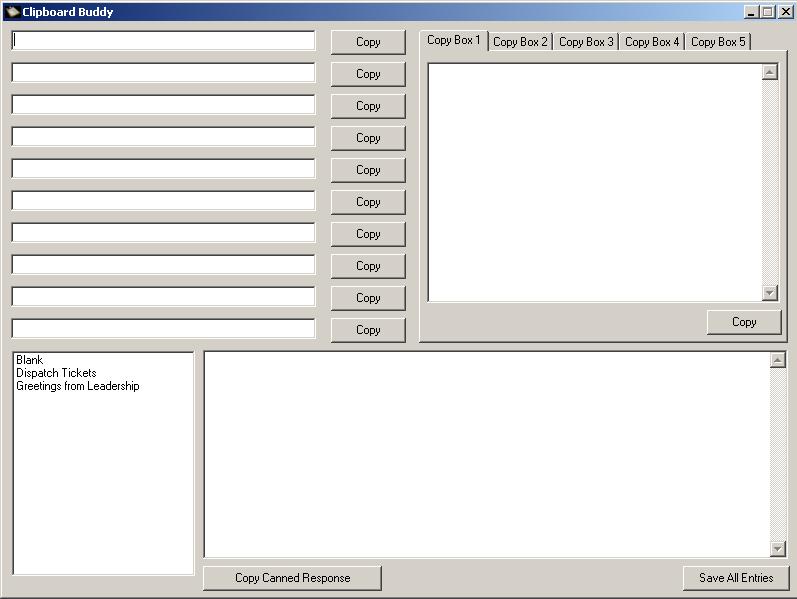
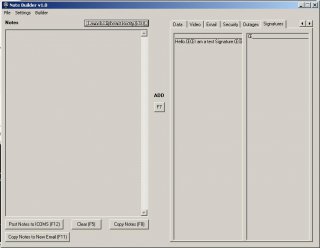
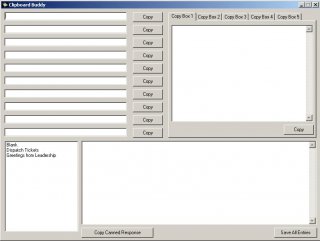
Original topic: The original project was to develop a program for physically challenged users to be able to add words, phrases, sentences or entire paragraphs to a note block then take that note block and offer various solutions with what to do with those notes. Attached are some screen shots of what I have built into the GUI so far and below is a short description. The primary project is the Note Builder. The notes box on the left is where the notes get added to. The right side is the various tabs of notes or phrases that can be added to the note block. There is also a tab that reads Outlook signatures (that is what we use in our office for emails) so the user can add their email signatures to their notes if they wish. There are a few buttons at the bottom for posting the notes to our billing software, clearing the notes entirely, copying the notes to the clipboard and creating a brand new email with the notes in the body of the email. There are numerous hotkeys for swapping tabs (ctrl numpad keys & ctrl left & right arrow) Users can add their own notes, so they only really have to type it once, then click the word and then the hotkey to add it to notes as they like Users can change the colors of most of the controls to fit their visual liking. The Clipboard Buddy is a separate project. It was designed for repetitive tasks such as telling someone how to enter an order over and over again. The bottom section is the canned responses from leadership (a separate program was built to help them add those canned responses also) The top right is paragraph responses The top left is single line / sentence responses. The program will save the notes to a configuration file locally and each tab has its own copy button to copy the notes therein. On an even 3rd project I am testing a tab renaming function I built to let the user rename tabs on the fly that may be added into one or both of these programs. All in all, all features and functions noted above work perfectly fine with no hiccups - they are pretty simple projects and you can look at the GUI and figure out the code on your own (most AU3 developers). The reason I am posting this is to reach out to other developers for design ideas for the Note Builder program. I had gotten quite a few good ideas from the original post noted above, but they don't really apply to what I am working on now so I was hoping that showing a few screenshots would be able to give people a better idea of the project and help me expand on it and add more features. In office we use Microsoft Office products primarily (hence the linking to outlook to send the notes to an email)...but most of the other products, powerpoint, excel, etc, aren't used as much so I didn't feel the necessity to do anything with them. I was thinking about pairing it up with Microsoft Lync chat, but I'm finding very little on automating Lync unless I'm using C++ which I am sadly extremely lacking in. The time frame I have left to work on this project is short, unfortunately, so anything you guys offer may have a significant turn around on development and implementation, but I am fully up for it if it makes this program even more user friendly for someone suffering from a physical challenge that prevents them from typing. The only main thing I would personally like to add is more keywords, but I don't want to go overboard on it. I was thinking maybe an auto-fill feature? I do not know how to go about setting up such a feature though. I apologize if this is not the best locale to post this seeking for ideas, but this project is extremely important to me and I hold a strong desire to complete this project before other tasks call me away for a possibly long period of time. I have no desire to make money off this project in the future; I just want it to help people. Thanks in advance for any thought you may be able to put into it to assist me with making this project the best it can be. edit: forgot a few features...
-
@Esgaroth, I created a 'master loader' for my programs that I am developing at work and have to make a lot of shortcuts. I found that, for some strange reason, using @dekstop seems to make the shortcut creation fail...usually when associated with something on the network drive here in the call center. However, to get around this and keep my code readable / clean and since we use a generic naming scheme: $desktop_lnk = "C:Documents and Settings" & StringLower(@UserName) & "Desktop" ...is often what I have to use to make it create the shortcut the way I want and where I want. Then the create shortcut: FileCreateShortcut ($install_array[$a][1], $shortcut_lnk & "someAwesome au3 project.lnk") ...where in this example "$install_array[$a][1]" is a list of program locations I predefined at the beginning of the program. (Like I said, a lot of projects...) Not pretty and no I have no rhyme or reason why @desktop seems to be...problematic when dealing with network drives to local HD, but this has worked 100% of the time for me. Hope this is helpful for creating future shortcuts.
-
The range needs to be specified. Whenever I tried any other method it returned an obscene number as you also noted. Hope this helps. $iRows = $oExcel.Range("startingrow:endingrow").Rows.Count edit: made some grammatical corrections
-
Yup, stupid simple: HotKeySet("{NUMPAD0}", "_activate_tab_0") HotKeySet("{NUMPAD1}", "_activate_tab_1") HotKeySet("{NUMPAD2}", "_activate_tab_2") HotKeySet("{NUMPAD3}", "_activate_tab_3") HotKeySet("{NUMPAD4}", "_activate_tab_4") HotKeySet("{NUMPAD5}", "_activate_tab_5") ...works.
-
I'm probably missing something stupid easy, but not sure what. Below is just 1 piece of my accelerator array: "{NUMPAD1}", "_activate_tab_1" ...they press numpad 1 and it should call _activate_tab_1() function...correct? so here is _activate_tab_1 function: Func _activate_tab_1() _GUICtrlTab_SetCurFocus($tabHotkeys, 1) EndFunc Which I know this code works well as I call 1 for tab 0 to make sure it's selected correctly when the program launchs. But when I run the program, I hit numpad key 1, nothing. Thoughts? I checked the windows reserved keys and didn't see anything noting numpad1 being reserved. Not sure why the function won't launch.
-
Fixed that problem - was my tray exit menu item...in the wrong place and causing some fun stuff... Anyway, that being said.... i'm going to go ahead and close up this topic as RESOLVED, but if anyone has any other thoughts...please feel free to set input to forum.