Advert


sriKnight
-
Posts
40 -
Joined
-
Last visited


sriKnight's Achievements

Seeker (1/7)
0
Reputation
-

-Unsolved- ControlTreeView
sriKnight replied to sriKnight's topic in AutoIt General Help and Support
I am still having trouble figuring these issues out..... -
-Unsolved- ControlTreeView
sriKnight replied to sriKnight's topic in AutoIt General Help and Support
Ok....... Lets try this again. I am writing a script that will navigate the software that my company uses to run reports every month. Process of my script is to log into the GUI, run a report(Crystal Reports), export to a pdf, and save that pdf to a folder on a network drive. Here is most of my script( all I need to to is copy and paste 2 times and change some labels) ;;This is the window that shows when I elect to export and save my report. WinWaitActive("Export Report") WinActivate("Export Report") ;saves the file $hWnd = WinWait("Export Report", "") ;sets the file name to the current date. ControlSetText($hWnd, "", "[CLASSNN:Edit1]", "TJC WIP_" & @MON & "-" & @MDAY & "-" & @YEAR) ;; Saves the file as a pdf Sleep(700) send("{TAB}") sleep(700) Send("{DOWN}") sleep(700) send("{DOWN}") sleep(700) Send("{ENTER}") ControlClick($hWnd,"","[CLASSNN:Button1]") WinActivate("Export Report", "Export completed.") WinWaitActive("Export Report") ControlClick("Export Report", "OK", 2, "left") WinActivate("CORRIDOR") Where I have run into issues is with the window that my software generates to save the file. Problem #1 - I have having difficulties getting AutoIT to "cleanly" elect to save the file as a .pdf. I currently use keyboard navigation for this process. I have already created a thread for this issue, but I never got it resolved. Here is the Information for that particular control .... >>>> Window <<<< Title: Export Report Class: #32770 Position: -1452, 94 Size: 1102, 792 Style: 0x96CC02C4 ExStyle: 0x00010101 Handle: 0x0000000000AB1B74 >>>> Control <<<< Class: ComboBox Instance: 2 ClassnameNN: ComboBox2 Name: Advanced (Class): [CLASS:ComboBox; INSTANCE:2] ID: Text: Position: 125, 672 Size: 956, 23 ControlClick Coords: 165, 13 Style: 0x50030203 ExStyle: 0x00000000 Handle: 0x0000000000B11548 >>>> Mouse <<<< Position: -1154, 809 Cursor ID: 0 Color: 0xDADADA >>>> StatusBar <<<< >>>> ToolsBar <<<< >>>> Visible Text <<<< Namespace Tree Control Tree View Crystal Reports (*.rpt) ShellView &Save Cancel Address: W:\Corridor\Month End Reports >>>> Hidden Text <<<< Namespace Tree Control &Help Problem #2 - While saving the file I would like to specify the folder on a net work drive that this document will be saved to. This is done from the same window that the software we uses generates. Here is the control info for that System Tree. >>>> Window <<<< Title: Export Report Class: #32770 Position: -1452, 94 Size: 1102, 792 Style: 0x96CC02C4 ExStyle: 0x00010101 Handle: 0x0000000000AB1B74 >>>> Control <<<< Class: SysTreeView32 Instance: 1 ClassnameNN: SysTreeView321 Name: Advanced (Class): [CLASS:SysTreeView32; INSTANCE:1] ID: 100 Text: Tree View Position: 1, 66 Size: 255, 571 ControlClick Coords: 109, 191 Style: 0x5601D22D ExStyle: 0x00000000 Handle: 0x00000000005C0AEE >>>> Mouse <<<< Position: -1334, 381 Cursor ID: 0 Color: 0xFCFCFC >>>> StatusBar <<<< >>>> ToolsBar <<<< >>>> Visible Text <<<< Namespace Tree Control Tree View Crystal Reports (*.rpt) ShellView &Save Cancel Address: W:\Corridor\Month End Reports >>>> Hidden Text <<<< Namespace Tree Control &Help -
-Unsolved- ControlTreeView
sriKnight replied to sriKnight's topic in AutoIt General Help and Support
all that did was create a popup with the folder name. It didn't select anything from my "save as" window...... -
The script that I have been working on is still growing as I take more and more things into consideration. One of those things is making sure the reports That I am running with this script are saved in the correct location. I have looked through a bunch of different functions and I think the ControlTreeView is my best bet to select the proper network drive and folder to save this out to. My first question is am I right? If I am correct the question then How would I properly format my item to select a particular folder. I'm not quite following the help file.
-
(Resolved) - Launching an .exe
sriKnight replied to sriKnight's topic in AutoIt General Help and Support
well I didnt know to try that one from the help file. The scripts I write are pretty basic and I'm stepping out more nad more and getting more creative. But umpteen million might have been a stretch so we will say 10. -
(Resolved) - Launching an .exe
sriKnight replied to sriKnight's topic in AutoIt General Help and Support
The single quote is what I was missing. thank you very much -
Ok, I know this is probably the most simple thing in AutoIT, however, I am unable to figure this out. I have read the help file and tried "umpteen" million different combinations of syntax for the comand. The .exe I want to run is burried in the Program files (x86). the full path is C:\Program Files (x86)\CORRIDOR\Release\ST37.exe
-
Here is my script as it stands right now. All is resolved minus this setting the file type issue. WinActivate("CORRIDOR") ;;navigates to first report (WIP)(I know its not very clean, but the software is a pain!!) Send("{ALT}r") Sleep(500) Send("{UP 2}") Sleep(500) Send("{RIGHT}") Sleep(500) Send("{UP}") Sleep(500) Send("{ENTER}") WinWaitActive("Work Order WIP Report") ControlClick("Work Order WIP Report", "Print", 3523, "left") WinWaitActive("Report Output WorkInProcess.rpt") WinActivate("Report Output WorkInProcess.rpt") ;kicks off an export from the GUI Send("{DOWN 2}") Sleep(500) Send("{ENTER}") WinWaitActive("Export Report") WinActivate("Export Report") ;saves the file $hWnd = WinWait("Export Report", "") ControlSetText($hWnd, "", "[CLASSNN:Edit1]", "TJCWIP" & @YEAR & "-" & @MON & "-" & @MDAY) ;for these three lines I am able to see the dropdown show and then hide, but it still will not select pdf as a file type. ControlCommand($hWnd, "", "[CLASSNN:ComboBox2]", "ShowDropDown", "") ControlCommand($hWnd, "", "[CLASSNN:ComboBox2]", "SelectString", 'PDF (.pdf)') ControlCommand($hWnd, "", "[CLASSNN:ComboBox2]", "HideDropDown", "") ControlClick($hWnd,"","[CLASSNN:Button1]") WinActivate("Export Report", "Export completed.") WinWaitActive("Export Report") ControlClick("Export Report", "OK", 2, "left") WinActivate("CORRIDOR") ;Navigate to next report to be run from the schema (WO Invoice Register) Send("{ALT}r") Sleep(500) Send("{UP 2}") Sleep(500) Send("{RIGHT}") Sleep(500) send("{DOWN 9}") sleep(500) send("{Enter}") ;wait for the date paramter field to apear WinWaitActive("Work Order Invoice Register Report") WinActivate("Work Order Invoice Register Report") ControlClick("Work Order Invoice Register Report", "From:", 13308, "left") ;sets the first date paramter to the first day of the month send("{Space}") sleep(500) send("{RIGHT}") sleep(500) send(@Mon) sleep(500) send("{RIGHT}") sleep(500) send("01") sleep(500) ;sets the second date paramter to the currect date that the reprots are being run. send("{TAB}") sleep(500) send("{Space}") sleep(500) send("{RIGHT}") sleep(500) send(@Mon) sleep(500) send("{RIGHT}") sleep(500) send(@Mday) sleep(500) sleep(500) send("{TAB}") ;kicks off the export to file ControlClick("Work Order Invoice Register Report", "Print", 3523, "left") WinWaitActive("Report Output WorkOrderInvoiceRegister.rpt") WinActivate("Report Output WorkOrderInvoiceRegister.rpt") send("{DOWN 2}") sleep(500) send("{ENTER}") ;saves the file $hWnd = WinWait("Export Report", "") ControlSetText($hWnd, "", "[CLASSNN:Edit1]", "TJC WO Invoice REG_" & @YEAR & "-" & @MON & "-" & @MDAY) ;for these three lines I am able to see the dropdown show and then hide, but it still will not select pdf as a file type. ControlCommand($hWnd, "", "[CLASSNN:ComboBox2]", "ShowDropDown", "") ControlCommand($hWnd, "", "[CLASSNN:ComboBox2]", "SelectString", 'PDF (.pdf)') ControlCommand($hWnd, "", "[CLASSNN:ComboBox2]", "HideDropDown", "") ControlClick($hWnd,"","[CLASSNN:Button1]") WinActivate("Export Report", "Export completed.") WinWaitActive("Export Report") ControlClick("Export Report", "OK", 2, "left") sleep(500) WinActivate("CORRIDOR") Send("!r") Sleep(500) Send("{UP 5}") Sleep(500) Send("{RIGHT}") Sleep(500) send("{UP}") sleep(500) send("{Enter}") ;wait for the date paramter field to apear WinWaitActive("Invoice Register Report") WinActivate("Invoice Register Report") ControlClick("Invoice Register Report", "From:", 12103, "left") ;sets the first date paramter to the first day of the month send("{Space}") sleep(500) send("{RIGHT}") sleep(500) send(@Mon) sleep(500) send("{RIGHT}") sleep(500) send("01") sleep(500) ;sets the second date paramter to the currect date that the reprots are being run. send("{TAB}") sleep(500) send("{Space}") sleep(500) send("{RIGHT}") sleep(500) send(@Mon) sleep(500) send("{RIGHT}") sleep(500) send(@Mday) sleep(500) sleep(500) send("{TAB}") ;kicks off the export to file ControlClick("Invoice Register Report", "Print", 1983, "left") WinWaitActive("Report Output SalesOrderInvoiceRegister.rpt") WinActivate("Report Output SalesOrderInvoiceRegister.rpt") send("{DOWN 2}") sleep(500) send("{ENTER}") ;saves the file $hWnd = WinWait("Export Report", "") ControlSetText($hWnd, "", "[CLASSNN:Edit1]", "TJC SO Invoice REG_" & @YEAR & "-" & @MON & "-" & @MDAY) ;for these three lines I am able to see the dropdown show and then hide, but it still will not select pdf as a file type. ControlCommand($hWnd, "", "[CLASSNN:ComboBox2]", "ShowDropDown", "") ControlCommand($hWnd, "", "[CLASSNN:ComboBox2]", "SelectString", 'PDF (.pdf)') ControlCommand($hWnd, "", "[CLASSNN:ComboBox2]", "HideDropDown", "") ControlClick($hWnd,"","[CLASSNN:Button1]") WinActivate("Export Report", "Export completed.") WinWaitActive("Export Report") ControlClick("Export Report", "OK", 2, "left")
-
Resolved - Setting a date range paramater
sriKnight replied to sriKnight's topic in AutoIt General Help and Support
Yes it and I will. How do I mark a topic as resolved? -
Resolved - Setting a date range paramater
sriKnight replied to sriKnight's topic in AutoIt General Help and Support
Jlogan, idk why but you last post just flipped the swithc to the logic center of my brain which i turned off for friday. I have one last portion of this script to complete and that is to get the file to save as a pdf. WinActivate("CORRIDOR") ;;navigates to first report (WIP)(I know its not very clean, but the software is a pain!!) Send("{ALT}r") Sleep(500) Send("{UP 2}") Sleep(500) Send("{RIGHT}") Sleep(500) Send("{UP}") Sleep(500) Send("{ENTER}") WinWaitActive("Work Order WIP Report") ControlClick("Work Order WIP Report", "Print", 3523, "left") WinWaitActive("Report Output WorkInProcess.rpt") WinActivate("Report Output WorkInProcess.rpt") ;kicks off an export from the GUI Send("{DOWN 2}") Sleep(500) Send("{ENTER}") WinWaitActive("Export Report") WinActivate("Export Report") ;saves the file $hWnd = WinWait("Export Report", "") ControlSetText($hWnd, "", "[CLASSNN:Edit1]", "TJCWIP" & @YEAR & "-" & @MON & "-" & @MDAY) ;for these three lines I am able to see the dropdown show and then hide, but it still will not select pdf as a file type. ControlCommand($hWnd, "", "[CLASSNN:ComboBox2]", "ShowDropDown", "") ControlCommand($hWnd, "", "[CLASSNN:ComboBox2]", "SelectString", 'PDF (.pdf)') ControlCommand($hWnd, "", "[CLASSNN:ComboBox2]", "HideDropDown", "") ControlClick($hWnd,"","[CLASSNN:Button1]") WinActivate("Export Report", "Export completed.") WinWaitActive("Export Report") ControlClick("Export Report", "OK", 2, "left") WinActivate("CORRIDOR") ;Navigate to next report to be run from the schema (WO Invoice Register) Send("{ALT}r") Sleep(500) Send("{UP 2}") Sleep(500) Send("{RIGHT}") Sleep(500) send("{DOWN 9}") sleep(500) send("{Enter}") ;wait for the date paramter field to apear WinWaitActive("Work Order Invoice Register Report") WinActivate("Work Order Invoice Register Report") ControlClick("Work Order Invoice Register Report", "From:", 13308, "left") ;sets the first date paramter to the first day of the month send("{Space}") sleep(500) send("{RIGHT}") sleep(500) send(@Mon) sleep(500) send("{RIGHT}") sleep(500) send("01") sleep(500) ;sets the second date paramter to the currect date that the reprots are being run. send("{TAB}") sleep(500) send("{Space}") sleep(500) send("{RIGHT}") sleep(500) send(@Mon) sleep(500) send("{RIGHT}") sleep(500) send(@Mday) sleep(500) sleep(500) send("{TAB}") ;kicks off the export to file ControlClick("Work Order Invoice Register Report", "Print", 3523, "left") WinWaitActive("Report Output WorkOrderInvoiceRegister.rpt") WinActivate("Report Output WorkOrderInvoiceRegister.rpt") send("{DOWN 2}") sleep(500) send("{ENTER}") saves the file $hWnd = WinWait("Export Report", "") ControlSetText($hWnd, "", "[CLASSNN:Edit1]", "TJC WO Invoice REG_" & @YEAR & "-" & @MON & "-" & @MDAY) ;for these three lines I am able to see the dropdown show and then hide, but it still will not select pdf as a file type. ControlCommand($hWnd, "", "[CLASSNN:ComboBox2]", "ShowDropDown", "") ControlCommand($hWnd, "", "[CLASSNN:ComboBox2]", "SelectString", 'PDF (.pdf)') ControlCommand($hWnd, "", "[CLASSNN:ComboBox2]", "HideDropDown", "") ControlClick($hWnd,"","[CLASSNN:Button1]") WinActivate("Export Report", "Export completed.") WinWaitActive("Export Report") ControlClick("Export Report", "OK", 2, "left") you can see in the comments just where I am having trouble with the file type. -
Resolved - Setting a date range paramater
sriKnight replied to sriKnight's topic in AutoIt General Help and Support
Ok, So that will function will do the math, how do I turn that into two seperate dates then input one instance at a time? I order to navigate around some of the windows in my software I have to use a lot of send("{DOWN}") send("{SPACE}") send("{RIGHT}") send("<Current Month>" send("{RIGHT}") Send("<First day of current Month>") How can I tie all of this together? -
I noticed that as I have been trying different combinations of commands and that has had no effect.
-
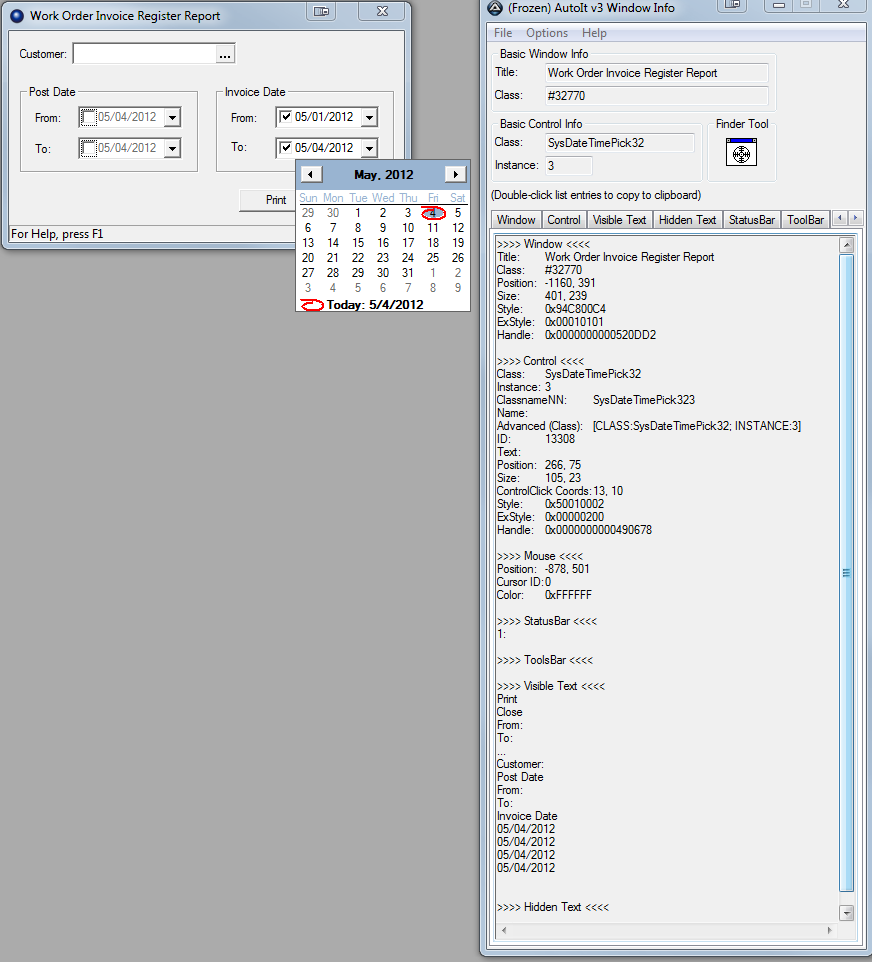
In my on going trial and error of writing a script that will automatically run some end of the month reports for me I have run into another issue. For two reports that I have to run I must select a date range of records that want to view. For example at the end of May when I run the report I will need the Range to be 5/1/2012 - 5/31/2012. Next month will be 6/1/2012 - 6/30/2012. Before a date can be entered the check boxes must be marked. Is there a for me to tell AutoIT, "Hey, Look up what calender month we are in and check these two boxes and enter the first day of that month and the last day of that month?" I have added a screen shot of the window I am working with and a summary of the information.
-
here is the code as it is so far. Everything works great except the file still saves a .rptWinActivate("CORRIDOR") ;navigates to my desired report(I know its not very clean, but the software is a pain!!) Send("{ALT}r") Sleep(500) Send("{UP 2}") Sleep(500) Send("{RIGHT}") Sleep(500) Send("{UP}") Sleep(500) Send("{ENTER}") WinWaitActive("Work Order WIP Report") ControlClick("Work Order WIP Report", "Print", 3523, "left") WinWaitActive("Report Output WorkInProcess.rpt") WinActivate("Report Output WorkInProcess.rpt") ;kicks off an export from the GUI Send("{DOWN 2}") Sleep(500) Send("{ENTER}") WinWaitActive("Export Report") WinActivate("Export Report") ;saves the file $hWnd = WinWait("Export Report", "") ControlSetText($hWnd, "", "[CLASSNN:Edit1]", "Report_" & @YEAR & "-" & @MON & "-" & @MDAY) ;for these three lines I am able to see the dropdown show and then hide, but it still will not select pdf as a file type. ControlCommand($hWnd, "", "[CLASSNN:ComboBox2]", "ShowDropDown", "") ControlCommand($hWnd, "", "[CLASSNN:ComboBox2]", "SelectString", 'PDF(*.pdf)') ControlCommand($hWnd, "", "[CLASSNN:ComboBox2]", "HideDropDown", "") ControlClick($hWnd,"","[CLASSNN:Button1]") WinActivate("Export Report", "Export completed.") WinWaitActive("Export Report")
-
Still dropping it in as a .rpt